1. پیژندنه
Welcome to the user manual for your Natec FURY SHOBO SH4F RGB MIDI TOWER PC Case. This guide provides essential information for the proper assembly, installation, operation, and maintenance of your new computer chassis. Please read this manual thoroughly before beginning installation to ensure optimal performance and longevity of your components.
2. د خوندیتوب لارښوونې
- د کمپیوټر کیس دننه د هر ډول اجزاو نصبولو یا لرې کولو دمخه تل د دیوال آوټ لیټ څخه د بریښنا رسولو قطع کړئ.
- د الکتروسټاتیک خارجیدو (ESD) څخه د زیان څخه د مخنیوي لپاره اجزاو ته په احتیاط سره لاس ورکړئ. د جامد ضد لاسي تسمې کارولو په اړه فکر وکړئ.
- کوچنۍ برخې، لکه پیچونه، له ماشومانو لرې وساتئ.
- د کمپیوټر د قضیې شاوخوا مناسب هوا ورکول ډاډمن کړئ ترڅو د ډیر تودوخې مخه ونیول شي.
- Do not expose the case to extreme temperatures, humidity, or direct sunlight.
- Avoid placing heavy objects on top of the case.
3. د بسته محتويات
مهرباني وکړئ تصدیق کړئ چې ټول توکي ستاسو په کڅوړه کې شتون لري:
- Natec FURY SHOBO SH4F RGB MIDI TOWER PC Case
- Accessory box (containing screws, cable ties, and other small parts)
- د کارونکي لارښود (دا لاسوند)
4. محصول ختم شوview
The Natec FURY SHOBO SH4F is a MIDI TOWER PC case designed for gaming and general-purpose computing, offering ample space for components and efficient cooling. It features a modern design with RGB lighting.
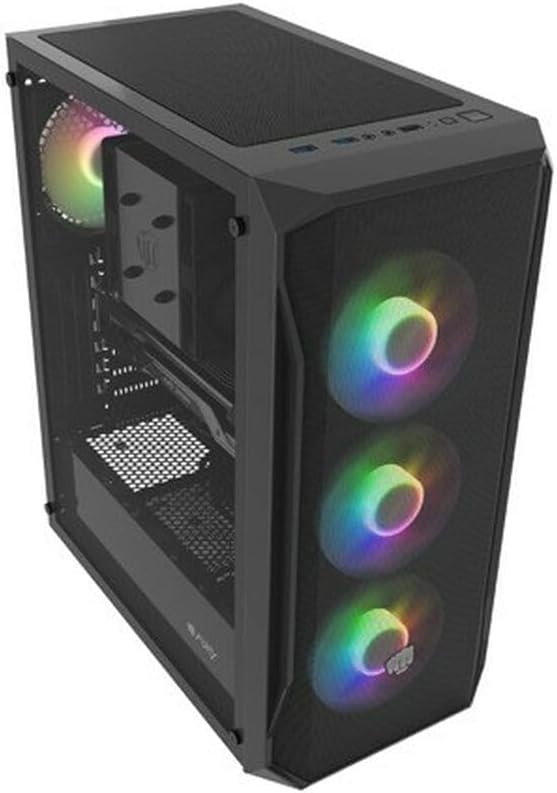
شکل ۳: یو زاویه لرونکی view of the Natec FURY SHOBO SH4F RGB MIDI TOWER PC Case, showcasing its black metal and tempered glass construction. The front panel features a mesh design with three illuminated RGB fans, and a single RGB fan is visible at the rear exhaust. The top panel includes I/O ports and a mesh filter.
۴.۱ د مخکینۍ I/O پینل
- د بریښنا تڼۍ
- د بیا تنظیم تڼۍ
- د USB 2.0 پورټ (x1)
- آډیو جیکونه (هیډفون/مایکروفون)
- RGB Control Button (if applicable)
4.2 Internal Layout
The case supports Micro ATX and Mini ATX motherboards and features a bottom-mounted power supply bay. It includes dedicated areas for storage drives and efficient cable management.
۲. د اجزاو تنظیم او نصب کول
Follow these steps to install your PC components into the FURY SHOBO SH4F case.
۳.۱ د قضیې چمتو کول
- قضیه په یوه فلیټ او مستحکم سطحه کېږدئ.
- Remove the side panels. Typically, the tempered glass side panel is secured with thumbscrews.
5.2 د مادر بورډ نصب کول
- د I/O شیلډ (که ستاسو په مور بورډ کې مخکې له مخکې نصب شوی نه وي) د کیس په شا خلاصیدو کې نصب کړئ.
- Ensure the motherboard standoffs are correctly aligned for your Micro ATX or Mini ATX motherboard. Adjust or install additional standoffs if necessary.
- په احتیاط سره مدر بورډ په سټینډ آفونو کې ځای په ځای کړئ، د سکرو سوري سره سمون ورکړئ.
- د ورکړل شویو پیچونو سره مور بورډ خوندي کړئ. ډیر مه ټینګوئ.
۲.۴ د بریښنا رسولو نصبول
- Locate the power supply bay at the bottom rear of the case.
- Slide your power supply unit (PSU) into the bay from the rear of the case, ensuring the fan faces downwards (if the case has a bottom vent) or upwards.
- د قضیې له شا څخه د پیچونو سره PSU خوندي کړئ.
۴.۴ د ذخیره کولو ډرایو نصب کول
Refer to your case's specific drive bay design for 2.5" SSDs and 3.5" HDDs. Typically, these involve trays or direct screw mounting.
5.5 Expansion Card Installation (e.g., Graphics Card)
- د کیس له شا څخه اړین PCI-E سلاټ پوښونه لرې کړئ.
- خپل د توسعې کارت په مدر بورډ کې اړونده PCI-E سلاټ کې دننه کړئ.
- کارت د سکرو یا د قضیې د ساتلو میکانیزم سره خوندي کړئ.
5.6 د کیبل مدیریت
د کیبلونو د روټ کولو او خوندي کولو لپاره د مدر بورډ ټرې شاته د کټ آوټونو او ټای ډاون نقطو څخه کار واخلئ. دا د هوا جریان او جمالیات ښه کوي.
5.7 Connecting RGB Fans
The pre-installed RGB fans typically connect to a central RGB controller or directly to your motherboard's RGB headers. Consult your motherboard manual for specific RGB header locations and software control. Ensure all fan power cables are connected to appropriate fan headers on the motherboard or a fan hub.
۴. ستاسو د کمپیوټر قضیه چلول
6.1 بریښنا کول / بندول
After all components are installed and cables connected, plug your power supply into a wall outlet. Press the power button on the front I/O panel to turn on your system. To turn off, use the operating system's shutdown function or press and hold the power button for several seconds.
۵.۴ د RGB رڼا کنټرول
If your case features an RGB control button on the front I/O panel, press it to cycle through various lighting modes and colors. For advanced customization, use your motherboard's RGB software (e.g., ASUS Aura Sync, MSI Mystic Light, Gigabyte RGB Fusion) if the fans are connected to compatible headers.
7. ساتنه
منظم ساتنه د غوره فعالیت ډاډمن کولو کې مرسته کوي او ستاسو د کمپیوټر اجزاو عمر اوږدوي.
۵.۱ د دوړو فلټر پاکول
The FURY SHOBO SH4F case includes dust filters (e.g., on the top and bottom). Periodically remove and clean these filters by rinsing them with water and allowing them to dry completely before re-installing. This prevents dust buildup and maintains airflow.
7.2 بهرنۍ پاکول
د کیس بهرنۍ برخه په نرم، دamp ټوکر. د کثافاتو پاکوونکو یا محلولونو څخه ډډه وکړئ کوم چې کولی شي پای یا تودوخې شیشې ته زیان ورسوي.
8. ستونزه حل کول
که تاسو له ستونزو سره مخ شئ، نو لاندې عام د ستونزو حل کولو مرحلو ته مراجعه وکړئ:
- ځواک نشته: Ensure the power supply is properly connected to the wall outlet and the motherboard. Check all internal power cables (24-pin ATX, 8-pin CPU, GPU power). Verify the power button cable is correctly connected to the motherboard's front panel header.
- مينه وال چې نه ګرځېږي: Check if fan power cables are securely connected to the motherboard or fan hub. Ensure the power supply is functioning.
- د RGB رڼا کار نه کوي: Verify RGB cables are correctly connected to the RGB controller or motherboard header. If using a button, try cycling through modes. If using software, ensure it's installed and configured correctly.
- ډیر ګرمول: Ensure all fans are spinning correctly and oriented for proper airflow (intake/exhaust). Clean dust filters and internal components. Verify CPU cooler and GPU cooler are properly installed.
9. مشخصات
| برانډ | ناټیک |
| لړۍ | د SH4F لپاره تفتیش وسپارئ، موږ به په XNUMX ساعتونو کې له تاسو سره اړیکه ونیسو. |
| د ماډل شمیره | NFO-2154 |
| د قضیې ډول | میډی ټاور |
| د مور بورډ مطابقت | Micro ATX, Mini ATX |
| رنګ | تور |
| مواد | فلزي |
| د محصول ابعاد (LxWxH) | 19.69 x 16.93 x 9.84 انچه (50 x 43 x 25 سانتي متره) |
| د توکي وزن | ۷.۹۶ پونډه (۳.۶۲ کیلوګرامه) |
| د بریښنا رسولو د نصبولو ډول | لاندې غر |
| د یخولو طریقه | هوا |
| د USB 2.0 پورټونو شمیر | 1 |
10. تضمین او ملاتړ
Natec products are manufactured to high-quality standards. For information regarding warranty terms and conditions, please refer to the warranty card included with your product or visit the official Natec website. If you encounter any issues not covered in this manual or require further assistance, please contact Natec customer support through their official channels.
جوړونکی: ناټیک


