1. پیژندنه
This manual provides instructions for the safe and efficient operation of your ChargeWorx Mini Portable Charger Power Bank, Model CX6896BK. Please read this manual thoroughly before use and retain it for future reference.
2. محصول ختم شوview
The ChargeWorx Mini Portable Charger Power Bank is a compact and versatile charging solution designed for mobile devices. It features a built-in USB-C connector, a 5,000 mAh battery capacity, and an LCD display for monitoring battery levels. The device supports fast charging, dual output, and pass-through charging capabilities.

Image: The ChargeWorx Mini Portable Charger connected directly to the charging port of a smartphone, displaying '100' on its LCD screen.
کلیدي ځانګړتیاوې:
- Built-in USB-C Connector: Directly connects to compatible devices.
- د ۵۰۰۰ mAh بیټرۍ ظرفیت: Provides extended power for mobile devices.
- LCD Power Indicator: د اوسني بیټرۍ فیصده ښیېtage.
- چټک چارج کول: Supports 5V/A fast charging.
- دوه ګونی محصول: Charge two devices simultaneously using the built-in USB-C connector and the additional USB-C port.
- له لارې چارج کول: Allows charging of a device while the power bank itself is being charged.
- کمپیکٹ او پورټ ایبل ډیزاین: Easily fits into pockets or bags.
- محافظتي خولۍ: Covers the built-in USB-C connector when not in use.

Image: An internal diagram of the power bank highlighting the digital battery display and the C-type output connector.
3. د بسته محتويات
- ChargeWorx Mini Portable Charger Power Bank (Model CX6896BK)
- د کارن لارښود
4. ترتیب کول
د پاور بانک لومړنی چارج کول:
- Connect a USB-C charging cable (not included) to the USB-C input/output port on the side of the power bank.
- د USB-C کیبل بل پای د یو مناسب USB بریښنا اډاپټر سره وصل کړئ (د مثال په توګه، دیوال چارجر، د کمپیوټر USB پورټ).
- د LCD ښودنه به د چارج کولو پرمختګ وښيي، چې د بیټرۍ سلنه به په ګوته کړيtage.
- Charge the power bank until the LCD display shows 100%.

Image: An internal diagram of the power bank illustrating the USB-C input/output port and its 5000mAh power bank capacity.
5. عملیاتي لارښوونې
د وسیلې چارج کول:
- Remove the protective cap from the built-in USB-C connector.
- Carefully plug the built-in USB-C connector directly into your device's USB-C charging port.
- The power bank will automatically begin charging your device. The LCD display on the power bank will show its remaining battery percentage.
- To stop charging, simply disconnect the power bank from your device. Replace the protective cap when not in use.

Image: A smartphone displaying '75% Charged' while connected to the ChargeWorx power bank, held in a user's hand.
دوه ګونی وسیلې چارج کول:
د پاور بانک د دوو وسایلو په یو وخت چارج کولو ملاتړ کوي:
- Connect the first device using the built-in USB-C connector as described above.
- Connect a second device to the power bank's USB-C input/output port using a compatible USB-C charging cable (not included).
- Both devices will charge concurrently.
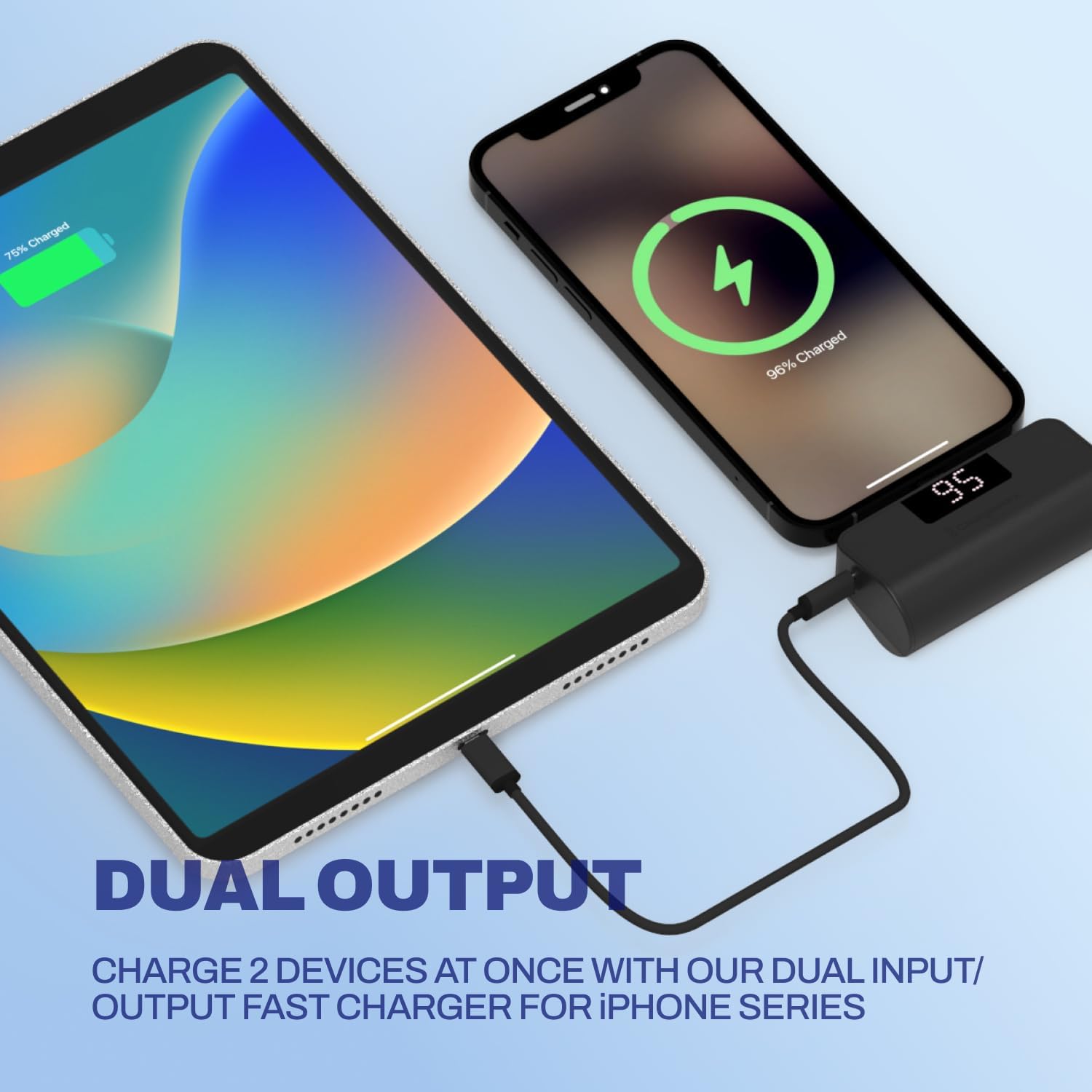
Image: A smartphone and a tablet are shown charging simultaneously, with the smartphone connected directly to the power bank and the tablet connected via a cable to the power bank's additional USB-C port.
له لارې چارج کول:
You can charge a device while the power bank itself is being recharged:
- خپل وسیله د جوړ شوي USB-C نښلونکي په کارولو سره د بریښنا بانک سره وصل کړئ.
- Connect the power bank to a power source using a USB-C charging cable plugged into its USB-C input/output port.
- د پاور بانک او ستاسو وصل شوی وسیله دواړه به چارج شي.
6. د LCD نندارې معلومات
The integrated LCD screen provides real-time information about the power bank's battery status. When the power bank is in use (charging a device) or being charged, the display will illuminate and show the current battery percentagد 0 څخه تر 100٪ پورې.

Image: A close-up of the ChargeWorx power bank, highlighting its easy-to-read digital LCD display and the included soft protective cap for the USB-C connector.
7. د خوندیتوب معلومات
- د بریښنا بانک د لوړې تودوخې، مستقیم لمر وړانګو یا اور ته مه ښکاره کوئ.
- د قوي تاثیراتو سره د بریښنا بانک له غورځولو یا تابع کولو څخه ډډه وکړئ.
- د وسیله جلا کول، ترمیم کول یا د ترمیم کولو هڅه مه کوئ.
- د بریښنا بانک د اوبو او نورو مایعاتو څخه لرې وساتئ.
- Ensure the built-in USB-C connector is properly aligned and inserted into your device's port to prevent damage. Avoid applying excessive force or stress to the connector while in use, especially when the device is in a pocket or bag, as this may cause damage to the connector or your phone's charging port.
- یوازې د مناسب چارج کولو کیبلونه او اډاپټرونه وکاروئ.
- د ماشومانو د لاسرسي څخه لرې وساتئ.
8. ساتنه
- پاکول: د پاور بانک په نرم او وچ ټوکر سره پاک کړئ. سخت کیمیاوي مواد یا د کثافاتو مواد مه کاروئ.
- ذخیره کول: Store the power bank in a cool, dry place away from direct sunlight and moisture. If storing for extended periods, charge the power bank to approximately 50% every three months to maintain battery health.
- Always replace the protective cap over the built-in USB-C connector when not in use to prevent dust and damage.
9. ستونزه حل کول
د بریښنا بانک چارج نه کوي:
- ډاډ ترلاسه کړئ چې د USB-C چارج کولو کیبل په خوندي ډول د بریښنا بانک او بریښنا اډاپټر دواړو سره وصل دی.
- تایید کړئ چې د بریښنا اډاپټر په سمه توګه کار کوي او په ژوندۍ بریښنا سایټ کې پلګ شوی دی.
- د یو بل USB-C کیبل یا بریښنا اډاپټر کارولو هڅه وکړئ.
وسیله د پاور بانک څخه چارج نه کیږي:
- Check if the power bank has sufficient charge (refer to the LCD display).
- Ensure the built-in USB-C connector is fully and correctly inserted into your device's charging port.
- If using the additional USB-C port, ensure the cable is securely connected and functional.
- ډاډ ترلاسه کړئ چې ستاسو وسیله د USB-C چارج کولو سره مطابقت لري.
- خپل وسیله بیا پیل کړئ او بیا هڅه وکړئ.
ورو چارج کول:
- ډاډ ترلاسه کړئ چې د پاور بانک او ستاسو وسیله دواړه د چټک چارج ملاتړ کوي.
- Check if the charging cable and power adapter (if charging the power bank) are rated for fast charging.
- په یو وخت کې د څو وسایلو چارج کول ممکن د انفرادي چارج سرعت کم کړي.
10. مشخصات
| د ماډل شمیره | CX6896BK |
| د بیټرۍ ظرفیت | 5000 mAh |
| د نښلونکي ډول | Built-in USB-C, USB-C Input/Output Port |
| د محصول ابعاد | 3.07 x 1.06 x 2.09 انچه |
| د توکي وزن | 5.9 اونس |
| ځانګړي ځانګړتیاوې | Auto Shut-Off, Built-in Cable, Digital Display, Over Charging Protection, Pocket Size |
11. تضمین او ملاتړ
For warranty information or technical support, please refer to the official ChargeWorx webسایټ ته مراجعه وکړئ یا د دوی د پیرودونکو خدماتو څانګې سره اړیکه ونیسئ. د هر ډول تضمین ادعا لپاره د پیرود ثبوت په توګه د پیرود رسید وساتئ.

