1. پیژندنه
This manual provides comprehensive instructions for the Hantek DSO4254C Digital Oscilloscope. The DSO4254C is a versatile 4-channel instrument featuring a 250 MHz bandwidth, 1GSa/s sample rate, and an integrated 1-channel arbitrary function waveform generator. It is designed for precise signal analysis and generation in various applications.
Key features include over 32 types of auto measurement functions, an advanced digital trigger system with high sensitivity, and more than 14 trigger types (edge, overtime, pulse, pattern, interval, etc.). It also supports serial bus triggering and decoding, displaying protocol information intuitively. The integrated function/arbitrary signal generator offers 25MHz, 12-bit resolution, and 200MHz DDS, capable of producing various waveforms such as square, sine, triangular, trapezoidal, impulse, and DC. Connectivity options include USB Host/Device for PC communication and U-stick storage/system updates, with optional RS232 and LAN ports.
2. د خوندیتوب معلومات
Before operating the Hantek DSO4254C, please read and understand all safety instructions to prevent personal injury and damage to the instrument. Keep this manual for future reference.
- د بریښنا رسول: یوازې ټاکل شوی بریښنا اډاپټر او حجم وکاروئtage range (110-230V). Ensure the power cord is in good condition and properly grounded.
- چاپیریال: Operate the oscilloscope in a dry, well-ventilated area, away from direct sunlight, high temperatures, humidity, and corrosive gases.
- وینټیلیشن: د آلې د هوا د جریان دروازې مه بندوئ. د ډیر تودوخې مخنیوي لپاره کافي هوا جریان اړین دی.
- تحقیقات: Always use probes with appropriate voltage ratings. Do not exceed the maximum input voltage specified for the oscilloscope.
- پاکول: د پاکولو دمخه بریښنا قطع کړئ. نرم او وچ ټوکر وکاروئ. مایع یا ایروسول پاکوونکي مه کاروئ.
- خدمت کول: ټول خدمات وړ خدماتو پرسونل ته راجع کړئ. هڅه مه کوئ چې وسیله پخپله پرانیزئ یا ترمیم کړئ.
3. د بسته محتويات
ډاډ ترلاسه کړئ چې لاندې ټول توکي ستاسو په بسته کې شامل دي. که کوم توکي ورک یا زیانمن شوي وي، سمدلاسه خپل عرضه کونکي سره اړیکه ونیسئ.
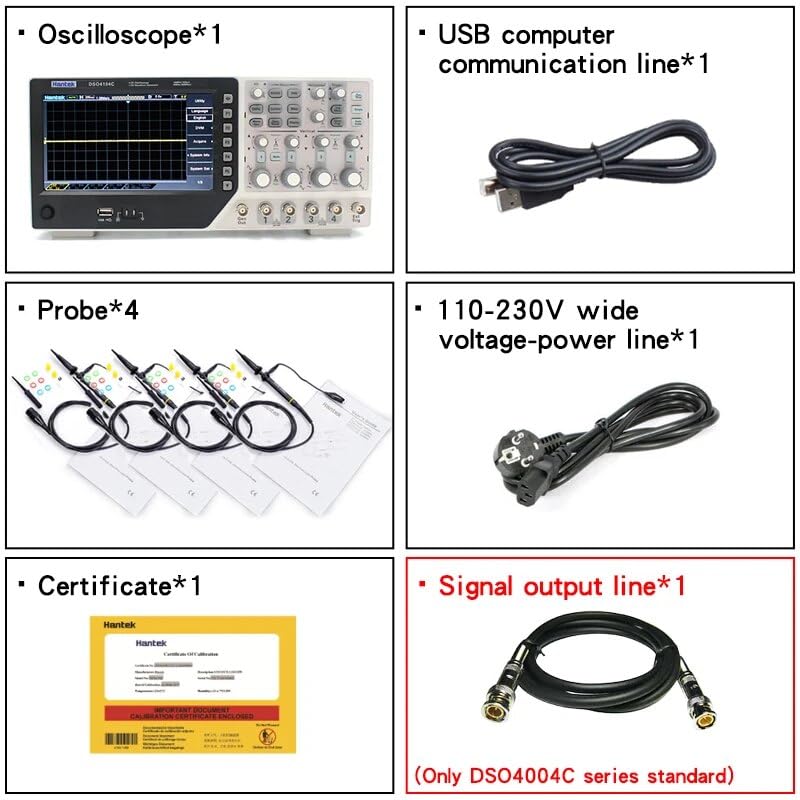
Figure 3.1: Hantek DSO4254C Package Contents
- Hantek DSO4254C Digital Oscilloscope Unit (x1)
- Oscilloscope Probes (x4)
- USB Computer Communication Line (x1)
- 110-230V Wide Voltage Power Line (x1)
- Calibration Certificate (x1)
- Signal Output Line (x1) - Standard for DSO4000C series
4. محصول ختم شوview
The Hantek DSO4254C is a high-performance digital oscilloscope designed for a wide range of electronic testing and measurement applications. It combines a 4-channel oscilloscope with an external trigger, arbitrary function generator (AFG), digital voltmeter (DVM), and auto-ranging capabilities.
4.1 مخکښ پینل

شکل 4.1: د مخ پینل ترتیب
The front panel features the main display, channel input connectors (CH1-CH4), external trigger input, function generator output, and various control knobs and buttons for navigation, vertical and horizontal adjustments, trigger settings, and measurement functions.
4.2 اړخ پینل

شکل 4.2: د غاړې پینل
The side panel typically includes ventilation grilles for heat dissipation and may house additional ports or controls depending on the specific model configuration.
4.3 شاته پینل

شکل 4.3: د شا پینل ترتیب
The rear panel provides the main power input, USB Host/Device ports for PC communication and storage, and optional RS232 and LAN ports for remote control and network connectivity.
5. ترتیب کول
Follow these steps to set up your Hantek DSO4254C Digital Oscilloscope for initial use.
- بسته بندي کول: Carefully remove the oscilloscope and all accessories from the packaging. Inspect for any signs of damage.
- د بریښنا پیوستون: Connect the provided 110-230V power line to the power input on the rear panel of the oscilloscope, then plug it into a grounded AC power outlet.
- پاور آن: Press the power button, usually located on the front or side panel, to turn on the oscilloscope. The display should illuminate.
- د پلټنې اړیکه: Connect the oscilloscope probes to the desired input channels (CH1-CH4) on the front panel. Ensure a secure connection.
- د پلټنې جبران: Before taking measurements, perform probe compensation to ensure accurate readings. Connect the probe tip to the probe compensation output (usually a square wave signal) and adjust the probe until a flat-top square wave is displayed.
- USB/PC Connection (Optional): If connecting to a PC, use the provided USB communication line to connect the oscilloscope's USB Device port to your computer. Install the necessary drivers and software from Hantek's official webسایټ
6. عملیاتي لارښوونې
This section outlines the basic operation of the oscilloscope and its integrated functions.
6.1 Basic Oscilloscope Operation
- د چینل انتخاب: Use the channel buttons (CH1, CH2, CH3, CH4) to enable or disable specific input channels.
- Vertical Scale (VOLTS/DIV): Adjust the vertical scale knob for each channel to change the voltage per division displayed on the screen.
- عمودی موقعیت: Use the vertical position knob to move the waveform up or down on the screen.
- Horizontal Scale (SEC/DIV): Adjust the horizontal scale knob to change the time per division, controlling the time base of the display.
- افقي موقعیت: Use the horizontal position knob to shift the waveform left or right.
- د محرک ترتیبات:
- د محرک کچه: د حجم تنظیم کولو لپاره د ټریګر لیول نوب تنظیم کړئtage point at which the oscilloscope captures a stable waveform.
- د ټریګر حالت: Select trigger modes such as Auto, Normal, or Single.
- د محرک ډول: Choose from various trigger types including Edge, Overtime, Pulse, Pattern, and Interval.
- Auto Measurement: The DSO4254C supports over 32 types of automatic measurements. Access these through the measurement menu to display parameters like Vpp, Vmax, Vmin, Freq, Period, etc.
- Auto Range Function: Utilize the auto range feature for quick setup of vertical and horizontal scales.
6.2 Arbitrary Function Generator (AFG) Operation
- د محصول پیوستون: Connect the signal output line from the AFG port on the front panel to the circuit or device you wish to test.
- د څپې شکل انتخاب: Navigate to the AFG menu to select the desired waveform type (e.g., sine, square, triangular, arbitrary).
- فریکونسی/Ampد رڼا تنظیم: تعدد تنظیم کړئ amplitude, and offset parameters for the generated waveform using the corresponding controls or menu options.
- Output Enable: Ensure the AFG output is enabled to generate the signal.
6.3 Data Storage and Communication
- U-Stick Storage: Insert a USB flash drive into the USB Host port to save waveforms, screenshots, or instrument settings.
- PC Communication: Use the USB Device port and Hantek software to control the oscilloscope remotely, transfer data, or update firmware.
- SCPI Commands: The oscilloscope supports SCPI remote control commands for automated testing and integration with external systems. Refer to the programming manual for detailed commands.
7. ساتنه
Proper maintenance ensures the longevity and accuracy of your Hantek DSO4254C.
- پاکول: Regularly clean the exterior of the oscilloscope with a soft, dry, lint-free cloth. For stubborn dirt, a slightly damp cloth with mild detergent can be used, ensuring no liquid enters the instrument. Do not use abrasive cleaners or solvents.
- وینټیلیشن: Keep the ventilation openings clear of dust and debris to maintain proper airflow and prevent overheating.
- د تفتیش پاملرنه: Handle probes carefully. Avoid bending or stressing the cables. Store them properly to prevent damage.
- اندازه کول: While the instrument is factory calibrated, periodic calibration by qualified personnel is recommended to maintain measurement accuracy, especially after significant temperature changes or prolonged use.
- د فرم ویئر تازه معلومات: Check the Hantek official webد غوره فعالیت او نوي ځانګړتیاو ته د لاسرسي ډاډ ترلاسه کولو لپاره د فرم ویئر تازه معلوماتو لپاره په دوره یي ډول سایټ.
8. ستونزه حل کول
This section provides solutions to common issues you might encounter. If the problem persists, contact technical support.
| ستونزه | احتمالي لامل | د حل لاره |
|---|---|---|
| له بریښنا وروسته نه ښودل | Power cable not connected; Power switch off; Faulty power supply | د برېښنا کیبل اتصال وګورئ؛ ډاډ ترلاسه کړئ چې د برېښنا سویچ فعال دی؛ د برېښنا د بل سایټ سره ازموینه وکړئ. |
| هیڅ څپې بڼه نه ښودل کیږي | Probe not connected; Channel disabled; Vertical scale too high/low; Trigger not set correctly | Connect probe to signal source; Enable channel; Adjust VOLTS/DIV; Adjust trigger level and mode. |
| بې ثباته څپې بڼه | Incorrect trigger settings; Noisy signal | Adjust trigger level and source; Select appropriate trigger type; Ensure signal source is stable. |
| ناسم اندازه کول | Probe compensation incorrect; Incorrect measurement settings | Perform probe compensation; Verify measurement parameters in the menu. |
| د USB ارتباط ناکامي | Incorrect cable; Driver not installed; Software issue | Ensure correct USB cable; Install Hantek drivers; Restart PC and oscilloscope. |
9. مشخصات
Below are the key technical specifications for the Hantek DSO4254C Digital Oscilloscope.
- ماډل: DSO4254C
- چینلونه: 4 Oscilloscope Channels + 1 Arbitrary Function Generator Channel + EXT + DVM
- بانډ ویت: 250 MHz
- Sampنرخ: 1 GSa/s (single channel), 500 MSa/s (dual channel)
- Minimum Vertical Range: 500 µV / div
- Auto Measurement Functions: Over 32 types
- محرک سیسټم: Advanced digital trigger, high sensitivity
- Trigger Functions: Over 14 types (edge, overtime, pulse, pattern, interval, etc.)
- Serial Bus Triggering & Decode: ملاتړ شوی
- Arbitrary Function Generator:
- فریکونسی: 25 MHz
- قرارداد: 12 بټونه
- DDS: 200 MHz
- د څپې بڼه: ARB, Square, Sine, Triangular, Trapezoidal, Impulse, DC
- ارتباط: Integrated USB Host/Device, optional RS232 port, optional LAN port
- ابعاد (L x W x H): 21 x 11 x 16 سانتي متره
- وزن: 1.5 کیلو ګرامه
- د بریښنا رسول: 110-230V پراخه حجمtage
- تصدیقونه: سي ای، ISO 9001، RoHS
- د حرارت درجه: تر 60 درجو سیلسیس پورې
- د اصلي هیواد: چین
10. تضمین او ملاتړ
Hantek provides reliable support for its products. Please refer to the information below for warranty details and how to obtain technical assistance.
- تضمین: The product comes with a manufacturer's warranty. Please refer to the warranty card included in your package or contact Hantek customer service for specific terms and conditions.
- د پرزو شتون: اضافي پرزې د پیرود نیټې څخه د یو کال لپاره شتون لري.
- تخنیکي ملاتړ: For technical assistance, troubleshooting, or service inquiries, please visit the official Hantek website or contact their customer support team. Have your model number (DSO4254C) and purchase information ready.


