1. پیژندنه
Thank you for choosing the Mecer 23.8 Inch Full HD LED Monitor. This manual provides essential information for setting up, operating, and maintaining your monitor. Please read it thoroughly before use to ensure proper functionality and longevity of your device.
This monitor features a 23.8-inch Full HD (1920 x 1080) display, offering crisp and clear visuals. It incorporates TFT LED panel technology for energy efficiency and vibrant colors, with a 16:9 aspect ratio suitable for widescreen viewing. Connectivity options include VGA and HDMI, making it compatible with various devices. Built-in speakers provide basic audio, and wide 178° viewing angles ensure comfortable use. With a 2ms response time, it is suitable for general computing and multimedia consumption.
2. د خوندیتوب معلومات
- د بریښنا سرچینه: یوازې هغه بریښنا اډاپټر وکاروئ چې د مانیټر سره چمتو شوی وي. ډاډ ترلاسه کړئ چې د بریښنا سایټ په سمه توګه ځمکنی شوی دی.
- وینټیلیشن: د هوا د جریان لارې مه بندوئ. د هوا د مناسب جریان لپاره د مانیټر شاوخوا کافي ځای پریږدئ ترڅو د ډیر تودوخې مخه ونیول شي.
- ځای په ځای کول: Place the monitor on a stable, flat surface. Avoid placing it in direct sunlight, near heat sources, or in environments with excessive dust or humidity.
- پاکول: Disconnect the power cord before cleaning. Use a soft, dry cloth for the screen and a slightly damp cloth for the casinج. د کثافاتو پاکوونکو یا محلولونو کارولو څخه ډډه وکړئ.
- د مایع افشا کول: Keep liquids away from the monitor. If liquid enters the monitor, disconnect power immediately and contact qualified service personnel.
- بې لارې کول: د مانیټر د جلا کولو یا ترمیم کولو هڅه مه کوئ. ټولې خدمتونه وړ خدماتو پرسونل ته راجع کړئ.
3. د بسته محتويات
مهرباني وکړئ د بسته بندۍ محتويات وګورئ ترڅو ډاډ ترلاسه کړئ چې ټول توکي شتون لري:
- Mecer 23.8 Inch LED Monitor
- د څارنې موقف (بنسټ او غاړه)
- د بریښنا اډاپټر او کیبل
- HDMI کیبل
- د VGA کیبل
- د کارونکي لارښود (دا لاسوند)
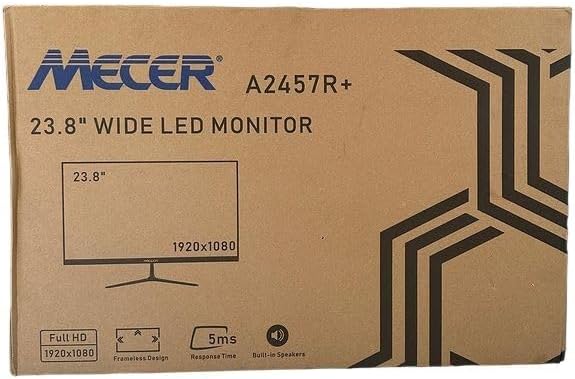
انځور 3.1: The monitor packaging box, indicating the model A2457R+ and key features like 23.8" display, Full HD 1920x1080 resolution, frameless design, 5ms response time, and built-in speakers.
4. ترتیب کول
۱. د مانیټر سټینډ راټولول
- د مانیټر او سټینډ اجزا په احتیاط سره له بسته بندۍ څخه لرې کړئ.
- Attach the stand neck to the monitor panel by aligning the tabs and pushing firmly until it clicks into place.
- Attach the stand base to the stand neck, securing it with the provided screw (usually hand-tightened).
- راټول شوی مانیټر په یوه مستحکم او فلیټ سطحه کېږدئ.

انځور 4.1: مخکی view of the Mecer 23.8 Inch LED Monitor with its stand assembled, ready for connection.
4.2. د کمپیوټر سره نښلول
The monitor supports both HDMI and VGA connections. Choose the appropriate cable for your computer.
- د HDMI پیوستون: Connect one end of the HDMI cable to the HDMI port on your computer's graphics card and the other end to the HDMI port on the monitor. HDMI transmits both video and audio signals.
- د VGA پیوستون: Connect one end of the VGA cable to the VGA port on your computer's graphics card and the other end to the VGA port on the monitor. VGA transmits only video signals.

انځور 4.2: شاته view of the Mecer 23.8 Inch LED Monitor, showing the input ports including HDMI and VGA, as well as the power input.
4.3. د بریښنا پیوستون
- Connect the power adapter cable to the DC IN port on the back of the monitor.
- د بریښنا اډاپټر په دیوال کې ولګوئ.
5. عملیاتي لارښوونې
5.1. بریښنا کول/بندول
Press the power button, typically located on the bottom right side or rear of the monitor, to turn the monitor on or off. The power indicator light will illuminate when the monitor is on.
5.2. د ننوت سرچینې انتخاب
If you have multiple devices connected, you may need to manually select the input source. Use the monitor's control buttons (usually located near the power button) to navigate to the input selection menu and choose between HDMI or VGA.
5.3. پر پرده ښودنه (OSD) مینو
The OSD menu allows you to adjust various display settings. Use the monitor's control buttons to:
- د OSD مینو ته لاسرسی ومومئ.
- Navigate through menu options (e.g., Brightness, Contrast, Color Settings, Input Source).
- Adjust values or select options.
- د OSD مینو څخه وتل.
عام تنظیمیدونکي ترتیبات پدې کې شامل دي:
- روښانتیا/ تضاد: د رڼا او تیاره سیمو ترمنځ عمومي رڼا او توپیر تنظیم کړئ.
- د رنګ ترتیبات: Adjust color temperature, RGB values, or select preset color modes.
- د اړخ نسبت: Change between 16:9, 4:3, or other available options.
- آډیو: Adjust volume for the built-in speakers.
5.4. جوړ شوي سپیکرونه
The monitor includes built-in speakers for basic audio output. If using an HDMI connection, audio will be transmitted automatically. For VGA connections, ensure your computer's audio output is configured correctly. Adjust the volume through the OSD menu or your computer's operating system.
6. ساتنه
۴. د مانیټر پاکول
- تل د پاکولو دمخه مانیټر د بریښنا له ساکټ څخه خلاص کړئ.
- سکرین: په نرمۍ سره سکرین د نرم، لینټ نه پاک ټوکر سره پاک کړئ. د سختو نښو لپاره، په نرمۍ سرهampen the cloth with water or a specialized screen cleaner (ensure it's alcohol-free and ammonia-free) and wipe carefully. Do not spray liquid directly onto the screen.
- Casing: د مانیټر د پاکولو لپاره نرم، وچ ټوکر وکاروئ casing. If necessary, a slightly damp ټوکر کارول کیدی شي، او بیا وچ ټوکر وکارول شي.
6.2. ذخیره کول
که چیرې مانیټر د اوږدې مودې لپاره ذخیره کوئ، ټول کیبلونه جلا کړئ، په خپل اصلي بسته بندۍ کې یې بسته کړئ (که شتون ولري)، او په یخ او وچ ځای کې یې د مستقیم لمر وړانګو او سختې تودوخې څخه لرې وساتئ.
7. ستونزه حل کول
که تاسو د خپل مانیټر سره ستونزې سره مخ شئ، لاندې عامې ستونزې او حل لارې وګورئ:
- ځواک نشته:
- ډاډ ترلاسه کړئ چې د بریښنا کیبل په خوندي ډول د مانیټر او دیوال آوټ لیټ سره وصل دی.
- د بل وسیله په لګولو سره د بریښنا سایټ کار کوي تایید کړئ.
- وګورئ چې ایا د بریښنا اډاپټر په سمه توګه کار کوي.
- هیڅ سیګنال نشته:
- Ensure the video cable (HDMI or VGA) is securely connected to both the monitor and the computer.
- تایید کړئ چې په مانیټر کې د ننوتلو سمه سرچینه غوره شوې ده (د OSD مینو له لارې).
- Check if your computer is powered on and outputting a video signal.
- Try a different video cable if available.
- انځور تیاره یا تحریف شوی دی:
- ډاډ ترلاسه کړئ چې د مانیټر ریزولوشن ستاسو د کمپیوټر د ښودنې ترتیباتو کې خپل اصلي ریزولوشن (1920 x 1080) ته تنظیم شوی دی.
- Adjust the monitor's OSD settings for brightness, contrast, and sharpness.
- For VGA connections, use the 'Auto Adjust' function in the OSD menu if available.
- د جوړ شوي سپیکرونو څخه هیڅ غږ نشته:
- ډاډ ترلاسه کړئ چې د مانیټر حجم په OSD مینو کې خاموش یا ډیر ټیټ نه دی ټاکل شوی.
- د خپل کمپیوټر د آډیو آوټ پټ تنظیمات وګورئ ترڅو ډاډ ترلاسه کړئ چې مانیټر د پلې بیک وسیلې په توګه غوره شوی.
- If using VGA, ensure your computer's audio is routed to an external speaker system, as VGA does not carry audio.
8. مشخصات
| فیچر | مشخصات |
|---|---|
| برانډ | میسیر |
| د ماډل شمیره | A2457R+ |
| د ښودلو اندازه | ۷۸۷ انچه |
| قرارداد | 1920 x 1080 پکسلز (بشپړ HD) |
| د ښودلو ډول | LED (TFT LED Panel) |
| د اړخ نسبت | 16:9 |
| د غبرګون وخت | 2 ملی ثانیه |
| د تازه کولو نرخ | 75 Hz |
| Viewزاویه | ۳۵۰ درجې افقي / ۱۸۰ درجې عمودي |
| ارتباط | 1x HDMI، 1x VGA |
| جوړ شوي سپیکرونه | هو |
| رنګ | تور |
| د محصول ابعاد (د x څلویښتم x څلویښتم) | ۶۲D x ۳۴W x ۲۳۰H ملي متره |
| ځانګړي ځانګړتیاوې | High performance intelligent multi-frequency scanning, Micro Computer digital technology control, no radiation, no glare, Comply with VESA DPMS international power saving regulation, Support DDC 1/2B and Windows PNP Plug and Play |
9. تضمین او ملاتړ
This Mecer monitor comes with a د 1 کال محدود تضمین د پیرود نیټې څخه. مهرباني وکړئ د تضمین ادعاوو لپاره د پیرود ثبوت وساتئ.
For technical support, service, or warranty inquiries, please contact your retailer or the authorized Mecer service center in your region. Do not attempt to repair the product yourself, as this may void your warranty.


