1. پیژندنه
This manual provides comprehensive instructions for the installation, operation, and maintenance of your Lloyd's Smart Full HD 1080P Video Intercom System. This system is designed to provide secure access control for your home or office, allowing you to monitor, communicate with, and grant access to visitors remotely.
Please read this manual thoroughly before using the product to ensure proper function and safety. Keep this manual for future reference.
2. د خوندیتوب معلومات
د محصول د زیان یا ځان یا نورو ته د زیان رسولو مخنیوي لپاره، مهرباني وکړئ لاندې خوندیتوب احتیاطي تدابیر په پام کې ونیسئ:
- ډاډ ترلاسه کړئ چې د نصب یا ساتنې دمخه ټول بریښنا قطع شوې ده.
- که تاسو د بریښنایی تارونو سره بلد نه یاست، نو نصب کول باید د وړ بریښنایی متخصص لخوا ترسره شي.
- محصول د خورا تودوخې ، رطوبت یا مستقیم لمر وړانګو ته مه ښکاره کوئ.
- یوازې چمتو شوي بریښنا اډاپټر او لوازم وکاروئ.
- محصول د اوبو او نورو مایعاتو څخه لرې وساتئ.
- د واحد د جلا کولو یا ترمیم کولو هڅه مه کوئ. د مرستې لپاره د پیرودونکو ملاتړ سره اړیکه ونیسئ.
3. د بسته محتويات
ډاډ ترلاسه کړئ چې ټول توکي په کڅوړه کې شتون لري:
- 1 x Monitor (7'' Color LCD Touchscreen)
- 1 x Outdoor Unit (Doorbell with Camera and Keypad)
- 1 x د کارن لارښود
- 1 x هستوګنې
- 1 x Rain Cover Bracket
- 1 x Recessed Box
- 1 x AC/DC اډاپټر
- 1 x د قوس قوس
- Wall Plugs and Mounting Screws
- 3 ایکس نښلونکي
- 1 x Allen Screwdriver
- 4 x Connection Cables

شکل 3.1: پایview of the Lloyd's Smart Video Intercom System components and packaging.
4. محصول ختم شوview
4.1. Monitor (Indoor Unit)
- ښکاره کول: 7-inch color LCD touchscreen with 1020 x 600 px resolution.
- د تنظیم وړ ترتیبات: Brightness, contrast, and volume.
- دندې: Hands-free intercom, call transfer (requires additional monitor), date, time, and weather display.
- ذخیره کول: Integrated memory for up to 30 photos, supports up to 128 GB memory card (not included).
- ارتباط: 2.4 GHz Wi-Fi for stable connection in large areas.
4.2. Outdoor Unit (Doorbell)
- کمره: 2MP Full HD (1920x1080) resolution.
- د شپې لید: Yes, with LED numeric panel.
- Viewزاویه: 120 درجې.
- د حرکت کشف: Detection distance of less than or equal to 3 meters.
- آډیو: 2-way audio with adjustable microphone and speaker volume.
- د لاسرسي کنټرول: Works with a 12 VDC electric lock (not included), supports 4-6 digit password entry.
- Tamper Button: Sends alerts to your smartphone and triggers an alarm if the outdoor unit is forced.
- پایښت: IP65 rating for indoor or outdoor use.
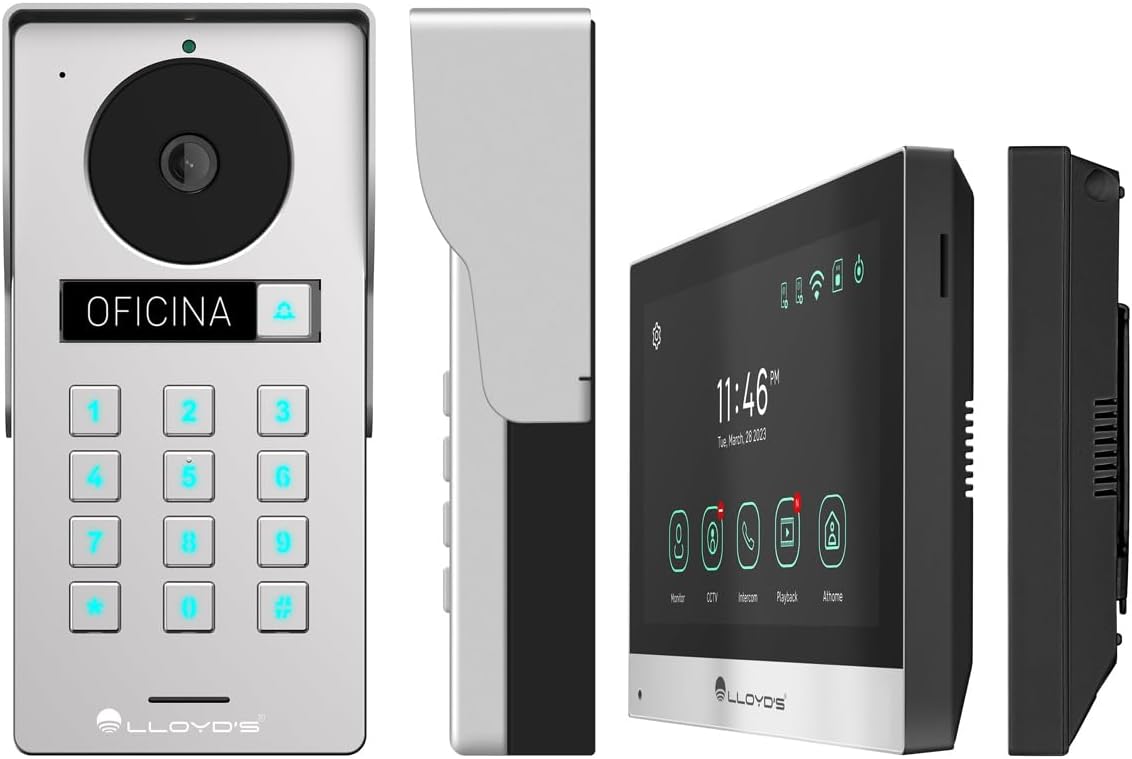
شکل 4.1: مفصل views of the outdoor unit and monitor.

Figure 4.2: Key features of the Lloyd's Smart Video Intercom System.
5. ترتیب او نصب کول
۵.۲. تارونه او نصب کول
The system requires a wired connection between the monitor and the outdoor unit. The maximum operating distance is 50 meters using a 4-wire cable (0.5 mm² not included). Follow the wiring diagram provided in the quick start guide for correct connections.
- Outdoor Unit Mounting: Choose a suitable location near your entrance, ensuring clear camera view and easy access to the keypad. Use the provided mounting bracket, wall plugs, and screws. The unit is IP65 rated for outdoor use.
- Monitor Mounting: Install the monitor indoors at a convenient height for viewing and interaction. Use the mounting bracket and screws.
- د بریښنا پیوستون: Connect the AC/DC adapter to the monitor and a power outlet.
- Electric Lock Connection (Optional): If using an electric lock (12 VDC, not included), connect it to the outdoor unit as per the wiring diagram.
5.2. App and Wi-Fi Connection
To utilize smart features, download the Lloyd's smart home application on your smartphone (compatible with Android 5.0+ and iOS 11+).
- Power on the monitor and outdoor unit.
- On the monitor, navigate to the Wi-Fi settings and connect to your 2.4 GHz Wi-Fi network.
- Open the Lloyd's app on your smartphone and create an account or log in.
- Follow the in-app instructions to add your new video intercom system. This typically involves scanning a QR code displayed on the monitor or manually entering device details.
- Once connected, you will receive notifications and can control the system remotely via the app.
6. عملیاتي لارښوونې
6.1. Answering Calls and Communication
- When a visitor presses the doorbell button, the monitor will ring, and you will receive a notification on your smartphone.
- On the monitor, tap the "Answer" icon to establish two-way audio and video communication.
- On your smartphone, open the app and tap the incoming call notification to answer.
- The intercom communication time is 60 seconds.

Figure 6.1: Communicate with visitors from anywhere using the app or monitor.

Figure 6.2: Receive instant notifications on your smartphone and monitor.
۴.۴. د دروازې پرانیستل
- له اپلیکیشن څخه: During a call, tap the "Unlock" icon in the app to open the connected electric lock.
- From the Monitor: During a call, tap the "Unlock" icon on the monitor's touchscreen.
- From the Outdoor Unit: Visitors can enter a pre-set 4-6 digit password on the numeric keypad to open the door.
۲. د حرکت کشف او ثبت کول
- The system automatically captures photos and videos when motion is detected within 3 meters of the outdoor unit or when someone rings the doorbell.
- You will receive real-time alerts on your smartphone via the app when motion is detected.
- Review recorded events and snapshots through the app or on the monitor.
- The monitoring time for motion detection is 30 seconds.

Figure 6.3: Receive motion detection alerts directly on your smartphone app.

Figure 6.4: Automatic photo and video capture for events.
۴.۷. د سیسټم پراخول
The system supports expansion for enhanced security and convenience:
- Up to 2 additional Outdoor Units (Doorbell)
- Up to 3 additional Monitors
- Up to 2 additional Cameras
- Up to 2 additional Sensors
(Additional units and sensors are not included and must be purchased separately.)
You can also integrate the system with other Lloyd's smart home products to create customized routines and share device access with family members.
7. ساتنه
- پاکول: Use a soft, dry cloth to clean the monitor screen and outdoor unit. Do not use abrasive cleaners or solvents.
- د سافټویر تازه معلومات: Periodically check the Lloyd's app for firmware updates to ensure optimal performance and security.
- د ذخیرې مدیریت: If using a memory card, regularly back up important recordings and delete old fileد ځای خالي کولو لپاره.
8. ستونزه حل کول
| ستونزه | احتمالي لامل | د حل لاره |
|---|---|---|
| No image or sound from outdoor unit. | Loose wiring, power issue, unit malfunction. | Check all cable connections. Ensure power adapter is properly connected. Restart the system. |
| Wi-Fi connection unstable or disconnected. | Weak Wi-Fi signal, incorrect password, router issues. | Ensure the monitor is within Wi-Fi range. Re-enter Wi-Fi password. Restart your router. |
| Cannot open door via app/monitor. | Electric lock not connected, lock malfunction, wiring issue. | Verify electric lock connection and functionality. Check wiring between outdoor unit and lock. |
| د حرکت کشف خبرتیاوې نشته. | Motion detection disabled, incorrect sensitivity, app notification settings. | Enable motion detection in app settings. Adjust sensitivity. Check smartphone notification permissions for the app. |
| د ویډیو خراب کیفیت. | Dirty camera lens, poor lighting, network bandwidth. | د کیمرې لینز پاک کړئ. کافي رڼا ډاډمنه کړئ. د خپل انټرنیټ سرعت وګورئ. |
9. مشخصات
| فیچر | تفصیل |
|---|---|
| د ماډل شمیره | LC-1373 |
| څارنه ښودل | ۷ انچه رنګین LCD ټچ سکرین |
| د څارنې حل | 1020 x 600 px |
| Outdoor Unit Camera Resolution | 2MP Full HD (1920x1080) |
| Viewزاویه | 120 درجې |
| د شپې لید لړۍ | تر 10 مترو پورې |
| د حرکت کشف رینج | ≤ 3 متره |
| بې سیم ارتباط | 2.4 GHz وائی فای |
| ذخیره کول | Integrated (30 photos), supports up to 128 GB MicroSD (not included) |
| د بریښنا رسول | 12 VDC (via AC/DC adapter) |
| د بریښنا مصرف (ستونزه) | 4W |
| د بریښنا مصرف (عملیات) | 10W |
| Operating Distance (Wired) | Up to 50m (with 0.5 mm² 4-wire cable) |
| Ingress Protection (Outdoor Unit) | IP65 |
| Monitor Dimensions (H x W x D) | 12.4 cm x 18 cm x 2.1 cm |
| د بهرنۍ واحد ابعاد (H x W x D) | 18 cm x 8.7 cm x 3.2 cm |
| مطابقت لرونکې وسیلې | Android 5.0 یا لوړ، iOS 11 یا لوړ |

Figure 9.1: Dimensions of the Monitor and Outdoor Unit.
10. تضمین او ملاتړ
For warranty information, please refer to the warranty card included with your product or visit the official Lloyd's website. If you encounter any issues or require technical assistance, please contact Lloyd's customer support.
د پیرودونکي ملاتړ: Refer to the contact information provided on the product packaging or the official Lloyd's webسایټ
آنلاین سرچینې: لیدنه Lloyd's Official Store on Amazon د اضافي محصول معلوماتو او ملاتړ لپاره.
۸. د محصول رسمي ویډیوګانې
په شته معلوماتو کې د دې محصول لپاره د پلورونکي رسمي ویډیوګانې نه دي ورکړل شوي.


