پیژندنه
Thank you for choosing the Mastech MS8233D Digital Multimeter. This manual provides essential information for the safe and effective operation, maintenance, and troubleshooting of your device. Please read this manual thoroughly before use and keep it for future reference.
د خوندیتوب معلومات
WARNING: To avoid electric shock or personal injury, read and understand all safety information before using this product.
- تل ډاډ ترلاسه کړئ چې ملټي میټر د اندازه کولو دمخه په سمه فعالیت او حد کې دی.
- د ټاکل شوي حجم څخه ډیر مه پلي کوئtage, as marked on the meter, between terminals or between any terminal and earth ground. The MS8233D has a Safety Rating of CATII 600V.
- د حجم سره کار کولو پر مهال له احتیاط څخه کار واخلئtagد 30V AC RMS، 42V چوکۍ، یا 60V DC څخه پورته. داسې حجمtagد شاک خطر رامنځته کوي.
- د اندازه کولو په وخت کې خپلې ګوتې د پروب خنډونو شاته وساتئ.
- Do not use the meter if it is damaged or if the case is open. Inspect the meter and test leads before use.
- کله چې د بیټرۍ ټیټ شاخص څرګند شي نو سمدلاسه بیټرۍ بدله کړئ ترڅو دقیق لوستل ډاډمن شي.
- میټر په چاودیدونکو ګازو، بخاراتو یا دوړو چاپیریال کې مه چلوئ.
کلیدي ځانګړتیاوې
The Mastech MS8233D Digital Multimeter offers a range of functionalities for various electrical measurements:
- ښکاره کول: د دقیق لوستلو لپاره 2000 شمیرې.
- لړۍ: Auto and Manual Ranging capabilities.
- د ډایډ ټیسټ: Features a Diode Open Voltagد 1.5V.
- د دوام ازموینه: Audible buzzer for resistance less than 60Ω.
- د معلوماتو ساتل: د اسانتیا لپاره ښودل شوي لوستل کنګل کوي.
- اتومات بریښنا بند: د بیټرۍ ژوند ساتي.
- غیر تماس والیtage کشف (NCV): د مستقیم تماس پرته د ژوندیو تارونو پیژندلو لپاره.
- اعظمي اندازه کول: Records the highest value measured.
- د شاته څراغ ښکاره کول: د ټیټ ر lightا شرایطو کې د لید لپاره.
- د بیټرۍ ټیټ ښودنه: کله چې د بیټرۍ بدلولو ته اړتیا وي په ګوته کوي.
- د بریښنا رسول: Operates on 1x 9V 6F22 Battery.
- تصدیقونه: د RoHS مطابق.
- د خوندیتوب درجه: CATII 600V.
شکل 1: مخکی view of the Mastech MS8233D Digital Multimeter, highlighting the display, rotary function switch, and input terminals.
محصول پای ته ورسیدview او اجزا
The MS8233D multimeter is designed for ease of use and durability. Familiarize yourself with its main parts:

شکل 2: پایview of the MS8233D Digital Multimeter, illustrating its physical dimensions, power supply, and typical applications in domestic, industrial, and electronics settings.
- د LCD نندارې: د اندازه کولو لوستل، واحدونه، او د فعالیت شاخصونه ښیې.
- د روټري سویچ فعالیت: Used to select the desired measurement function (e.g., ACV, DCV, Resistance, Diode, Continuity, Temperature, NCV).
- داخله جیکونه: د ازموینې لیډونو د نښلولو لپاره ټرمینلونه.
- COM جیک: د ټولو اندازه کولو لپاره عام (منفي) ان پټ ټرمینل.
- د VΩmA جیک: د حجم لپاره مثبت ان پټ ټرمینلtage, resistance, diode, continuity, and small current measurements.
- ۱۰ الف جک: Positive input terminal for high current (up to 10A) measurements.
- د فعالیت تڼۍ: For features like Data Hold, Backlight, and Range selection.
چمتو کول
د بیټرۍ نصب کول
The MS8233D requires one 9V 6F22 battery for operation. To install or replace the battery:
- ډاډ ترلاسه کړئ چې ملټي میټر بند دی او د ټیسټ ټولې لیډونه د ان پټ ټرمینلونو څخه جلا کړئ.
- د میټر په شا کې د بیټرۍ د برخې پوښ ومومئ.
- Use a screwdriver to loosen the screw(s) on the battery cover and remove the cover.
- Connect the new 9V battery to the battery clips, observing the correct polarity.
- بیټرۍ په کڅوړه کې واچوئ او پوښ یې بدل کړئ، د سکرو سره یې خوندي کړئ.
یادونه: The meter includes a low battery indicator. Replace the battery promptly when this indicator appears to maintain measurement accuracy.
عملیاتي لارښوونې
Before making any measurement, ensure the test leads are properly connected and the function switch is set to the desired range.
د DC حجم اندازه کولtage (DCV)
- Insert the red test lead into the VΩmA jack and the black test lead into the COM jack.
- Set the rotary switch to the desired DCV range (e.g., 200mV, 2V, 20V, 200V, 600V). If unsure, start with the highest range or use auto-ranging if available.
- Connect the test probes across the component or circuit to be measured, observing polarity.
- ټوک ولولئtagد LCD نندارې ارزښت.
د AC حجم اندازه کولtage (ACV)
- Insert the red test lead into the VΩmA jack and the black test lead into the COM jack.
- Set the rotary switch to the desired ACV range (e.g., 2V, 20V, 200V, 600V).
- د ازموینې پروبونه د هغه برخې یا سرکټ په اوږدو کې وصل کړئ چې اندازه کیږي.
- ټوک ولولئtagد LCD نندارې ارزښت.
Measuring DC/AC Current (DCA/ACA)
CAUTION: Never connect the meter in parallel to a voltagد جریان اندازه کولو پر مهال د بریښنا سرچینه. دا کولی شي میټر او سرکټ ته زیان ورسوي.
- For currents up to 200mA, insert the red test lead into the VΩmA jack. For currents up to 10A, insert the red test lead into the 10A jack. Insert the black test lead into the COM jack.
- Set the rotary switch to the desired DC or AC current range (e.g., 200µA, 2000µA, 20mA, 200mA, 10A).
- هغه سرکټ پرانیزئ چیرې چې جریان اندازه کیږي او میټر په لړۍ کې د بار سره وصل کړئ.
- په LCD نندارې کې اوسنی ارزښت ولولئ.
Measuring Resistance (Ω)
- Insert the red test lead into the VΩmA jack and the black test lead into the COM jack.
- د روټري سویچ مطلوب مقاومت حد ته تنظیم کړئ (د مثال په توګه، 200Ω، 2kΩ، 20kΩ، 200kΩ، 2MΩ، 20MΩ).
- د مقاومت اندازه کولو دمخه ډاډ ترلاسه کړئ چې سرکټ یا برخه غیر انرژي شوې ده.
- د ازموینې پروبونه د برخې په اوږدو کې وصل کړئ.
- په LCD ډسپلې کې د مقاومت ارزښت ولولئ.
د ډایډ ټیسټ
- Insert the red test lead into the VΩmA jack and the black test lead into the COM jack.
- Set the rotary switch to the Diode symbol (usually shared with Continuity).
- سور پروب د انود سره او تور پروب د ډایډ کیتوډ سره وصل کړئ.
- ښودنه به د مخکینۍ حجم وښييtage drop. Reverse the probes; the display should show 'OL' (Open Loop) for a good diode.
د دوام ازموینه
- Insert the red test lead into the VΩmA jack and the black test lead into the COM jack.
- Set the rotary switch to the Continuity symbol (usually shared with Diode).
- د ازموینې پروبونه د سرکټ یا برخې په اوږدو کې وصل کړئ.
- که چیرې مقاومت تقریبا 60Ω څخه کم وي، نو بزر به غږ وکړي، چې دوام ښیي. ښودنه به د مقاومت ارزښت هم وښيي.
غیر تماس والیtage (NCV) کشف
- Set the rotary switch to the NCV function.
- Move the top part of the meter (NCV sensor area) close to the conductor suspected of having AC voltage.
- The meter will emit an audible beep and the NCV indicator will light up if AC voltage کشف شوی دی.
د ډاټا نیول فنکشن
د 'نیول' تڼۍ کېکاږئ ترڅو په ښودنه کې اوسنی لوستل کنګل کړئ. بیا یې فشار ورکړئ ترڅو هولډ خوشې کړئ او ژوندۍ اندازه کول بیا پیل کړئ.
د بیک لائټ فنکشن
Press the 'LIGHT' button to turn on the display backlight. Press it again to turn it off. The backlight may automatically turn off after a short period to conserve battery.
ساتنه
پاکول
د میټر کیس د اعلان سره پاک کړئamp ټوکر او یو معتدل صابون. د کثافاتو یا محلولونو څخه کار مه اخلئ. ډاډ ترلاسه کړئ چې میټر د کارولو دمخه په بشپړه توګه وچ دی.
د بیټرۍ بدلول
Refer to the 'Battery Installation' section under 'Setup' for instructions on replacing the 9V battery. Always replace the battery when the low battery indicator is displayed to ensure accurate readings and proper operation.
د فیوز بدلول
The MS8233D is equipped with internal fuses to protect against overcurrent. If the current measurement function stops working, the fuse may need replacement. Fuse replacement should only be performed by qualified personnel. Use only fuses of the specified type and rating (e.g., F200mA/250V for mA range, F10A/250V for 10A range).
د ستونزو حل کول
| ستونزه | احتمالي لامل | د حل لاره |
|---|---|---|
| هیڅ ښودنه نشته یا تیاره ښودنه نشته | مړ یا ټیټ بیټرۍ | د 9V بیټرۍ ځای په ځای کړئ. |
| غلط لوستل | Incorrect function/range selected; poor test lead connection; low battery | Verify function and range; check test lead connections; replace battery. |
| اوسنی اندازه کول کار نه کوي | فلج شوی فیوز | Replace the appropriate fuse (refer to Maintenance section). |
| 'OL' (اوورلوډ) ښودل شوی | Measurement exceeds selected range; open circuit (for continuity/resistance) | Select a higher range; check for open circuit. |
| د دوام غږ نشته | Resistance too high; open circuit | Check for continuity; ensure resistance is below 60Ω. |
مشخصات
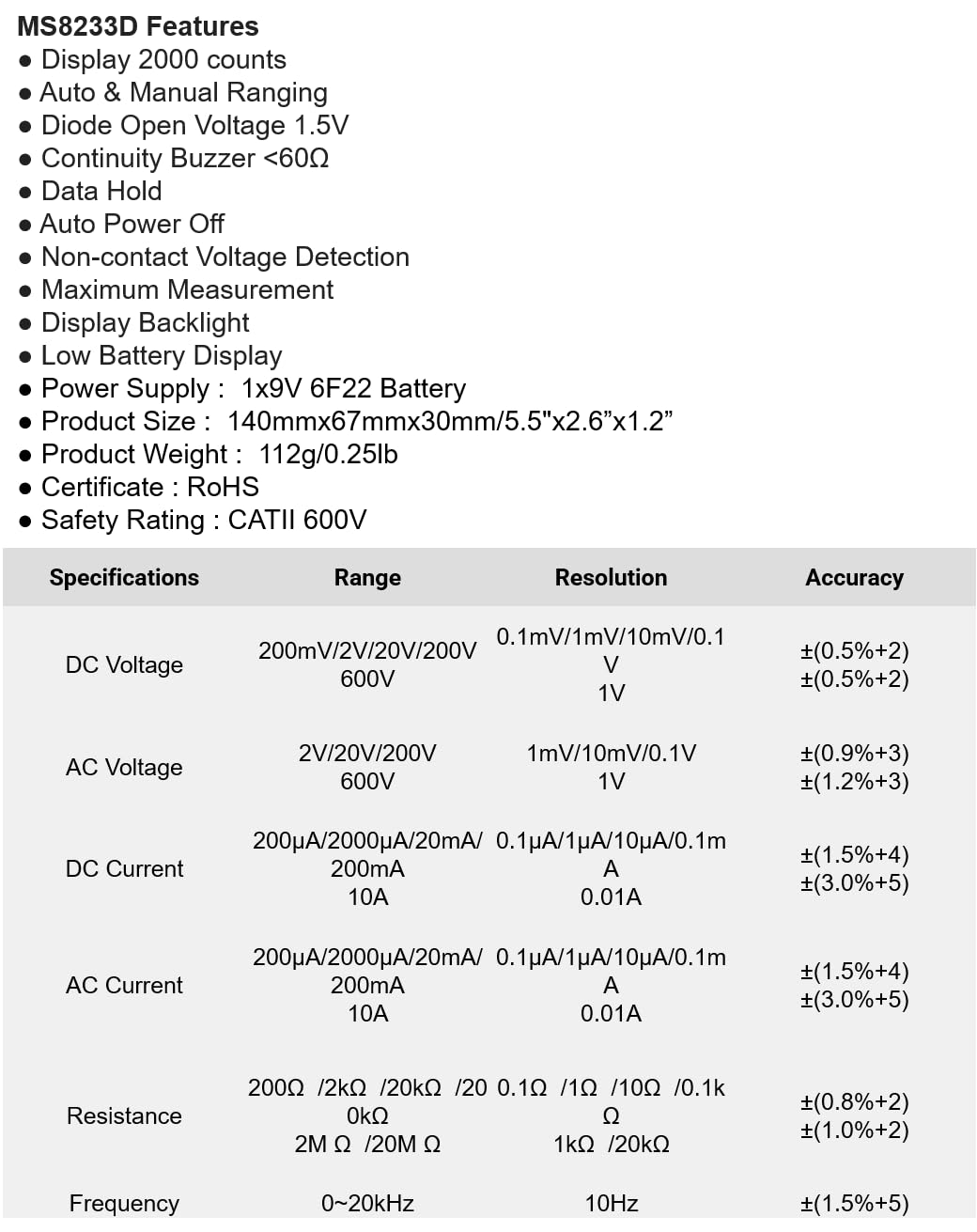
The following table details the measurement ranges, resolutions, and accuracies for the Mastech MS8233D Digital Multimeter:

Figure 3: Comprehensive specifications for the MS8233D, outlining measurement capabilities and precision.
| فیچر | مشخصات |
|---|---|
| ښودل | 2000 شمېرې |
| DC Voltage | ۲۰۰ ملی وولټ / ۲ ولټ / ۲۰ ولټ / ۲۰۰ ولټ / ۶۰۰ ولټ |
| AC Voltage | 2V / 20V / 200V / 600V |
| DC اوسنی | 200µA / 2000µA / 20mA / 200mA / 10A |
| AC اوسنی | 200µA / 2000µA / 20mA / 200mA / 10A |
| مقاومت | 200Ω / 2kΩ / 20kΩ / 200kΩ / 2MΩ / 20MΩ |
| فریکونسی | 0-20kHz |
| ډایډ خلاص والیومtage | 1.5V |
| دوامدار بجر | <60Ω |
| د بریښنا رسول | 1x 9V 6F22 Battery |
| د محصول ابعاد | 140mm x 67mm x 30mm (5.5" x 2.6" x 1.2") |
| د محصول وزن | 112g (0.25lb) |
| د خوندیتوب درجه | CATII 600V |
| تصدیقونه | CE، RoHS |
تضمین او ملاتړ
For warranty information and technical support, please refer to the documentation provided with your purchase or contact the seller/manufacturer directly. Keep your purchase receipt as proof of purchase for any warranty claims.