1. پیژندنه
This manual provides detailed instructions for the setup, operation, maintenance, and troubleshooting of your Koiiko Wireless Gaming Controller Z01. This versatile controller is designed for compatibility across multiple platforms, including iOS, Android, PC, Nintendo Switch, PlayStation 3, and PlayStation 4, offering an enhanced gaming experience with its advanced features.

انځور 1.1: مخکی view of the Koiiko Wireless Gaming Controller Z01, showcasing its design and illuminated elements.
2. Controller Components
Familiarize yourself with the various buttons and features of your Koiiko Z01 controller:
- Left/Right Analog Sticks (Hall Effect): For precise 3D movement and input, featuring Hall Effect sensors to prevent drift.
- D-pad: Directional pad for digital input.
- د عمل تڼۍ (A، B، X، Y): Standard gaming input buttons, with interchangeable key values.
- Shoulder Buttons (LB, RB) & Triggers (Hall Effect Linear): For additional actions and responsive input, featuring Hall Effect linear triggers.
- د کور تڼۍ: For system menu access and power control.
- Select/Share Button: For various in-game or system functions.
- Start/Options Button: For various in-game or system functions.
- M1/M2 تڼۍ: Programmable back buttons for custom actions.
- د توربو تڼۍ: Activates continuous input for other buttons.
- Light Adjustment Button: Controls the 7-color RGB breathing light modes.
- د USB-C پورټ: د کنټرولر چارج کولو لپاره.

انځور ۸.۴: تفصیليview of the Koiiko Wireless Gaming Controller Z01, highlighting its main features.
3. کلیدي ځانګړتیاوې
- پراخه مطابقت: Supports iOS (iPhone, iPad), Android (phones, tablets), PC, Nintendo Switch/Switch OLED/Switch Lite, PlayStation 3, and PlayStation 4. Compatible with Steam, Xbox Game Pass, Nvidia GeForce Now, Amazon Luna, Google Stadia, and other cloud gaming services.
- د هال اغیزې ټیکنالوژي: Equipped with Hall Effect joysticks and linear triggers for enhanced precision, durability, and prevention of stick drift.
- د اصلاح وړ RGB رڼا: Features a 7-color RGB breathing light with 5 distinct lighting modes on the joysticks, adjustable via a dedicated button.
- د پروګرام وړ بټنونه: Includes two programmable back buttons (M1, M2) and highly customizable LB, RB buttons, supporting up to 30 action keys.
- Six-Axis Gyro: Built-in 6-axis gyroscope for motion control, supported on PC, PS3, PS4, and Switch.
- د ټربو دنده: Allows for continuous input with a single press, enhancing gameplay for rapid actions.
- اوږدمهاله بیټرۍ: Integrated 600mAh lithium battery provides approximately 10-15 hours of continuous use on a single charge.
- وړ وړ ډیزاین: Small and lightweight, making it easy to carry and store.
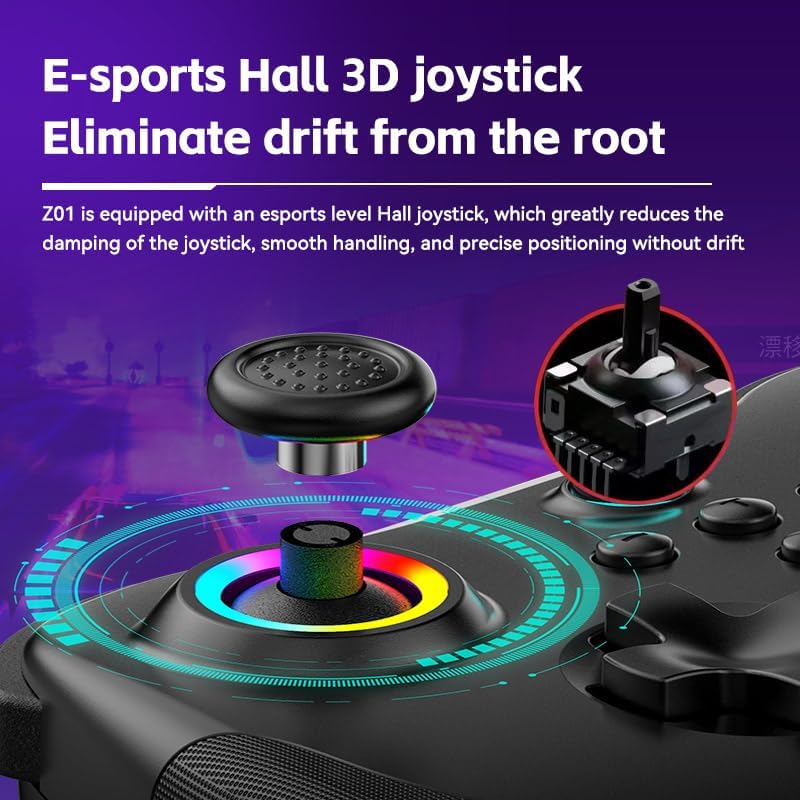
Image 3.1: Illustration of the Hall Effect 3D joystick, highlighting its drift-prevention design.
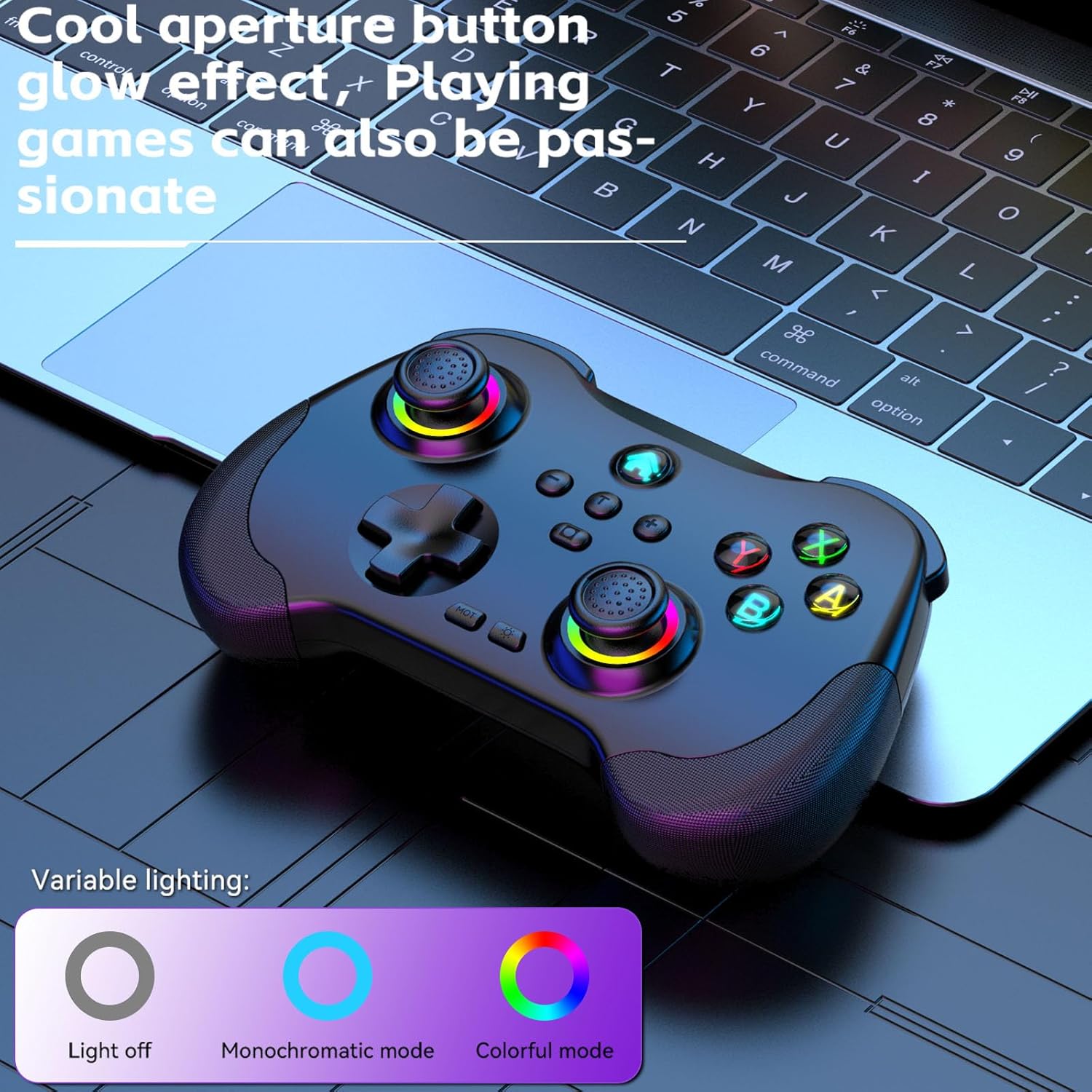
Image 3.2: The controller displaying its customizable RGB lighting on joysticks and buttons.
4. تنظیم او چارج کول
4.1. د کنټرولر چارج کول
Before first use, fully charge the controller. Connect the included USB-C cable to the controller's charging port and the other end to a USB power source (e.g., computer, wall adapter). The LED indicators will show charging status and turn off or change color when fully charged.
- د بیټرۍ ظرفیت: 600mAh
- د چارج کولو وخت: تقریبا 2 ساعته
- استقامت: تقریبا 10-15 ساعته
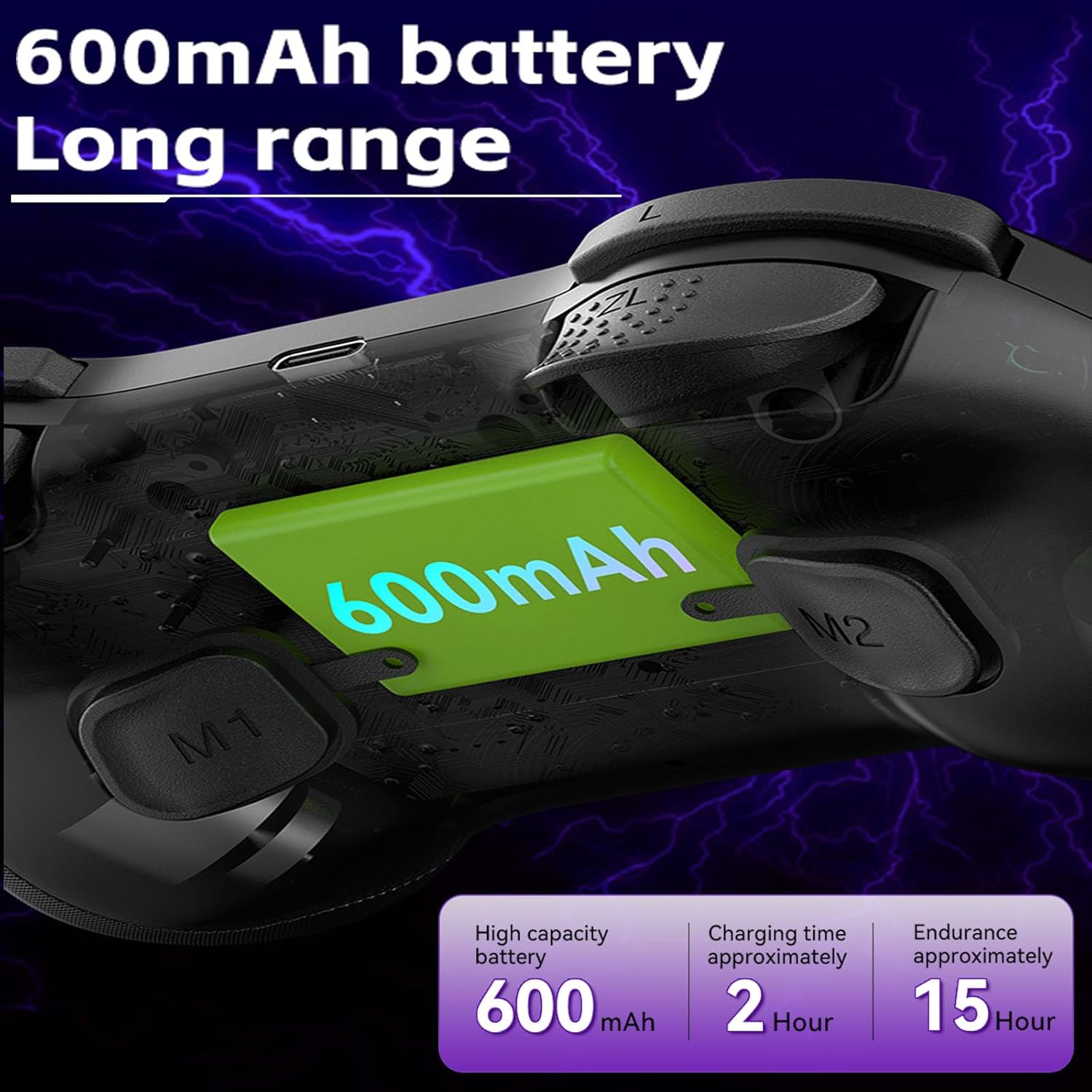
Image 4.1: Diagram illustrating the 600mAh battery capacity and charging specifications.
4.2. بریښنا کول/بندول
- د فعالولو لپاره: Press and hold the Home button for 1-2 seconds.
- د بریښنا بندولو لپاره: Press and hold the Home button for 3-5 seconds until the indicator lights turn off.
5. عملیاتي لارښوونې
5.1. د وسایلو سره نښلول
The Koiiko Z01 controller supports various connection modes. The specific button combination to enter pairing mode may vary by platform. Please refer to the included physical user manual for exact button combinations for each mode. Below are general guidelines:
- General Bluetooth Pairing: Typically involves holding a combination of buttons (e.g., Home + X, Home + A, Home + B) until the indicator lights flash rapidly, indicating pairing mode. Then, search for "Koiiko Z01" or similar on your device's Bluetooth settings and connect.
- د نینټینډو سویچ: Navigate to the 'Controllers' menu on your Switch, then 'Change Grip/Order'. Hold the specific pairing button combination on the controller until it connects.
- کمپیوټر (وینډوز): Ensure your PC has Bluetooth enabled. Hold the specific pairing button combination, then go to 'Bluetooth & other devices' in Windows settings and add a new Bluetooth device. The controller will typically connect as an X-Input device.
- iOS/Android: Enable Bluetooth on your mobile device. Hold the specific pairing button combination, then select the controller from the list of available Bluetooth devices.
- PlayStation 3/4: Connect the controller via USB cable first to register it, then it may be used wirelessly. Specific pairing methods may vary; consult your console's instructions.

Image 5.1: Connection guideline for PC.

Image 5.2: Connection guideline for Nintendo Switch.
5.2. ABXY Key Value Interchange
The controller allows you to switch the ABXY button layout between Nintendo Switch and Xbox settings without physically removing the buttons.
- To Interchange: فشار ورکړئ او ونیسئ X + B + HOME keys simultaneously. The controller will switch its ABXY key value. Repeat the combination to revert to the previous setting.

Image 5.3: ABXY key value interchange function.
۴. د RGB رڼا تنظیم کول
The controller features customizable RGB lighting around the joysticks and on the buttons.
- د حالتونو بدلولو لپاره: Press the dedicated Light Adjustment button (refer to the controller diagram in your physical manual for location) to cycle through the 5 available RGB light modes, including a mode to turn the lights off.
5.4. Programmable Back Buttons (M1/M2)
The M1 and M2 buttons on the back of the controller can be programmed to perform specific actions or sequences.
- د پروګرام کولو مرحلې: Refer to your physical user manual for detailed instructions on how to program the M1 and M2 buttons, as the process typically involves entering a programming mode and then inputting the desired button sequence.
۲. د ټربو فعالیت
The Turbo function allows a button to register continuous presses when held down.
- د فعالولو لپاره: فشار ورکړئ ټربو button simultaneously with the desired action button (e.g., TURBO + A).
- د غیر فعالولو لپاره: Repeat the activation step (TURBO + A) for the same button.

انځور 5.4: اوورview of advanced functions including macro programming and Turbo mode.
6. ساتنه
سمه پاملرنه به ستاسو د کنټرولر ژوند وغځوي.
- پاکول: د کنټرولر د پاکولو لپاره نرم، وچ ټوکر وکاروئ. د سختې خاورې لپاره، لږ څهampټوکر د اوبو سره ومینځئ. د سختو کیمیاوي موادو یا د کثافاتو پاکوونکو څخه ډډه وکړئ.
- ذخیره کول: کنټرولر په یخ او وچ ځای کې د مستقیم لمر وړانګو او سختې تودوخې څخه لرې وساتئ.
- د بیټرۍ پاملرنه: To maintain battery health, avoid fully discharging the controller frequently. If storing for an extended period, charge it to about 50% every few months.
- د فزیکي اغیزو څخه ډډه وکړئ: کنټرولر مه غورځوئ یا یې قوي اغیزو ته مه اړوئ، ځکه چې دا کولی شي داخلي برخې زیانمنې کړي.
7. ستونزه حل کول
If you encounter issues with your Koiiko Z01 controller, try the following solutions:
| ستونزه | احتمالي حل |
|---|---|
| کنټرولر بریښنا نه کوي. | ډاډ ترلاسه کړئ چې کنټرولر چارج شوی دی. د USB-C کیبل په کارولو سره یې د بریښنا سرچینې سره وصل کړئ. |
| د بلوتوث له لارې نشي وصل کېدای. |
|
| Buttons or joysticks are unresponsive or drifting. |
|
| د RGB څراغونه کار نه کوي. | Press the Light Adjustment button to cycle through modes or turn them on. Ensure the controller is powered on. |
| کنټرولر ډېر ځله منقطع کېږي. |
|
8. مشخصات
| فیچر | تفصیل |
|---|---|
| ماډل | Z01 |
| د محصول ابعاد | 2.44 x 6.85 x 4.84 انچه (6.2 x 17.4 x 12.3 سانتي متره) |
| د توکي وزن | 12.6 اونس (357.2 ګرامه) |
| بیټرۍ | ۱ AA بیټرۍ ته اړتیا ده (پکې شامله ده) - Note: Product features mention 600mAh Lithium, please refer to product packaging for exact battery type. |
| د بیټرۍ ظرفیت | 600mAh (Lithium, built-in) |
| د چارج کولو وخت | تقریبا 2 ساعته |
| د کارولو موده | تقریبا 10-15 ساعته |
| د بلوتوټ لیږد واټن | ≤ 8 متره |
| د کار Voltage | DC3.7V |
| د کار روان | <35mA |
| جوړونکی | ShenZhen ShanWan Technology Co., Ltd. |
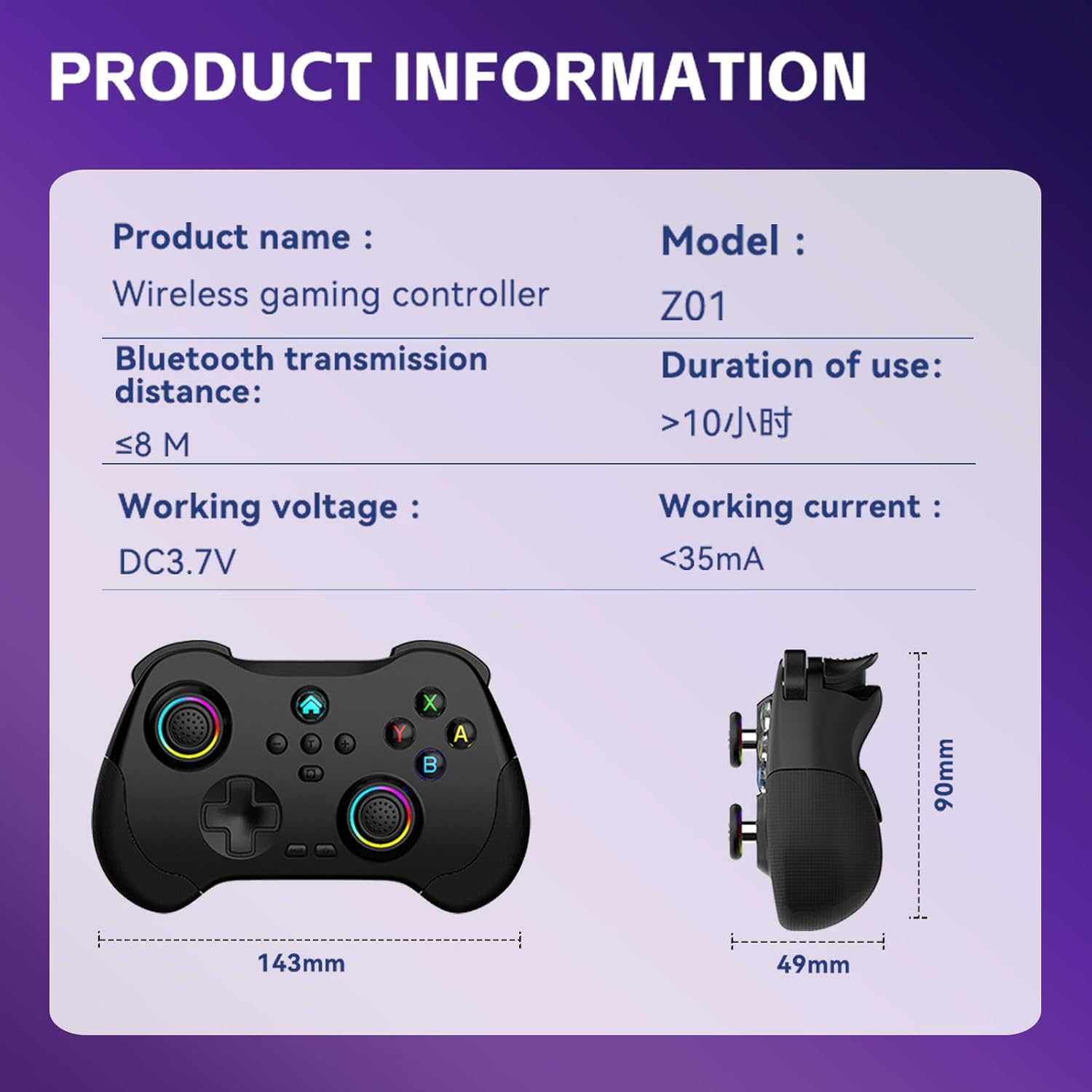
Image 8.1: Product information table with key specifications.
9. تضمین او ملاتړ
Koiiko provides technical support for its products. If you have any questions, encounter issues, or require assistance with your Koiiko Wireless Gaming Controller Z01, please contact our customer support team.
- د اړیکو معلومات: Please refer to the contact details provided on your product packaging or the official Koiiko webد خورا تازه ملاتړ چینلونو لپاره سایټ.
- تضمین: Information regarding product warranty periods and terms can be found on the official Koiiko webسایټ یا ستاسو د محصول بسته بندۍ کې.


