1. پیژندنه
The Mastech MS8250D is a high-performance digital multimeter designed for accurate measurement of AC/DC voltage, AC/DC current, resistance, capacitance, frequency, and temperature. It features a 6600-count display, auto/manual ranging, True RMS, Non-Contact Voltage (NCV) detection, diode and continuity testing, and a USB interface for PC connectivity. This manual provides detailed instructions for safe and effective use of the device.
کلیدي ځانګړتیاوې:
- 6600-count digital display
- Automatic and Manual Ranging
- ریښتیني RMS اندازه کول
- غیر تماس والیtage (NCV) کشف
- Diode and Continuity Tester (buzzer < 50Ω)
- MAX/MIN value recording
- د ډیټا هولډ فعالیت
- شاته څراغ ښکاره کړئ
- د اتومات بریښنا بند
- د اړونده اندازه کولو حالت
- د ټیټ بیټرۍ نښه
- USB Interface for Windows OS
2. د خوندیتوب معلومات
خبرداری: To avoid electric shock or personal injury, and to avoid damage to the meter or to the equipment under test, read all safety information carefully before using the meter. This device complies with CE, RoHS, and UL safety standards.
- Always ensure the test leads are in good condition and properly connected.
- د ټاکل شوي حجم څخه ډیر مه پلي کوئtage، لکه څنګه چې په میټر کې نښه شوې، د ترمینل یا د هر ترمینل او ځمکې ځمکې ترمنځ.
- د حجم سره کار کولو پر مهال له احتیاط څخه کار واخلئtagد 30V AC RMS، 42V چوکۍ، یا 60V DC څخه پورته. دا حجمونهtagد شاک خطر رامنځته کوي.
- د جریان اندازه کولو دمخه، ډاډ ترلاسه کړئ چې سرکټ غیر انرژي شوی او میټر په لړۍ کې وصل دی.
- تل د دندو یا رینجونو بدلولو دمخه د ازموینې لیډونه له سرکټ څخه جلا کړئ.
- که چیرې میټر خراب ښکاري یا قضیه خلاصه وي نو مه یې کاروئ.
- هرڅومره ژر چې د ټیټ بیټرۍ شاخص څرګند شي بیټرۍ بدله کړئ ترڅو دقیق لوستل ډاډمن شي.
- Adhere to the specified measurement categories (CAT III 1000V / CAT IV 600V) for safe operation.
3. محصول ختم شوview
Familiarize yourself with the components of your Mastech MS8250D Digital Multimeter.

انځور 3.1: مخکی view of the Mastech MS8250D Digital Multimeter, showing the display, function dial, and input jacks. The display shows "1.987 V", indicating a voltage measurement. The function dial is set to T-RMS. Input jacks are labeled for µA mA, A, VΩHz%, and COM.
اصلي برخې:
- د LCD نندارې: د اندازه کولو لوستل، واحدونه، او د فعالیت شاخصونه ښیې.
- د فعالیت ډیل: د مطلوب اندازه کولو فعالیت غوره کولو لپاره کارول کیږي (د مثال په توګه، حجمtage, Current, Resistance, Diode, Continuity, Temperature).
- د فعالیت تڼۍ:
- هولډ: د اوسني ښودنې لوستل کنګل کوي.
- رینج: Switches between auto and manual ranging.
- REL: د نسبي اندازه کولو حالت فعالوي.
- MAX/MIN: اعظمي او لږترلږه ارزښتونه ثبتوي.
- FUNC: Selects sub-functions within a dial position (e.g., AC/DC, Diode/Continuity).
- T-RMS: (Indicated on dial) True RMS measurement.
- NCV: غیر تماس والیtage کشف.
- د شاته رڼا تڼۍ: Activates display backlight.
- داخله جیکونه:
- COM: د ټولو اندازه کولو لپاره عام ټرمینل (منفي لیډ).
- VΩHz%: د حجم لپاره داخلولtage, resistance, frequency, capacitance, and diode/continuity measurements (positive lead).
- µA mA: د مایکرو لپاره ان پټampمخکې او ملیampere current measurements (positive lead). Fused for protection.
- A: لپاره داخلول ampere current measurements (positive lead). Fused for protection.
شاملې برخې:
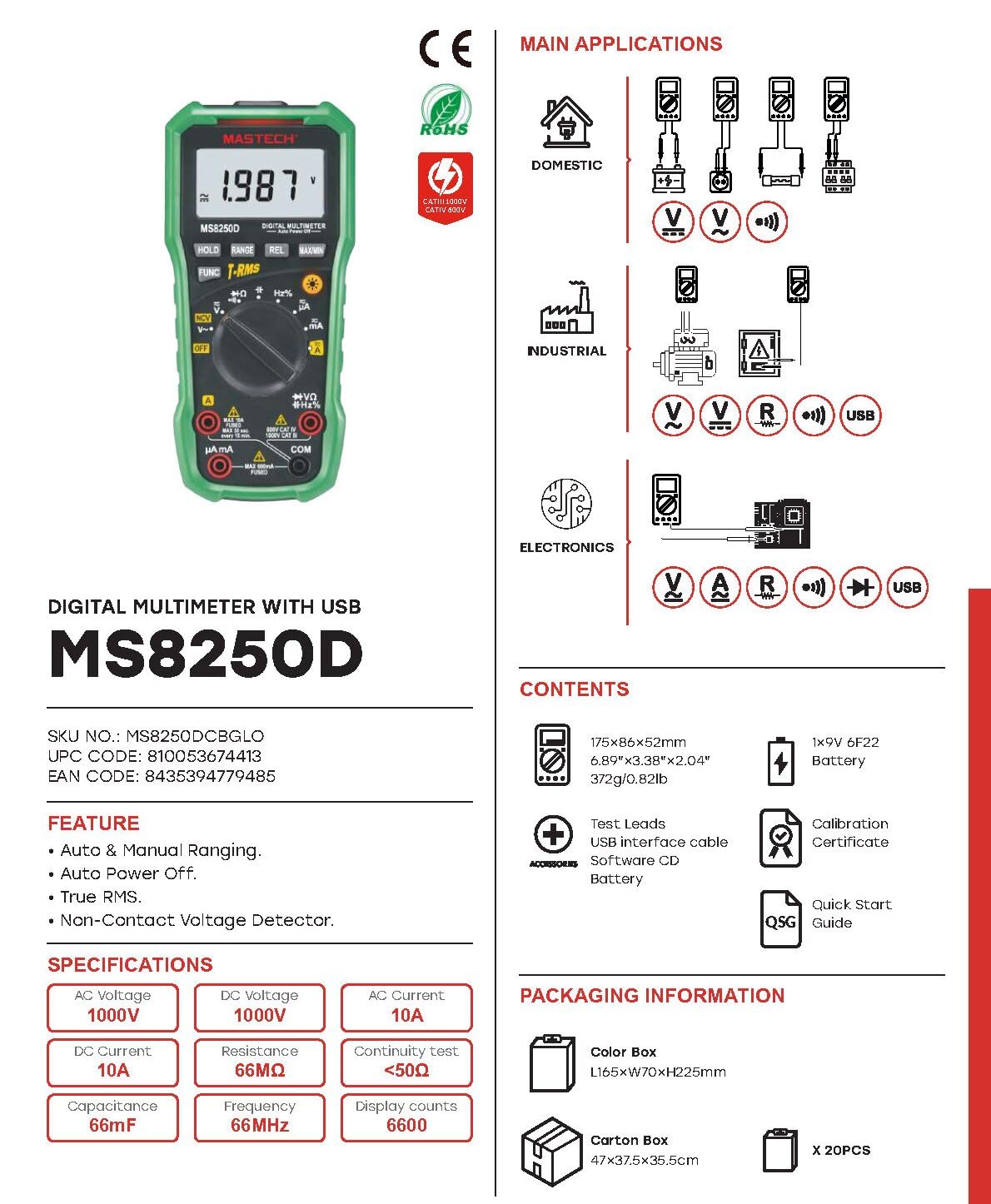
انځور 3.2: Diagram showing the Mastech MS8250D Multimeter and its included accessories. The image also illustrates typical applications in domestic, industrial, and electronics settings.
- Mastech MS8250D Digital Multimeter
- د ازموینې لیډونه (سور او تور)
- ۱x ۹ ولټه ۶F۲۲ بیټرۍ (مخکې نصب شوې یا په جلا توګه شامله شوې)
- د USB انٹرفیس کیبل
- Software CD (for Windows OS)
- د حساب ورکولو سند
- د چټک پیل لارښود
4. ترتیب کول
4.1 د بیټرۍ نصب کول
The MS8250D requires one 9V 6F22 battery for operation. Two LR44 batteries are also mentioned in specifications, likely for a different internal component or an error in data. For the main power, use the 9V battery.
- ډاډ ترلاسه کړئ چې ملټي میټر بند دی.
- د میټر په شا کې د بیټرۍ د برخې پوښ ومومئ.
- د پوښ د خوندي کولو لپاره د سکرو ډرایور څخه کار واخلئ.
- پوښ لرې کړئ.
- Connect the 9V battery to the battery clips, observing correct polarity (+ and -).
- بیټرۍ په کڅوړه کې ځای په ځای کړئ.
- د بیټرۍ د برخې پوښ بدل کړئ او د سکرو سره یې خوندي کړئ.
یادونه: The meter also uses 2 LR44 batteries, which are typically included and pre-installed for specific functions like the backlight or non-contact voltage detection. Refer to the quick-start guide for specific details on these smaller batteries if replacement is needed.
۶.۲ د ټیسټ لیډونو نښلول
تل تور ټیسټ لیډ د COM جیک سره وصل کړئ. سور ټیسټ لیډ د اندازه کولو ډول پراساس مناسب ان پټ جیک سره وصل کړئ:
- د والی لپارهtage, Resistance, Capacitance, Frequency, Diode, and Continuity measurements: Connect the red lead to the VΩHz٪ جیک
- For Current measurements (µA or mA): Connect the red lead to the µA mA جیک
- For High Current measurements (A): Connect the red lead to the A جیک
ډاډ ترلاسه کړئ چې د ازموینې لیډونه په بشپړ ډول په جیکونو کې داخل شوي دي.
5. عملیاتي لارښوونې
۸ پاور آن/بند
To turn the meter ON, rotate the function dial from the "OFF" position to any desired measurement function. To turn the meter OFF, rotate the function dial back to the "OFF" position.
The meter features an د اتومات بریښنا بند function to conserve battery life. It will automatically power off after a period of inactivity. To disable or re-enable this feature, refer to the quick-start guide or the full user manual provided on the software CD.
5.2 Auto Ranging and Manual Ranging
The MS8250D defaults to د ګاډو رنګ ورکول, which automatically selects the best measurement range. Press the بدل کړئ بره ته تلو لپاره ت .ۍ لاسي رنګه. In manual ranging, each press of the بدل کړئ button cycles through available ranges. To return to auto ranging, press and hold the بدل کړئ تڼۍ
5.3 اندازه کول د AC/DC حجمtage (V)
- د فعالیت ډایل په V~ (AC جلدtage) یا V- (DC Voltage) موقف.
- د تور ټیسټ مشرتابه ته COM جیک او سور ټیسټ د VΩHz٪ جیک
- د ازموینې پروبونه د سرکټ یا برخې په اوږدو کې وصل کړئ ترڅو اندازه شي.
- ټوک ولولئtage value on the display. The meter will automatically detect AC or DC if the dial is set to the combined V position, or you can use the FUNC button to toggle between AC and DC if available on your model.
5.4 Measuring AC/DC Current (A, mA, µA)
خبرداری: هیڅکله میټر د حجم سره موازي مه نښلوئ.tagد بریښنا سرچینه کله چې جریان اندازه کوي. دا کولی شي فیوز وچوي یا میټر ته زیان ورسوي.
- سرکټ ته بریښنا بنده کړئ.
- د فعالیت ډایل په A~ (AC جریان)، A- (ډي سي کرنټ)، mA~, ما-, µA~، یا µA- موقعیت
- د تور ټیسټ مشرتابه ته COM جیک
- سره د سور ازموینې لیډ وصل کړئ A jack for high current, or µA mA jack for low current.
- Open the circuit where the current is to be measured and connect the meter in series with the load.
- سرکټ ته بریښنا تطبیق کړئ.
- Read the current value on the display. Use the FUNC button to toggle between AC and DC if needed.
۶.۲ د مقاومت اندازه کول (Ω)
- د فعالیت ډایل په Ω موقعیت
- د تور ټیسټ مشرتابه ته COM جیک او سور ټیسټ د VΩHz٪ جیک
- ډاډ ترلاسه کړئ چې د ازموینې لاندې سرکټ یا برخه غیر انرژي شوې ده.
- د ازموینې پروبونه د برخې په اوږدو کې وصل کړئ.
- په ښودنه کې د مقاومت ارزښت ولولئ.
۵.۷ ډایډ ټیسټ او دوام ازموینه
- د فعالیت ډایل په ډایډ/دوام position (often shared with resistance or capacitance).
- د تور ټیسټ مشرتابه ته COM جیک او سور ټیسټ د VΩHz٪ جیک
- د کارولو FUNC button to select between Diode Test and Continuity Test.
- د ډایډ ازموینې لپاره: سور پروب د انود سره او تور پروب د ډایډ کیتوډ سره وصل کړئ. ښودنه به د مخکینۍ حجم وښييtage drop (typically 0.5V to 0.8V for silicon diodes). Reversing the probes should show "OL" (Open Loop).
- د دوام ازموینې لپاره: Connect the probes across the circuit or component. If resistance is less than approximately 50Ω, the buzzer will sound, indicating continuity.
۶.۷ د ظرفیت اندازه کول (F)
- د فعالیت ډایل په ظرفیت position (often shared with resistance or diode).
- د تور ټیسټ مشرتابه ته COM جیک او سور ټیسټ د VΩHz٪ جیک
- Ensure the capacitor is fully discharged before testing to avoid damage to the meter.
- د ازموینې پروبونه د کپیسیټر ترمینلونو په اوږدو کې وصل کړئ.
- په ښودنه کې د ظرفیت ارزښت ولولئ.
5.8 Measuring Frequency (Hz) and Duty Cycle (%)
- د فعالیت ډایل په Hz٪ موقعیت (ډیری وختونه د والیم سره شریک شویtagاو).
- د تور ټیسټ مشرتابه ته COM جیک او سور ټیسټ د VΩHz٪ جیک
- د سیګنال سرچینې په اوږدو کې د ازموینې پروبونه وصل کړئ.
- The display will show the frequency. Press the FUNC button to toggle to Duty Cycle measurement if available.
5.9 غیر اړیکه والیومtage (NCV) کشف
- د فعالیت ډایل په NCV موقعیت
- Hold the meter with the NCV sensor (usually at the top of the meter) near a live AC voltage سرچینه.
- میټر به د AC حجم شتون په ګوته کړيtage through an audible beep and/or visual indicator (e.g., LED).
5.10 USB Interface (Windows OS)
The MS8250D includes a USB interface for connecting to a computer running Windows OS. This allows for data logging and real-time monitoring of measurements. Install the provided software from the CD and follow the on-screen instructions for driver installation and software usage.
6. ساتنه
6.1 پاکول
د میټر کیس د اعلان سره پاک کړئamp ټوکر او یو معتدل صابون. د کثافاتو یا محلولونو څخه کار مه اخلئ. ډاډ ترلاسه کړئ چې میټر د کارولو دمخه په بشپړه توګه وچ دی.
6.2 د بیټرۍ بدلول
When the low battery indicator appears on the display, replace the 9V battery immediately to ensure accurate readings. Follow the steps in Section 4.1 Battery Installation.
6.3 د فیوز بدلول
If the meter fails to measure current, the fuse may be blown. Fuses are located inside the meter. To replace a fuse:
- Ensure the meter is turned OFF and all test leads are disconnected.
- د بیټرۍ د خونې پوښ خلاص کړئ (او احتمالاً اصلي قضیه، د ډیزاین پورې اړه لري).
- په احتیاط سره زوړ فیوز لرې کړئ.
- Replace with a fuse of the exact same type and rating (e.g., F600mA/250V for mA/µA range, F10A/250V for A range). Refer to the meter's internal markings or the full manual for specific fuse ratings.
- میټر بیا سره یوځای کړئ، ډاډ ترلاسه کړئ چې ټول پیچونه ټینګ شوي دي.
خبرداری: Never use a fuse with a different rating or bypass the fuse. This can damage the meter and pose a serious safety hazard.
7. ستونزه حل کول
| ستونزه | احتمالي لامل | د حل لاره |
|---|---|---|
| میټر نه چالانېږي. | مړ بیټرۍ. | د 9V بیټرۍ ځای په ځای کړئ. |
| "OL" (اوورلوډ) ښودل شوی. | اندازه کول د ټاکل شوي حد یا میټر له اعظمي ظرفیت څخه ډیر دي. | Switch to a higher range (if in manual ranging) or ensure the measurement is within the meter's limits. |
| No current reading. | Blown fuse; incorrect lead connection; open circuit. | Check and replace fuse if necessary. Ensure leads are connected correctly (in series). Verify circuit continuity. |
| ناسم لوستل. | Low battery; poor lead contact; external interference. | Replace battery. Ensure leads are firmly connected. Move away from strong electromagnetic fields. |
| Display shows "USB" but no PC connection. | Drivers not installed; incorrect software settings. | Install drivers from the provided CD. Refer to software manual for connection instructions. |
8. مشخصات
The following table details the technical specifications of the Mastech MS8250D Digital Multimeter.

انځور 8.1: Detailed specifications table for the Mastech MS8250D, outlining ranges, resolutions, and accuracies for various measurement functions.
| فعالیت | رینج | قرارداد | دقت |
|---|---|---|---|
| DC Voltage | |||
| 660mV | 0.1mV | ±(0.8%+3) | |
| 6.6V/66V/660V/1000V | ۱ ایم وی/۱۰ ایم وی/۰.۱ وی/۱ وی | ±(0.5%+5) | |
| AC Voltage (ریښتیا RMS) | |||
| 660mV | 0.1mV | ±(1.5%+5) | |
| 6.6V/66V | 1mV/10mV | ±(1.2%+5) | |
| 660V/1000V | 0.1V/1V | ±(1.0%+3) | |
| DC اوسنی | |||
| 660µA/6600µA/66mA/660mA | ۰.۱µA/۱µA/۱۰µA/۰.۱mA | ±(1.0%+5) | |
| 10A | 10mA | ±(2.0%+5) | |
| AC اوسنی (ریښتینی RMS) | |||
| 660µA/6600µA/66mA/660mA | 0.1µA/1µA/0.01mA/0.1mA | ±(1.5%+5) | |
| 10A | 10mA | ±(3.0%+5) | |
| مقاومت | |||
| 660Ω / 6.6kΩ / 66kΩ / 660kΩ / 6.6MΩ | 0.1Ω / 1Ω / 10Ω / 100Ω / 1kΩ | ±(0.8%+5) | |
| 66MΩ | 10kΩ | ±(1.5%+5) | |
| ظرفیت | |||
| 6.6nF/66nF/660nF/6.6µF/66µF | 1pF/10pF/0.1nF/1nF/10nF | ±(4.0%+5) | |
| 600،XNUMXµF | 1،XNUMXµF | ±(3.0%+5) | |
| 6.6mF/66mF | 1µF/10µF | ±(4.0%+5) | |
| فریکونسی | |||
| 66Hz/660Hz/6.6kHz/66kHz | 0.01Hz / 0.1Hz / 1Hz / 10Hz | ±(1.5%+5) | |
| 660kHz/6.6MHz/66MHz | 0.1kHz/1kHz/10kHz | ±(1.5%+5) | |
| د دندې سایکل | |||
| 0.1%~99.9% | 0.1% | ±(2.0%+5) | |
عمومي مشخصات:
- ښکاره کول: د 6600 شمیره
- د بریښنا سرچینه: 1x 9V 6F22 Battery (main power), 2x LR44 batteries (auxiliary, e.g., backlight)
- اتومات بریښنا بند: هو
- ریښتینی RMS: هو
- غیر تماس والیtagد (NCV) کشف کونکی: هو
- ډایډ خلاص والیومtage: 3.2V
- د دوام غږ: <50Ω
- MAX/MIN: هو
- د معلوماتو ساتل: هو
- د بیټرۍ ټیټ ښودنه: هو
- د شاته څراغ ښکاره کول: هو
- USB انٹرفیس: Yes (Windows OS)
- د خوندیتوب درجه: CAT III 1000V / CAT IV 600V
- د اندازه کولو دقت: 0.4% (general, specific accuracies per function in table)
- د عملیاتو Voltage (من): 3.2 ولټه
- د لوړ حرارت درجه: 50 درجې سیلسیس
- ابعاد (L x W x H): 20 x 15 x 25 سانتي متره
- د توکي وزن: 1 کیلو ګرامه
- مواد: اکریلونایتریل بوټاډین سټیرین (ABS)
- رنګ: آبي
- جوړونکی: ماسټر
- د اصلي هیواد: تایوان
- تصدیقونه: CE، RoHS، UL
9. تضمین او ملاتړ
Mastech products are designed for reliability and durability. For specific warranty information, please refer to the warranty card included with your product or contact Mastech customer support directly. Typically, Mastech offers a limited warranty against defects in materials and workmanship.
For technical support, troubleshooting assistance, or warranty claims, please contact your authorized Mastech dealer or visit the official Mastech webد اړیکو معلوماتو لپاره سایټ.
د اروپايي اتحادیې د اضافي پرزو د شتون موده: 1 کال