Mastech MS2101 AC/DC Digital Clamp د میټر کارونکي لارښود
Model: MS2101 | Brand: Mastech
۱.۱. د خوندیتوب مهم معلومات
Please read and understand all safety information and operating instructions before using this instrument. Improper use may result in electric shock or damage to the meter. Always adhere to local and national safety codes.
- د هر فعالیت لپاره ټاکل شوي اعظمي ان پټ ارزښتونو څخه ډیر مه کوئ.
- Ensure the test leads are properly connected and in good condition before making any measurements.
- که چیرې میټر خراب ښکاري یا د ازموینې لیډونو موصلیت خراب شوی وي نو مه یې کاروئ.
- د حجم سره کار کولو پرمهال خورا احتیاط وکړئtagد 30V AC RMS، 42V چوکۍ، یا 60V DC څخه پورته. دا حجمونهtagد شاک خطر رامنځته کوي.
- تل د سرکټ بریښنا قطع کړئ او ټول لوړ ولټ خارج کړئtagد مقاومت، تسلسل، ډایډونو، یا ظرفیت اندازه کولو دمخه د e capacitors.
- کله چې د بیټرۍ ټیټ شاخص څرګند شي نو سمدلاسه بیټرۍ بدل کړئ ترڅو دقیق لوستل ډاډمن شي.
- This device is rated for CAT III 600V and CAT II 1000V. Adhere to these safety categories.
2. محصول ختم شوview
The Mastech MS2101 is a versatile AC/DC digital clamp meter designed for accurate measurement of current, voltage, resistance, capacitance, frequency, and temperature. It features auto-ranging capabilities and a clear digital display, making it suitable for both domestic and industrial electrical testing.
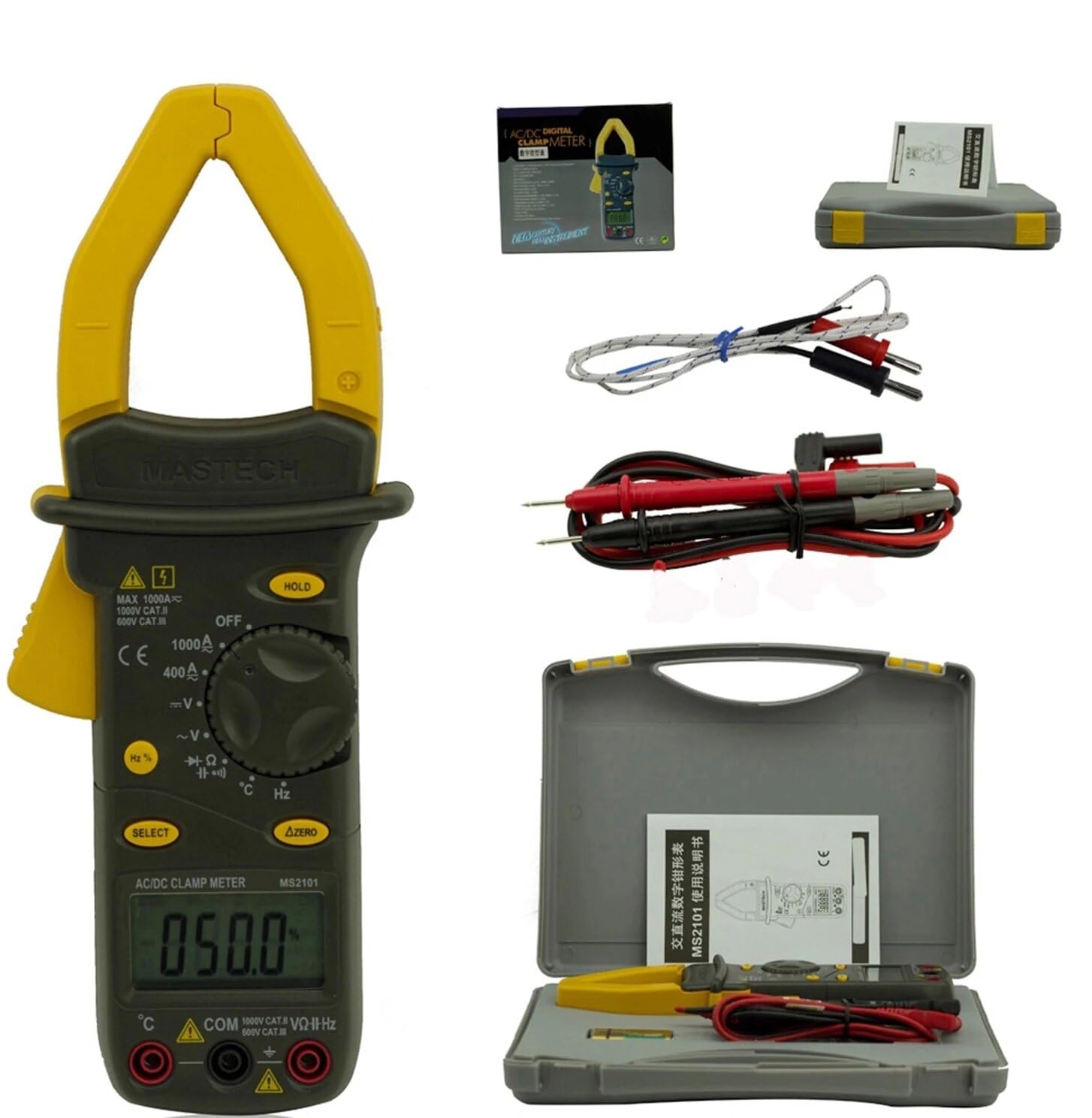
Image: Mastech MS2101 clamp meter with included test leads, temperature probe, and carrying case.
2.1 کلیدي ځانګړتیاوې
- ښودنه: 4000 شمېرې
- Jaw Opening: Φ42mm / 1.7 inches
- اوتومات او لاسي رنګ ورکول
- د اتومات بریښنا بند فعالیت
- ډایډ خلاص والیومtage: 2.2V
- Continuity Buzzer: Activates at <50±20Ω
- د ډیټا هولډ فعالیت
- د ټیټ بیټرۍ ښودنې شاخص
3. د بسته محتويات
د کڅوړې د پرانیستلو پر مهال، ډاډ ترلاسه کړئ چې لاندې لیست شوي ټول توکي شتون لري او په ښه حالت کې دي.

Image: Contents of the Mastech MS2101 package, including the meter, test leads, and documentation.
- Mastech MS2101 AC/DC Digital Clamp متره
- Test Leads (one pair)
- K-Type Thermocouple (for temperature measurement)
- د بار وړلو کڅوړه
- د حساب ورکولو سند
- د چټک پیل لارښود
- Batteries (2 x LR44, included)
۳. د وسیلې ترتیب او کنټرولونه
Familiarize yourself with the various parts and controls of your MS2101 clamp متره

انځور: مخکینۍ برخه view of the Mastech MS2101, highlighting the display, rotary switch, and function buttons.
- اوسنی Clamp ژامې: د غیر تماس لرونکي AC/DC جریان اندازه کولو لپاره کارول کیږي.
- Jaw Trigger: Squeeze to open the current clamp ژامه
- روټري سویچ: Selects the desired measurement function (OFF, V, A, Ω, Capacitance, Hz, Diode, Continuity, Temperature).
- د LCD نندارې: د اندازه کولو لوستل، واحدونه، او د فعالیت شاخصونه ښیې.
- تڼۍ ونیسئ: په ښودنه کې اوسنی لوستل کنګل کوي.
- د انتخاب تtonۍ: Toggles between AC/DC modes or different functions within a rotary switch position (e.g., Diode/Continuity, AC/DC Voltagاو).
- ΔZERO Button: Used to zero out DC current readings or relative measurements.
- د COM ان پټ جیک: د ازموینې لیډونو لپاره عام (منفي) ان پټ.
- VΩHz Input Jack: د حجم لپاره مثبت ان پټtage، مقاومت، فریکونسۍ، ظرفیت، ډایډ، او دوام اندازه کول.
- Temperature Input Jack: Specific input for the K-type thermocouple.
5. ابتدايي ترتیب
5.1 د بیټرۍ نصب کول
The Mastech MS2101 requires two LR44 batteries for operation. These are typically included in the package.

انځور: شاته view of the Mastech MS2101, indicating the location of the battery compartment screws.
- ډاډ ترلاسه کړئ چې میټر بند دی.
- د میټر په شا کې د بیټرۍ کڅوړه ومومئ.
- Use a screwdriver to remove the screws securing the battery cover.
- په احتیاط سره د بیټرۍ پوښ لرې کړئ.
- Insert two LR44 batteries, observing the correct polarity (+ and -) as indicated inside the compartment.
- د بیټرۍ پوښ بدل کړئ او د پیچونو سره یې خوندي کړئ.
6. عملیاتي لارښوونې
۸ پاور آن/بند
To power on the meter, rotate the rotary switch from the 'OFF' position to any desired measurement function. To power off, rotate the switch back to 'OFF'.
6.2 د فعالیت انتخاب
Turn the rotary switch to the desired measurement function. For functions with multiple modes (e.g., AC/DC Voltage, Diode/Continuity), press the 'SELECT' button to toggle between them.
۵.۲ د AC/DC جریان اندازه کول
- Rotate the switch to the 'A' (Current) position.
- Press 'SELECT' to choose between AC or DC current measurement.
- د cl خلاصولو لپاره د جبڑے محرک فشار ورکړئamp ژامه
- د سرکټ یوازې یو کنډکټر د cl دننه وتړئamp ژامه. ډاډ ترلاسه کړئ چې ژامه په بشپړه توګه تړل شوې ده.
- په LCD نندارې کې اوسنی ارزښت ولولئ.
- For DC current, use the 'ΔZERO' button to zero the display before measurement if necessary.
6.4 اندازه کول د AC/DC حجمtage
- Rotate the switch to the 'V' (Voltage) موقف.
- Press 'SELECT' to choose between AC or DC voltage اندازه کول.
- Insert the red test lead into the 'VΩHz' jack and the black test lead into the 'COM' jack.
- د ازموینې پروبونه د هغه سرکټ یا برخې سره موازي وصل کړئ چې تاسو یې اندازه کول غواړئ.
- ټوک ولولئtagد LCD نندارې ارزښت.
6.5 د مقاومت اندازه کول
- Rotate the switch to the 'Ω' (Resistance) position.
- Insert the red test lead into the 'VΩHz' jack and the black test lead into the 'COM' jack.
- Ensure the circuit or component is de-energized before connecting the test probes across it.
- په LCD ډسپلې کې د مقاومت ارزښت ولولئ.
6.6 د ظرفیت اندازه کول
- Rotate the switch to the 'Capacitance' position.
- Insert the red test lead into the 'VΩHz' jack and the black test lead into the 'COM' jack.
- ډاډ ترلاسه کړئ چې کپیسیټر په بشپړ ډول خارج شوی دی مخکې لدې چې د ازموینې پروبونه په هغې کې وصل کړئ.
- په LCD نندارې کې د ظرفیت ارزښت ولولئ.
6.7 Measuring Frequency/Duty Cycle
- Rotate the switch to the 'Hz' (Frequency) position.
- Insert the red test lead into the 'VΩHz' jack and the black test lead into the 'COM' jack.
- د سیګنال سرچینې په اوږدو کې د ازموینې پروبونه وصل کړئ.
- Read the frequency or duty cycle value on the LCD display. Press 'SELECT' to toggle between frequency and duty cycle.
6.8 د ډایډ ټیسټ
- Rotate the switch to the Diode/Continuity position. Press 'SELECT' until the diode symbol appears.
- Insert the red test lead into the 'VΩHz' jack and the black test lead into the 'COM' jack.
- سور پروب د انود سره او تور پروب د ډایډ کیتوډ سره وصل کړئ.
- مخکینۍ برخه ولولئtage drop on the display. Reverse the probes to check for open circuit (OL) in reverse bias.
6.9 د دوام ازموینه
- Rotate the switch to the Diode/Continuity position. Press 'SELECT' until the continuity buzzer symbol appears.
- Insert the red test lead into the 'VΩHz' jack and the black test lead into the 'COM' jack.
- د ازموینې پروبونه د سرکټ یا برخې په اوږدو کې وصل کړئ.
- که چیرې مقاومت تقریبا 50Ω څخه کم وي، نو بزر به غږ وکړي، چې دوام ښیي.
6.10 دحرارت اندازه کول
- Rotate the switch to the '°C/°F' (Temperature) position.
- Insert the K-type thermocouple into the dedicated temperature input jacks, observing polarity.
- د ترموکوپل نوک په هغه شی یا نږدې کېږدئ چې د هغه تودوخه یې اندازه کول غواړئ.
- Read the temperature on the LCD display. Press 'SELECT' to toggle between Celsius and Fahrenheit.
6.11 د ډیټا هولډ فعالیت
د 'نیول' تڼۍ کېکاږئ ترڅو په ښودنه کې اوسنی لوستل کنګل کړئ. بیا یې فشار ورکړئ ترڅو هولډ خوشې کړئ او ژوندۍ اندازه کول بیا پیل کړئ.
6.12 Zeroing (ΔZERO) Function
In DC current mode, press the 'ΔZERO' button to zero the display before making a measurement. This compensates for any residual magnetic fields or offsets, ensuring more accurate DC current readings.
6.13 د آټو بریښنا بند
The meter will automatically power off after approximately 15 minutes of inactivity to conserve battery life. To reactivate, turn the rotary switch to 'OFF' and then back to the desired function.
7. ساتنه
7.1 پاکول
د میټر سی پاک کړئasinد اعلان سره gamp ټوکر او یو معتدل صابون. د کثافاتو یا محلولونو څخه کار مه اخلئ. ډاډ ترلاسه کړئ چې میټر د کارولو دمخه په بشپړه توګه وچ دی.
7.2 د بیټرۍ بدلول
When the low battery indicator appears on the display, replace the batteries as described in Section 5.1. Always use two new LR44 batteries.
7.3 ذخیره کول
If the meter is not used for an extended period, remove the batteries to prevent leakage and damage. Store the meter in a cool, dry place, away from direct sunlight and extreme temperatures.
8. ستونزه حل کول
- میټر نه چالانیږي: د بیټرۍ نصب کول وګورئ او ډاډ ترلاسه کړئ چې بیټرۍ ختمې شوې نه دي.
- No reading or 'OL' displayed: Ensure test leads are properly connected and making good contact. For current measurements, ensure only one conductor is within the clamp jaw. For resistance/continuity, ensure the circuit is de-energized. 'OL' (Overload) indicates the measured value is beyond the meter's range.
- ناسم لوستل: Check battery level. Ensure the correct function is selected. For DC current, use the 'ΔZERO' function.
- Buzzer not sounding in continuity mode: The resistance may be too high (above 50Ω), or the circuit is open.
9. تخنیکي مشخصات
Detailed specifications for the Mastech MS2101 clamp meter are provided below.

Image: Table detailing the measurement ranges, resolutions, and accuracies of the Mastech MS2101.
| اندازه کول | رینج | قرارداد | دقت |
|---|---|---|---|
| DC Voltage | 400mV/4V/40V/400V 1000V | 0.1mV/1mV/10mV/0.1V 1V | ±(0.7%+1) ±(0.8%+3) |
| AC Voltage | 4V/40V/400V 750V | 1mV/10mV/0.1V 1V | ±(0.8%+5) ±(1.0%+10) |
| DC اوسنی | 400A/1000A | 0.1A/1A | ±(3.0%+3) |
| AC اوسنی | 400A/1000A | 0.1A/1A | ±(3.0%+3) |
| مقاومت | 400Ω/4kΩ/40kΩ/400kΩ/4MΩ 40MΩ | 0.1Ω/1Ω/10Ω/100Ω/1kΩ 10kΩ | ±(1.2%+1) ±(2.0%+3) |
| ظرفیت | 4nF/40nF/400nF 4µF/40µF/100µF | 1pF/10pF/0.1nF 1nF/10nF/100nF | ±(4.0%+10) ±(4.0%+10) |
| فریکونسی | 40Hz/400Hz/4kHz/40kHz/100kHz | 0.01Hz/0.1Hz/1Hz/10Hz/0.1kHz | ±(2.0%+1) |
| د دندې سایکل | 0.1% ~ 99.9% | 0.10% | ±(2.0%+2) |
| د حرارت درجه | -40°C ~ 0°C 1°C ~ 400°C 401°C ~ 750°C | ۹۶ درجې سانتي ګراد ۹۶ درجې سانتي ګراد ۹۶ درجې سانتي ګراد | ±(1.0%+6) ±(1.0%+3) ±(1.0%+5) |
| ښودل | 4000 شمېرې | ||
| د ژامې خلاصول | 42mm / 1.7 انچه | ||
| دوامدار بجر | <50±20Ω | ||
| ډایډ خلاص والیومtage | 2.2V | ||
| د بریښنا سرچینه | 2 x LR44 batteries | ||
| ابعاد (L x W x H) | 7.87 x 5.91 x 9.84 انچه | ||
| وزن | ۱ کیلوګرامه (۲.۲ پونډه) | ||
10. تضمین او ملاتړ
The Mastech MS2101 Digital Clamp Meter comes with a 1-year warranty from the date of purchase, covering manufacturing defects. Please retain your proof of purchase for warranty claims.
For technical support, product information, or warranty inquiries, please visit the official Mastech webسایټ ته مراجعه وکړئ یا د دوی د پیرودونکو خدماتو سره اړیکه ونیسئ:
- Official Mastech Webسایټ: www.mastech-group.com
- د ملاتړ پاڼه: http://www.mastech-group.com/support.php?n=0


