1. پیژندنه
The Mastech MS2203 is a professional 3-Phase Digital Power Clamp Meter designed for accurate measurement of electrical parameters in three-phase systems. This instrument features high sensitivity, True-RMS measurement, power factor correction, and a USB interface for data logging. This manual provides essential information for the safe and effective operation, maintenance, and troubleshooting of your MS2203 meter.
2. د خوندیتوب معلومات
To ensure safe operation and service of the meter, follow these safety precautions:
- تل د محلي او ملي خوندیتوب کوډونو ته غاړه کیږدئ.
- که چیرې میټر خراب ښکاري یا د ازموینې لیډونو موصلیت خراب شوی وي نو مه یې کاروئ.
- Ensure the rotary switch is in the correct position for the desired measurement before connecting to the circuit.
- د هر فعالیت لپاره د اعظمي ان پټ درجې څخه ډیر مه کوئ.
- د ژوندیو سرکټونو سره د کار کولو پر مهال خورا احتیاط وکړئ.
- د اندازه کولو پرمهال ګوتې د ازموینې لیډونو کې د ګوتو ساتونکو شاته وساتئ.
- کله چې د بیټرۍ ټیټ شاخص څرګند شي نو بیټرۍ بدل کړئ ترڅو دقیق لوستل ډاډمن شي.
3. محصول ختم شوview
The Mastech MS2203 is a versatile clamp meter capable of measuring AC voltage, AC current, frequency, active power, apparent power, reactive power, and power factor. It features a large LCD display with backlight, data hold, MAX/MIN recording, and a bar graph for quick visual indication.
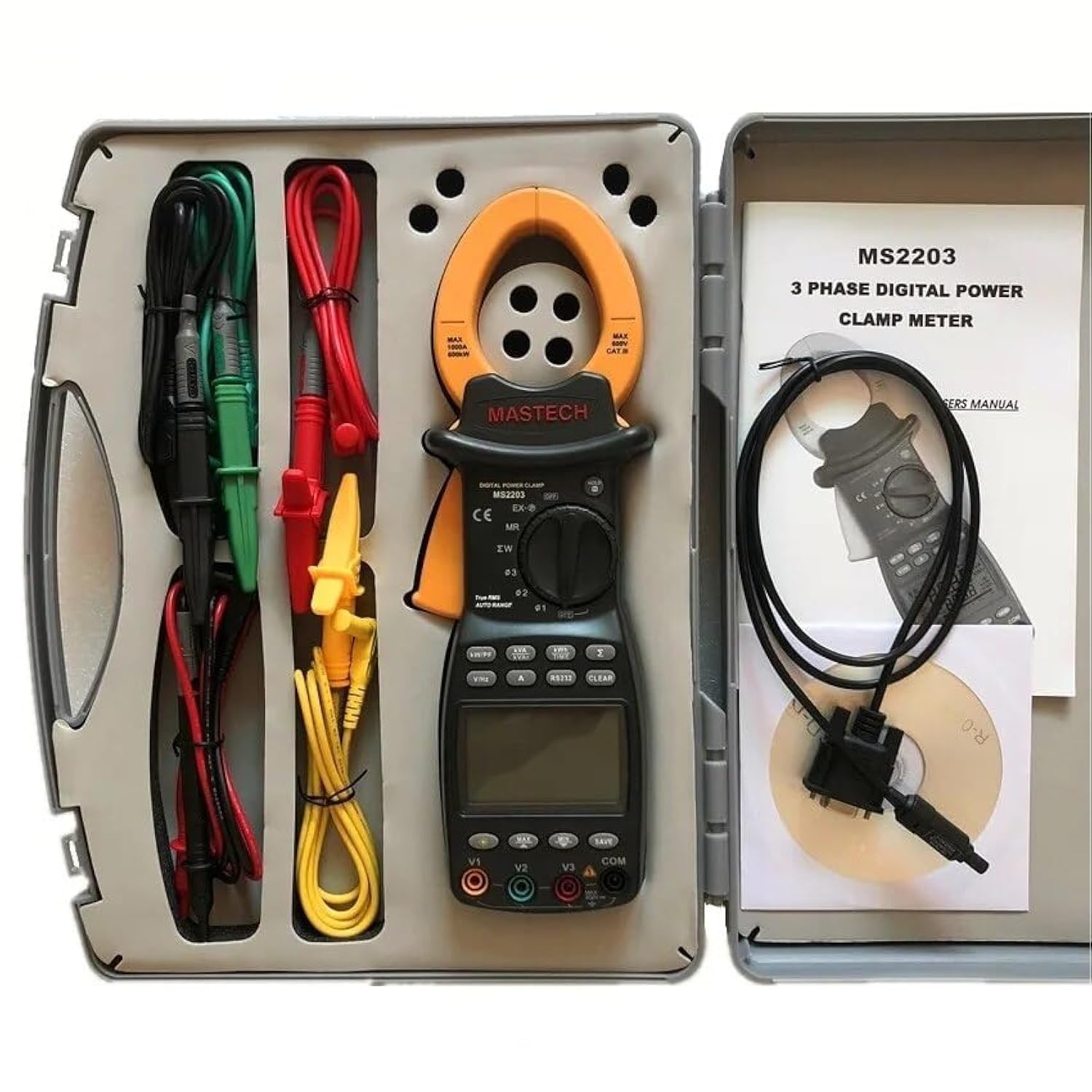
Image 3.1: The Mastech MS2203 3-Phase Digital Power Clamp Meter and its accessories, neatly organized within its protective carrying case. The kit includes the clamp meter, test leads, USB cable, and user manual.
کلیدي ځانګړتیاوې:
- ښودنه: 9999 شمېرې
- Jaw Opening: Φ50mm/2.0"
- اتومات او لاسي رینج
- Data Logging: 28 groups
- True Root Mean Square (True-RMS) measurement
- Bar Graph display
- MAX/MIN Measurement function
- د ډیټا هولډ فعالیت
- Display Backlight for low-light conditions
- د ټیټ بیټرۍ ښودنې شاخص
- RS232 Interface for Windows OS connectivity
۲.۱. د بسته بندۍ او محتوا خلاصول
Carefully unpack the meter and check for any damage. Verify that all items listed below are present. If any item is missing or damaged, contact your dealer immediately.

Image 4.1: An illustrative diagram detailing the contents included with the Mastech MS2203, such as the main unit, test leads, alligator clips, RS232 cable, software, carrying case, and batteries.
د بسته محتويات:
- Mastech MS2203 3-Phase Digital Power Clamp متره
- Test Leads (Red, Yellow, Green, Black)
- د الیګیټر کلیپس
- RS232 Interface Cable
- PC data record graph software (CD-ROM)
- د لیږد قضیه
- Batteries (2 x LR44, included)
- د چټک پیل لارښود
- د حساب ورکولو سند
5. ترتیب کول
5.1 د بیټرۍ نصب کول
- د میټر په شا کې د بیټرۍ د برخې پوښ ومومئ.
- د سکرو ډرایور څخه کار واخلئ ترڅو سکرو خلاص کړئ او پوښ لرې کړئ.
- Insert the two LR44 batteries, observing the correct polarity (+/-) as indicated inside the compartment.
- د بیټرۍ پوښ بدل کړئ او د سکرو سره یې خوندي کړئ.
۶.۲ د ټیسټ لیډونو نښلول
Insert the banana plugs of the test leads into the appropriate input jacks on the meter. For most measurements, the common (COM) jack will be used with the black lead, and the V1, V2, V3, or A jacks will be used with the colored leads (red, yellow, green) depending on the measurement type and phase configuration.
5.3 USB/RS232 Interface Setup
To connect the meter to a computer for data logging and analysis:
- Install the provided PC data record graph software from the CD-ROM onto your Windows OS computer.
- Connect one end of the RS232 interface cable to the meter's RS232 port.
- Connect the other end of the cable to an available USB port on your computer (an RS232-to-USB adapter may be required if your computer lacks an RS232 port).
- Follow the software instructions to establish communication with the meter.
6. عملیاتي لارښوونې
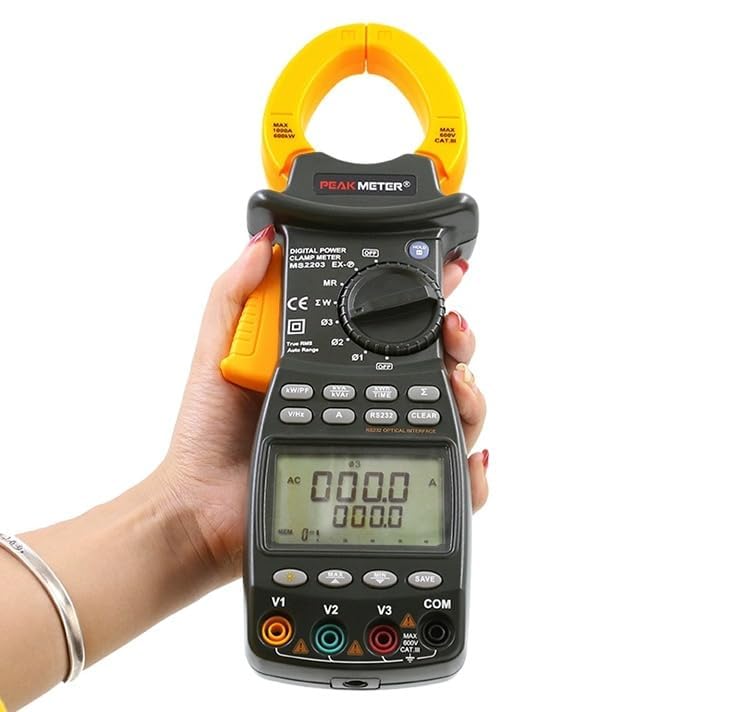
Image 6.1: The Mastech MS2203 in use, highlighting the digital display and the rotary selector for various measurement functions.
۸ پاور آن/بند
To power on the meter, rotate the function switch from the 'OFF' position to any desired measurement function. To power off, rotate the switch back to 'OFF'.
6.2 د فعالیت انتخاب
The rotary switch allows selection of different measurement modes. Ensure the switch is set to the appropriate function before taking a measurement.
۴.۳ د اندازه کولو طرزالعملونه
د AC اوسنی اندازه کول:
- Rotate the function switch to the 'A' (AC Current) position.
- cl خلاص کړئamp د ټریګر په فشارولو سره ژامې.
- Enclose only one conductor of the circuit within the jaws. Ensure the jaws are fully closed.
- په ښودنه کې اوسنی ارزښت ولولئ.
AC Voltage Measurement (3-Phase):
- Rotate the function switch to the 'V' (AC Voltage) موقف.
- Connect the test leads to the V1, V2, V3, and COM input jacks.
- Connect the test leads to the respective phase conductors and neutral/ground of the 3-phase system.
- The meter will display the voltage readings for each phase.
Power Measurement (Active, Apparent, Reactive, Power Factor):
- Rotate the function switch to the 'W/PF' (Power/Power Factor) position.
- د ازموینې لیډونه او cl سره وصل کړئamp the current jaws as required for 3-phase power measurement.
- The meter will display active power (W), apparent power (VA), reactive power (VAR), and power factor (PF).
6.4 ځانګړې دندې
- د معلوماتو ساتل: د 'نیول' تڼۍ کېکاږئ ترڅو په ښودنه کې اوسنی لوستل کنګل کړئ. د خوشې کولو لپاره بیا فشار ورکړئ.
- اعظمي/منځني اندازه کول: Press the 'MAX/MIN' button to record the maximum and minimum values during a measurement session. Press again to cycle through MAX, MIN, and current readings.
- د معلوماتو ثبتول: The meter can store up to 28 groups of data. Refer to the detailed software manual for instructions on logging and retrieving data via the RS232 interface.
- شاته رڼا: Press the backlight button to illuminate the display for use in dimly lit environments.
- ریښتینی-RMS: The MS2203 provides True-RMS measurements for accurate readings on non-sinusoidal waveforms.
7. ساتنه
7.1 پاکول
میټر د اعلان سره پاک کړئamp ټوکر او نرم صابون. د کثافاتو یا محلولونو څخه کار مه اخلئ. ډاډ ترلاسه کړئ چې میټر د کارولو دمخه په بشپړه توګه وچ دی.
7.2 د بیټرۍ بدلول
When the low battery indicator appears on the display, replace the batteries as described in Section 5.1. Remove batteries if the meter is not to be used for an extended period.
7.3 ذخیره کول
Store the meter in its carrying case in a cool, dry environment, away from direct sunlight and extreme temperatures.
8. ستونزه حل کول
- نه ښودنه: Check battery installation and charge. Ensure the rotary switch is not in the 'OFF' position.
- ناسم لوستل: Verify correct function selection and proper test lead connection. Ensure the clamp jaws are fully closed around a single conductor for current measurements. Check for low battery.
- No PC Communication: Ensure the RS232 cable is correctly connected and the software drivers are installed. Check COM port settings in the software.
9. مشخصات
انځور ۷.۱: یو مفصل اوورview of the Mastech MS2203's technical specifications, including measurement ranges and display capabilities.
| پیرامیټر | ارزښت |
|---|---|
| ښودل | 9999 شمېرې |
| د ژامې خلاصول | ۲۵ ملي متره / ۰.۹۸" |
| AC Voltage | 600V |
| AC اوسنی | 1000A |
| فریکونسی | 1000Hz |
| فعال ځواک | 600kW |
| ښکاره ځواک | 600kVA |
| د غبرګون ځواک | 600kVAR |
| د توکي ماډل شمیره | YQ-MS2203 |
| د محصول ابعاد | 7.87 x 5.91 x 9.84 انچه |
| د توکي وزن | ۱ کیلوګرامه (۲.۲ پونډه) |
| بیټرۍ | 2 LR44 بیټرۍ (شامل) |
10. تضمین او ملاتړ
Mastech products are designed for reliability and performance. For warranty information, technical support, or service inquiries, please refer to the warranty card included with your product or visit the official Mastech website. Do not attempt to repair the meter yourself, as this may void the warranty and pose a safety risk.


