1. پیژندنه
Thank you for choosing the Dreo HM311S Smart Humidifier. This manual provides essential information for safe operation, effective use, and proper maintenance of your device. Please read it thoroughly before use and retain it for future reference.
د بسته محتويات:
- Dreo HM311S Smart Humidifier
- د ماین پاکولو کارتریج
- د پاکولو برش
- د خوشبو پاډ
- د کارن لارښود
- د پاکولو لارښود
2. محصول ختم شوview
The Dreo HM311S is an ultrasonic humidifier designed to provide precise humidity control, featuring smart connectivity, a large water tank, and quiet operation.

Figure 2.1: Dreo HM311S Smart Humidifier with its main components and a smartphone displaying the control app.
مهمې برخې:
- د اوبو ټانک: د اوږدې مودې کارونې لپاره د ۵ لیټرو ظرفیت.
- د دوړو نوزل: 30° tiltable for directional mist output.
- د تضمین اداره: Digital display with touch controls for power, mist level, light, auto mode, timer, and sleep mode.
- د خوشبو بکس: Integrated tray for essential oils.
- د ماین پاکولو کارتوس: د منرالونو د راټولیدو کمولو کې مرسته کوي.
- Smart Humidistat: For precise humidity measurement and automatic adjustment.

Figure 2.2: Internal components of the humidifier, including the 2.4MHz atomizer for fine mist, smart humidistat, and airflow booster.
3. ترتیب کول
۳.۱ لومړنی ځای پرځای کول
Place the humidifier on a flat, stable, and water-resistant surface at least 15 cm (6 inches) away from walls and furniture. Ensure the mist outlet is not directed towards walls or electronic devices.
3.2 د اوبو د ټانک ډکول
- د رطوبت کونکي پورتنۍ پوښ لرې کړئ.
- Pour clean, cool tap water directly into the water tank. Do not exceed the 'MAX' fill line. Distilled or demineralized water is recommended to prevent mineral buildup.
- پورته پوښ په خوندي ډول بدل کړئ.
4. عملیاتي لارښوونې
۸ پاور آن/بند
Plug the humidifier into a power outlet. Press the ځواک د کنټرول پینل کې تڼۍ د واحد د فعال یا بندولو لپاره.
۵.۲ د دوړې کچه تنظیمول
فشار ورکړئ دوړې button to cycle through three mist output levels (Low, Medium, High). The digital display will indicate the current level.

Figure 4.1: Humidifier producing a high mist stream.

Figure 4.2: The humidifier's supersized mist output quickly hydrates the air.
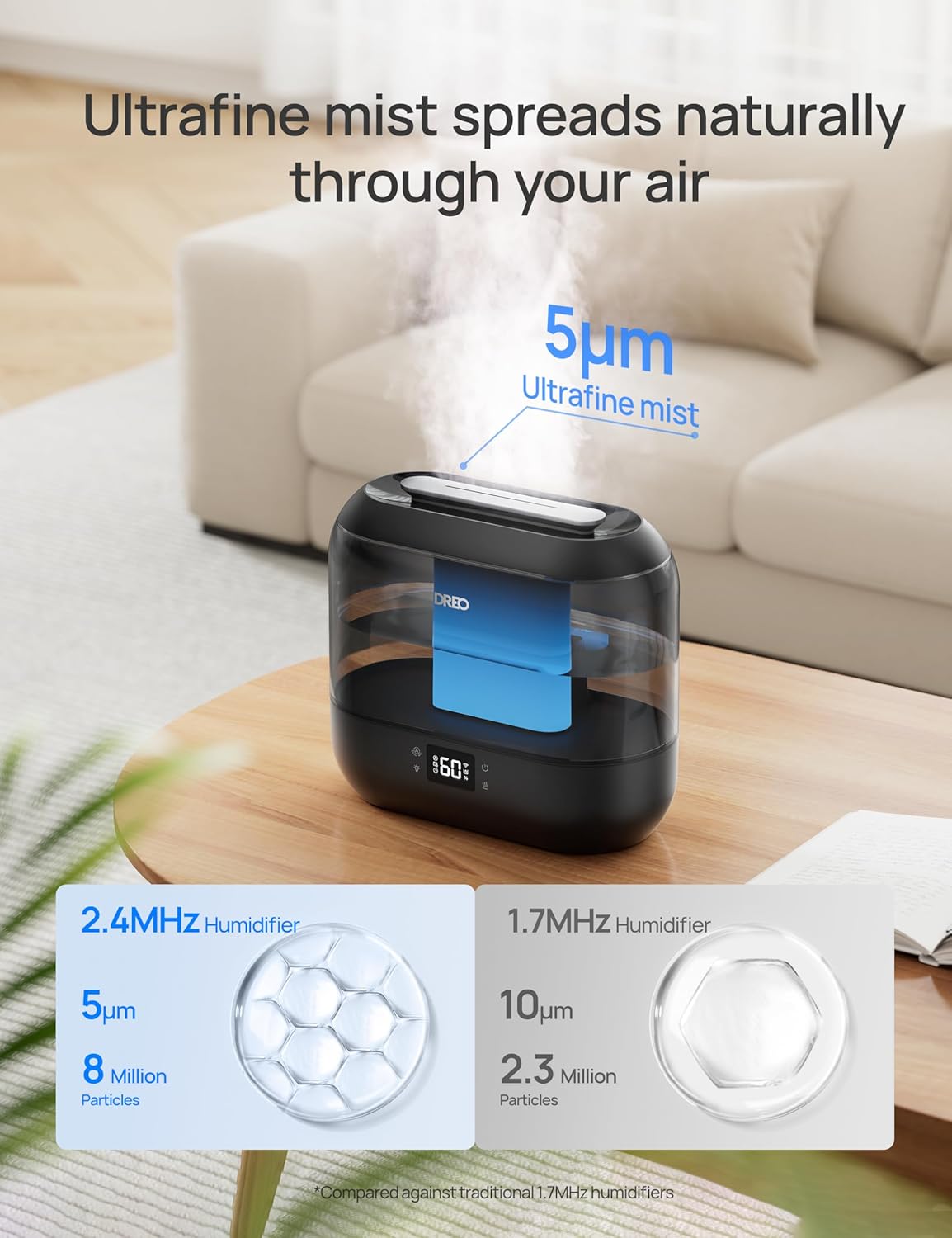
Figure 4.3: The humidifier disperses ultrafine mist particles for even distribution.
4.3 اتومات حالت
فشار ورکړئ اتومات button to activate Auto Mode. The humidifier will automatically adjust the mist output to maintain your preset humidity level. The smart ambient light will indicate humidity changes.
4.4 د شپې رڼا
فشار ورکړئ رڼا button to turn the ambient night light on or off.
4.5 د خوب حالت
فشار ورکړئ خوب button to enter Sleep Mode. The display lights will dim, and the humidifier will operate at a low, quiet mist level (28 dB) for undisturbed sleep. The 4L tank allows for up to 36 hours of continuous operation in this mode.

Figure 4.4: The humidifier provides up to 36 hours of continuous mist on a single fill, ideal for overnight use.
4.6 د ټیمر فعالیت
فشار ورکړئ ټایمر button to set an auto-off timer. You can set the humidifier to turn off after a specified number of hours.
4.7 د اروما ډیفیوزر
Pull out the aroma box located at the base of the unit. Add a few drops of your preferred essential oil onto the aroma pad. Slide the box back into place. The mist will carry the fragrance into the air.
۶.۶ سمارټ کنټرول (اپلیکیشن او غږ)
Download the Dreo app to control your humidifier remotely. You can adjust mist levels, set schedules, control ambient lighting, and monitor humidity from anywhere. The humidifier is also compatible with Alexa and Google Assistant for voice control.

Figure 4.5: Control your humidifier's humidity settings precisely using the Dreo smartphone app.

Figure 4.6: Tailor the humidifier's operation to your lifestyle with smart schedules via the app.
5. ساتنه
منظم پاکول د غوره فعالیت او حفظ الصحې لپاره خورا مهم دي. تل د پاکولو دمخه د رطوبت کونکي څخه خلاص کړئ.
5.1 ورځنی ساتنه
- د اوبو ټانک او بیس هره ورځ خالي کړئ.
- ټانک او اساس د پاک ټوکر سره وچ کړئ.
5.2 په اونۍ کې پاکول
- د رطوبت ماشین خلاص کړئ او د اوبو ټانک لرې کړئ.
- Pour 2 cups (470ml) of distilled white vinegar into the water tank.
- Replace the top cover and let it soak for 20 minutes.
- Empty the vinegar and rinse the tank thoroughly with clean water.
- Use the provided cleaning brush to clean the atomizer and other hard-to-reach areas in the base.
- Rinse all components and wipe dry.
5.3 Demineralization Cartridge
The demineralization cartridge helps prevent white dust from hard water. Replace it every 2-3 months, or more frequently if you have very hard water or use the humidifier often.
5.4 Aroma Pad
Clean the aroma pad as needed by rinsing it with warm water and allowing it to air dry. Replace the pad if it becomes discolored or loses its effectiveness.
6. ستونزه حل کول
| ستونزه | احتمالي لامل | د حل لاره |
|---|---|---|
| هیڅ دوړې نشته یا د دوړې کم تولید | د اوبو ټیټه کچه په اټومیزر باندې د معدني جوړښت د ورېښمو نوزل بند شوی | د اوبو ټانک بیا ډک کړئ Clean atomizer with cleaning brush Clear any obstructions from the mist nozzle |
| د رطوبت ورکونکي شاوخوا سپینه دوړې | سختې اوبه کارول کیږي د ماین پاکولو کارتوس بدلولو ته اړتیا لري | د منرالونو څخه پاک شوي یا منرال شوي اوبه وکاروئ د منرال کولو کارتریج بدل کړئ |
| ناخوښه بوی | Stagنانټ اوبه د ناپاکو اوبو ټانک/بنسټ | Empty and clean water tank/base regularly Use fresh water daily |
| Humidifier not responding to app/voice control | د وای فای اتصال ستونزه اپلیکیشن نه دی تازه شوی | Ensure humidifier is connected to Wi-Fi Check app for updates and restart |
7. مشخصات
| فیچر | تفصیل |
|---|---|
| د ماډل نوم | HM311S |
| ابعاد (L x W x H) | 14 x 27.99 x 25.81 سانتي متره (5.5 x 11 x 10.1 انچه) |
| وزن | ۷.۰ کیلو ګرامه (۱۵.۵ پونډه) |
| د اوبو د ټانک ظرفیت | 4 لیتره |
| د پوښښ ساحه | تر 300 مربع فوټ پورې |
| د عملیاتو حالت | الټراسونیک |
| د شور کچه | ۲۷ dB (د خوب په حالت کې) |
| ځانګړي ځانګړتیاوې | Digital Display, Adjustable Humidity Control, Top-Fill, Timer, Wi-Fi/APP/Voice Control, Aroma Diffuser, Night Light |

Figure 7.1: Dimensions of the Dreo HM311S Smart Humidifier.
8. تضمین او ملاتړ
Dreo products are manufactured with the highest quality standards. For warranty information or technical support, please refer to the warranty card included in your package or visit the official Dreo webسایټ
Please have your model number (HM311S) and purchase details ready when contacting support.


