پیژندنه
This manual provides detailed instructions for the TECPHILE iPad Keyboard Case, Model T5509D. It covers setup, operation, maintenance, and troubleshooting to ensure optimal use of your device. Please read this manual thoroughly before using the product.
مطابقت
The TECPHILE iPad Keyboard Case (Model T5509D) is specifically designed for the following iPad Pro 12.9-inch models:
- iPad Pro 12.9-inch (6th Generation, 2022): ماډلونه A2436، A2764، A2437، A2766
- iPad Pro 12.9-inch (5th Generation, 2021): ماډلونه A2378، A2379، A2461، A2462
- iPad Pro 12.9-inch (4th Generation, 2020): ماډلونه A2233، A2229، A2069، A2232
- iPad Pro 12.9-inch (3rd Generation, 2018): ماډلونه A1876، A2014، A1895، A1983
دا قضیه د نورو iPad ماډلونو سره مطابقت نلري.

Image: Compatibility chart for TECPHILE iPad Keyboard Case. Please verify your iPad model number on the back of your device to ensure compatibility.
د بسته محتويات
د کڅوړې د پرانیستلو پر مهال، مهرباني وکړئ ډاډ ترلاسه کړئ چې ټول توکي شتون لري:
- TECPHILE iPad Keyboard Case (with integrated kickstand and pencil holder)
- Detachable Wireless Backlit Keyboard
- د USB-C چارج کیبل
- د کارونکي لارښود (دا لاسوند)
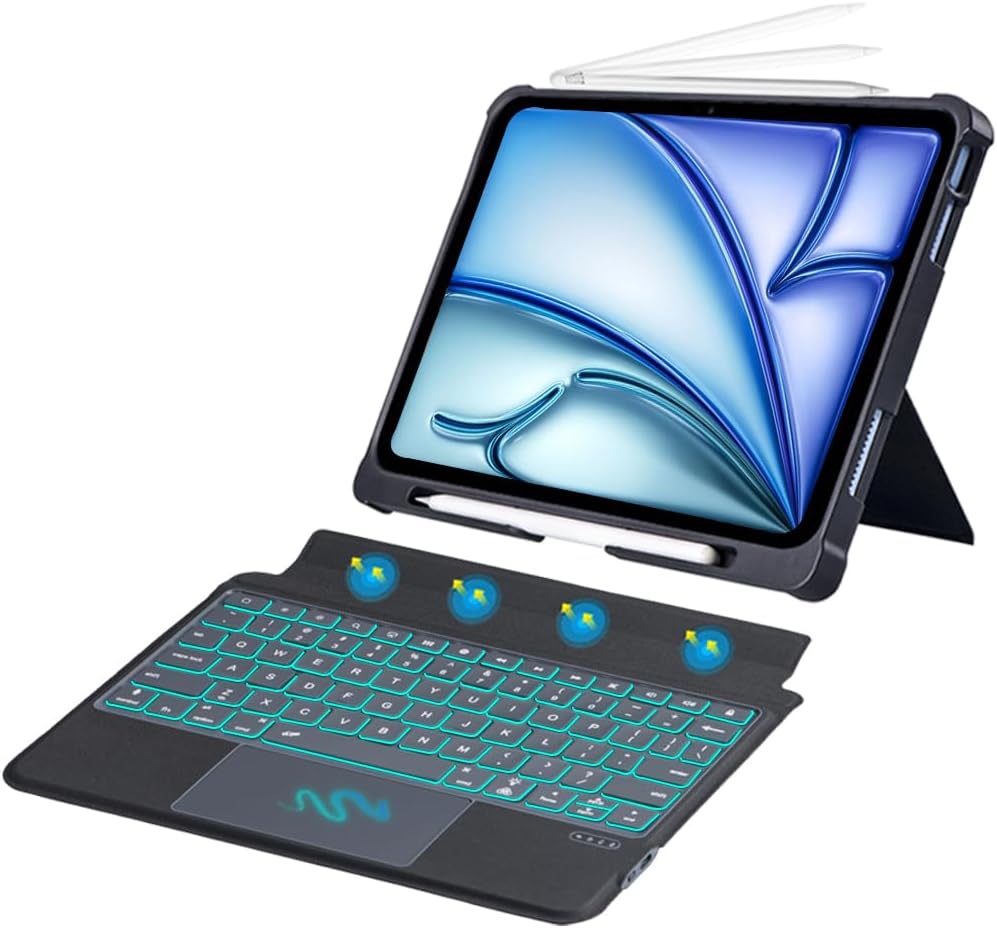
انځور: اوورview of the TECPHILE iPad Keyboard Case components, including the case with an iPad and the detached wireless keyboard.
د تنظیم کولو لارښود
۱. خپل آی پیډ د قضیې سره وصل کړئ
- Gently align your iPad Pro 12.9-inch with the case.
- Insert the iPad into the protective shell, ensuring all corners are securely fitted. The case provides full protection and features honeycomb heat release design.
- The case includes a dedicated pencil holder and supports wireless charging for your Apple Pencil.
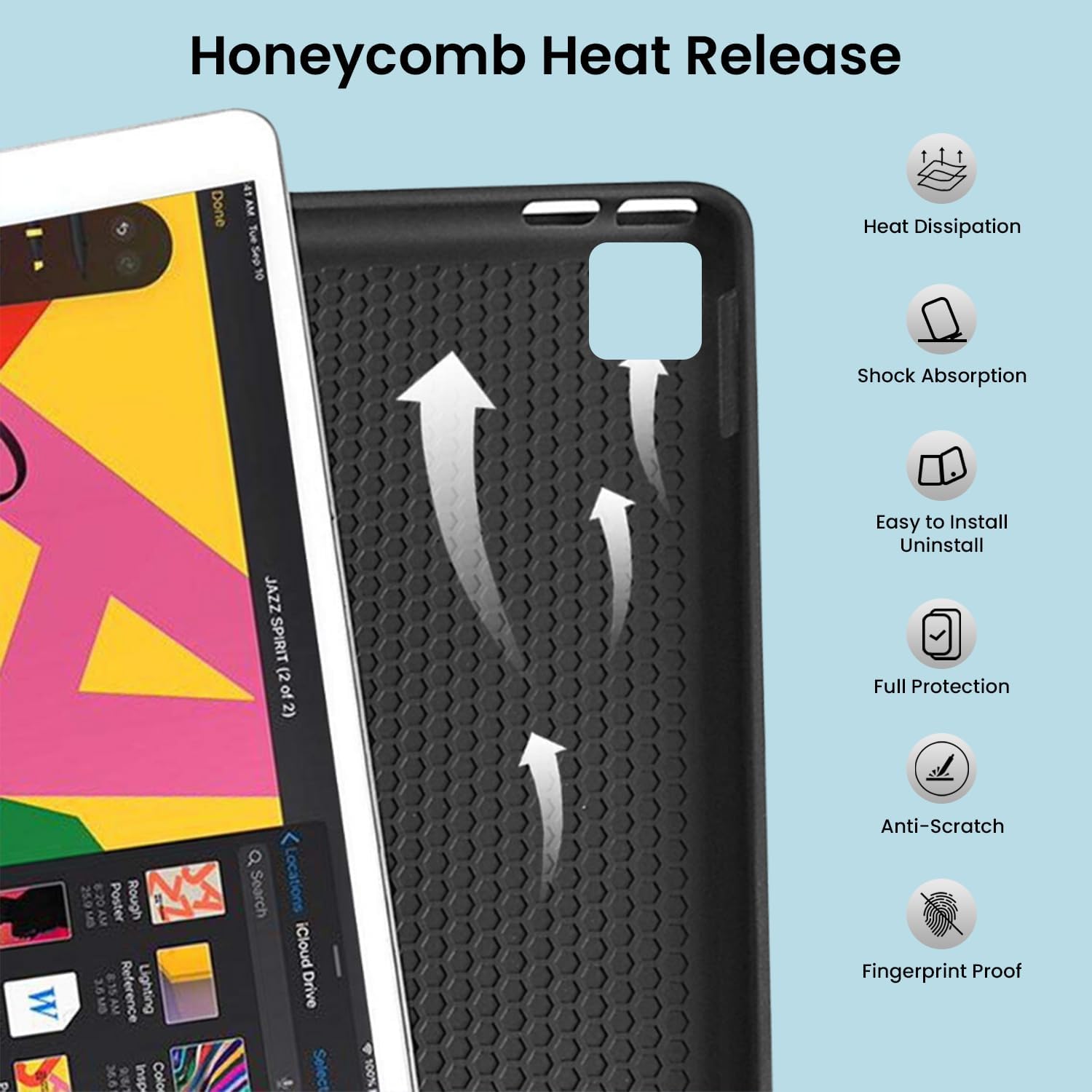
Image: Detail of the case's honeycomb structure for heat dissipation and protective features.

Image: Illustrates the wireless charging capability for the Apple Pencil and the integrated pencil holder.
2. د کیبورډ چارج کول
Before initial use, fully charge the keyboard. The keyboard has a 500mAh battery capacity.
- د کیبورډ په اړخ کې د USB-C چارج کولو پورټ ومومئ.
- Connect the provided USB-C cable to the keyboard and a power source (e.g., USB wall adapter, computer USB port).
- The charging indicator light will illuminate. Once fully charged, the light may change or turn off.
A full charge provides approximately 80 hours of use without backlight or 5 hours with backlight enabled.

Image: Keyboard charging port and battery performance details.
3. Connecting the Keyboard via Bluetooth
The keyboard connects wirelessly to your iPad via Bluetooth.
- ډاډ ترلاسه کړئ چې کیبورډ چارج شوی او فعال دی.
- په کیبورډ کې، فشار ورکړئ Fn+Z keys simultaneously. The Bluetooth indicator light will start blinking, indicating it's in pairing mode.
- په خپل iPad کې، لاړ شئ ترتیبات> بلوتوټ.
- بلوتوث فعال کړئ. ستاسو iPad به د شته وسایلو لټون وکړي.
- Locate and tap "Bluetooth Keyboard" (or similar name) in the list of devices to connect.
- Once connected, the Bluetooth indicator light on the keyboard will stop blinking.

Image: Visual guide for Bluetooth pairing process.
عملیاتي لارښوونې
د کیبورډ دندې
The detachable keyboard features a QWERTY layout with additional function keys for iPad control.
- د شاتنۍ رڼا کنټرول: مطبوعاتي Fn+ 💡 (light bulb icon) to turn on/off the backlight and cycle through 7 different colors. Press Fn+ ☀️ (sun icon) to adjust the 3 levels of brightness.
- Full Shortcut Row: Access common iPad functions directly from the top row of keys.
- Intelligent Voice Input Function: Utilize the dedicated key for voice input.

انځور: تفصیلي view of the keyboard's backlit keys and function controls.
Smart Multi-Gesture Trackpad
The integrated large trackpad supports multi-touch gestures for enhanced navigation.
- اساسي نیویګیشن: Move the cursor by sliding your finger across the trackpad.
- Click Functions: Supports right and left click functions.
- Multi-Finger Gestures: Utilize native iPad multi-finger gestures for scrolling, swiping, and other actions. Refer to your iPad's settings for a full list of supported gestures.
- Turn On/Off Trackpad: مطبوعاتي Fn+ 🖱️ (trackpad icon) to enable or disable the trackpad.
Adjustable Kickstand and Usage Modes
The case features an adjustable kickstand that allows for multiple viewد زاویې او کارونې طریقې ضمیمه کول.
- د ډول حالت: Position the iPad upright with the keyboard attached for a laptop-like experience.
- View حالت: Adjust the kickstand to a comfortable angle for watching videos or presentations without the keyboard.
- د لوستلو طریقه: Fold the keyboard behind the iPad for a tablet-like reading experience.
- د سکیچ حالت: Lower the angle for drawing or writing with the Apple Pencil.
The kickstand offers a seamless range of angles, smoothly reclining from 30° to 160° while maintaining stability.

Image: Various usage modes enabled by the adjustable kickstand and detachable keyboard.
Auto Wake/Sleep Function
The keyboard case includes an auto wake/sleep function to conserve battery life. Closing the case will put your iPad to sleep, and opening it will wake it up.
ساتنه
- پاکول: یو نرم استعمال کړئ، دamp د کیس او کیبورډ بهرنۍ برخې د پاکولو لپاره ټوکر. د سختو کیمیاوي موادو یا خړوبونکي موادو څخه ډډه وکړئ.
- ذخیره کول: کله چې د اوږدې مودې لپاره نه کارول کیږي، د کیبورډ کیس په یخ او وچ ځای کې وساتئ. ډاډ ترلاسه کړئ چې کیبورډ بند دی ترڅو د بیټرۍ ژوند خوندي شي.
- د بیټرۍ پاملرنه: To prolong battery life, avoid fully discharging the keyboard frequently. Charge it regularly.
د ستونزو حل کول
کیبورډ نه نښلي
- ځواک چیک کړئ: ډاډ ترلاسه کړئ چې کیبورډ چالان دی او کافي بیټرۍ چارج لري.
- بلوتوث بیا جوړه کړئ:
- په خپل iPad کې، لاړ شئ ترتیبات> بلوتوټ.
- Forget or unpair the "Bluetooth Keyboard" if it appears in "My Devices".
- خپل آی پیډ بیا پیل کړئ.
- Put the keyboard into pairing mode (press Fn+Z).
- لټون and connect to the keyboard again on your iPad.
- لاسوهنه: د نورو بېسیم وسیلو څخه لیرې شئ چې ممکن د مداخلې لامل شي.
کیلي ځواب نه ورکوي
- د بیټرۍ کچه: کیبورډ په بشپړه توګه چارج کړئ.
- بلوتوث پیوستون ډاډ ترلاسه کړئ چې کیبورډ د بلوتوث له لارې په سمه توګه وصل دی.
- بیا پیل کول: کیبورډ بند او بیا چالان کړئ.
Trackpad Not Working
- Enable Trackpad: Ensure the trackpad is enabled by pressing Fn+ 🖱️ (trackpad icon).
- د iPad ترتیبات: Check iPad accessibility settings for pointer control.
- پاک ټریک پیډ: Ensure the trackpad surface is clean and free of debris.
مشخصات
| د ماډل نوم | T5509D |
| مطابقت | iPad Pro 12.9" (6th, 5th, 4th, 3rd Gen) |
| ارتباط | بلوتوث |
| د کیبورډ ترتیب | QWERTY |
| شاته څراغ | ۷ رنګونه، ۳ د روښانتیا کچه |
| ټریک پیډ | Large Multi-Gesture Trackpad |
| د بیټرۍ ظرفیت | 500mAh (لیتیم ایون) |
| Battery Life (Non-backlight) | تر 80 ساعتونو پورې |
| Battery Life (Backlight) | تر 5 ساعتونو پورې |
| د چارج کولو بندر | USB-C |
| د محصول ابعاد | 29 x 24 x 2 سانتي متره |
| د توکي وزن | 735 ګرامه |
| مواد | Leatherite and ABS Plastic |
| ځانګړي ځانګړتیاوې | Adjustable Kickstand (30°-160°), Detachable Keyboard, Pencil Holder, Wireless Pencil Charging Support, Auto Wake/Sleep, Honeycomb Heat Release |
تضمین او ملاتړ
For warranty information or technical support, please refer to the documentation included with your purchase or contact TECPHILE customer service through the retailer where the product was purchased. Please have your model number (T5509D) and purchase details ready when contacting support.
