1. پیژندنه
The ATuMan LS6 is a versatile 3-in-1 laser distance meter designed for high-precision measurements. It combines distance measurement, laser projection, and angle detection, making it suitable for a wide range of applications from home DIY projects to professional construction and interior design. This manual provides detailed instructions on how to set up, operate, and maintain your device to ensure optimal performance and longevity.

Image 1.1: The ATuMan LS6 Laser Distance Meter, showcasinد دې کمپیکټ ډیزاین او مدغم نندارتون.
2. د بسته محتويات
Please verify that all items are present in the package before use:
- Laser Distance Meter (LS6) x1
- Charging Cable (USB Type-C) x1
- لینیارډ x1
- د کارن لارښود x1

Image 2.1: Contents of the ATuMan LS6 package, including the device, charging cable, and lanyard.
3. د خوندیتوب معلومات
The ATuMan LS6 uses a Class 1 laser. While generally safe, please observe the following precautions:
- مستقیم لیزر بیم ته مه ګورئ.
- د لیزر بیم په خلکو یا څارویو کې مه هدف مه کوئ.
- وسیله د ماشومانو له لاسرسي لرې وساتئ.
- د وسیلې د جلا کولو یا ترمیم کولو هڅه مه کوئ.
- وسیله یوازې د خپل ټاکل شوي هدف لپاره وکاروئ لکه څنګه چې پدې لارښود کې تشریح شوي.
- د وسیلې د خورا تودوخې ، رطوبت یا مستقیم لمر وړانګو ته د افشا کولو څخه ډډه وکړئ.
4. محصول ختم شوview
The ATuMan LS6 features a durable aluminum body and a clear TFT color display. Its intuitive user interface allows for effortless one-handed operation.
4.1 مهمې برخې
- د لیزر ایمیټر/رسیور: Located at the top of the device for sending and receiving laser signals.
- TFT Color Display: High-definition screen for displaying measurements, modes, and settings.
- د کنټرول تڼۍ: For power, measurement activation, mode selection, and settings adjustment.
- د USB ډول-C پورټ: د داخلي بیټرۍ چارج کولو لپاره.

انځور ۳.۱: نږدې انځور view of the ATuMan LS6 laser emitter, highlighting its precision.

Image 4.2: The TFT color display of the LS6, showing clear and easy-to-read data with an intuitive user interface.
5. ترتیب کول
5.1 د وسیلې چارج کول
The ATuMan LS6 is equipped with a 300mAh rechargeable battery. Before first use, or when the battery indicator shows low power, charge the device using the provided USB Type-C cable.
- د USB ډول-C کیبل د وسیلې د چارج کولو پورټ سره وصل کړئ.
- د کیبل بل پای د معیاري USB بریښنا اډاپټر (شامل نه دی) یا د کمپیوټر USB پورټ سره وصل کړئ.
- په نندارتون کې د بیټرۍ شاخص به د چارج کولو حالت وښيي.
- یوځل چې په بشپړ ډول چارج شو ، کیبل یې وصل کړئ.

Image 5.1: The ATuMan LS6 connected to a USB Type-C charger, illustrating its long battery life feature.
5.2 بریښنا کول / بندول
- د فعالولو لپاره: Press and hold the main control button (center button) for a few seconds until the display lights up.
- د بریښنا بندولو لپاره: Press and hold the main control button again for a few seconds. The device also features an auto-off function after 180 seconds of inactivity to conserve battery.
6. عملیات
The ATuMan LS6 offers 19 measurement functions. Familiarize yourself with the control buttons and display icons for efficient use.
6.1 Basic Measurement (Distance)
- ډاډ ترلاسه کړئ چې وسیله فعاله ده.
- د لیزر ایمیټر د هدف سطحې په لور وښایاست.
- Press the main control button once to activate the laser beam.
- Press the main control button a second time to take the measurement. The distance will be displayed on the screen.
6.2 د اندازه کولو طریقې
The device supports various measurement modes. Use the side button(s) to cycle through the available modes. The current mode will be indicated on the display.
- دوامداره اندازه کول: کله چې تاسو وسیله حرکت کوئ، د فاصلې په اړه په ریښتیني وخت کې تازه معلومات چمتو کوي.
- د ساحې اندازه کول: Measure two sides (length and width) to automatically calculate the area.
- د حجم اندازه کول: Measure three sides (length, width, and height) to automatically calculate the volume.
- Pythagorean Measurement (Pythagoras-1 & Pythagoras-2): Used for indirect measurements where direct measurement is not possible. Follow the on-screen prompts to take the required measurements (e.g., hypotenuse and one leg).
- د زاویې اندازه کول: Utilizes the visual aligning beam for precise angle detection.
- Addition & Subtraction: د اندازه کولو اضافه کولو یا کمولو ته اجازه ورکوي.
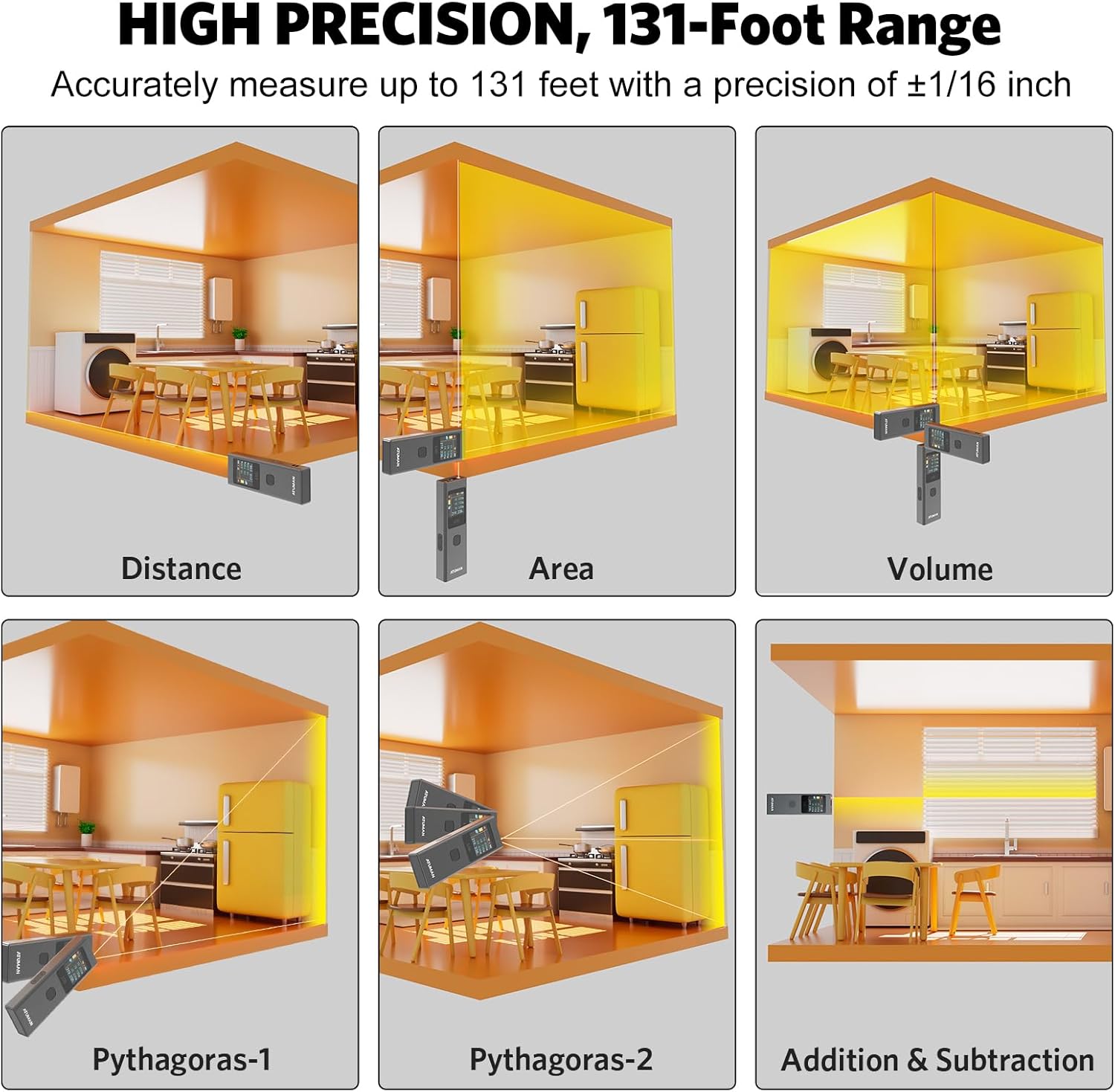
Image 6.1: Visual representation of various measurement modes including Distance, Area, Volume, and Pythagorean calculations.

انځور ۶: پخوانیamples of advanced measurement types, including various Pythagorean calculations and area/volume measurements in different settings.

انځور 6.3: اوورview of the 19+ built-in functions for versatile use, including linear, continuous, area, volume, and various Pythagorean modes.
۵.۳ د بدلولو واحدونه
The device supports switching between meters (M), inches (IN), and feet (FT). Refer to the user manual's specific instructions for unit switching, as it may involve multiple button presses.

Image 6.4: The ATuMan LS6 display showing measurements in meters, inches, and feet, demonstrating unit switching capability.
6.4 د معلوماتو ذخیره کول
The LS6 can store up to 20 sets of measurement data. This feature allows for efficient data management and review of past measurements.

Image 6.5: The ATuMan LS6 displaying multiple stored measurement data sets, indicating its 20-data set storage capacity.
7. ساتنه
Proper care and maintenance will extend the life of your ATuMan LS6.
- پاکول: Use a soft, dry cloth to clean the device. Do not use abrasive cleaners or solvents. For the lens, use a lens cleaning cloth.
- ذخیره کول: Store the device in a cool, dry place away from direct sunlight and extreme temperatures. If storing for extended periods, ensure the battery is partially charged (around 50%) and recharge every few months to prevent deep discharge.
- د اغیزو څخه ډډه وکړئ: While durable, avoid dropping the device or subjecting it to strong impacts.
8. ستونزه حل کول
If you encounter issues with your ATuMan LS6, refer to the following common problems and solutions:
| ستونزه | احتمالي لامل | د حل لاره |
|---|---|---|
| وسیله فعاله نه ده. | ټیټ بیټرۍ. | Charge the device using the USB Type-C cable. |
| Display is difficult to read outdoors. | High ambient light. | The TFT color display may be less visible in direct bright sunlight. Try to shade the screen or use in less direct light. |
| ناسم اندازه کول. | Obstruction in laser path, unstable surface, or incorrect measurement mode. | Ensure a clear path for the laser. Measure from a stable surface. Verify you are in the correct measurement mode for the task. |
| Difficulty changing settings (e.g., units). | د تڼیو له ترکیبونو سره نا اشنا. | Refer to the detailed instructions in the full printed user manual for specific button sequences for settings adjustments. Practice the button presses. |
| Laser dot not visible at long distances. | Environmental factors (bright light) or target surface. | In very bright conditions or on non-reflective surfaces, the laser dot may be hard to see. Consider using a target plate or measuring at closer distances if possible. For very long distances, a tripod may help stabilize the device. |
If the problem persists after trying these solutions, please contact ATuMan customer support.
9. مشخصات
Technical specifications for the ATuMan LS6 Laser Distance Meter:
| فیچر | مشخصات |
|---|---|
| برانډ | ATuMan د Android لپاره |
| د ماډل نوم | LS6 Laser Distance Meter |
| د اندازه کولو رینج | تر 131 فوټو پورې (40 متره) |
| دقت | +/- ۱/۱۶ انچه |
| لیزر ټولګي | ټولګي 1 |
| لیزر تولید | 0.081mW |
| د لیزر ډول | 520nm±10nm |
| د بیټرۍ ډول | Lithium (300mAh rechargeable) |
| د چارج کولو بندر | د USB ډول-C |
| مواد | المونیم |
| رنګ | تور |
| ابعاد (L x W x H) | 5.04 x 2.76 x 0.75 انچه |
| وزن | تقریبا ۴.۵ کیلوګرامه |
| د معلوماتو ذخیره کول | 20 ډیټا سیټونه |
| اوتومات | 180 ثانیې |
10. تضمین او ملاتړ
10.1 د تولید کونکي تضمین
The ATuMan LS6 Laser Distance Meter comes with a 2-Year Manufacturer Warranty. This warranty covers defects in materials and workmanship under normal use. Please retain your proof of purchase for warranty claims.
10.2 د پیرودونکي ملاتړ
For technical assistance, troubleshooting not covered in this manual, or warranty inquiries, please contact ATuMan customer support through their official channels or the retailer from whom you purchased the product.
You can visit the official ATuMan store on Amazon for more information and support: ATuMan Amazon Store


