محصول پای ته ورسیدview

The KiiBoom Loop 65 mechanical keyboard, featuring its distinctive gradient design and RGB backlighting.
The KiiBoom Loop 65 is a high-performance 65% mechanical keyboard designed for enthusiasts and professionals. It features a full aluminum block structure with a unique gradient design, offering both durability and aesthetic appeal. The keyboard incorporates advanced features such as QMK/VIA programmability, hot-swappable switches, and tri-mode connectivity, providing a customizable and versatile typing experience.
کلیدي ځانګړتیاوې عبارت دي له:
- Aesthetic Gradient Design: Anodized 6063 aluminum case with a unique two-color gradient, complemented by Cherry Profile dye-sub PBT keycaps.
- Gasket Mount Structure and Flex-cut FR4 Plate: Ensures superior key sounds and typing comfort with a neutral sound profile and pleasant flex.
- Five Layers of Sound Dampening Material: Includes Poron sandwich foam, IXPE switch pad, PET sound-improving film, Poron case foam, and an additional PET film layer for enhanced acoustic performance.
- QMK/VIA Programmable: Allows for extensive customization of key mappings, macros, shortcuts, and key combinations.
- د ګرمو بدلولو وړ PCB: Supports easy replacement of 3-pin/5-pin mechanical switches without soldering, enabling personalized tactile feedback and efficient maintenance.
- درې اړخیزه اړیکه: Offers flexible connection options via wired USB-C, Bluetooth 5.0, and 2.4GHz wireless with a USB dongle.
- 4000mAh بیټرۍ: Provides long-lasting wireless operation.
- South-Facing RGB Lighting: Ensures visible backlighting and full compatibility with Cherry profile کیکیپس.

The KiiBoom Loop 65 mechanical keyboard, showcasing its compact 65% layout and key features such as tri-mode connectivity, full aluminum construction, QMK/VIA support, and hot-swappable switches.
چمتو کول
د بسته محتويات
Before setup, ensure all items are present:
- KiiBoom Loop 65 Mechanical Keyboard
- د USB کیبل (USB-C څخه USB-A ته)
- کیکیپ پلر
- Switch Puller (often included with hot-swappable keyboards)
- 2.4GHz USB Dongle (for wireless connectivity)
لومړنی پیوستون
The KiiBoom Loop 65 supports three connectivity modes: wired, Bluetooth, and 2.4GHz wireless.

The KiiBoom Loop 65 offers versatile tri-mode connectivity for various devices.
وایرډ موډ (USB-C)
- Locate the USB-C port on the keyboard (typically on the back or side).
- Connect one end of the provided USB-C cable to the keyboard and the other end to a USB-A port on your computer.
- Ensure the connectivity switch on the keyboard is set to the wired mode (refer to the keyboard's physical switch, often labeled with a USB icon or 'Wired').
- کیبورډ به ستاسو د عملیاتي سیسټم لخوا په اتوماتيک ډول وپیژندل شي.
2.4GHz بې سیم حالت
- Locate the 2.4GHz USB dongle. This dongle is often stored in a dedicated slot on the keyboard itself for convenience.
- د USB ډونګل په خپل کمپیوټر کې موجود USB پورټ کې ولګوئ.
- Set the connectivity switch on the keyboard to the 2.4GHz wireless mode (often labeled with a wireless icon or '2.4G').
- The keyboard should automatically pair with the dongle. If not, press Fn + 4$ (as indicated in product images) to initiate pairing.
بلوتوث حالت
- Set the connectivity switch on the keyboard to Bluetooth mode (often labeled with a Bluetooth icon or 'BT').
- The keyboard supports up to three Bluetooth devices. To enter pairing mode for a specific slot, press and hold Fn + Q, Fn + W, or Fn + E for a few seconds until the keyboard's RGB lighting indicates pairing mode (e.g., rapid flashing).
- On your device (PC, laptop, tablet, smartphone), navigate to Bluetooth settings and search for new devices.
- Select "KiiBoom Loop 65" (or similar name) from the list of available devices to complete the pairing process.
- Once paired, you can switch between connected Bluetooth devices by pressing Fn + Q, Fn + W, or Fn + E.

تفصيلي view of the KiiBoom Loop 65's connectivity options and compatible devices.
عملیاتي لارښوونې
QMK/VIA Programmability
The KiiBoom Loop 65 is QMK/VIA programmable, allowing for extensive customization of key functions, macros, and lighting effects. To utilize this feature:
- Download the QMK Toolbox and VIA software from the official QMK/VIA webسایټ
- Connect your keyboard in wired mode to your computer.
- Launch the VIA software. The software should automatically detect your keyboard.
- Use the intuitive interface to remap keys, create custom macros, and configure layers. Changes are applied in real-time.
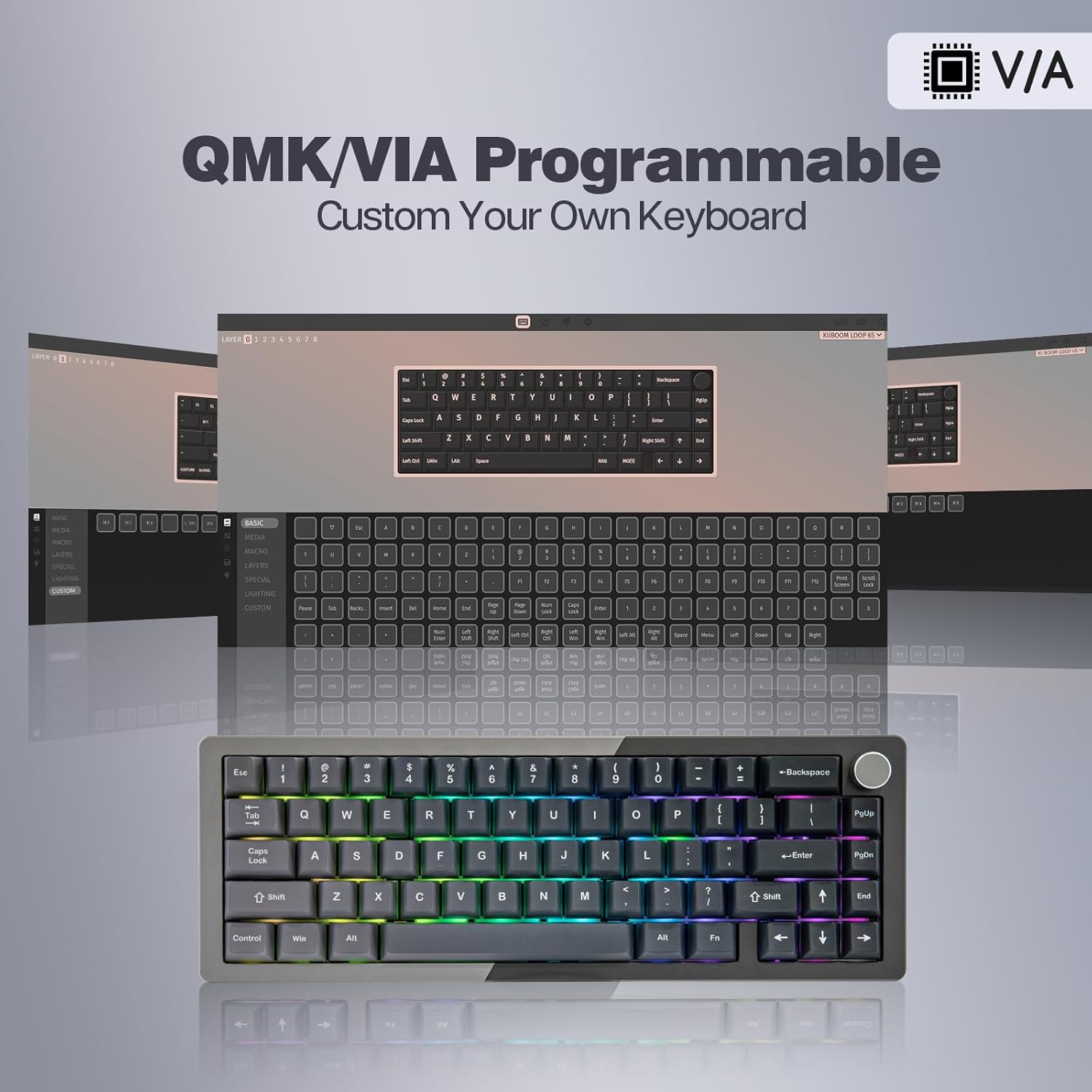
Customize your keyboard layout and functions using the QMK/VIA software.
Note: Some users have reported initial difficulties with QMK/VIA setup. Ensure you are using the correct software version and refer to online community resources or the official KiiBoom support for detailed guides if needed.
د RGB رingا کنټرول
The keyboard features south-facing RGB lighting with various effects. You can control the lighting directly from the keyboard:
- Turn On/Off Backlights: Press Fn + Z
- Toggle Backlight Effects: Press Fn + \ (backslash)
- Toggle Backlight Colors: Press Fn + < (comma) or Fn + > (period)
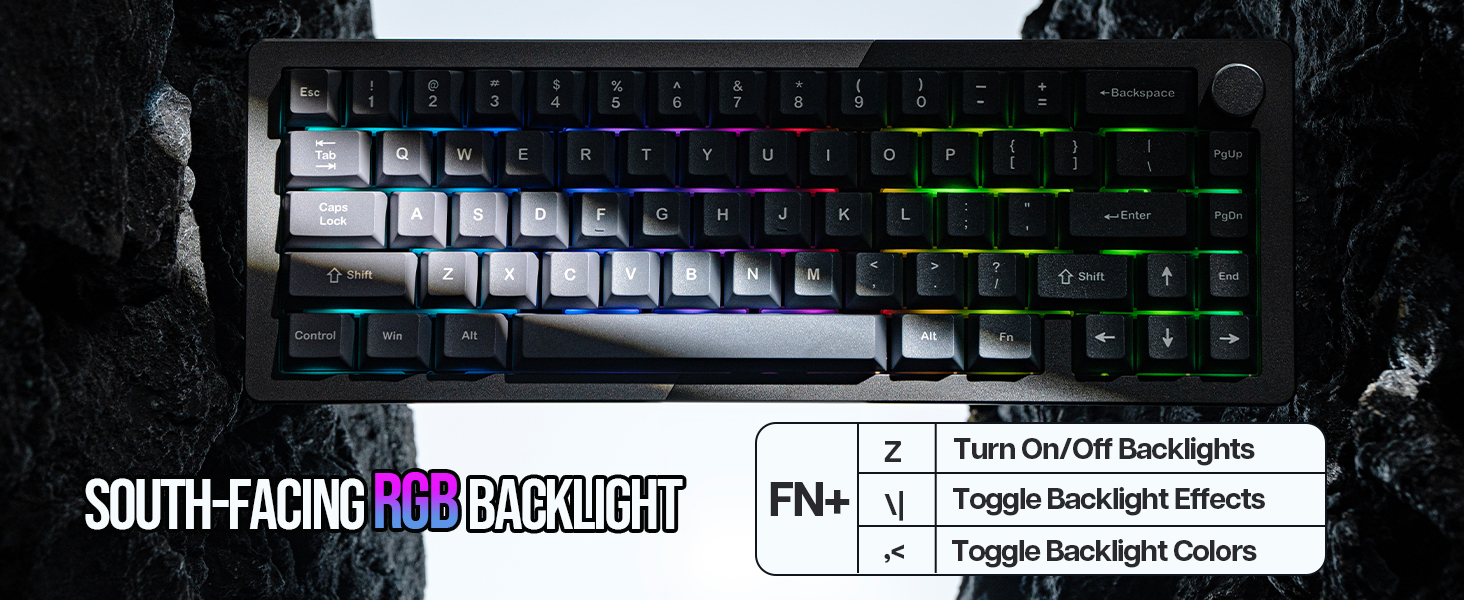
Control the vibrant RGB lighting directly from your keyboard.
د حجم نوب
The integrated metal knob on the upper right corner of the keyboard functions as a volume control. Rotate it to adjust the system volume. Press the knob to mute/unmute audio.

The multi-functional metal knob for volume control.
د بیټرۍ مدیریت
The KiiBoom Loop 65 is equipped with a 4000mAh battery for extended wireless use. To charge the keyboard, connect it via the USB-C cable to a power source (computer USB port or wall adapter). The keyboard can be used while charging.

The 4000mAh battery provides long-lasting power for wireless use.
ساتنه
د کیبورډ پاکول
منظم پاکول د کیبورډ فعالیت او بڼه ساتلو کې مرسته کوي:
- کیبورډ د ټولو بریښنا سرچینو څخه جلا کړئ.
- د نرم، لینټ پاک ټوکر څخه لږ څه کار واخلئampد کیلي کیپونو او کیس پاکولو لپاره د اوبو یا یو نرم پاکولو محلول سره مینځل. د ډیر رطوبت څخه مخنیوی وکړئ.
- د کیلي کیپسونو ترمنځ د دوړو او کثافاتو لپاره، د فشار شوي هوا یا کوچني برش څخه کار واخلئ.
د سویچونو بدلول (ګرم بدلیدونکی)
The KiiBoom Loop 65 features a hot-swappable PCB, allowing you to change switches without soldering. This is useful for customizing typing feel or replacing faulty switches.
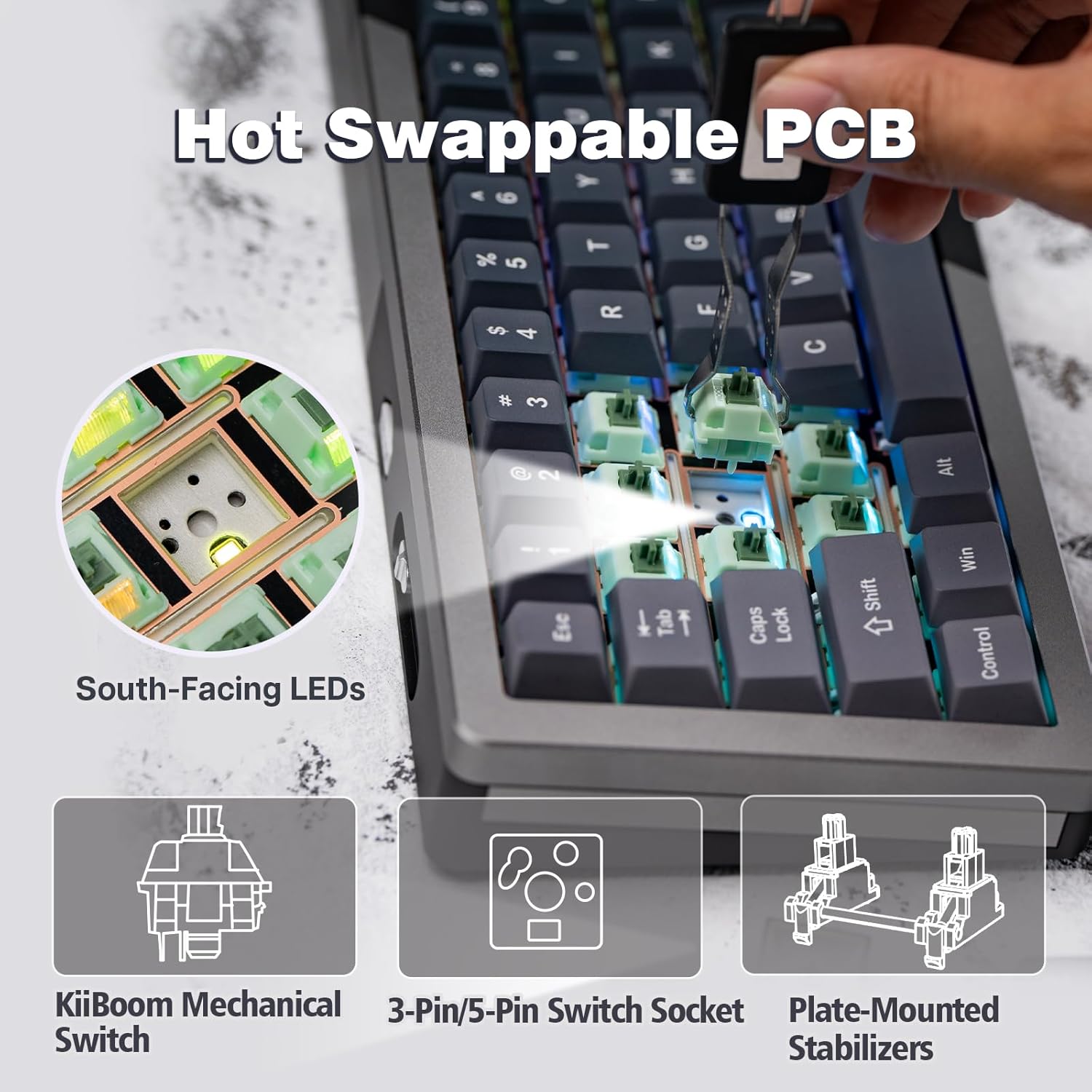
The hot-swappable PCB allows for easy switch replacement.
- Using the provided keycap puller, gently remove the desired keycap by pulling straight up.
- Once the keycap is removed, use the switch puller to grasp the switch firmly. Apply gentle pressure and pull the switch straight up to remove it from the PCB.
- د نوي سویچ پنونه د PCB سوریو سره سم کړئ. ډاډ ترلاسه کړئ چې پنونه مستقیم دي ترڅو د خمیدو مخه ونیول شي.
- نوی سویچ په نرمۍ سره په خپل ځای کې فشار ورکړئ تر هغه چې په خوندي ډول کلیک وکړي.
- Re-attach the keycap by pressing it firmly onto the new switch stem.
Video demonstrating the assembly process of the KiiBoom Loop 65 keyboard, including how to install components like switches and the case structure.
د Keycaps بدلول
To replace keycaps, use the keycap puller to gently remove the existing keycap. Align the new keycap with the switch stem and press down firmly until it is seated securely.

The keyboard features durable Cherry Profile dye-sub PBT keycaps.
د ستونزو حل کول
| ستونزه | احتمالي لامل | د حل لاره |
|---|---|---|
| Keyboard not connecting wirelessly (2.4GHz/Bluetooth) |
|
|
| Keys not responding or inconsistent input |
|
|
| QMK/VIA software not detecting keyboard or programming issues |
|
|
| Key height inconsistency |
|
|
مشخصات
| فیچر | تفصیل |
|---|---|
| د محصول ابعاد | ۴.۶ x ۲.۵ x ۱.۵ انچه (۱۱۵ ملي متره L x ۶۳ ملي متره W x ۴۰ ملي متره H) |
| د توکي وزن | ۱.۹ پونډه (تقریبا ۰.۸۶ کیلوګرامه) |
| جوړونکی | KiiBoom |
| د ارتباط ټیکنالوژي | ۲.۴ ګیګاهرتز بېسیم، بلوتوث ۵.۰، USB-C وایرډ |
| د کیبورډ توضیحات | میخانیکي |
| وړاندیز شوي استعمالونه | Everyday Use, Education, Gaming, Business |
| ځانګړي ځانګړتیاوې | CNC Aluminum, QMK/VIA Programmable, Backlit, Creamy Keyboard, Detachable Block Structure, Gasket Mount, FR4 Plate, 5-layer Sound Dampدننه کېدل |
| رنګ | Grey Black (as per current model) |
| د کلیدونو شمیر | 66 |
| شاته رڼا کول | RGB (جنوب ته مخامخ) |
| د بیټرۍ ظرفیت | 4000mAh |
| د کیکیپ مواد | Dye-sub PBT (Cherry Profile) |

Detailed dimensions and specifications of the KiiBoom Loop 65 keyboard.
تضمین او ملاتړ
For warranty information, technical support, or further assistance, please refer to the official KiiBoom website or contact their customer service directly. A detailed User Manual in PDF format is also available for download:
د کارونکي لارښود (PDF) ډاونلوډ کړئ
For additional resources and community support, consider visiting the KiiBoom Store on Amazon.


