1. پیژندنه
This manual provides detailed instructions for the BSIDE 2-Channel Handheld Oscilloscope Multimeter Signal Generator. This versatile 4-in-1 device integrates a dual-channel oscilloscope, a 6000-count multimeter, a signal generator, and supports a flexible current clamp for comprehensive electrical testing and analysis. It is designed for both professional and educational applications, offering portability and a wide range of measurement capabilities.
2. د خوندیتوب معلومات
د وسیلې د شخصي ټپي کیدو او زیان څخه د مخنیوي لپاره تل لاندې خوندیتوب احتیاطي تدابیر په پام کې ونیسئ:
- که چیرې وسیله خرابه ښکاري یا په غیر معمولي ډول کار کوي نو مه کاروئ.
- Ensure all probes and test leads are properly connected and in good condition before use.
- د اعظمي ان پټ حجم څخه ډیر مه کوئtage ratings specified in the technical specifications.
- Avoid contact with live circuits when connecting or disconnecting probes.
- Use caution when working with high voltages یا جریانونه.
- Do not operate the device in wet or explosive environments.
- Refer to the manual for proper fuse replacement if necessary.
3. د بسته محتويات
ډاډ ترلاسه کړئ چې لاندې ټول لیست شوي توکي ستاسو په کڅوړه کې شتون لري:
- BSIDE 2-Channel 25MHz Oscilloscope Multimeter
- Oscilloscope Probe (Quantity: 2)
- Red and Black Crocodile Clip Probe
- Multimeter Test Leads (Pen type)
- Protective Cap (Quantity: 2)
- Color Ring (Quantity: 8)
- Regulating Rod (Quantity: 1)
- High-end EVA Storage Bag
- د لارښوونې لارښود
- د USB چارج کیبل

Image 3.1: The BSIDE 4-in-1 handheld device shown with its complete set of accessories, including oscilloscope probes, multimeter leads, crocodile clips, charging cable, and the protective EVA storage bag.
4. محصول ختم شوview
4.1 د وسیلې ځانګړتیاوې
The BSIDE handheld device combines four essential functions into one compact unit:
- اوسیلوسکوپ: Dual-channel, 25MHz bandwidth for waveform analysis.
- ملټي میټر: 6000-count for various electrical measurements.
- سیګنال جنراتور: Produces 7 types of waveforms for testing.
- انعطاف منونکی جریان Clamp ملاتړ: Allows measurement of high AC currents up to 6000A.

Image 4.1: A visual representation highlighting the integrated functions of the device: signal generation, multimeter measurements, and oscilloscope waveform display.
۲.۳ کنټرولونه او ښودنه
The device features a 3.98-inch TFT full-view color screen (480*320 IPS) for clear data visualization. Navigation and function selection are performed using the front panel buttons.
- د ښودلو سکرین: Shows waveforms, measurement readings, and menu options.
- CH1/CH2 داخلونه: Connect oscilloscope probes for dual-channel input.
- OSC Port (OUT/PUT): Signal generator output.
- Input/COM Terminals: Connect multimeter test leads.
- د بریښنا تڼۍ: وسیله آن/بندوي.
- د مینو تڼۍ: د سیسټم ترتیباتو او اختیارونو ته لاسرسی لري.
- د موډ تڼۍ: د اوسیلوسکوپ، ملټي میټر، او سیګنال جنراتور حالتونو ترمنځ بدلیږي.
- د F1-F4 فعالیت تڼۍ: Context-sensitive buttons for specific operations within each mode.
- د نیویګیشن تڼۍ: Up, Down, Left, Right for menu navigation and parameter adjustment.
- AUTO PEAK Button: Automatic waveform acquisition and scaling in oscilloscope mode.
- د خوندي کولو تڼۍ: Saves current data or waveform.
- x1/x10 Button: Adjusts probe attenuation setting.
- د AC/DC تڼۍ: Selects AC or DC coupling.
5. ترتیب کول
5.1 د بیټرۍ چارج کول
The device is equipped with a 5000mA rechargeable lithium battery. Before first use, fully charge the device using the provided USB charging cable and a compatible USB power adapter (not included).
- Connect the small end of the USB charging cable to the charging port on the side of the device.
- Connect the standard USB end to a USB power source.
- په سکرین کې د چارج کولو شاخص به د چارج کولو حالت وښيي.

Image 5.1: The device being charged via its USB port, illustrating the battery icon on the display indicating charging status. A full charge provides approximately 10 hours in oscilloscope mode or 20 hours in multimeter mode.
5.2 ابتدايي پاور آن
Press and hold the Power button until the screen illuminates. The device will boot into its last used mode or a default mode.
5.3 Connecting Probes and Leads
Always ensure the device is off or in a safe mode before connecting or disconnecting probes and leads.
- د اوسیلوسکوپ پروبونه: Connect to the CH1 and CH2 BNC inputs. Ensure the probe attenuation setting (x1 or x10) on the probe matches the setting on the device.
- Multimeter Test Leads: Insert the red lead into the 'Input' terminal and the black lead into the 'COM' terminal for voltage, resistance, capacitance, and diode measurements. For current measurements, refer to the specific current input terminals.
- انعطاف منونکی جریان Clamp: د انعطاف وړ جریان cl سره وصل کړئamp to the appropriate input terminals as indicated for high current measurements.
6. عملیاتي طریقې
د کارولو موډ button to switch between the primary operating modes: Oscilloscope, Multimeter, and Signal Generator.
۵.۲ د اوسیلوسکوپ حالت
This mode allows for real-time visualization and analysis of electrical waveforms.
- مطبوعاتي موډ د اوسیلوسکوپ حالت غوره کولو لپاره.
- Connect oscilloscope probes to CH1 and/or CH2 inputs.
- Adjust the probe attenuation (x1/x10) on both the probe and the device to match.
- Use the navigation buttons to adjust vertical sensitivity (V/div) and horizontal time base (s/div).
- مطبوعاتي AUTO PEAK د اتوماتیک ویوفارم سکیلینګ او ټریګر کولو لپاره.
- The display shows waveform parameters such as Vpp, Vmax, Vmin, duty cycle, and frequency.
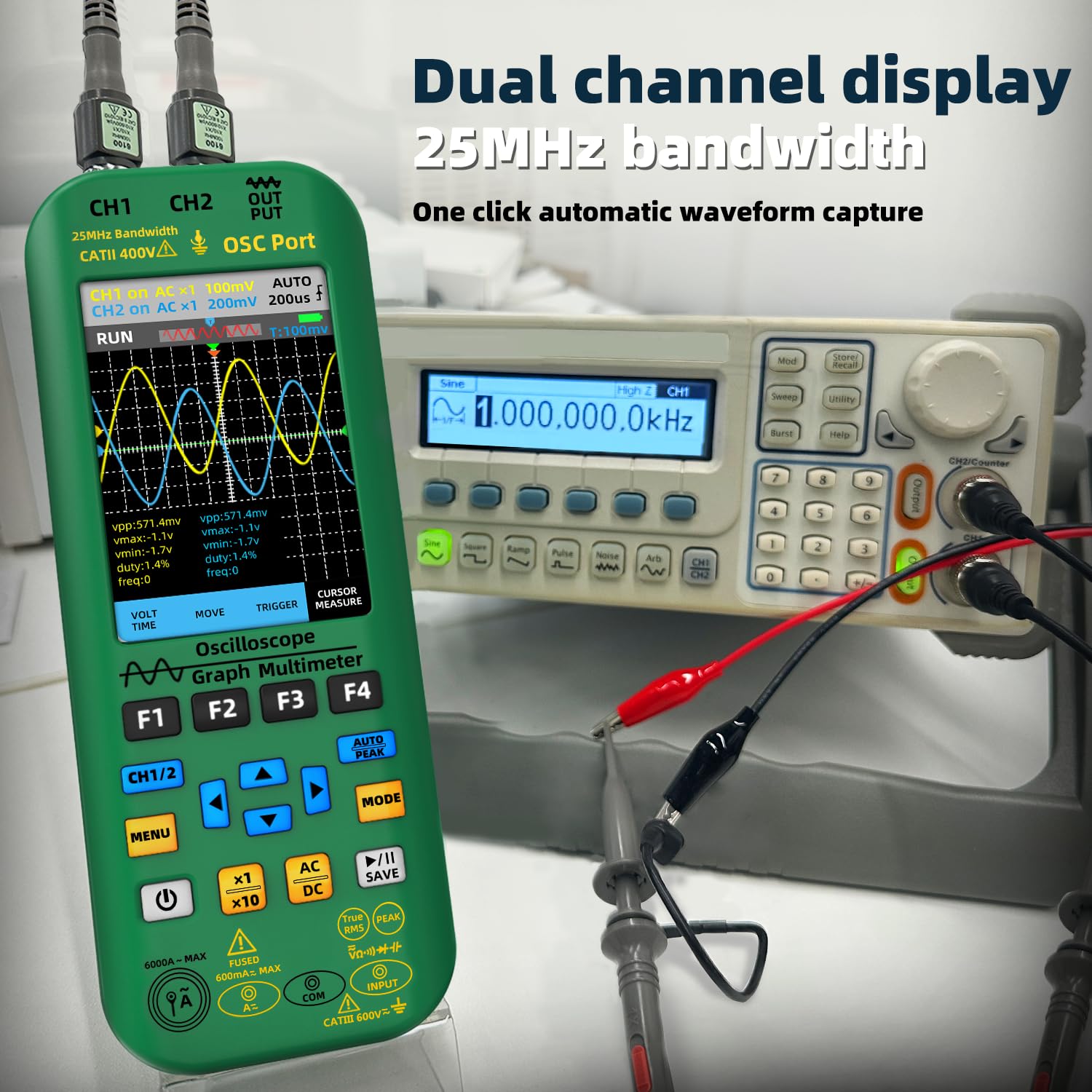
Image 6.1: The oscilloscope displaying dual-channel waveforms (CH1 and CH2) with various measurement parameters such as peak-to-peak voltage، اعظمي حجمtage، لږترلږه حجمtage, duty cycle, and frequency.
۵.۳ د څو متره حالت
The multimeter function provides precise measurements of various electrical quantities.
- مطبوعاتي موډ د ملټي میټر حالت غوره کولو لپاره.
- Connect the multimeter test leads to the appropriate input terminals.
- Use the F1-F4 buttons or navigation to select the desired measurement function (e.g., DC Voltage، AC Voltage, Resistance, Capacitance, Current, Diode, Continuity, Temperature).
- For AC current measurements up to 6000A, connect the flexible current clamp.

Image 6.2: A user performing an AC voltage measurement within an electrical panel using the multimeter function of the BSIDE device. The display shows a reading of 235.6V AC.
۵.۴ د سیګنال جنراتور حالت
The signal generator can output various waveforms for testing electronic circuits.
- مطبوعاتي موډ to select Signal Generator mode.
- Connect a test lead from the OSC Port (OUT/PUT) to the circuit under test.
- Use the F1-F4 buttons or navigation to select the desired waveform type (sine, square, triangle, half, full, sawtooth, DC).
- محصول تنظیم کړئ amplitude (0.1V-3.0V) and frequency (0Hz-2MHz) using the navigation buttons.
- For square waves, the duty cycle can be adjusted from 1% to 99%.
6.4 د معلوماتو مدیریت
The device supports data storage, preview, and export functions.
- فشار ورکړئ خوندي کړئ button to store current waveform data or measurement readings.
- Navigate through saved data for preview.
- Connect the device to a computer via the USB port for high-speed data transmission and export of stored data.

Image 6.3: The BSIDE device connected to a laptop, demonstrating its high-speed data transmission capability. Waveform data saved on the device can be exported and viewed on a computer for further analysis.
7. ساتنه
7.1 پاکول
د وسیلې د پاکولو لپاره، د نرم، d څخه کار واخلئamp ټوکر. د کثافاتو پاکوونکي یا محلولونه مه کاروئ. ډاډ ترلاسه کړئ چې وسیله بنده ده او د پاکولو دمخه د بریښنا له هرې سرچینې څخه جلا شوې ده.
7.2 د بیټرۍ پاملرنه
The integrated 5000mA Li-ion battery provides extended operation. To maximize battery life:
- کله چې د ټیټ بیټرۍ شاخص څرګند شي نو بیټرۍ چارج کړئ.
- د بیټرۍ په مکرر ډول د بشپړ چارج کولو څخه ډډه وکړئ.
- که چیرې وسیله د اوږدې مودې لپاره ذخیره کوئ، نو دا نږدې 50٪ ته چارج کړئ او په یخ او وچ ځای کې یې وساتئ.
7.3 ذخیره کول
When not in use, store the device in its provided high-end EVA storage bag to protect it from dust, moisture, and physical impact. Store in a dry environment away from direct sunlight and extreme temperatures.
8. ستونزه حل کول
If you encounter issues with your BSIDE device, refer to the following common problems and solutions:
- وسیله نه فعالیږي: ډاډ ترلاسه کړئ چې بیټرۍ چارج شوې ده. د چارج کولو کیبل وصل کړئ او بیا هڅه وکړئ.
- هیڅ ښودنه یا تیاره ښودنه نشته: Check battery level. Adjust backlight settings in the menu.
- Incorrect readings in Multimeter mode: Verify test lead connections. Ensure the correct measurement function is selected. Check for damaged leads.
- No waveform in Oscilloscope mode: Check probe connections to both the device and the circuit. Ensure probe attenuation matches the device setting. Use AUTO PEAK to automatically adjust settings. Verify the circuit under test is active.
- Signal Generator output not working: Ensure the device is in Signal Generator mode and the output is enabled. Check connections from the OSC Port.
- د معلوماتو د لیږد مسلې: Ensure the USB cable is securely connected to both the device and the computer. Check computer's device manager for proper driver installation.
که ستونزه دوام ومومي، د نورو مرستې لپاره د پیرودونکي ملاتړ سره اړیکه ونیسئ.
9. مشخصات
| فیچر | مشخصات |
|---|---|
| ښودل | 3.98-inch TFT Color Screen, 480*320 IPS, 6000 words |
| Sampد نرخ کچه | 3 times / second (Multimeter) |
| بانډ ویت | 25MHz (Dual-channel) |
| په ریښتیني وخت Sampد نرخ کچه | 208MSa / s |
| د چینلونو شمیر | 2 چینلونه |
| د ننوتلو خنډ | 1MΩ, @16pF |
| د تفتیش توجه | ×۲، ×۴ |
| د اعظمي داخل مقدارtage | ×1 range <150V, ×10 range <300V (DC + AC peak) |
| Horizontal Sampد لینګ نرخ رینج | 1.5Sa/s - 208MSa/s |
| عمودی حساسیت | ۱۰mV/div - ۱۰V/div |
| د ښودلو حالت | XT, XY, Scroll |
| د ګلو وروسته وخت | Min, 500ms, 1s, 10s, Unlimited |
| DC Voltage (V) | 0.001V - 1000V (0.8%+3) |
| AC Voltage (V) | 0.001V - 750V (1.0%+3) |
| د DC اوسنی (MA) | 0.01mA - 600.0mA (1.0%+3) |
| د AC اوسنی (MA) | 0.01mA - 600.0mA (1.2%+5) |
| انعطاف منونکی جریان Clamp AC اوسنی | 0.1A - 6000A (1.0%+5) |
| مقاومت | 0.1Ω - 60.00MΩ (1.0%+3) |
| ظرفیت | 0.1nF - 99.99mF (4.5%+5) |
| د حرارت درجه | (-20 - 1000)°C / (-4 - 1832)°F (2.5%+5) |
| Signal Generator Waveform Types | Sine, Square, Triangle, Half, Full, Sawtooth, DC |
| Signal Generator Frequency Range | ۲۰۰.۰۰ هرټز - ۲۰.۰۰۰ میګاهرتز |
| د سیګنال جنراتور محصول Ampدرود | ۱۰۰ وولټ - ۲۵۰ وولټ |
| Signal Generator Square Wave Duty Cycle | ۴۰٪ - ۸۰٪ |
| بیټرۍ | 5000mA Li-ion (2 Lithium Ion batteries included) |
| ابعاد | 216.6 x 84.5 x 36.0 mm (8.5 x 3.31 x 1.42 انچه) |
| وزن | 384 ګرامه (13.55 اونس) |
10. تضمین او ملاتړ
For warranty information and technical support, please refer to the documentation included with your purchase or contact BSIDE customer service through their official website or the retailer where the product was purchased. Please have your model number (2 channel handheld oscilloscope) and purchase details ready when contacting support.
۹. د ویډیو معلومات
په دې لارښود کې د ځای پر ځای کولو لپاره د پلورونکي لخوا د محصول رسمي ویډیوګانې شتون نه درلودې.


