پیژندنه
This manual provides essential information for setting up, operating, maintaining, and troubleshooting your HP Envy 17 Laptop. This high-performance laptop features a 17.3" FHD Touchscreen Display, Intel i7-1355U Processor, 32GB RAM, 1TB SSD, and NVIDIA GeForce RTX 3050 graphics, designed for a versatile computing experience.
محصول پای ته ورسیدview
The HP Envy 17 is a powerful and versatile laptop designed for productivity and entertainment. Its large touchscreen display and robust internal components make it suitable for various tasks, from content creation to everyday computing.

انځور: مخکینۍ برخه view of the HP Envy 17 Laptop, highlighting its key features on the screen.
چمتو کول
ابتدايي پاور آن
- لپ ټاپ او د بریښنا اډاپټر خلاص کړئ.
- د بریښنا اډاپټر لپ ټاپ او د بریښنا سایټ سره وصل کړئ.
- د لپ ټاپ پوښ خلاص کړئ او د بریښنا تڼۍ فشار ورکړئ.
- د وینډوز 11 کور تنظیم بشپړولو لپاره په سکرین کې لارښوونې تعقیب کړئ.
د پردیو سره نښلول
The laptop offers various ports for connecting external devices.
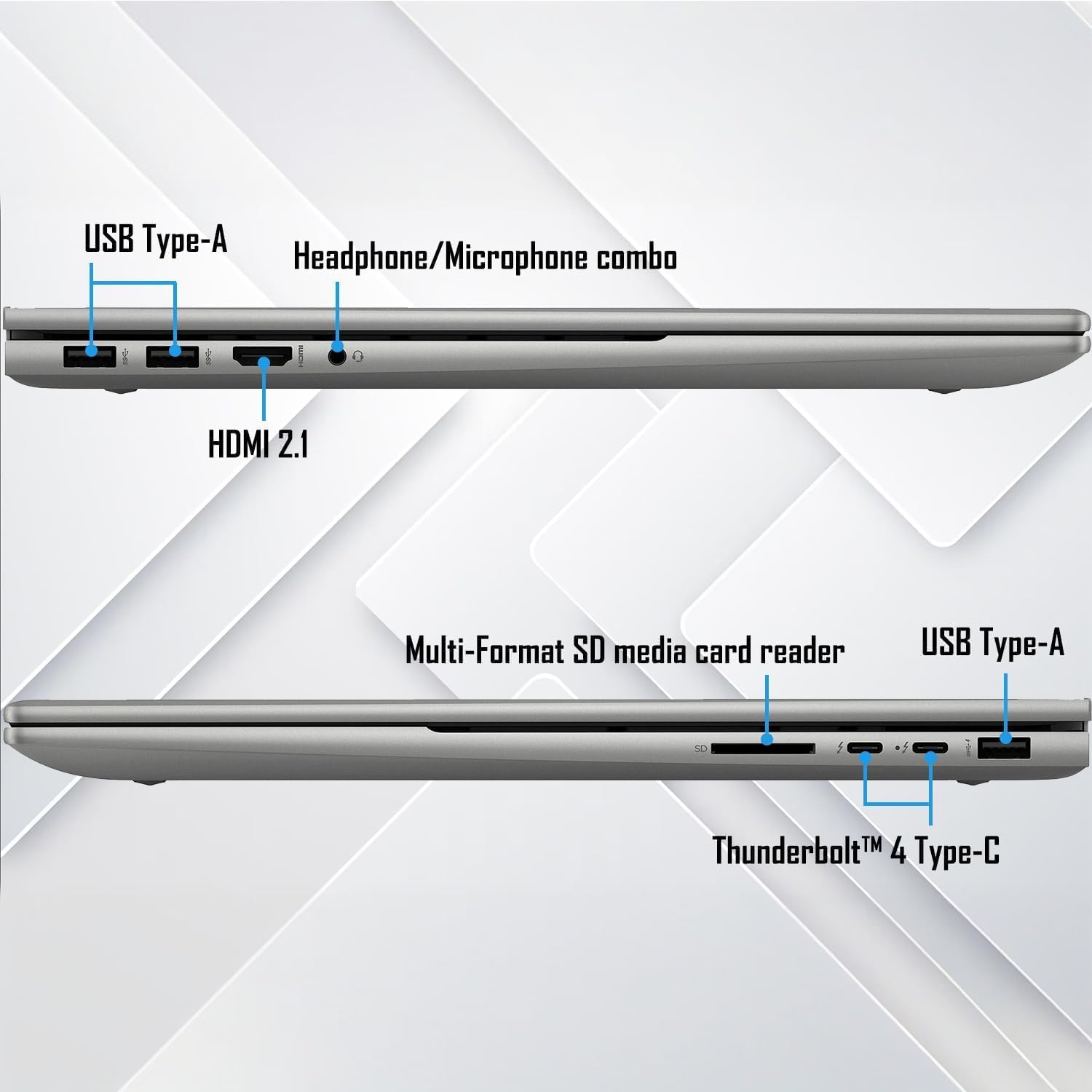
انځور: تفصیلي view د لپ ټاپ د اتصال بندرونو دواړو خواوو ته.
- د USB ډول A: د معیاري USB وسیلو لکه موږکانو، کیبورډونو، او بهرني ډرایو لپاره.
- Thunderbolt 4 Type-C: Supports USB Power Delivery, DisplayPort 1.4, and HP Sleep and Charge for high-speed data transfer and display output.
- HDMI2.1: د بهرنیو نندارتونونو یا پروجیکټرونو سره وصل شئ.
- د هیډفون/مایکروفون ترکیب جیک: د آډیو ان پټ/آؤټ پټ لپاره.
- د څو بڼو SD میډیا کارت لوستونکی: د SD کارتونو لوستلو لپاره.
عملیاتي لارښوونې
د ټچ سکرین فعالیت
The 17.3" FHD touchscreen display allows for intuitive interaction with Windows 11. Use gestures like tap, swipe, pinch-to-zoom, and scroll directly on the screen.
کیبورډ او ټچ پیډ
The full-size backlit keyboard with a numeric keypad provides a comfortable typing experience. The integrated touchpad supports multi-touch gestures for navigation.
وائی فای او بلوتوث ارتباط
The laptop supports Wi-Fi 6E (2x2/160) Gig+ and Bluetooth 5.3 for high-speed wireless connections to networks and peripherals.

Image: Visual representation of the laptop's advanced Wi-Fi 6E and Thunderbolt 4 connectivity.
د آډیو سیسټم
Experience rich audio with Bang & Olufsen dual speakers. Adjust volume and sound settings through the Windows sound control panel.

Image: The laptop showcasing its Bang & Olufsen audio system with visual sound effects.
د ګرافیک فعالیت
The NVIDIA GeForce RTX 3050 with 4GB dedicated memory provides excellent graphics performance for demanding applications, gaming, and content creation.

Image: The laptop highlighting its NVIDIA GeForce RTX 3050 graphics for creative and gaming tasks.
ساتنه
د سافټویر تازه معلومات
Regularly update Windows 11 and HP drivers to ensure optimal performance and security. Access Windows Update through Settings > Windows Update.
د لپ ټاپ پاکول
- د سکرین او چیسس پاکولو لپاره نرم، لینټ نه پاک ټوکر وکاروئ.
- For the screen, use a screen cleaner specifically designed for electronics.
- د سختو کیمیاوي موادو یا خړوبونکي موادو څخه ډډه وکړئ.
د بیټرۍ پاملرنه
To prolong battery life, avoid extreme temperatures and frequent full discharges. It is recommended to keep the battery charge between 20% and 80% for optimal longevity.
د ستونزو حل کول
عام مسایل او حل لارې
- ځواک نشته: Ensure the power adapter is securely connected and the power outlet is functional. Try a different outlet.
- سکرین نه ښودل کیږي: Check external display connections if applicable. Restart the laptop. If the issue persists, perform a hard reset by holding the power button for 15 seconds.
- ورو فعالیت: Close unnecessary applications, check for background processes, and ensure sufficient free storage space. Run a disk cleanup and check for malware.
- د وای فای اتصال: Restart your router and the laptop. Check Wi-Fi settings and update network drivers.
د ملاتړ سره اړیکه ونیسئ
If issues persist, refer to the official HP support webسایټ (support.hp.com) or contact customer service for further assistance. Have your product serial number ready.
مشخصات
| فیچر | تفصیل |
|---|---|
| ښودل | 17.3" FHD (1920 x 1080) Touchscreen Micro-Edge IPS, 300-Nits |
| پروسیسر | 13th Gen Intel Core i7-1355U (up to 5 GHz, 10-Cores, 12-Threads) |
| ګرافیک | NVIDIA GeForce RTX 3050, 4GB |
| RAM | 32GB DDR4-3200MHZ |
| ذخیره کول | ۱ ټې بي PCIe NVMe M.2 سالډ سټیټ ډرایو |
| عملیاتي سیسټم | د وینډوز 11 کور (64-bit) |
| کیبورډ | د عددي کیپډ سره د بشپړ اندازې بیک لیټ کیبورډ |
| بې سیم ټیکنالوژي | Wi-Fi 6E (2x2/160) Gig+, Bluetooth 5.3 |
| آډیو | بینګ او اولوفسین د دوه ګونی غږونکو سره |
| کیمره | HP True Vision 5MP IR Camera with Shutter |
| بندرونه | 2x Thunderbolt 4 Type-C, 1x USB Type-A (HP Sleep and Charge), 2x USB Type-A, 1x HDMI 2.1, 1x Headphone/Microphone Combo, 1x Multi-format SD Media Card Reader |
| بیټرۍ | 4-Cell 55Wh Li-Ion Polymer |
| وزن | 5.50 پونډه |
| ابعاد (WxLxH) | ۸۳.۸" x ۵۵.۷" x ۴۴.۱" |
یادونه: مشخصات پرته له خبرتیا بدلیږي.
تضمین او ملاتړ
د تضمین تفصيلي معلوماتو او تخنیکي ملاتړ لپاره، مهرباني وکړئ د HP رسمي ملاتړ ته مراجعه وکړئ. website or contact your retailer. Keep your purchase receipt and product serial number handy for faster service.