1. پیژندنه
This manual provides essential instructions for the proper installation, operation, and maintenance of your X-BULL Winch Control Box. This control box is designed to protect the solenoid relay and organize the wiring for 8000-13000lbs electric winches. Please read this manual thoroughly before installation and use to ensure safe and efficient operation.
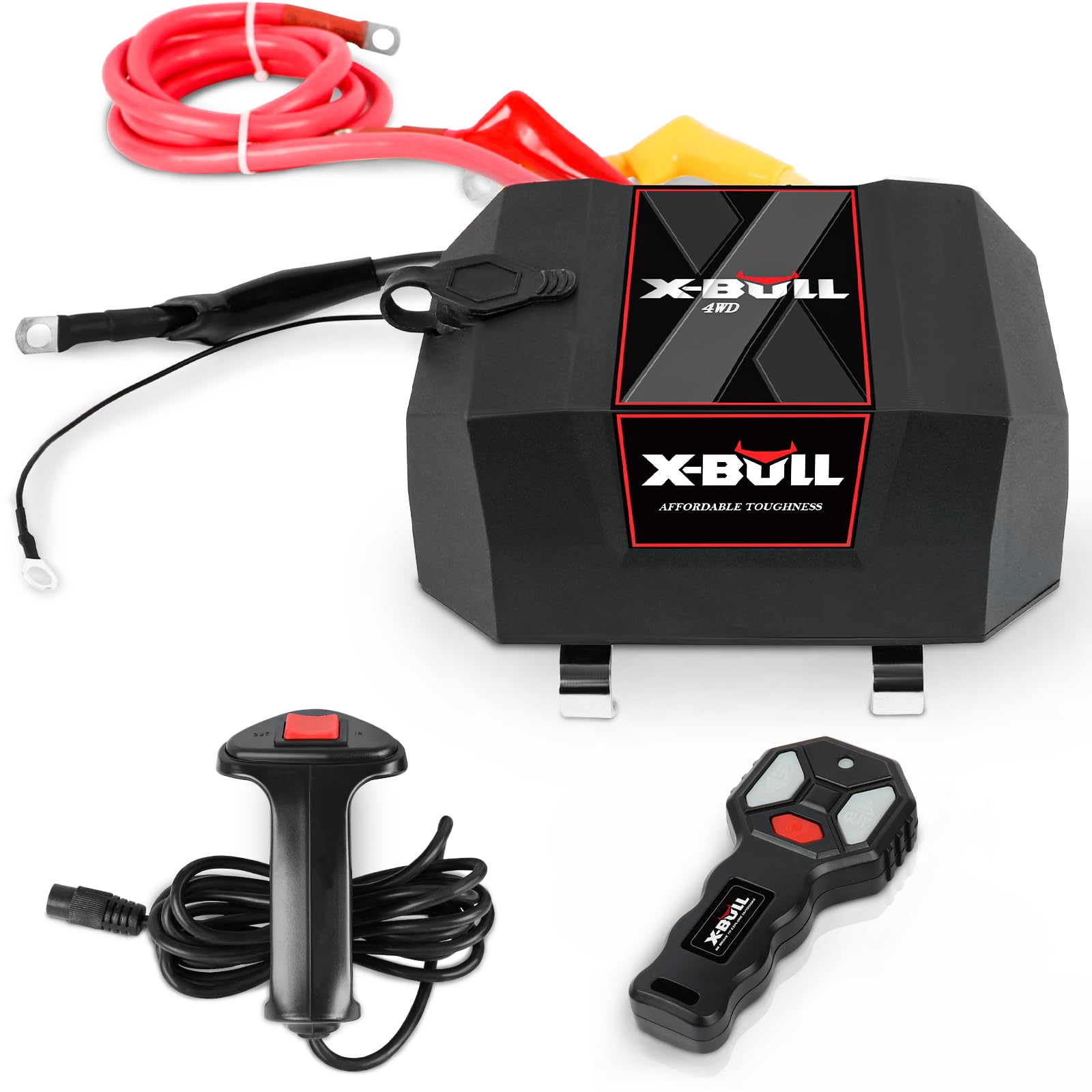
Figure 1: X-BULL Winch Control Box with included remotes and wiring.
2. د محصول مشخصات
| برانډ | X-BULL |
| ماډل | USAM-XBCB002 |
| مطابقت | Universal for 8000-13000lbs 12V solenoid winches |
| فعالیت | Protects solenoid relay, organizes winch cables |

Figure 2: Approximate dimensions of the X-BULL Winch Control Box (7.3in x 5.1in x 4.1in).
۲. په بکس کې څه دي؟
- X-BULL Winch Control Box
- وائرډ ریموټ کنټرول
- بې سیم ریموټ کنټرول
- Necessary Wiring Cables
4. نصب او تنظیم کول
The X-BULL Winch Control Box is designed for straightforward installation. It is compatible with various makes and models of 9500-13000lbs 12V solenoid winches, including those found on SUVs, Jeeps, 4x4 vehicles, and 12V trailers.
4.1 د تار لګولو لارښوونې
Follow these steps to properly connect the control box to your winch and vehicle battery:
- Prepare the Solenoid Contactor: Place your existing solenoid contactor inside the X-BULL control box.
- Connect to Winch Terminals: Connect the three colored wires (typically red, yellow, and black) from the control box to the corresponding three terminals located on top of your winch.
- Connect to Winch Ground: The smallest black wire from the control box must be connected to the bottom of the winch, which typically serves as the winch's ground connection.
- Connect to Battery Positive: The longest red line from the control box needs to be connected to the positive (+) terminal of your car battery.
- Connect to Battery Negative: Ensure a separate heavy-gauge black cable connects the negative (-) terminal of your car battery to the winch's main ground point.

Figure 3: The control box interface, which protects against dust and water where the manual remote control is connected.
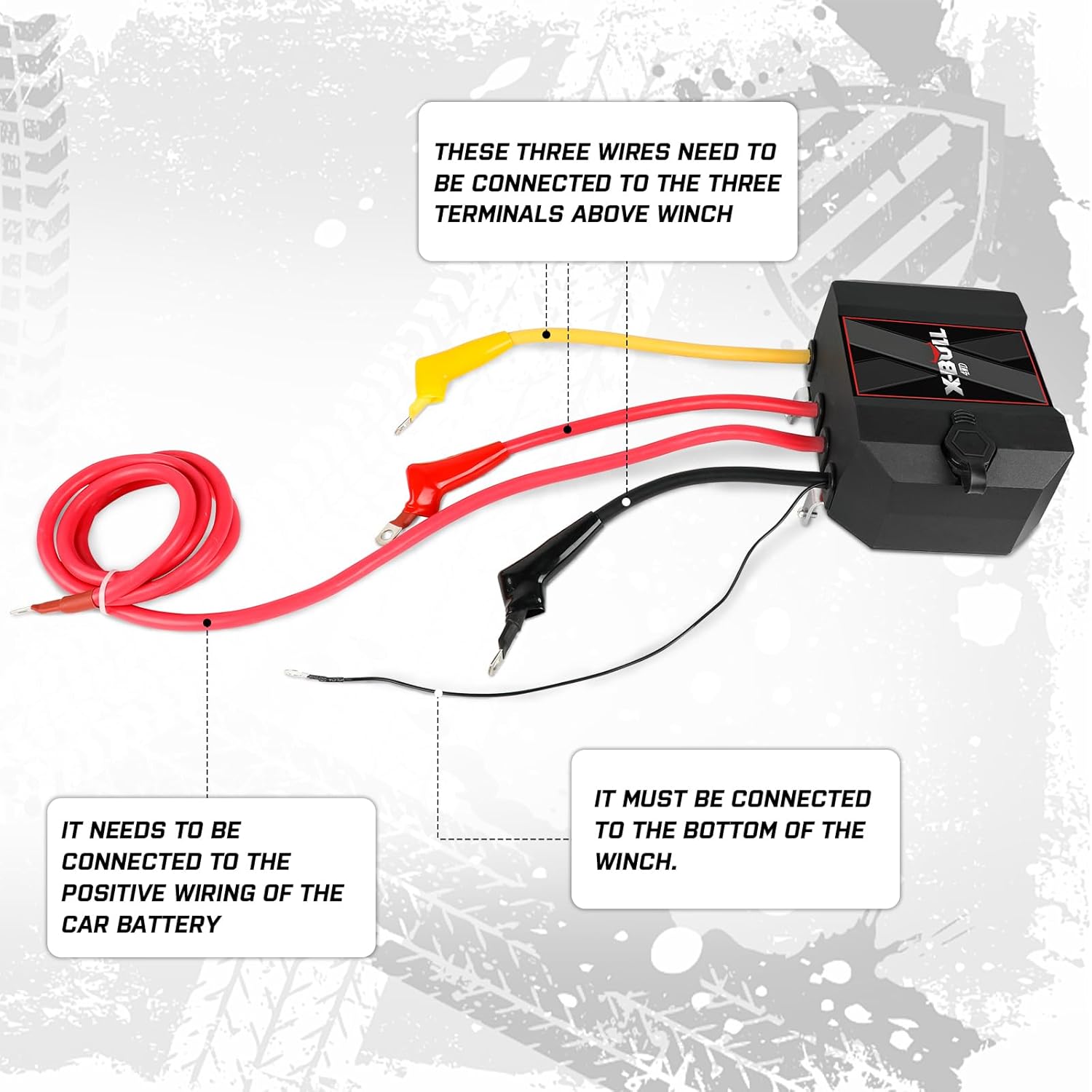
Figure 4: Illustration showing the three wires from the control box connecting to the three terminals on the winch, and the smallest black wire connecting to the bottom of the winch.

Figure 5: A detailed wiring diagram illustrating connections between the control box, battery, and winch. Note the 'Long Red' to battery positive, 'Long Black' to battery negative, and the 'Red', 'Yellow', 'Black' wires to the winch terminals.

Figure 6: An overall wiring diagram showing the connection points for the control box, battery, and winch, highlighting the longest red line to the battery positive and the smallest black line to the bottom of the winch.
Proper wiring ensures the control box functions correctly and protects your winch's electrical components.
5. Operating the Winch Control Box
Once installed, the control box facilitates the operation of your winch using the provided wired or wireless remote controls.
۶.۲ د ریموټ کنټرولونو کارول
- وائرډ ریموټ: Plug the wired remote into the designated port on the control box (refer to Figure 3). Use the 'IN' button to retract the winch cable and the 'OUT' button to extend it.
- بې سیم ریموټ: The wireless remote allows for operation from a distance. Ensure the remote has working batteries. Press the 'IN' or 'OUT' buttons to control the winch cable movement.
Always ensure a clear line of sight to the winch and the load during operation. Keep hands and clothing clear of the winch cable and fairlead.
6. ساتنه
Regular maintenance helps ensure the longevity and reliable performance of your X-BULL Winch Control Box.
- د تارونو معاینه کول: Periodically check all electrical connections for corrosion, fraying, or loose terminals. Tighten any loose connections and clean any corrosion.
- Clean Control Box: Keep the exterior of the control box clean from dirt, mud, and debris. The interface is designed to protect against dust and water, but regular cleaning is recommended.
- ریموټ بیټرۍ: For wireless remotes, replace batteries as needed to ensure consistent performance.
- ذخیره کول: When not in use for extended periods, store the control box and remotes in a dry, protected environment.
7. ستونزه حل کول
If you encounter issues with your X-BULL Winch Control Box, refer to the following common troubleshooting steps:
- Winch Not Responding:
- Check all wiring connections to ensure they are secure and free of corrosion.
- Verify that the vehicle battery has sufficient charge.
- Ensure the solenoid contactor inside the box is functioning correctly.
- For wireless remotes, check and replace batteries if necessary.
- Winch Operates in Reverse Direction:
- This indicates that the motor wires (typically red and yellow) connected to the winch terminals may be reversed. Consult your winch's manual for correct motor wiring and adjust the connections on the control box accordingly.
- موقتي عملیات:
- Inspect for loose or damaged wiring.
- Ensure the remote control signal is not obstructed (for wireless remotes).
If problems persist after attempting these steps, it is recommended to consult a qualified technician or contact X-BULL customer support.
8. تضمین او ملاتړ
For information regarding warranty coverage, technical support, or replacement parts, please refer to the X-BULL official webسایټ ته مراجعه وکړئ یا مستقیم د دوی د پیرودونکو خدماتو څانګې سره اړیکه ونیسئ. د هر ډول تضمین ادعا لپاره د پیرود ثبوت په توګه د پیرود رسید وساتئ.


