1. پیژندنه
Thank you for choosing the ErGear EGESD8 Electric Standing Desk. This manual provides essential information for the safe and efficient assembly, operation, and maintenance of your new desk. Please read these instructions carefully before use and retain them for future reference. This electric standing desk is designed to offer ergonomic flexibility, allowing you to easily switch between sitting and standing positions, promoting a healthier work environment.

د ایر ګیر بریښنایی سټینډینګ ډیسک، شوکasing its sleek design and spacious desktop in a contemporary workspace.
2. د خوندیتوب لارښوونې
د خوندي عملیاتو ډاډ ترلاسه کولو او د زیان مخنیوي لپاره، مهرباني وکړئ لاندې ټکي په پام کې ونیسئ:
- د میز چلولو دمخه ډاډ ترلاسه کړئ چې ټولې اړیکې خوندي دي.
- د کار پرمهال ماشومان او څاروي له میز څخه لرې وساتئ.
- Do not place hands or other body parts near moving parts to avoid injury.
- Do not overload the desk. The maximum weight capacity is 80 کیلو ګرامه.
- د مایعاتو مستقیم د کنټرول پینل یا بریښنایی برخو ته نږدې د ځای پرځای کولو څخه ډډه وکړئ.
- If the desk makes unusual noises or movements, discontinue use and consult the troubleshooting section or contact support.
- یوازې چمتو شوي بریښنا اډاپټر او کیبلونه وکاروئ.

This image highlights the robust construction of the ErGear Electric Standing Desk, capable of supporting up to 80 kg, ensuring stability even under significant load.
3. د بسته محتويات
مهرباني وکړئ وګورئ چې ټولې برخې شتون لري او زیانمن شوي ندي:
- Desktop Panels (assembled)
- د میز پښې (۲)
- د پښو پیډونه (۲)
- د غاړې قوسونه (2)
- کراس بار
- د لیږد راډ
- د تضمین اداره
- د بریښنا اډاپټر او کیبل
- Cable Grommets (2)
- Headphone Hooks (2)
- د اسمبلۍ هارډویر (پیچونه، د ایلن رنچ)
- د کارن لارښود
4. د مجلس لارښوونې
Follow these steps to assemble your ErGear Electric Standing Desk. It is recommended to have two people for assembly.
Official assembly video for the ErGear Electric Standing Desk, demonstrating step-by-step installation.
1 ګام: چوکاټ راټول کړئ
- Attach the side brackets to the desk legs using the provided screws and Allen wrench.
- Secure the foot pads to the bottom of each leg.
- Connect the two leg assemblies with the crossbar, ensuring all screws are tightened.
Step 2: Fix the Transmission Rod
- Insert the transmission rod into the designated openings on both desk legs.
- Ensure the rod is properly seated and secured with the retaining clips or screws.
Step 3: Assemble the Desktop Panel
- Lay the desktop panels face down on a soft, clean surface.
- Align the panels and secure them together using the provided connectors and screws.
Step 4: Attach the Frame to the Desktop
- Carefully place the assembled desk frame onto the underside of the desktop.
- Align the pre-drilled holes and secure the frame to the desktop using the appropriate screws.
- د چمتو شویو پیچونو په کارولو سره د کنټرول پینل د ډیسټاپ لاندې برخې ته په مناسب ځای کې وصل کړئ.
- Install the headphone hooks to the underside of the desktop as desired.
شپږم ګام: کیبلونه وصل کړئ
- Connect the motor cables from the legs to the control box.
- د کنټرول پینل کیبل د کنټرول بکس سره وصل کړئ.
- د بریښنا اډاپټر د کنټرول بکس سره وصل کړئ او بیا د بریښنا آوټ لیټ سره.
Step 6: Fix the Cable Grommets
- Insert the cable grommets into the pre-cut holes on the desktop to manage cables.
5. عملیاتي لارښوونې
Your ErGear Electric Standing Desk features an intuitive control panel for easy height adjustment.
لنډ ویډیويي نندارتونasing key features of the ErGear Electric Standing Desk, including height adjustment and stability.
د کنټرول پینل ختم شوview

The desk's intelligent control panel features an LED display showing current height in centimeters, along with up/down arrows and four memory preset buttons for quick adjustments.
- Up/Down Arrows (▲ / ▼): Press and hold to adjust the desk height manually.
- د LED نندارې: Shows the current height of the desk in centimeters.
- Memory Presets (1, 2, 3, 4): Store and recall preferred height settings.
د لوړوالی تنظیم کول
The desk can be adjusted between 72 سانتي متره او 118 سانتي متره.
- لاسي تنظیم کول: Press and hold the up (▲) or down (▼) arrow button until the desk reaches your desired height.
- Using Memory Presets: Press the corresponding memory button (1, 2, 3, or 4) to automatically move the desk to the saved height.
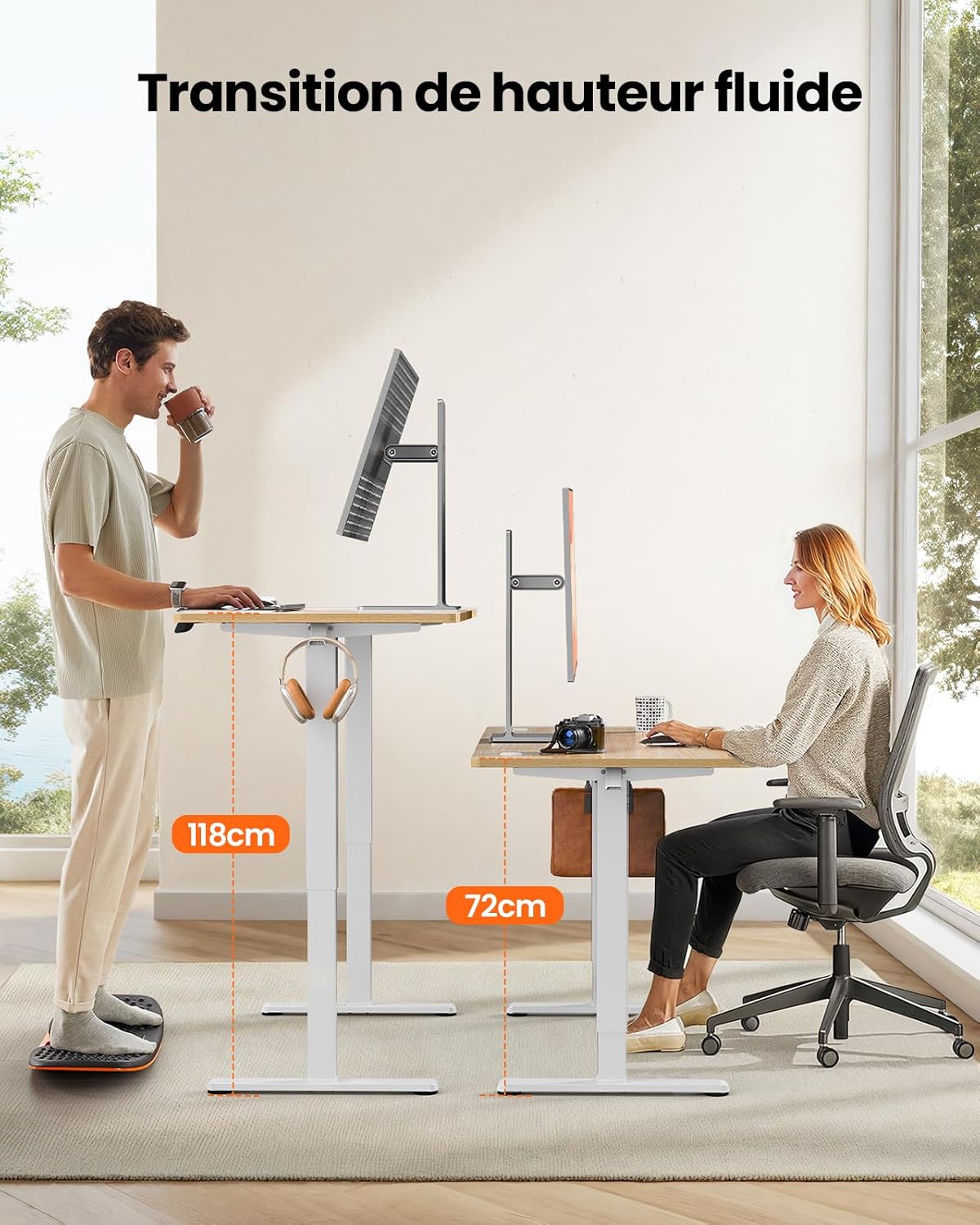
This image demonstrates the adjustable height range of the ErGear Electric Standing Desk, showing a user sitting at 72cm and standing at 118cm, emphasizing ergonomic flexibility.
د حافظې پریسیټونه تنظیم کول
- د پورته/ښکته تیرونو په کارولو سره میز د خپلې خوښې لوړوالي سره سم تنظیم کړئ.
- Press the 'M' button (if available, or a 'Set' button) followed by the desired memory button (1, 2, 3, or 4). The display will typically flash or beep to confirm the setting is saved.
خاموش عملیات
The desk operates with a quiet motor, producing a noise level of ≤ 55 dB, ensuring a peaceful work environment.

Illustrates the ultra-quiet operation of the ErGear Electric Standing Desk, with a noise level of 55dB, ensuring a peaceful and undisturbed work environment.
6. ساتنه
منظم ساتنه ستاسو د میز د ژوند اوږدولو کې مرسته کوي:
- پاکول: Wipe the desk surface and legs with a soft, damp ټوکر. د سختو کیمیاوي موادو یا د کثافاتو پاکوونکو څخه ډډه وکړئ.
- د کیبل مدیریت: Periodically check that all cables are neatly organized and not pinched or tangled. Utilize the integrated cable grommets and hooks.
- Screw Tightness: Occasionally check and tighten any loose screws on the frame or desktop connections.
- تفتیش: Inspect the desk for any signs of wear or damage. If any issues are found, contact customer support.

تفصیل view of the desk's integrated cable grommets and convenient hooks, designed to help maintain a tidy and organized workspace by managing cables and accessories.
7. ستونزه حل کول
If you encounter any issues with your desk, please refer to the following common problems and solutions:
| ستونزه | احتمالي لامل | د حل لاره |
|---|---|---|
| مېز نه حرکت کوي. | د برېښنا کیبل قطع شوی، د موټرو کیبل خلاص شوی، ډیر بار شوی. | Check all power and motor connections. Reduce weight on the desk. |
| میز په نا مساوي ډول حرکت کوي. | نا مساوي بار، خلاص پیچونه، خنډ. | وزن په مساوي ډول وویشئ. ټول د راټولولو پیچونه وګورئ او ټینګ کړئ. ډاډ ترلاسه کړئ چې هیڅ خنډ نشته. |
| میز د تنظیم کولو پرمهال ودریږي. | Overload protection activated, obstruction. | Remove some weight. Check for obstructions. Wait a few minutes before trying again. |
| د کنټرول پینل ځواب نه ورکوي. | Control panel cable loose, power issue. | Check control panel cable connection. Verify power supply. |
که چیرې د دې حلونو هڅه کولو وروسته هم ستونزه دوام ومومي، مهرباني وکړئ د ErGear پیرودونکي ملاتړ سره اړیکه ونیسئ.
8. مشخصات
| فیچر | تفصیل |
|---|---|
| برانډ | ار ګیر |
| د ماډل شمیره | EGESD8 |
| رنګ | Beige and Natural |
| د ډیسکټاپ ابعاد (L x W) | 120 cm x 60 cm |
| د لوړوالی تنظیم کولو سلسله | ۴۸ سانتي متره - ۵۶.۸ سانتي متره |
| مواد | Wood (Desktop), Metal (Base) |
| د وزن ظرفیت | 80 کیلو ګرامه |
| د موټرو شور کچه | ≤ 55 dB |
| ځانګړي ځانګړتیاوې | Ergonomic, Electric, 4 Memory Presets, Cable Grommets, Headphone Hooks |
| د محصول وزن | 19.05 کیلو ګرامه |

A clear diagram illustrating the overall dimensions of the ErGear Electric Standing Desk, including its 120cm x 60cm desktop and adjustable height range of 72cm to 118cm.
9. تضمین او ملاتړ
ErGear products are designed for durability and performance. This product comes with a standard manufacturer's warranty. For specific warranty details, please refer to the warranty card included in your package or visit the official ErGear webسایټ
If you have any questions, require technical assistance, or need to report a missing or damaged part, please contact ErGear customer support through the retailer where you purchased the product or via the contact information provided on the official ErGear webسایټ
Please have your model number (EGESD8) and purchase information ready when contacting support.


