پیژندنه
This manual provides comprehensive instructions for the HP 255 Dual Wireless Mouse (Model 8R3U1UT). This device offers dual-mode connectivity via 2.4 GHz wireless (USB-A dongle) and Bluetooth 5.0, ensuring compatibility with Windows, ChromeOS, and macOS. It features a 1600 DPI optical sensor for precise control and is designed for comfortable, ambidextrous use.
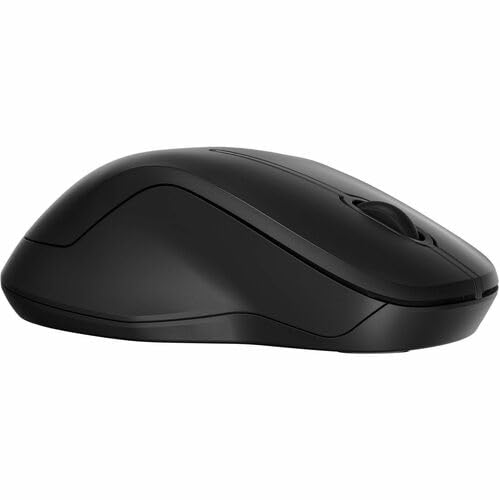
انځور: پورته-ښکته view of the HP 255 Dual Wireless Mouse, showcasing its symmetrical black design.
د بسته محتويات
ډاډ ترلاسه کړئ چې ټول توکي په کڅوړه کې شتون لري:
- HP 255 Dual Wireless Mouse
- USB-A Wireless Dongle (typically stored inside the mouse)
- د چټک پیل لارښود (که شامل وي)
- یادونه: 1 AA battery is required and not included.
چمتو کول
1. د بیټرۍ نصب کول
- د موږک په لاندې برخه کې د بیټرۍ د برخې پوښ ومومئ.
- د خونې د خلاصولو لپاره پوښ پورته کړئ یا یې وغورځوئ.
- یو AA بیټرۍ دننه کړئ، د سم قطبیت ډاډ ترلاسه کړئ (+/-).
- د بیټرۍ کمپارټ پوښ په خوندي ډول وتړئ.
The mouse requires one AA battery for operation. Batteries are not included with the product.
2. Connecting via 2.4 GHz Wireless (USB-A Dongle)
- Remove the USB-A wireless dongle from its storage slot, typically located inside the battery compartment or near it.
- Plug the USB-A dongle into an available USB-A port on your computer (Windows, ChromeOS, or macOS).
- د بریښنا سویچ په کارولو سره موږک د هغې په لاندې اړخ کې چالان کړئ.
- The mouse should automatically connect to your computer. No additional drivers are typically required for this plug-and-play connection.
۳.۴. د بلوتوث ۵.۰ له لارې نښلول
- ډاډ ترلاسه کړئ چې ستاسو د کمپیوټر بلوتوث فعال دی.
- د بریښنا سویچ په کارولو سره موږک د هغې په لاندې اړخ کې چالان کړئ.
- Press and hold the Bluetooth pairing button (often located on the underside of the mouse, or combined with the mode switch) until the indicator light starts blinking, indicating pairing mode.
- On your computer, navigate to Bluetooth settings:
- وینډوز: Settings > Devices > Bluetooth & other devices > Add Bluetooth or other device.
- macOS: System Settings > Bluetooth.
- ChromeOS: Quick Settings panel > Bluetooth.
- Select "HP 255 Mouse" or a similar name from the list of available devices and follow any on-screen prompts to complete pairing.
- The indicator light on the mouse will stop blinking and remain solid (or turn off) once successfully paired.
عملیاتي لارښوونې
د موږک تڼۍ
The HP 255 Dual Wireless Mouse features 3 buttons:
- د کیڼ کلیک تڼۍ: Primary function for selecting items, opening links, etc.
- د ښي کلیک تڼۍ: Secondary function for context menus and additional options.
- Scroll Wheel / Middle Button: د اسنادو له لارې سکرول کولو لپاره کارول کیږي او web pages. Pressing it down often acts as a middle-click button for specific functions.
DPI (په انچ کې نقطې)
The mouse operates at a fixed resolution of 1600 DPI, providing smooth and precise cursor control across various surfaces.
د بریښنا مدیریت
- د بریښنا سویچ: Use the ON/OFF switch on the underside of the mouse to conserve battery life when not in use.
- د اتوماتیک خوب حالت: The mouse enters a low-power sleep mode after a period of inactivity to extend battery life. Move the mouse or click a button to wake it up.
- د بیټرۍ ژوند: A single AA battery can provide up to 12 months of usage, depending on usage patterns.
ساتنه
- پاکول: د موږک د پاکولو لپاره نرم، وچ ټوکر وکاروئ. د سختې خاورې لپاره، لږ څهampټوکر د اوبو سره ومینځئ. د سختو کیمیاوي موادو یا د کثافاتو پاکوونکو څخه ډډه وکړئ.
- د سینسر پاکول: Periodically clean the optical sensor on the underside of the mouse with a soft, lint-free cloth to ensure optimal tracking performance.
- د بیټرۍ بدلول: Replace the AA battery when the mouse performance degrades or the low battery indicator (if present) illuminates.
- ذخیره کول: When not in use for extended periods, turn off the mouse and consider removing the battery to prevent leakage. Store the USB dongle inside the mouse for safekeeping.
د ستونزو حل کول
موږک ځواب نه ورکوي
- بیټرۍ چیک کړئ: ډاډ ترلاسه کړئ چې د AA بیټرۍ په سمه توګه نصب شوې او کافي چارج لري. که اړتیا وي نو بدل یې کړئ.
- د بریښنا سویچ: Verify the mouse is turned ON.
- USB Dongle (2.4 GHz):
- Ensure the dongle is securely plugged into a working USB-A port.
- Try plugging the dongle into a different USB-A port.
- Ensure the dongle is within range (typically up to 10 meters) and not obstructed.
- Bluetooth (Bluetooth 5.0):
- ډاډ ترلاسه کړئ چې ستاسو د کمپیوټر بلوتوث فعال دی.
- Re-attempt the pairing process as described in the "Connecting via Bluetooth 5.0" section.
- Ensure the mouse is within Bluetooth range (typically up to 10 meters).
- Remove the mouse from your computer's Bluetooth device list and re-pair it.
- سطحه: Ensure you are using the mouse on a suitable surface. Highly reflective or transparent surfaces may affect optical tracking.
د کرسر بې نظمه حرکت
- د موږک په لاندې برخه کې نظري سینسر پاک کړئ.
- هڅه وکړئ موږک په بل سطح کې وکاروئ.
- ډاډ ترلاسه کړئ چې نږدې قوي الکترومقناطیسي مداخلې شتون نلري.
مشخصات
| د ماډل نوم | HP 255 Dual Wireless Mouse (8R3U1UT) |
| د ارتباط ټیکنالوژي | Wireless (2.4 GHz via USB-A dongle), Bluetooth 5.0 |
| د خوځښت کشف | نظري |
| د حرکت پریکړه | 1600 DPI |
| د تڼیو شمیر | 3 (Left, Right, Scroll Wheel/Middle) |
| د لاس لارښوونه | متضاد |
| د بریښنا سرچینه | 1 x AA بیټرۍ (شامل نه ده) |
| د بیټرۍ ژوند | تر 12 میاشتو پورې |
| مطابقت لرونکي عملیاتي سیسټمونه | Windows, ChromeOS, macOS |
| مواد | 50% Post-Consumer Recycled Plastics |
| ابعاد (L x W) | 5.3"L x 3.4"W (approximate) |
تضمین او ملاتړ
د تضمین معلوماتو او تخنیکي ملاتړ لپاره، مهرباني وکړئ هغه اسناد وګورئ چې ستاسو د محصول سره شامل دي یا د HP رسمي ملاتړ ته مراجعه وکړئ. webسایټ:
Keep your purchase receipt and product model number (8R3U1UT) handy when contacting support.