1. پهview
The BIGBIG WON Rainbow 2 Pro is a versatile wireless gaming controller designed for multiple platforms, including PC (Windows 10 & 11), Nintendo Switch, Android (7.0+), and iOS (14.0+). It offers various connection methods and advanced features to enhance your gaming experience.
ویډیو 1.1: یوه تعارفي ویډیو نندارهasing the BIGBIG WON Rainbow 2 Pro controller's design and key functionalities.
2. د محصول ب Featuresې
- د پیوستون څو طریقې: Connect via 2.4G wireless dongle, Bluetooth, or USB cable.
- د څو پلیټ فارم مطابقت: Supports Nintendo Switch, Windows 10 & 11, Android 7.0+, and iOS 14.0+.
- High-Precision Controls: Features ALPS joysticks with 0 deadzone and 12-bit axis resolution, along with Hall-effect triggers for precise input.
- Adaptive Calibration: Automatic joystick center point sampling to reduce drift.
- د حرکت کنټرول: "GYROCON+" technology enables motion aiming on PC (not compatible with Switch).
- د اصلاح وړ تڼۍ: Includes 2 custom back buttons and 2 top buttons, all remappable.
- د آډیو ملاتړ: Integrated 3.5mm audio jack for use with 2.4G wireless connection.
- High Polling Rates: 200Hz for 2.4G wireless and 1000Hz for wired connections.
- د RGB رڼا: Customizable RGB effects.
- BIGBIG WON ELITE App: Supports in-game customization for button mapping, deadzone, sensitivity, motion control parameters, and macro programming.

انځور 2.1: An illustration highlighting the key features of the Rainbow 2 Pro controller, including motion control, Hall Effect triggers, extra buttons, polling rates, trigger-stop switch, adaptive calibration, 2.4G wireless audio, 0 deadzone joystick, app customization, and 12-bit axis resolution.

انځور 2.2: The BIGBIG WON Rainbow 2 Pro controller displayed with its RGB lighting active, resting on a magnetic charging stand. This image emphasizes the aesthetic and charging capabilities.
3. تنظیم او ارتباط
3.1. Connecting to PC (Windows 10 & 11)
- د تار نښلول: Connect the controller to your PC using a USB-C cable. The PC should automatically detect and install the necessary drivers.
- 2.4G بې سیم اتصال: Insert the 2.4G wireless dongle into an available USB port on your PC. Turn on the controller. The controller and dongle should pair automatically.
- بلوتوث پیوستون Ensure your PC has Bluetooth enabled. Put the controller into Bluetooth pairing mode (refer to controller button combinations in section 4.1). On your PC, go to Bluetooth settings and select the Rainbow 2 Pro to pair.
۳.۳. د نینټینډو سویچ سره نښلول
- بې سیم On your Switch, navigate to "Controllers" > "Change Grip/Order". Put the Rainbow 2 Pro into Switch pairing mode (refer to controller button combinations in section 4.1). The Switch should detect and pair with the controller.
- د ویښیدو دنده: The controller supports one-click wake-up for the Switch console.
3.3. Connecting to Android/iOS Devices
- بلوتوث Enable Bluetooth on your Android (7.0+) or iOS (14.0+) device. Put the controller into Bluetooth pairing mode. Select the Rainbow 2 Pro from the list of available devices to pair.
- د اپلیکیشن اړیکه: For full customization, download the BIGBIG WON ELITE App from your device's app store. Android phones require Bluetooth and location services to be enabled for app connection.

انځور 3.1: The Rainbow 2 Pro controller shown connected to a PC and a Nintendo Switch, with a smartphone displaying the BIGBIG WON ELITE App for real-time customization. This illustrates the multi-platform compatibility and app integration.
4. عملیاتي لارښوونې
4.1. Basic Controls and Button Layout
The Rainbow 2 Pro features standard gamepad buttons (A, B, X, Y), an 8-way D-pad, two ALPS joysticks, Hall-effect triggers (LT, RT), shoulder buttons (LB, RB), and additional customizable buttons (M1, M2, M3, M4) on the back and top.
- پاور آن/بند: Press and hold the central BIGBIG WON button.
- د حالت بدلول: Hold the central button and press A for PC mode, B for Switch mode, etc. (Refer to the sticker on the back of the controller for specific combinations).
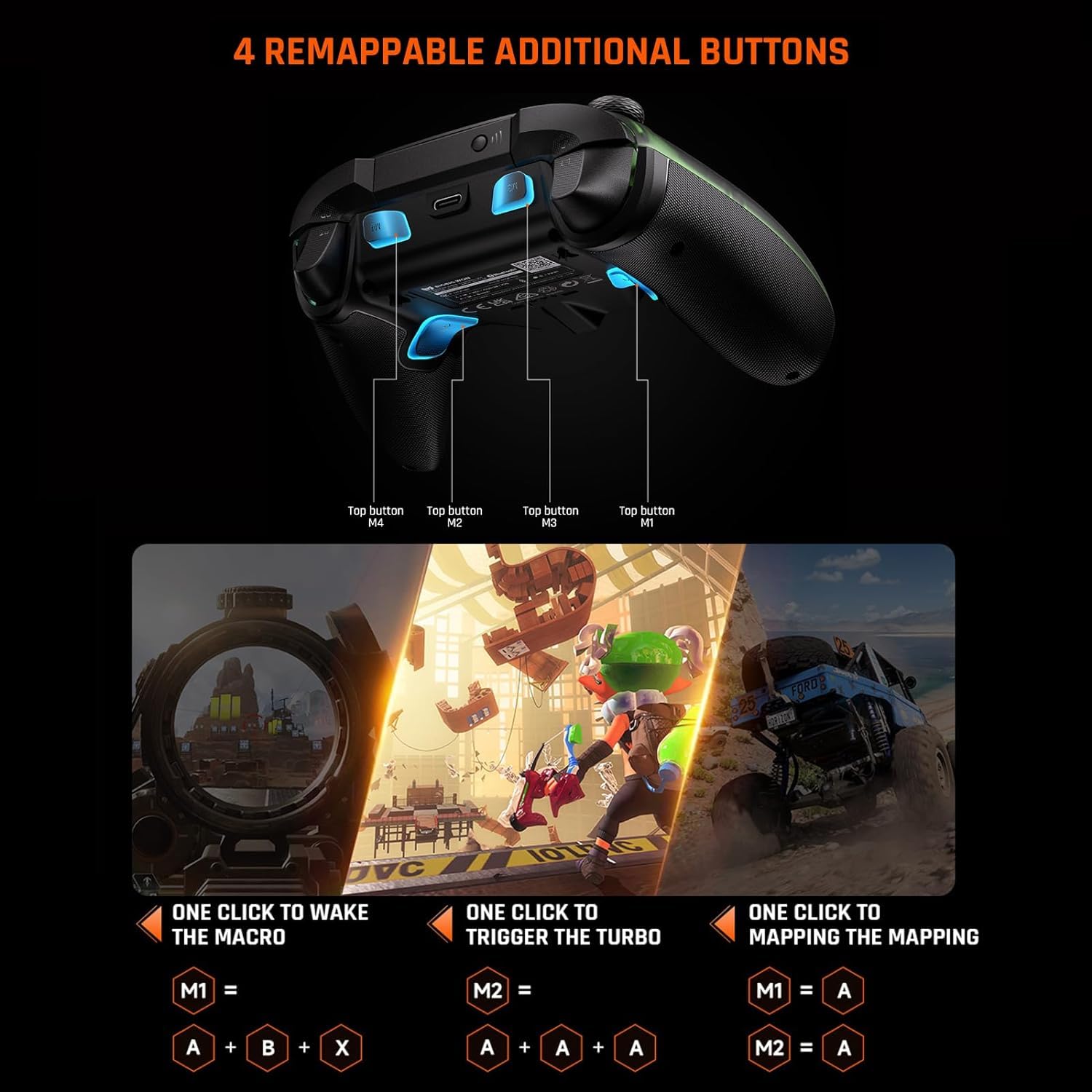
انځور 4.1: An image displaying the underside of the Rainbow 2 Pro controller, highlighting the four remappable additional buttons (M1, M2, M3, M4) located on the back and top of the grips.
4.2. Joystick and Trigger Functionality
- ALPS Joysticks: Provide precise control with 0 deadzone. Adaptive calibration automatically adjusts the center point to prevent drift.
- Interchangeable Joysticks: The controller comes with 3 sets of joysticks (short, middle, high) to match different gaming preferences.
- Hall-Effect Triggers: Offer 256 levels of precise input.
- Trigger-Stop Switch: Adjust the trigger travel distance for different game types. A short pull is ideal for FPS games (e.g., APEX), while a long pull is suitable for racing games (e.g., Forza Horizon 5).

انځور 4.2: A detailed diagram illustrating the internal components of the ALPS joystick and the three interchangeable joystick caps (short, middle, high) that can be used to customize the feel and response.

انځور 4.3: A cross-sectional view of the Hall-effect trigger mechanism, demonstrating its precise control. Below, two images show the trigger-stop switch set for a short pull (FPS games) and a long pull (racing games).
۳. د حرکت کنټرول
The controller incorporates "GYROCON+" technology for motion aiming. This feature is supported on PC platforms but not on Nintendo Switch.

انځور 4.4: A user operating the Rainbow 2 Pro controller for motion aiming in a PC game, demonstrating the "GYROCON+" technology in action.
4.4. BIGBIG WON ELITE App Customization
The BIGBIG WON ELITE App allows for extensive customization of your controller settings in real-time.
- د تڼۍ نقشه کول: Reassign functions to any button, including the additional M buttons.
- Joystick/Trigger Deadzone & Sensitivity: Fine-tune the response of joysticks and triggers.
- Motion Control Parameters: Adjust sensitivity and other settings for motion aiming.
- د میکرو پروګرام کول: Create and assign complex button sequences to simplify in-game actions.
- د RGB اغیزې: Customize the controller's RGB lighting.
Download the app from your device's respective app store. For Android users, ensure Bluetooth and location functions are enabled on your phone to connect to the app.

انځور 4.5: Multiple smartphone screens displaying various customization interfaces within the BIGBIG WON ELITE App, including sensitivity adjustments, deadzone settings, macro programming, and button mapping.
5. ساتنه
- پاکول: د کنټرولر پاکولو لپاره نرم، وچ ټوکر وکاروئ. د سختو کیمیاوي موادو یا کثافاتو موادو کارولو څخه ډډه وکړئ.
- ذخیره کول: کنټرولر په یخ او وچ ځای کې د مستقیم لمر وړانګو او سختې تودوخې څخه لرې وساتئ.
- د بیټرۍ پاملرنه: The controller includes a Lithium Ion battery. For optimal battery life, avoid fully discharging the battery frequently. Charge the controller regularly, especially if it will be stored for an extended period.
- Adaptive Calibration: The controller features adaptive calibration for joysticks. If you experience minor drift, the system will automatically sample the center point to correct it. Manual calibration is generally not required.
6. ستونزه حل کول
| مسله | احتمالي لامل | د حل لاره |
|---|---|---|
| Controller not connecting wirelessly | Low battery, incorrect mode, pairing issue, dongle not recognized. | Charge the controller. Ensure the correct connection mode (2.4G or Bluetooth) is selected. Re-pair the controller with the dongle or device. Try a different USB port for the dongle. |
| Joystick drift or inaccurate input | Calibration issue, physical obstruction. | The controller has adaptive calibration; allow it to self-correct. Ensure no debris is around the joystick base. If issues persist, check for firmware updates via the BIGBIG WON ELITE App. |
| تڼۍ بې ځوابه | د سافټویر خرابوالی، فزیکي زیان. | Restart the controller and the connected device. Check for any physical obstructions. If specific buttons are unresponsive, contact support. |
| Audio jack not working | Incorrect connection method, headset issue. | The 3.5mm audio jack function is supported when using a 2.4G wireless connection. Ensure your headset is properly plugged in and functional. |
| App not connecting to controller | Bluetooth/location services off (Android), pairing issue. | For Android, ensure Bluetooth and location services are enabled. Ensure the controller is in Bluetooth pairing mode and paired with your phone. |
7. مشخصات
- ماډل: Rainbow 2 Pro
- جوړونکی: بي بي بيګ وګټله
- ارتباط: ۲.۴ جي بېسیم، بلوتوث، USB-C وایرډ
- د رای ورکولو کچه: 200Hz (2.4G Wireless), 1000Hz (Wired)
- جوسټک: ALPS, 0 Deadzone, 12-bit Axis Resolution, Adaptive Calibration, 3 Interchangeable Sets
- محرکونه: Hall-Effect, 256 Levels, Trigger-Stop Switch
- ډي پیډ: ۳۲-لاره
- اضافي تڼۍ: 4 Remappable (2 back, 2 top)
- د حرکت کنټرول: GYROCON+ (PC only)
- آډیو: 3.5mm Jack (supported with 2.4G connection)
- بیټرۍ: 1 لیتیم ایون (شامل)
- مطابقت: PC (Windows 10/11), Nintendo Switch, Android (7.0+), iOS (14.0+)
- ابعاد: 7.52 x 5 x 2.99 انچه
- وزن: 1.1 پونډه
- د شتون لومړۍ نیټه: د اګست ۷، ۲۰۲۴

انځور 7.1: A graph illustrating the polling rates of the Rainbow 2 Pro controller (200Hz for 2.4G, 1000Hz for wired) compared to a regular controller's 125Hz, emphasizing the higher responsiveness.
8. تضمین او ملاتړ
For warranty information and technical support, please refer to the official BIGBIG WON webسایټ ته لاړ شئ یا مستقیم د دوی د پیرودونکو خدماتو سره اړیکه ونیسئ. د تضمین ادعاوو لپاره خپل د پیرود رسید وساتئ.


