1. پیژندنه
This manual provides detailed instructions for the safe installation, operation, and maintenance of your PHORUS 48-inch Modern White Ceiling Fan with Lights and Remote/APP Control. Please read all instructions carefully before beginning installation and retain this manual for future reference.
2. د خوندیتوب معلومات
- Ensure the power is disconnected at the circuit breaker before installation or servicing.
- ټول تارونه باید د ملي او محلي بریښنا کوډونو سره سم وي. که تاسو د تارونو سره بلد نه یاست، نو د یو وړ بریښنایی متخصص سره مشوره وکړئ.
- فین باید د فرش څخه د تیغ تر شا څنډې پورې لږ تر لږه 7 فوټ (2.1 متره) فاصله کې نصب شي.
- د نصبولو جوړښت باید د فین د وزن (تقریبا 13.4 پونډه) ملاتړ کولو توان ولري.
- د نصبولو یا پاکولو پرمهال د تیغ لرونکي مه ځړئ.
- دا فین د داخلي استعمال لپاره ډیزاین شوی.
3. د بسته محتويات
د نصبولو پیل کولو دمخه ډاډ ترلاسه کړئ چې ټولې برخې شتون لري:
- د فین موټرو مجلس
- ځوړند تخته
- 5 فین بلیډونه
- LED Lampسایه
- ریموټ کنټرول (د دوه AAA بیټریو سره)
- پیچونه او د نصبولو هارډویر
- د لارښوونې لارښود

4. مشخصات
| فیچر | مشخصات |
|---|---|
| برانډ | فارس |
| د ماډل نوم | #8907 |
| اندازه | ۸۵ انچه |
| رنګ | سپین |
| مواد | اکریلیک، پلاستیک |
| د موټرو ډول | DC Motor (30W) |
| د رڼا سرچینه | LED (28W) |
| رڼا رنګونه | 3 (White, Warm, Neutral) |
| Dimming لړ | Stepless (10%-100%) |
| د باد سرعت | 6 |
| د کنټرول طریقه | ریموټ کنټرول، د APP کنټرول |
| ځانګړي ځانګړتیاوې | Reversible Function, 2-Hour Timer, Memory Function |
| د غږ کچه | د 35 dB څخه ښکته |
| د محصول ابعاد | ۷۱"لیتر x ۲۳.۶"واټه x ۲۴.۴"هوا |
| د توکي وزن | ۲.۴۵ پونډه |
5. ترتیب او نصب کول
5.1 د نصب څخه دمخه چیک لیست
- Ensure the power supply is turned off at the main circuit breaker.
- Confirm you have all necessary tools (screwdriver, drill, wire strippers, etc.).
- Verify that the ceiling junction box is securely mounted and capable of supporting the fan.
۴.۲ ګام په ګام نصب کول
- Attach Blades to Motor Assembly: Secure each of the five fan blades to the motor assembly using the provided screws. Ensure the 'THIS SIDE UP' marking on the blade attachment is facing upwards.
- Install LED Light Board: Carefully place the LED light board into the designated area on the motor assembly and secure it with screws. Connect the LED wires.
- Attach LED Lampسایه: LED ځای په ځای کړئ lampshade over the light board and twist it clockwise until it is securely fastened.
- Mount Hanging Board: Secure the hanging board to your ceiling junction box using appropriate screws. Ensure it is firmly attached.
- د تار نښلول: Connect the fan's electrical wires to your household wiring. The typical connections are: Black (Live) to Black (Live), White (Neutral) to White (Neutral), and Yellow/Green (Ground) to Green (Ground). Use the provided wire connectors.
- Secure Fan to Hanging Board: Lift the fan assembly and attach it to the hanging board, ensuring all wires are tucked safely inside the canopy. Secure the fan with the provided screws.
6. عملیاتي لارښوونې
6.1 د ریموټ کنټرول فعالیتونه
The included remote control allows for convenient operation of your ceiling fan:
- پاور آن/بند: د فین او څراغ د فعالولو یا بندولو لپاره د بریښنا تڼۍ فشار ورکړئ.
- د فین سرعت: Select from 6 wind speeds (1-6) to adjust airflow.
- ر Lightا آن/آف: رڼا په خپلواکه توګه د فین څخه کنټرول کړئ.
- د رنګ حرارت: Cycle through 3 light colors: White (6000K), Neutral (4500K), and Warm (3000K).
- دیمینګ: د رڼا روښانتیا له ۵٪ څخه تر ۱۰۰٪ پورې تنظیم کړئ.
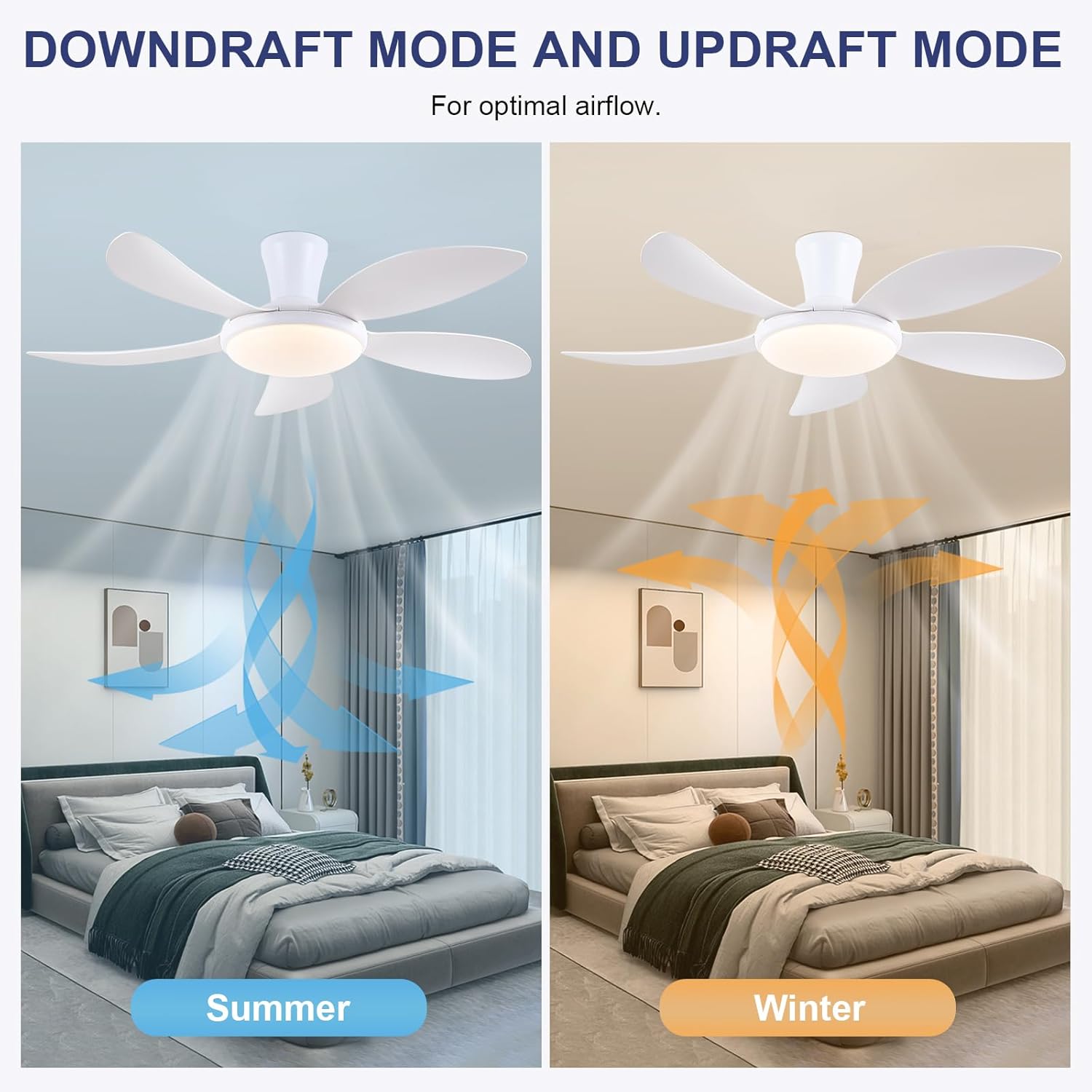
- د بیرته راګرځیدونکي فعالیت: Press the F/R key to change the blade rotation direction for summer (downdraft) or winter (updraft) modes. The fan will stop briefly before reversing.
- ټایمر: Set a 2-hour timer for automatic shutdown.
- د شپې حالت: Activates a low-speed fan and dim light setting.

6.2 Remote Code Pairing
If the remote control is not responding, it may need to be paired:
- Turn off the main power supply to the fan for one minute.
- Turn on the main power supply and simultaneously long-press the 'Code Key' button on the remote control for 3-5 seconds.
- The fan light will blink 2-3 times, indicating successful code matching. The remote can now be operated normally.
6.3 د APP کنټرول
Control your fan using the 'Fan Lamp Pro' mobile application:
- اپلیکیشن ډاونلوډ کړئ: Scan the QR code provided in the product images or search for "Fan Lamp Pro" in your app store.
- د بلوتوث له لارې وصل شئ: ډاډ ترلاسه کړئ چې ستاسو د تلیفون بلوتوث فعال دی.
- جوړه وسیله: Open the app, add a new device, and follow the on-screen instructions to connect to your fan. The fan light will blink twice upon successful connection.
- دندې: The app allows control over fan speeds, light colors, dimming, reverse function, and timer settings, similar to the remote control.
6.4 Fan Speed and Airflow
- کچه 1-2: Low Comfortable Wind, suitable for sleep.
- کچه 3-4: Medium Natural Wind, suitable for daily life.
- کچه 5-6: High Cooling Wind, suitable for hot weather.

6.5 د رڼا ترتیبات
- The LED light source supports stepless dimming and memory function, retaining your last brightness and color temperature setting.
- Choose from 3 color temperatures: 3000K (Warm Light), 4500K (Natural Light), and 6000K (White Light).

۵.۳ د بیرته راګرځیدونکي فعالیت
The reversible DC motor allows you to change the direction of the fan seasonally:
- د دوبي حالت (ډاونډرافټ): Blades rotate counter-clockwise, pushing cool air downwards.
- د ژمي حالت (اپډرافټ): Blades rotate clockwise, drawing cool air up and circulating warm air downwards.
7. ساتنه
- پاکول: د فین پاکولو لپاره، د نرم، d سره مسح کړئamp ټوکر د کثافاتو پاکوونکي یا محلول مه کاروئ.
- د تیغ ساتنه: The ABS blades are designed to be easy to clean and resistant to deformation.
- منظم چکونه: Periodically check all connections and screws to ensure they are secure.
8. ستونزه حل کول
که تاسو د خپل فین سره ستونزې سره مخ شئ، لاندې عامې ستونزې او حل لارې وګورئ:
- فین کار نه کوي: Check power supply, ensure all wiring connections are secure, and verify remote control pairing.
- رڼا کار نه کوي: Check power supply, ensure light wires are connected, and verify remote control pairing.
- فین شور دی: Ensure all screws are tightened, especially on the blades and mounting bracket. Check for any obstructions.
- ریموټ کنټرول کار نه کوي: Replace batteries, ensure line of sight to the fan, and re-pair the remote control as per section 6.2.
- د APP د اتصال ستونزې: Ensure Bluetooth is on, the app is updated, and try re-pairing the device.
9. تضمین او ملاتړ
PHORUS provides a one-year quality warranty for this product. For any damage or quality problems, free replacement service is offered. If you have any questions or require assistance, please contact PHORUS customer service. You will receive a satisfactory answer within 24 hours.
For additional support and resources, please visit the official PHORUS webسایټ ته مراجعه وکړئ یا ستاسو د پیرود سره چمتو شوي د اړیکو معلوماتو ته مراجعه وکړئ.


