1. د خوندیتوب لارښوونې
Please read and understand all safety instructions before operating the Moukey MTs10-2 Karaoke Machine. Retain this manual for future reference.
- وسیله د باران، رطوبت، یا ډیرې تودوخې سره مه مخ کوئ.
- د تودوخې سرچینو ته نږدې یا مستقیم لمر وړانګو کې د واحد له ایښودلو څخه ډډه وکړئ.
- سي مه خلاصوهasinز؛ ټولې خدمتونه وړ پرسونل ته راجع کړئ.
- د ډیر تودوخې مخنیوي لپاره مناسب هوا ورکول ډاډمن کړئ.
- یوازې چمتو شوي بریښنا اډاپټر وکاروئ.
- د ماشومانو د لاسرسي څخه لرې وساتئ.
- د بیټرۍ د ځایی مقرراتو سره سم په مسؤلیت سره تصفیه کړئ.
2. د بسته محتويات
ډاډ ترلاسه کړئ چې لاندې ټول توکي ستاسو په بسته کې شامل دي:
- Moukey MTs10-2 Karaoke Machine
- Wireless Microphone (x2)
- Adjustable Tablet Holder
- ریموټ کنټرول
- د بریښنا اډاپټر
- د 3.5 ملي مکس کیبل
- TV Cable (RCA to 3.5mm)
- د کارونکي لارښود (دا لاسوند)

3. محصول ختم شوview
3.1 اصلي برخې
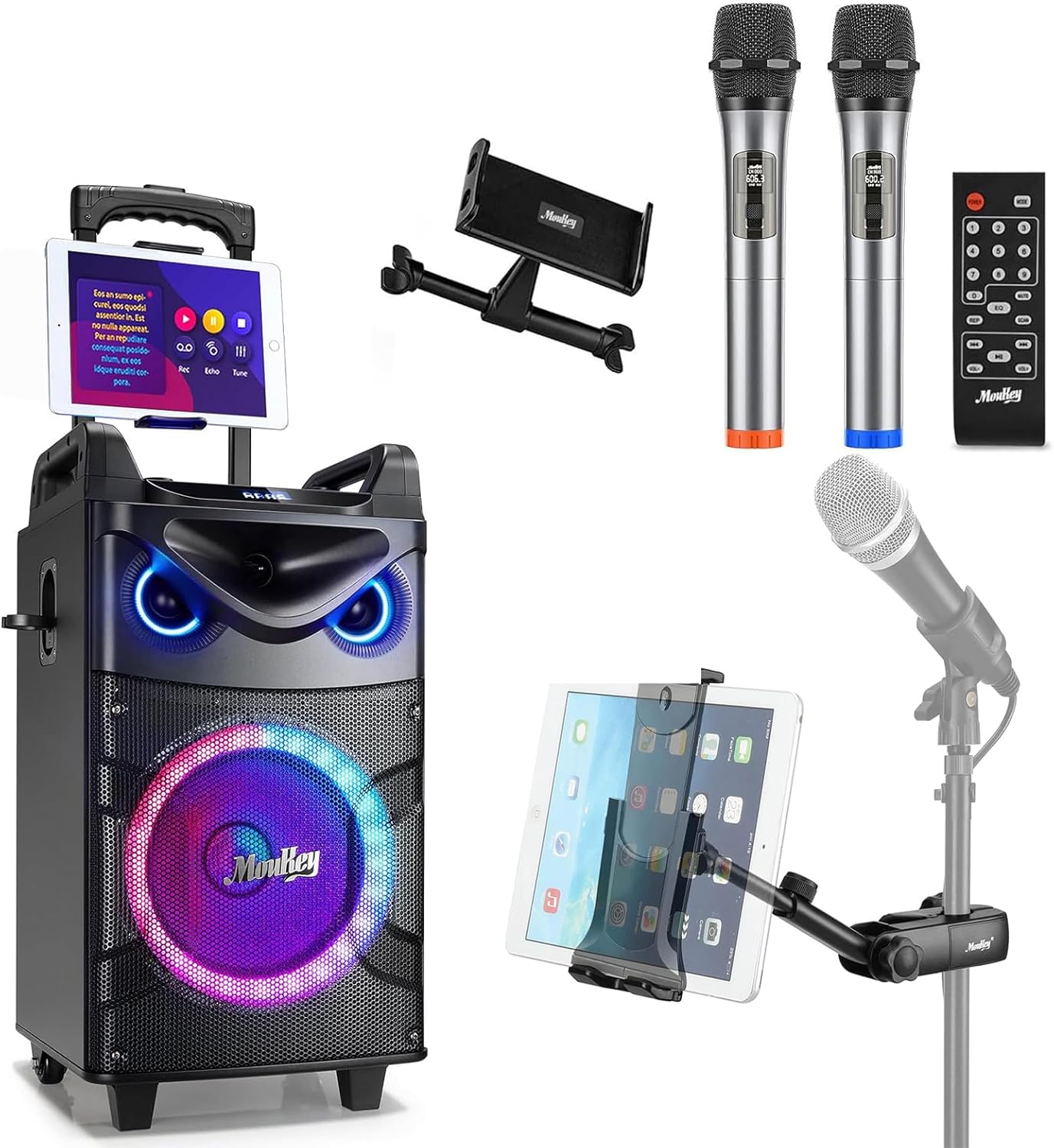
The Moukey MTs10-2 Karaoke Machine features a robust design with integrated audio components and versatile connectivity options.
- 10-inch Woofer: Provides powerful bass and full-range sound reproduction.
- 3 انچ ټویټر: Delivers clear high-frequency audio.
- UHF Wireless Microphones: Two high-fidelity microphones for vocal performance.
- د تنظیم وړ ټابلیټ لرونکی: Securely holds smartphones and tablets for lyric display or video playback.
- مدغم LED څراغونه: Dynamic colorful lights that synchronize with music.

3.2 د کنټرول پینل
The control panel located on the top of the unit provides access to all functions and adjustments.
- د حجم نوب: د ماسټر حجم تنظیموي.
- د باس تنظیم کول: Controls the low-frequency output.
- درې اړخیز تعدیل: Controls the high-frequency output.
- د حالت تڼۍ: Switches between input sources (Bluetooth, AUX, USB, TF Card, FM Radio).
- Light FX Button: Cycles through LED light modes.
- USB پورټ: د USB ډرایو پلې بیک لپاره.
- د TF کارت سلاټ: د TF کارت پلې بیک لپاره.
- AUX په کې: د بهرني آډیو وسیلو لپاره 3.5 ملي میتر ان پټ.
- 6.35mm Mic Jacks: Two additional inputs for wired microphones.
- INST/TWS Button: Initiates True Wireless System pairing or instrument input.

4. ترتیب کول
4.1 Charging the Karaoke Machine
- Connect the provided power adapter to the DC IN port on the back of the karaoke machine.
- اډیپټر په معیاري دیوال ساکټ کې پلګ کړئ.
- د چارج کولو شاخص څراغ به روښانه شي. بشپړ چارج معمولا شاوخوا 6 ساعته وخت نیسي.
- The machine offers up to 14 hours of playing time on a full charge, depending on usage.

4.2 Installing Microphone Batteries
Each wireless microphone requires two AA batteries (not included).
- Unscrew the bottom cap of each microphone.
- دوه AA بیټرۍ دننه کړئ، د سم قطبیت ډاډ ترلاسه کړئ (+/-).
- لاندې خولۍ په خوندي ډول بیرته ولګوئ.

4.3 Attaching the Tablet Holder
The adjustable tablet holder can be attached to the karaoke machine or a separate microphone stand.
- To the Karaoke Machine: Slide the tablet holder's base into the designated slot on top of the MTs10-2 unit until it clicks into place.
- To a Mic Stand: د cl څخه کار واخلئamp mechanism on the tablet holder to secure it to a standard microphone stand pole.
- Adjust the flexible ball joint and the 360° rotatable clamp د مطلوب ترلاسه کولو لپاره viewing angle for your device.


5. عملیاتي لارښوونې
۸ پاور آن/بند
Press and hold the Power button on the control panel to turn the karaoke machine on or off.
5.2 د بلوتوث اتصال
- Turn on the karaoke machine. It will automatically enter Bluetooth pairing mode, indicated by a flashing 'BLUE' on the display.
- په خپل سمارټ فون یا ټابلیټ کې، بلوتوټ فعال کړئ او د شته وسایلو لټون وکړئ.
- Select 'Moukey MTs10-2' from the list to pair. A confirmation tone will sound upon successful connection.
۶.۴ د مایکروفون کارول
- Turn on the wireless microphones using their respective power switches. They will automatically connect to the karaoke machine.
- Adjust the microphone volume using the dedicated controls on the machine.
- For wired microphones, plug them into the 6.35mm Mic Jacks on the control panel.
۴.۵ د ریښتیني بې سیم سیسټم (TWS) جوړه کول
The TWS function allows you to connect two MTs10-2 units for a stereo sound experience (second unit sold separately).
- Ensure both MTs10-2 units are powered on and not connected to any Bluetooth device.
- On one unit (the master), press and hold the 'INST/TWS' button until you hear a pairing tone.
- The two units will automatically connect. Once paired, connect your Bluetooth device to the master unit as described in Section 5.2.

5.5 د LED رڼا طریقې
Press the 'Light FX' button on the control panel or remote control to cycle through various colorful LED light modes. The lights can change color with the beat of the music, creating a dynamic atmosphere.

۶.۱ د آډیو ان پټ اختیارونه
The MTs10-2 supports multiple audio input methods:
- بلوتوث: Wireless connection to smartphones, tablets, and other Bluetooth-enabled devices.
- AUX په کې: Connect external audio players using the provided 3.5mm AUX cable.
- USB/TF کارت: Insert a USB drive or TF card into the respective slots for direct audio playback.
- ایف ایم راډیو: د سیمه ییزو سټیشنونو اوریدو لپاره د ایف ایم راډیو حالت ته لاړ شئ.

5.7 د غږ تنظیم کول
Use the dedicated knobs on the control panel to fine-tune your audio output:
- د حجم نوب: د حجم زیاتولو لپاره د ساعت په لور وګرځوئ، د کمولو لپاره د ساعت په مخالف لوري.
- د باس تنظیم کول: Adjust to enhance or reduce low frequencies.
- درې اړخیز تعدیل: Adjust to enhance or reduce high frequencies.
6. ساتنه
Proper maintenance ensures the longevity and optimal performance of your karaoke machine.
- پاکول: د واحد بهرنۍ برخه پاکولو لپاره نرم، وچ ټوکر وکاروئ. مایع پاکوونکي یا د کثافاتو مواد مه کاروئ.
- ذخیره کول: Store the machine in a cool, dry place away from direct sunlight and extreme temperatures when not in use.
- د بیټرۍ پاملرنه: If storing for an extended period, fully charge the internal battery every 3-6 months to maintain its health. Remove AA batteries from microphones if not used for a long time.
- وینټیلیشن: Ensure the speaker grilles and vents are free from dust and obstructions.
7. ستونزه حل کول
د عامو ستونزو او د هغوی د حل لارو لپاره لاندې جدول ته مراجعه وکړئ.
| ستونزه | احتمالي لامل | د حل لاره |
|---|---|---|
| هیڅ ځواک نشته | Battery depleted; Power adapter not connected. | Charge the machine; Ensure power adapter is securely connected to both the unit and a working outlet. |
| د غږ تولید نشته | حجم ډېر ټیټ دی؛ د ننوتلو ناسم حالت؛ وسیله وصل نه ده. | Increase master volume; Press 'Mode' button to select correct input; Re-pair Bluetooth device or check AUX/USB connection. |
| مایکروفون کار نه کوي | Microphone off; Batteries depleted; Out of range. | Turn on microphone; Replace AA batteries; Ensure microphone is within operating range of the machine. |
| د بلوتوث پیوستون بې ثباته | وسیله ډیره لرې ده؛ مداخله؛ نور بلوتوث وسایل وصل دي. | Move device closer to the machine; Avoid obstacles; Disconnect other Bluetooth devices. |
| د TWS جوړه ناکامه شوه | One or both units already connected to Bluetooth; Incorrect pairing procedure. | Ensure both units are disconnected from other Bluetooth devices; Follow TWS pairing steps in Section 5.4 carefully. |
8. مشخصات
| فیچر | مشخصات |
|---|---|
| برانډ | موکی |
| ماډل | د MTs10-2 معرفي کول |
| د ووفر اندازه | 10 انچه |
| د ټویټر اندازه | 3 انچه |
| د اعظمي بریښنا تولید | 160 واټ |
| د بریښنا سرچینه | د بیټرۍ چلول |
| د ارتباط ټیکنالوژي | بلوتوث |
| د چینلونو شمیر | 4 |
| آډیو ان پټ | Wired microphones, wireless microphones, musical instruments, audio players |
| Microphone Connector Type | 6.35mm Jack (for wired mics) |
| د ټابلیټ هولډر مطابقت | 4.7 to 12.9 inches phones & tablets (horizontal placement) |
| د نصب کولو ډول | د پوړ ودریدل |
| رنګ | تور |
9. تضمین او ملاتړ
Moukey products are designed and manufactured to the highest quality standards. For warranty information, technical support, or service inquiries, please refer to the warranty card included in your package or visit the official Moukey webسایټ تاسو هم کولی شئ لیدنه وکړئ په ایمیزون کې د موکي پلورنځی د اضافي محصول معلوماتو او ملاتړ سرچینو لپاره.


