1. محصول ختم شوview
The Tecmojo 42U Server Rack Network Cabinet is a robust enclosure designed for organizing and protecting 19-inch IT, networking, AV, and server equipment. This model features a 31.5-inch depth with a clear door for easy visibility. It is constructed from high-quality alloy steel to ensure durability and a superior load capacity of up to 1800 lbs.
Key features include an 8-outlet Power Distribution Unit (PDU), cooling fans, a shelf, adjustable rack rails, cable management panels, and casters with brakes for mobility and stability. The fully lockable polycarbonate front door provides security while allowing quick visual inspection of equipment status.

Figure 1: Tecmojo 42U Server Rack with key dimensions. The cabinet has an exterior depth of 31.5 inches and a maximum mountable rail depth of 26.38 inches.
2. د خوندیتوب معلومات
Please read and understand all safety instructions before assembling, installing, or operating this server rack. Failure to follow these instructions may result in injury or damage to equipment.
- د وزن ظرفیت: Do not exceed the maximum load capacity of 1800 lbs (816 kg). Distribute equipment weight evenly within the rack.
- مجلس: Assembly should be performed by at least two individuals due to the size and weight of components. Wear appropriate personal protective equipment (PPE) such as gloves and safety glasses.
- ثبات: Ensure the rack is placed on a level, stable surface. Use the leveling feet for additional stability, especially when the rack is stationary and fully loaded. Engage casters' brakes when moving the rack or when it is in its final position.
- بریښنایی خوندیتوب: When installing electrical components, ensure all power is disconnected. Use appropriate power strips and PDUs that comply with local electrical codes. Ensure proper grounding.
- وینټیلیشن: Maintain adequate airflow around the cabinet to prevent overheating of equipment. Do not block ventilation openings.
3. د بسته محتويات
د اسمبلۍ پیل کولو دمخه ډاډ ترلاسه کړئ چې لاندې لیست شوي ټولې برخې شتون لري او زیانمنې شوې نه دي. که کومه برخه ورکه یا زیانمنه شوې وي، مهرباني وکړئ د پیرودونکي ملاتړ سره اړیکه ونیسئ.
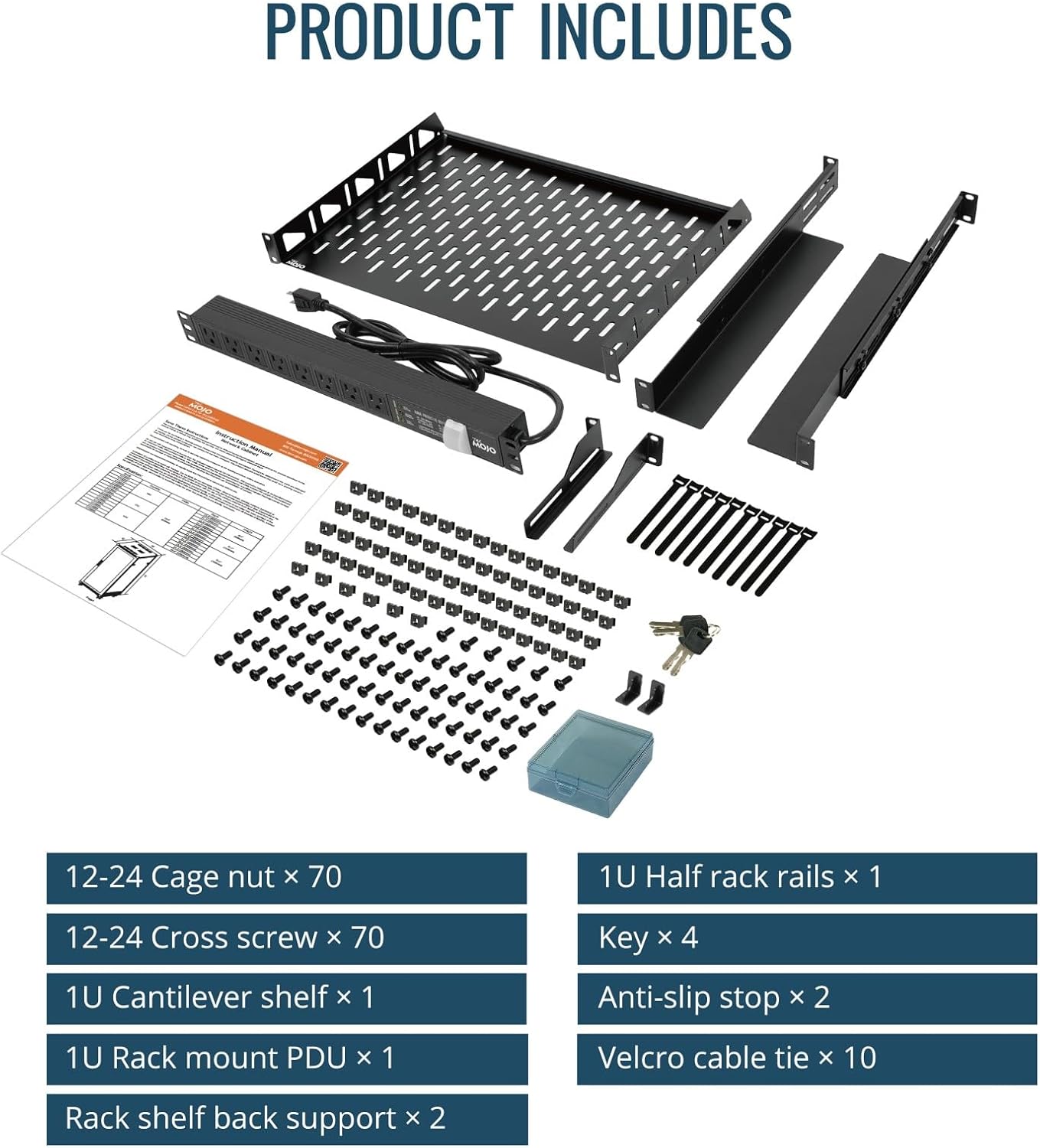
Figure 2: Included components for the Tecmojo 42U Server Rack. This includes various nuts, screws, rack rails, a cantilever shelf, a PDU, keys, anti-slip stops, and Velcro cable ties.
- 42U Server Rack Frame (unassembled)
- 8-Outlet Power Distribution Unit (PDU)
- Cooling Fans (pre-installed in top cover)
- Rack Rails (adjustable)
- 1U Cantilever Shelf
- Cable Management Panels
- Casters with Brakes
- د پښو سطحه کول
- 12-24 Cage Nuts (x70)
- 12-24 Cross Screws (x70)
- 1U Half Rack Rails (x1)
- کلیدونه (x4)
- Anti-slip Stops (x2)
- Velcro Cable Ties (x10)
- Assembly Hardware (bolts, screws, washers)
۴. تنظیم او مجلس
The Tecmojo 42U Server Rack is designed for quick and easy assembly. It is recommended to have at least two people for assembly. Refer to the included video guide for a visual walkthrough of the assembly process.
د مجلس پړاوونه:
- ټولې برخې خلاصې کړئ او د بسته بندۍ د منځپانګې لیست سره سم یې تایید کړئ.
- Assemble the base frame of the cabinet using the provided hardware. Ensure all connections are secure but do not fully tighten screws until the entire frame is assembled.
- Attach the vertical rack rails to the frame. The rack rails are adjustable to accommodate various equipment depths.
- Install the top cover, which includes the pre-installed cooling fans. Secure it with the provided screws.
- Install the side panels and the back door. These panels are removable for easy access and maintenance.
- Attach the front clear door. Ensure the locking mechanism functions correctly.
- Install the casters and/or leveling feet to the bottom of the cabinet. Casters provide mobility, while leveling feet offer stability.
- Install the PDU, cantilever shelf, and cable management panels as needed using the cage nuts and screws.
- Once all components are in place, securely tighten all screws throughout the cabinet.
Video 1: Assembly guide for the Tecmojo 42U Network Cabinet (31.5-inch deep model). This video demonstrates the step-by-step process of assembling the rack frame, installing components, and securing doors and panels.
5. عملیاتي لارښوونې
د تجهیزاتو نصب کول:
- Ensure the rack is stable and level before installing any equipment.
- Mount 19-inch rack-mountable equipment using the adjustable rack rails and appropriate cage nuts and screws.
- Distribute the weight of your equipment evenly from bottom to top to maintain stability.
- Utilize the cantilever shelf for non-rack-mountable devices.
Power Distribution Unit (PDU):
- Connect the PDU to a suitable power source.
- Plug your equipment into the PDU outlets. Avoid overloading the PDU's maximum current rating.
د یخولو پرستار:
- The top-mounted cooling fans help dissipate heat from the cabinet. Ensure they are connected to a power source and operating correctly.
- Monitor equipment temperatures to ensure adequate cooling.
د کیبل مدیریت:
- Use the provided cable management panels and Velcro ties to organize cables.
- Proper cable management improves airflow, simplifies maintenance, and prevents accidental disconnections.
امنیت:
- Lock the front clear door and side panels using the provided keys to secure your equipment.
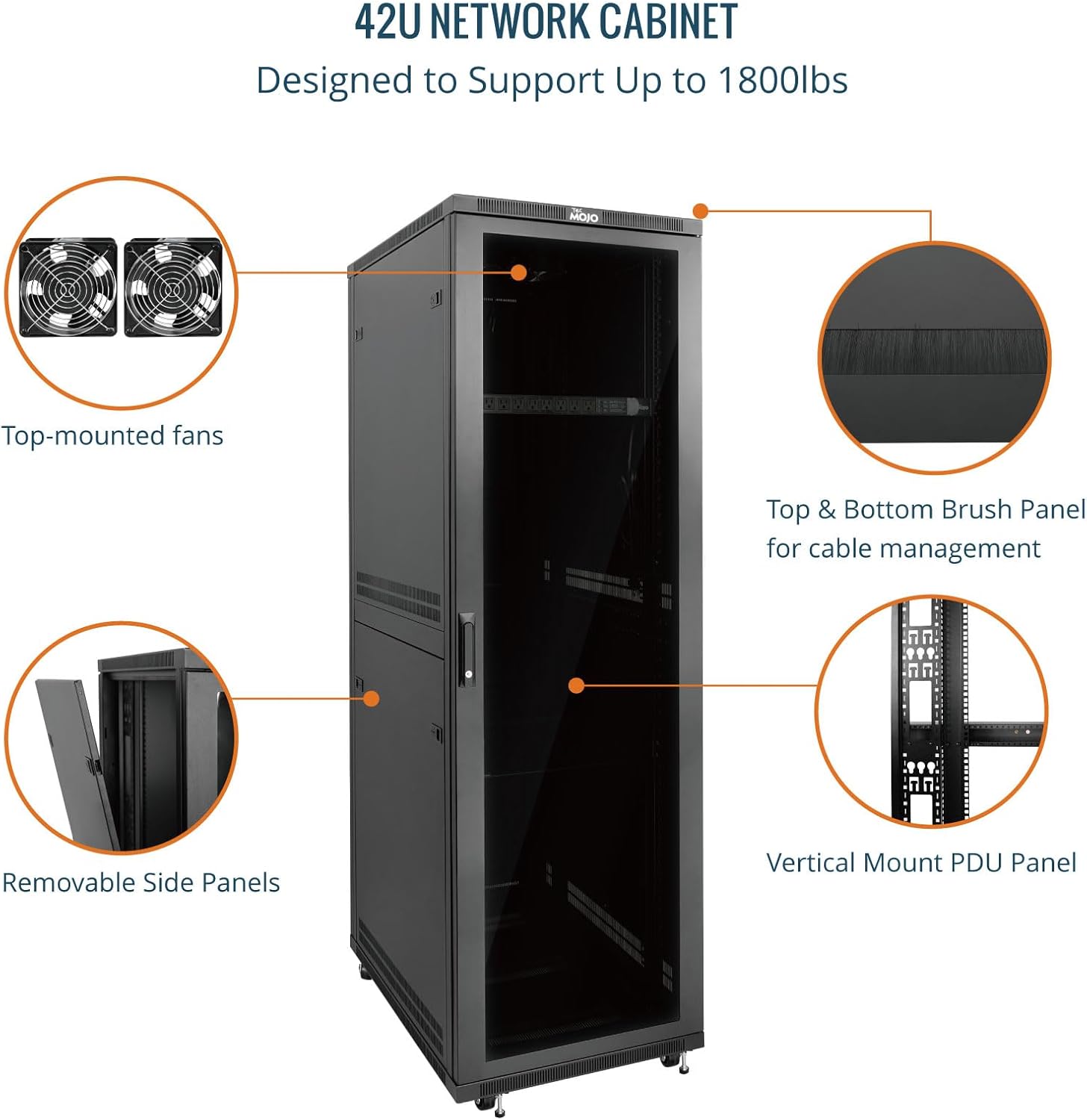
Figure 3: Internal features of the Tecmojo 42U Network Cabinet, highlighting top-mounted fans for cooling, top and bottom brush panels for cable management, removable side panels for access, and a vertical mount PDU panel.

Figure 4: The Tecmojo 42U Network Cabinet includes a PDU, shelf, and cooling fans. It also features adjustable rack rails, casters, and leveling feet for flexibility and mobility.
6. ساتنه
- پاکول: Regularly clean the exterior of the cabinet with a soft, damp cloth. Avoid abrasive cleaners. For the interior, use compressed air to remove dust from equipment and fans.
- د فین معاینه: Periodically check the cooling fans for dust buildup and ensure they are operating quietly and efficiently. Clean or replace as necessary.
- د هارډویر معاینه: Periodically inspect all screws, bolts, and connections to ensure they remain tight. Retighten any loose hardware.
- د کیبل مدیریت: Review cable routing to ensure no cables are pinched or obstructing airflow. Adjust as needed.
- Door and Lock Functionality: Ensure the front door and side panels open, close, and lock smoothly. Lubricate hinges or locks if they become stiff.
7. ستونزه حل کول
- Overheating Equipment:
- Ensure cooling fans are operational and not obstructed.
- Check for proper cable management to improve airflow.
- Verify that the room temperature is within acceptable limits for your equipment.
- د ریک بې ثباتي:
- Ensure the rack is on a level surface. Adjust leveling feet as needed.
- ډاډ ترلاسه کړئ چې ټول د اسمبلۍ پیچونه په خوندي ډول ټینګ شوي دي.
- Distribute equipment weight evenly.
- Doors or Panels Not Closing/Locking:
- Check for any obstructions preventing the door or panel from closing fully.
- Inspect hinges and locking mechanisms for damage or misalignment.
- Ensure the correct key is being used for the locks.
8. مشخصات

Figure 5: Detailed specifications for the Tecmojo 42U Server Rack, showing height of 77.4 inches (1965mm), depth of 31.5 inches (800mm), length of 23.6 inches (600mm), and a weight capacity of 1800 lbs (816 kg).
| فیچر | مشخصات |
|---|---|
| ماډل | 42U 31.5"DEPTH/CLEAR DOOR |
| د محصول ابعاد (د x څلویښتم x څلویښتم) | ۷.۰" x ۲.۰" x ۷.۰" (۱۷۸ ملي متره x ۵۱ ملي متره x ۱۷۸ ملي متره) |
| Max Mountable Depth | 26.38 انچه |
| د توکي وزن | ۶ پونډه (۳ کیلو ګرامه) |
| د بار کولو ظرفیت | تر 1800 پونډه (816 کیلو ګرامه) |
| مواد | د الماس فولاد |
| د دروازې ډول | Clear Door (Polycarbonate) |
| لوازم شامل دي | PDU, Cooling Fans, Shelf, Rack Rails, Cable Management Panels, Casters, Leveling Feet |
| موافقت | EIA/ECA-310-E Compliant |
9. تضمین او ملاتړ
Tecmojo products are manufactured to high-quality standards and come with a standard manufacturer's warranty. For specific warranty details, please refer to the warranty card included with your product or visit the official Tecmojo webسایټ
If you encounter any issues during assembly, installation, or operation, or if you require technical assistance, please contact Tecmojo customer support. Our team is available to provide guidance and resolve any concerns you may have.
د پیرودونکي ملاتړ: د مرستې لپاره، مهرباني وکړئ لیدنه وکړئ Tecmojo Store on Amazon یا ستاسو د محصول په بسته بندۍ کې چمتو شوي د اړیکو معلوماتو ته مراجعه وکړئ.


