1. پیژندنه
This manual provides detailed instructions for the installation, operation, and maintenance of the Aigo B760L D4 Motherboard. Please read this manual thoroughly before installing or using the product to ensure proper functionality and to prevent damage.
2. د خوندیتوب معلومات
تل د خوندیتوب لاندې احتیاطي تدابیر په پام کې ونیسئ:
- Disconnect power before installing or removing any components.
- د مور بورډ د څنډو له لارې لاس ورکړئ ترڅو حساسو برخو ته لاس ورنه کړئ.
- Use an anti-static wrist strap to prevent electrostatic discharge (ESD) damage.
- Ensure proper ventilation within the computer case to prevent overheating.
- مور بورډ د رطوبت یا ډیرې تودوخې سره مه مخ کوئ.
3. د بسته محتويات
ډاډ ترلاسه کړئ چې ټول توکي په کڅوړه کې شتون لري:
- Aigo B760L D4 Motherboard
- د کارونکي لارښود (دا لاسوند)
- د SATA کیبلونه (مقدار ممکن توپیر ولري)
- I / O شیلډ
- د ډرایور سي ډي/يو ايس بي (که شامل وي)
4. محصول ختم شوview
The Aigo B760L D4 is an M-ATX motherboard designed for Intel LGA 1700 processors, featuring the Intel B760 chipset. It supports DDR4 memory and offers a range of connectivity options.
4.1 د مور بورډ ترتیب
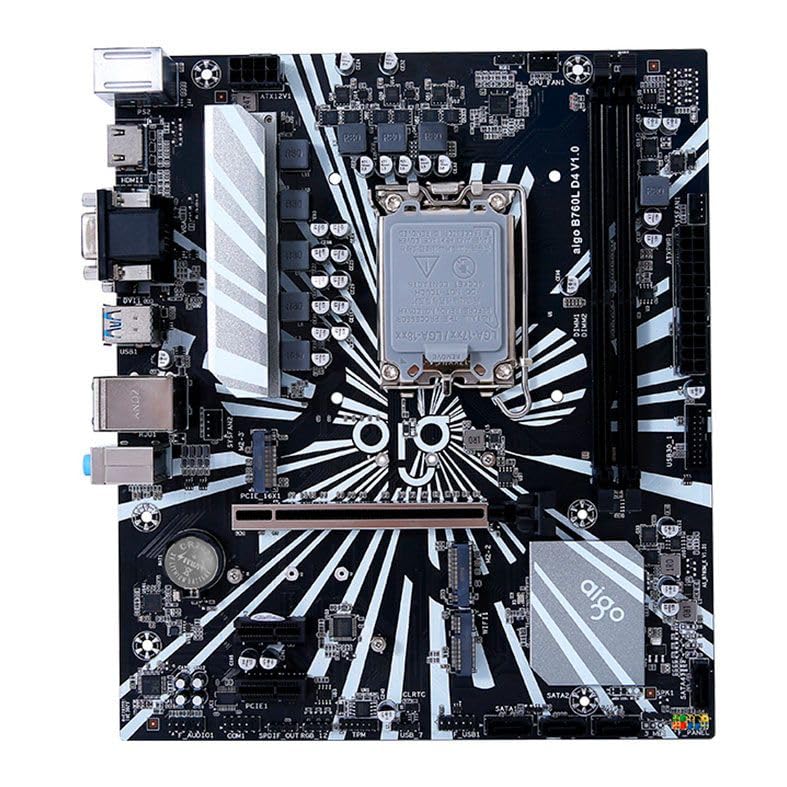
شکل 1: پایview of the Aigo B760L D4 Motherboard alongside its retail packaging.

شکل ۱: پورته څخه ښکته view of the Aigo B760L D4 Motherboard, highlighting component placement.

شکل ۳: زاویه لرونکی view of the Aigo B760L D4 Motherboard, showing the CPU socket and memory slots.
4.2 شاته I/O پینل

Figure 4: Rear I/O panel of the Aigo B760L D4 Motherboard, displaying various connectivity ports.
د شا I/O پینل کې شامل دي:
- 1 x PS/2 Keyboard and Mouse port
- 2 x USB 2.0 بندرونه
- 4 x USB 3.0 بندرونه
- 1 x HDMI بندر
- 2 x DVI ports
- 1 x VGA بندر
- 1 x RJ45 LAN port
- Audio jacks (Line In, Line Out, Mic In)
5. ترتیب کول
5.1 د CPU نصب کول
- په مور بورډ کې د LGA 1700 CPU ساکټ ومومئ.
- د CPU ساکټ لیور خلاص کړئ او د بار پلیټ پورته کړئ.
- په احتیاط سره CPU د ساکټ سره تنظیم کړئ، ډاډ ترلاسه کړئ چې په CPU کې مثلثي نښه د ساکټ نښه سره سمون لري.
- په نرمۍ سره CPU په ساکټ کې ځای په ځای کړئ پرته له دې چې فشار یې ورکړئ.
- د بار کولو پلیټ وتړئ او د لیور سره یې خوندي کړئ.
۴.۳ د DDR4 حافظې نصب کول
The motherboard supports up to 64GB of DDR4 memory across two slots, with speeds from 2133 MHz to 3200 MHz in dual-channel configuration.
- د DIMM سلاټ په دواړو سرونو کې کلپونه خلاص کړئ.
- د حافظې ماډل د سلاټ سره سم کړئ، ډاډ ترلاسه کړئ چې په ماډل کې نښه د سلاټ کې کیلي سره سمون لري.
- د حافظې ماډل په دواړو سرونو کې په کلکه فشار ورکړئ تر هغه چې کلپونه په خپل ځای کې راشي.
5.3 Installing Storage Devices
The motherboard features 4 x SATA 3.0 ports and 2 x M.2 NVME Dual-Protocol slots.
5.3.1 SATA Drives
- د SATA ډیټا کیبل یوه پای په مور بورډ کې د SATA پورټ سره وصل کړئ.
- د SATA ډیټا کیبل بل پای خپل SATA هارډ ډرایو یا SSD سره وصل کړئ.
- د خپل بریښنا رسولو څخه د SATA بریښنا کیبل ډرایو ته وصل کړئ.
5.3.2 M.2 NVME Drives
- Locate an M.2 slot on the motherboard.
- د M.2 سټینډ آف سکرو لرې کړئ.
- Insert the M.2 NVME drive into the slot at a 30-degree angle.
- Gently push the drive down and secure it with the standoff screw.
5.4 د نښلولو بریښنا
د 24-pin ATX بریښنا نښلونکی او د 8-pin ATX 12V بریښنا نښلونکی د خپل بریښنا رسولو څخه د مدر بورډ اړوندو پورټونو سره وصل کړئ.
5.5 Installing Expansion Cards
The motherboard includes 1 x PCIe x16 slot and 1 x PCIe x1 slot.
- Align your expansion card (e.g., graphics card) with the appropriate PCIe slot.
- Press down firmly until the card is seated correctly in the slot.
- Secure the card with a screw to the computer case.
6. چلول
۴.۱ لومړی بوټ او د BIOS تنظیم کول
After assembling your system, connect a monitor, keyboard, and mouse. Power on the system. During startup, press the designated key (usually DEL or F2) to enter the BIOS/UEFI setup utility. Here you can configure boot order, system time, and other advanced settings.
6.2 د عملیاتي سیسټم نصب کول
The Aigo B760L D4 Motherboard supports Windows 10 and Windows 11 operating systems. Insert your OS installation media (USB drive or DVD) and follow the on-screen instructions to install the operating system.
6.3 د ډرایور نصب کول
After OS installation, install the necessary drivers for the chipset, audio, LAN, and other integrated components. These drivers are typically provided on a CD/USB with the motherboard or can be downloaded from the manufacturer's webسایټ
7. ساتنه
- پاک وساتئ: Regularly clean dust from inside your computer case using compressed air. Dust accumulation can lead to overheating.
- د BIOS تازه معلومات: په دوره یي ډول د تولید کونکي معاینه وکړئ website for BIOS/UEFI updates. Updates can improve stability, compatibility, and performance. Follow update instructions carefully.
- د موټر چلوونکي تازه معلومات: خپل ډرایورونه تازه وساتئ ترڅو د نوي سافټویر او هارډویر سره غوره فعالیت او مطابقت ډاډمن کړئ.
- د چاپیریال کنټرول: Operate the system in a cool, dry, and well-ventilated environment.
8. ستونزه حل کول
۱ برېښنا نشته
- Ensure the power supply is connected correctly to the motherboard (24-pin and 8-pin ATX 12V).
- Check if the power supply switch is in the "ON" position.
- Verify that the power button on the case is correctly connected to the motherboard's front panel header.
8.2 نه ښکاره کول
- Ensure the monitor is connected to the correct video output (either integrated graphics or a dedicated graphics card).
- د ګرافیک کارت او حافظې ماډلونه بیا تنظیم کړئ.
- Try booting with only one memory module installed.
۶.۳ د سیسټم بې ثباتي / ټکرونه
- Check CPU and GPU temperatures to ensure they are not overheating.
- Verify that all power connectors are securely attached.
- د غلط RAM د چک کولو لپاره د حافظې تشخیصي وسایل چل کړئ.
- Ensure BIOS is updated to the latest stable version.
9. مشخصات
| فیچر | مشخصات |
|---|---|
| برانډ | ایګو |
| ماډل | AIGO-B760L-D4 |
| چپسیټ | Intel B760 |
| د CPU ساکټ | LGA 1700 |
| د یادونې سلاټونه | د 2 ایکس DDR4 DIMM سلاټونه |
| د حافظې اعظمي ظرفیت | 64GB |
| د حافظې سرعت ملاتړ | 2133 ~ 3200 MHz (Dual Channel) |
| آډیو انٹرفیس | 1 x HDMI, 2 x DVI, 1 x VGA |
| SATA Slots | ۱ ایکس ساټا ۳.۰ |
| M.2 سلاټونه | 2 x M.2 NVME Dual-Protocol |
| د USB پورټونه (شاته) | 2 x USB 2.0 ، 4 x USB 3.0 |
| د توسعې سلاټونه | 1 x PCIe x1، 1 x PCIe x16 |
| د عملیاتي سیسټم ملاتړ | وینډوز 10/11 |
| PS/2 پورټ | 1 x PS/2 Keyboard and Mouse |
| Power Phase | 8-پړاو |
| د بریښنا نښلونکي | 1 x 24-pin ATX, 1 x 8-pin ATX 12V |
| د وائی فای انٹرفیس | 1 x WiFi interface (PCIe compatible) |
| لین پورټ | 1 X RJ45 |
| ابعاد | 24.4 x 21 cm (M-ATX) |
10. تضمین او ملاتړ
For warranty information and technical support, please refer to the documentation provided with your purchase or visit the official Aigo webسایټ. د تضمین ادعاوو لپاره د پیرود ثبوت وساتئ.


