1. پیژندنه
This manual provides detailed instructions for the setup, operation, maintenance, and troubleshooting of your Gustard X30 Network Streaming DAC. Please read this manual thoroughly before using the device to ensure optimal performance and longevity.

شکل 1: مخکی view of the Gustard X30 Network Streaming DAC in silver finish.
2. کلیدي ځانګړتیاوې
The Gustard X30 is a high-performance balanced DAC and preamplifier designed for audiophiles, featuring advanced digital and analog technologies.
- Quad ES9039SPRO & ES9311Q Chipset: Utilizes four ES9039SPRO DAC chips and ES9311Q for a fully balanced architecture with independent power supply and grounding for each channel.
- د لوړ ریزولوشن آډیو ملاتړ: Supports PCM up to 32bit 768kHz, native DSD512, and MQA 384K decoding via XMOS XU216 USB interface.
- Advanced DSP Digital Filter: Incorporates ADI SHARC DSP platform with newly developed high-performance digital filters, supporting 3 types of PCM and 4 types of DSD, including NOS mode.
- Passive Analog Preampژوندی: Features R2R relay volume adjustment for lossless signal control, allowing direct connection to active studio monitors or power ampژغورونکي
- Network Streaming Capabilities: Connects to networks and supports Roon, Airplay, DLNA, UPnP, and NAA protocols with configurable settings and online upgrade functions.
- High-End Components: Includes K2 synthesizer synchronous clock implantation technology, local OCXO clock, external 10M clock input, and discrete Class A analog LPF circuits for optimized performance.
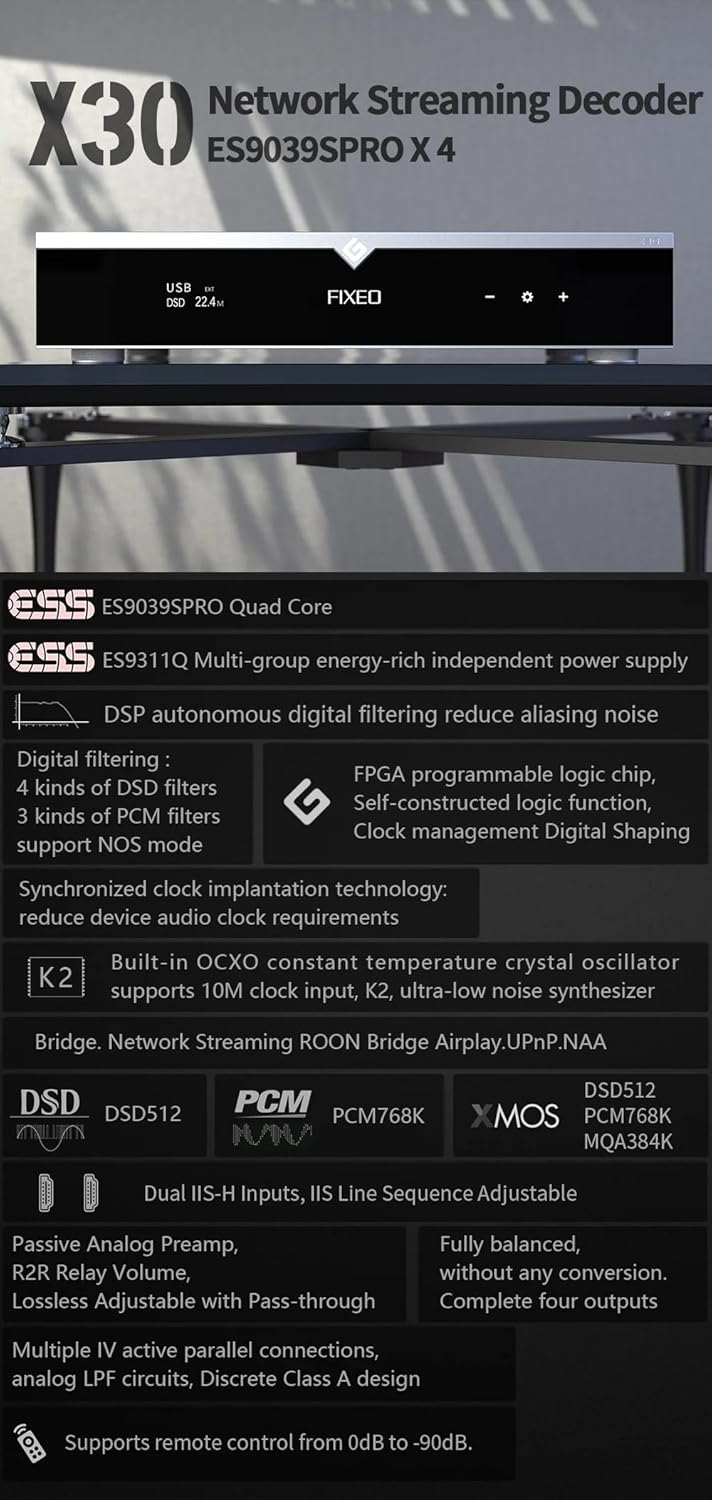
شکل 2: پایview of key features and supported audio formats, including ES9039SPRO Quad Core, DSP digital filtering, network streaming, and clock synchronization.
3. د تنظیم کولو لارښود
3.1 پاکول او ځای پرځای کول
Carefully remove the Gustard X30 from its packaging. Place the unit on a stable, level surface away from direct sunlight, heat sources, and excessive moisture. Ensure adequate ventilation around the unit.
3.2 د نښلولو بریښنا
Connect the provided power cable to the AC input on the rear panel of the X30. Ensure the voltage switch (if present and accessible) is set to your local mains voltage (AC115V/230V). Plug the other end into a suitable wall outlet.
3.3 د ننوتلو او آوټ پټ اتصال
The Gustard X30 offers a variety of digital inputs and analog outputs. Refer to the rear panel diagram for connection points.

Figure 3: Rear panel showing various input and output connections, including Clock, Coaxial, AES, USB, LAN, IIS, XLR, and RCA.
- د USB آله: Connect your computer or digital audio source via a USB cable.
- Optical/Coaxial/AES Inputs: For connecting digital audio sources like CD players, media streamers, or TVs.
- د LAN داخلول: For network streaming capabilities. Connect an Ethernet cable to your router or network switch.
- IIS Inputs (x2): For high-quality digital audio transmission from compatible sources.
- د ساعت داخلول: For connecting an external 10M clock for enhanced timing precision.
- XLR Outputs (Balanced): د متوازن سره د نښلولو لپاره ampلایفیر یا فعال سپیکر.
- RCA Outputs (Unbalanced): د غیر متوازن سره د نښلولو لپاره ampلایفیر یا فعال سپیکر.
4. عملیاتي لارښوونې
4.1 د مخکني پینل کنټرولونه
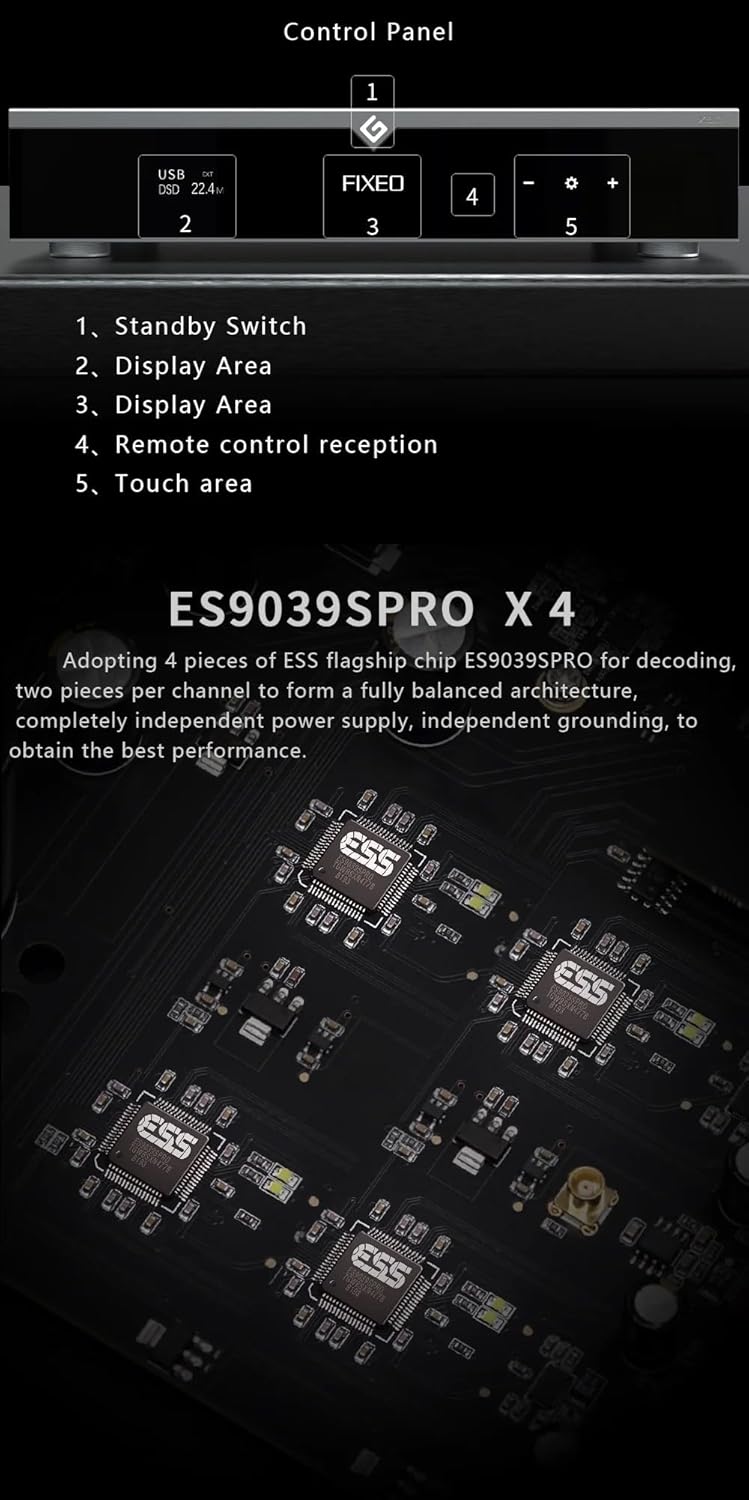
Figure 4: Front panel layout and control areas, indicating standby switch, display, remote reception, and touch area.
- سټینډ بای سویچ: Press to power on/off the unit or put it into standby mode.
- د ښودلو ساحه: اوسنی ان پټ ښیي، sampد نرخ، او نور عملیاتي معلومات.
- Remote Control Reception: د ریموټ کنټرول لپاره انفراریډ ریسیور.
- د ټچ ساحه: Used for navigation and selection on the display.
- Volume/Menu Controls: Adjusts volume or navigates menu options.
4.2 بنسټیز عملیات
- پاور آن/بند: Press the standby switch on the front panel or the power button on the remote control.
- د ننوتلو انتخاب: Use the front panel controls or remote to cycle through available digital inputs (USB, Optical, Coaxial, AES, LAN, IIS, Clock).
- د حجم سمون: Rotate the volume knob or use the +/- buttons on the remote. The X30 features a passive analog preamplifier with R2R relay volume adjustment for lossless control.
- مینو نیویگیشن: Access settings and advanced options via the front panel touch area or remote control.
۴.۳ د شبکې جریان
The Gustard X30 supports various network streaming protocols. For initial setup and configuration, access the device's web configuration page. The Linux kernel is optimized for I/O to reduce audio data forwarding delay and jitter.
- روون چمتو: Integrate the X30 into your Roon ecosystem for seamless music management and playback.
- ایر پلې ۲: د ایپل وسیلو څخه په بې سیم ډول آډیو جریان کړئ.
- ډي ایل این اې/یو پي این پي: Connect to compatible media servers and control points.
- NAA (Network Audio Adapter): For advanced network audio setups.
- د فرم ویئر تازه معلومات: The device supports online firmware upgrades via the network connection.

شکل 5: مثالample of network streaming interface on a tablet and smartphone, demonstrating connectivity and music playback.
5. ساتنه
- پاکول: د واحد بهرنۍ برخه پاکولو لپاره نرم، وچ ټوکر وکاروئ. د کثافاتو پاکوونکو یا محلولونو کارولو څخه ډډه وکړئ.
- وینټیلیشن: ډاډ ترلاسه کړئ چې د هوا د تودوخې د مخنیوي لپاره د وینټیلیشن خلاصونه بند شوي ندي.
- د فرم ویئر تازه معلومات: Regularly check for and install firmware updates to ensure optimal performance and access to new features. Instructions for online updates are available via the device's web انٹرفیس
6. ستونزه حل کول
| ستونزه | احتمالي لامل | د حل لاره |
|---|---|---|
| هیڅ ځواک نشته | Power cable not connected; Power outlet faulty; Unit in standby. | Check power cable connection; Try a different outlet; Press standby switch to power on. |
| د غږ تولید نشته | Incorrect input selected; Volume too low; Cables not connected properly; Amplifier/speakers off or faulty. | Select correct input; Increase volume; Check all audio cable connections; Verify amplifier/speaker status. |
| Network streaming issues | Network cable disconnected; Router/network issue; Incorrect network settings. | Check LAN cable connection; Restart router; Verify network settings via web انٹرفیس |
| خراب شوی غږ | Source audio quality; Incorrect sample rate setting; Faulty cables. | Ensure source audio is high quality; Check sample rate settings on source and DAC; Replace audio cables. |
که چیرې د دې حل لارو هڅه کولو وروسته هم ستونزه دوام ومومي، مهرباني وکړئ د پیرودونکو ملاتړ سره اړیکه ونیسئ.
7. تخنیکي مشخصات

Figure 6: Detailed specifications table outlining supported PCM, MQA, and DSD formats for USB/IIS streamer and AES/Coaxial/Optical inputs.
ډیجیټل ننوت
- LAN Support Protocols: Roon, Airplay, UPnP, NAA, Spotify (configurable via web page, online upgradeable)
- د LAN سرعت: 100/1000Mbps
- 10M Clock (BNC): Input impedance 50 Ohm, 0dBm-20dBm, CMOS square wave 0.2V-3.3V, Sine wave 0.5V-3.3V
انلاګ محصول
- د تعدد ځواب: 20-20kHz / +-0.2dB
- متحرک سلسله: >130dB
- سیګنال ته د شور نسبت: >129dB
- چینل Crosstalk: -139dB @ 10kHz
- THD+N: <=0.0001% @ 1kHz
- IMD: ~0.001% @ -1dbfs
- د RCA محصول کچه: 2.5Vrms (حجم ټاکل شوی)
- RCA Output Impedance: 100Ω
- XLR Output Level: 5.1Vrms (حجم ټاکل شوی)
- د XLR محصول خنډ: 100Ω
- XLR Interface Definition: American standard (1 ground, 2 hot, 3 cold)
نور پیرامیټونه
- د AC بریښنا رسول: AC115V/230V 50/60Hz
- د بریښنا مصرف: <30W
- اندازه (W*D*H): 430mm * 300mm * 80mm (including feet 92mm)
- Package Size (L*W*H): 530mm * 400mm * 180mm
- Weight with Package: ۵.۵ کیلو ګرامه
8. تضمین او ملاتړ
The Gustard X30 is covered by a manufacturer's warranty. Please refer to the warranty card included with your product for specific terms and conditions. For technical support, troubleshooting assistance beyond this manual, or warranty claims, please contact your retailer or the manufacturer, Gustard, directly. The seller, Auinshifiman, also provides 24-hour online service and a 1-year or more pledge from the date of purchase.
For further assistance, you may contact Auinshifiman through their Amazon seller page: Auinshifiman Seller Page.


