1. پیژندنه
This manual provides detailed instructions for the proper installation, operation, and maintenance of your DAIKIN Wireless Remote Controller, model BRC082A42W. This device is designed to offer convenient wireless control over your Daikin ceiling cassette air handler, enhancing your comfort and energy management.
2. محصول ختم شوview
2.1 کلیدي ځانګړتیاوې
- Convenient Wireless Control: Manage your ceiling cassette air handler from anywhere in the room.
- Wall-Mounted Holder: Includes a holder for secure and accessible storage.
- څو دندې: ON/OFF, mode selection, temperature setting, fan speed control, timer, and more.
- مطابقت: Designed for Daikin ceiling cassette units.
- د انرژۍ مدیریت: Includes scheduling options like auto on/off timer for better energy control.
2.2 اجزا
The DAIKIN Wireless Remote Controller BRC082A42W package includes:
- Wireless Remote Controller Unit
- Wall-Mounted Holder
- Signal Receiver (integrates with the decorative grille)
- Batteries (may be included or sold separately)
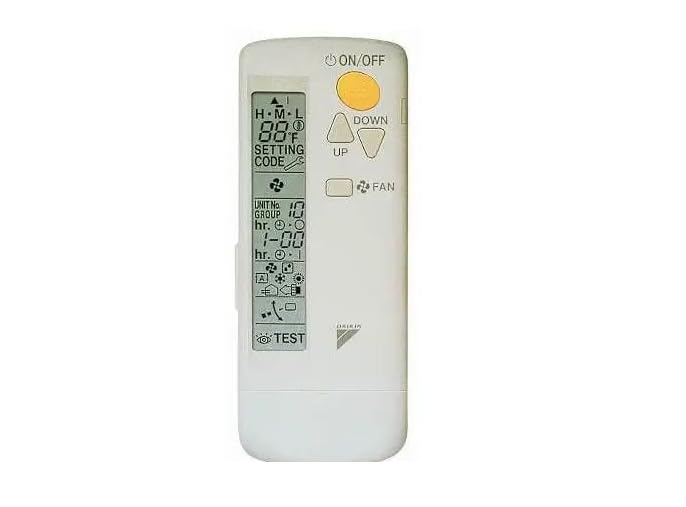
Figure 1: DAIKIN Wireless Remote Controller BRC082A42W. This image shows the compact, white remote control unit.
3. ترتیب او نصب کول
3.1 د بیټرۍ نصب کول
- Open the battery compartment cover on the back of the remote controller.
- Insert the specified batteries, ensuring correct polarity (+/-).
- د بیټرۍ کمپارټ پوښ په خوندي ډول وتړئ.
3.2 Wall-Mounted Holder Installation
- Choose a convenient location for the holder, ensuring the remote signal can reach the air handler's receiver.
- Use the provided screws to securely attach the holder to the wall.
- Place the remote controller into the holder.
3.3 Signal Receiver Integration
The signal receiver for the wireless remote controller integrates seamlessly with the decorative grille of your Daikin ceiling cassette air handler. Refer to your air handler's installation manual for specific instructions on how to install or confirm the presence and connection of the signal receiver.
3.4 Compatibility with Wired Controllers
If a wired controller is also in use with the same Daikin ceiling cassette unit, the wireless remote controller BRC082A42W must be configured as a فرعي کنټرولر. Consult your Daikin air handler's technical documentation or a qualified technician for proper configuration to avoid operational conflicts.
4. عملیاتي لارښوونې
The remote controller provides various functions to manage your Daikin air handler. Point the remote towards the air handler's signal receiver when operating.
4.1 بنسټیز عملیات
- د فعال / بند تڼۍ: Press to turn the air handler ON or OFF.
- د موډل انتخاب: Use the 'MODE' button to cycle through operating modes (e.g., Cool, Heat, Fan, Dry, Auto).
- د حرارت درجه ترتیب: Use the 'TEMP UP' and 'TEMP DOWN' buttons to adjust the desired room temperature.
- د فین سرعت کنټرول: Press the 'FAN' button to select desired fan speed (e.g., Low, Medium, High, Auto).
4.2 د ټیمر دندې
The timer function allows you to program the air handler to turn ON or OFF automatically at specified times, contributing to energy efficiency.
- Setting ON Timer: Press the 'TIMER ON' button, then use temperature/time adjustment buttons to set the desired ON time. Confirm with 'SET'.
- Setting OFF Timer: Press the 'TIMER OFF' button, then use temperature/time adjustment buttons to set the desired OFF time. Confirm with 'SET'.
- Canceling Timer: Press the 'CANCEL' button or the 'TIMER' button again to cancel an active timer.
4.3 پرمختللې دندې
Refer to the display on your remote controller for additional functions such as swing control, powerful mode, or economy mode, if available. Specific button labels and functions may vary slightly.
5. ساتنه
۴.۱ د ریموټ کنټرولر پاکول
To clean the remote controller, gently wipe its surface with a soft, dry cloth. Do not use liquid cleaners, abrasive materials, or chemical sprays, as these can damage the unit.
5.2 د بیټرۍ بدلول
When the display dims or the remote controller becomes unresponsive, it is time to replace the batteries. Always replace all batteries at the same time with new ones of the same type. Dispose of used batteries according to local regulations.
6. ستونزه حل کول
If you encounter issues with your DAIKIN Wireless Remote Controller, refer to the following common problems and solutions:
- ریموټ ځواب نه ورکوي:
- وګورئ چې بیټرۍ په سمه توګه داخلې شوې او کافي چارج لري. که اړتیا وي نو بدل یې کړئ.
- Ensure there are no obstructions between the remote and the air handler's signal receiver.
- Confirm the remote is pointed directly at the receiver.
- Incorrect temperature display:
- Verify the temperature unit setting (Celsius/Fahrenheit) if applicable.
- Air handler not responding to commands:
- Ensure the air handler itself is powered on.
- If a wired controller is also present, confirm the wireless remote is set as a Sub Controller.
For persistent issues, contact Daikin customer support or a qualified service technician.
7. مشخصات
| د ماډل شمیره | BRC082A42W |
| برانډ | ډیکین |
| د توکي وزن | 3.68 اونس |
| د کڅوړې ابعاد | 6 x 2.4 x 0.69 انچه |
| د ارتباط ټیکنالوژي | د راډیو فریکونسي |
| د کنټرولر ډول | د تڼۍ کنټرول |
| مطابقت لرونکې وسیلې | Daikin Ceiling Cassette Air Handlers |
8. تضمین او ملاتړ
This DAIKIN Wireless Remote Controller BRC082A42W is manufactured by Daikin. For specific warranty information, please refer to the warranty card included with your product or visit the official Daikin webسایټ. د تضمین شرایط معمولا د پیرود نیټې څخه د یوې ټاکلې مودې لپاره د تولید نیمګړتیاوې پوښي.
For technical support, service, or to inquire about replacement parts, please contact Daikin customer service directly. Contact information can usually be found on the manufacturer's webسایټ یا د محصول بسته بندي کې.


