1. پیژندنه
Thank you for choosing the LONPOO LP42M Active Bookshelf Speakers. These speakers are designed to deliver high-quality audio with versatile connectivity options, suitable for various home audio setups. This manual provides essential information for safe and efficient use of your new speakers.
2. د خوندیتوب معلومات
مهرباني وکړئ د محصول کارولو دمخه د خوندیتوب ټولې لارښوونې په دقت سره ولولئ. دا لارښود د راتلونکي حوالې لپاره وساتئ.
- د بریښنا سرچینه: یوازې چمتو شوی بریښنا اډاپټر وکاروئ. ډاډ ترلاسه کړئ چې حجمtage ستاسو د محلي بریښنا رسولو سره سمون لري.
- وینټیلیشن: د هوا د جریان لپاره د سپیکرو شاوخوا کافي ځای وساتئ.
- اوبه او رطوبت: Do not expose the speakers to water, rain, or moisture. Avoid placing liquid-filled objects on or near the speakers.
- تودوخه: Keep the speakers away from heat sources such as radiators, heat registers, stoves, or other heat-producing appliances.
- پاکول: Unplug the speakers from the power outlet before cleaning. Use a soft, dry cloth. Do not use liquid cleaners or aerosol cleaners.
- خدمت کول: د دې محصول پخپله خدمت کولو هڅه مه کوئ. ټول خدمتونه وړ خدماتي پرسونل ته راجع کړئ.
3. د بسته محتويات
ډاډ ترلاسه کړئ چې ټول توکي په کڅوړه کې شتون لري:
- LONPOO LP42M Active Bookshelf Speaker Pair (1 powered speaker, 1 passive speaker)
- د ریموٹ کنټرول x 1
- Speaker Wire (6.56ft / 2m) x 1
- Optical Cable (4.92ft / 1.5m) x 1
- AC Power Cord (3.94ft / 1.2m) x 1

4. محصول ختم شوview
The LONPOO LP42M speakers feature a classic wooden design with advanced audio components and multiple connectivity options.
4.1 Front Panel (Powered Speaker)
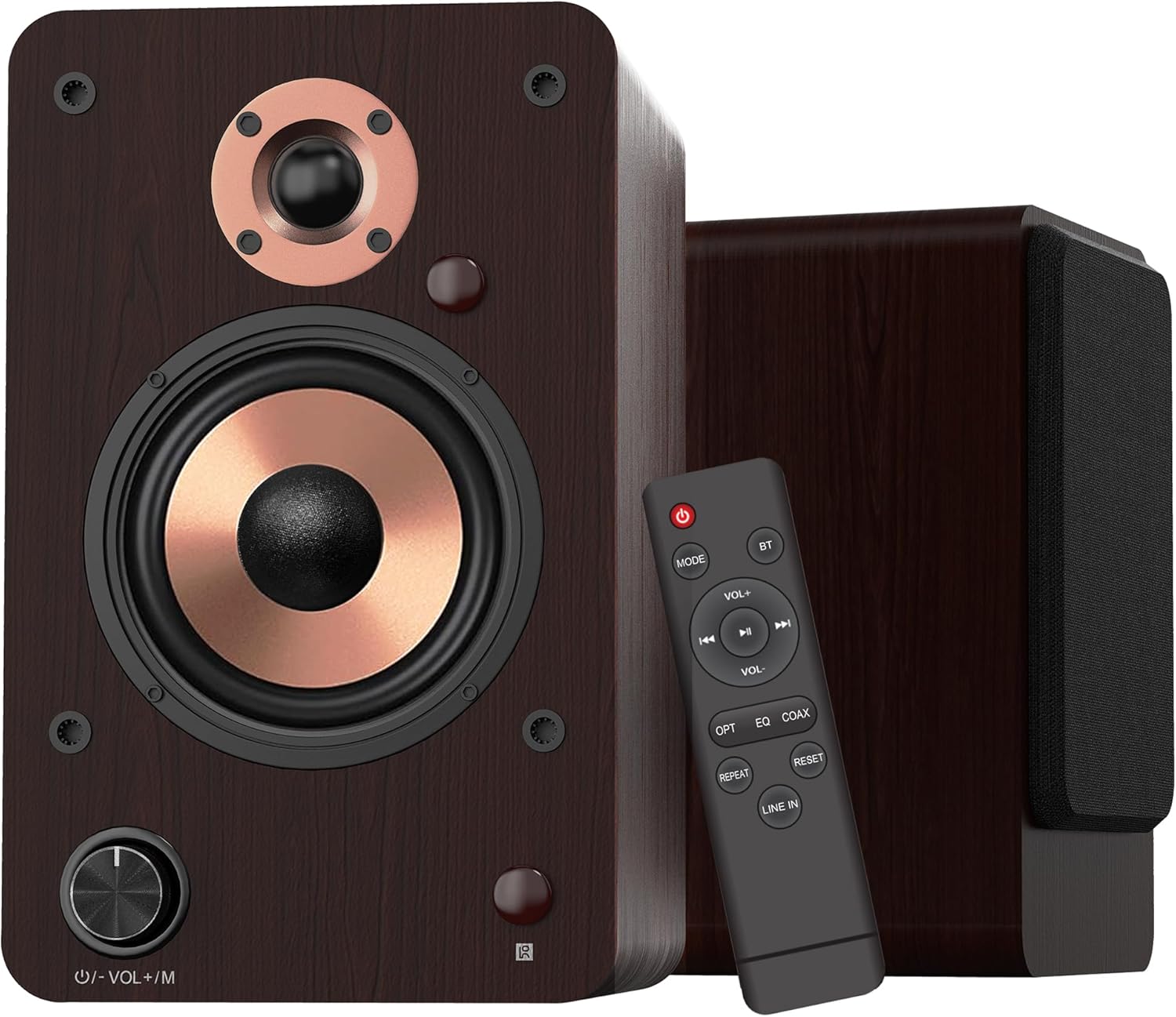
- Volume/Mode Knob: Rotate to adjust volume. Press to cycle through input modes.
- د LED شاخص: Displays the current input mode (Red: Standby, Blue: Bluetooth, Green: Optical, Purple: Coaxial/USB, Yellow: AUX, Light Blue: Line-in).
۳.۱ د سپیکر اجزا

- 1-inch Silk Dome Tweeter: Delivers crisp and clear high frequencies.
- 4-inch Aluminum Cone Woofer: Provides rich and powerful bass.
- 12mm MDF Wood Cabinet: Ensures solid construction and minimizes resonance for improved audio clarity.
4.3 Rear Panel (Powered Speaker)

- TREBLE Button: د لوړې فریکونسۍ محصول تنظیموي.
- د باس تڼۍ: د ټیټ فریکونسۍ محصول تنظیموي.
- د بریښنا سویچ: Turns the speaker system on or off.
- AC PORT: Connects to the AC power cord.
- وینا کوونکی: Connects to the passive speaker using the provided speaker wire.
- LINE IN (RCA L/R): For connecting devices with RCA audio output (e.g., turntables, CD players).
- په اکس کې: For connecting devices with a 3.5mm audio output.
- اختیاري: For connecting devices with optical audio output (e.g., TVs, game consoles).
- محوري: For connecting devices with coaxial audio output.
- د USB داخل: For connecting USB flash drives for audio playback or connecting to a PC.
5. ترتیب کول
5.1 پیک کول
په احتیاط سره د بسته بندۍ څخه ټولې برخې لرې کړئ. بسته بندۍ د راتلونکي لیږد یا ذخیره کولو لپاره وساتئ.
5.2 د سپیکر ځای پرځای کول
For optimal sound quality, place the speakers on a stable surface, such as a bookshelf or speaker stands. Position them along a wall or near a corner of the room to enhance bass response. Ensure the speakers are equidistant from your listening position for a balanced stereo image.
۵.۲ د سپیکرو نښلول
Connect the powered speaker to the passive speaker using the provided speaker wire. Ensure the red wire connects to the red terminal and the white/black wire connects to the black terminal on both speakers.

5.4 د آډیو سرچینو سره نښلول
The LP42M speakers offer multiple input options:
- بلوتوث: د سمارټ فونونو، ټابلیټونو، یا نورو بلوتوث فعالو وسیلو سره د بېسیم اتصال لپاره.
- USB: Connect a USB flash drive for direct audio playback or connect to a PC using a USB cable.
- نظري: Use the optical cable to connect to TVs, game consoles, or other digital audio sources.
- کواکسیال: Use a coaxial cable to connect to compatible digital audio sources.
- RCA (Line In): Use RCA cables to connect to devices like turntables, CD players, or DVD players.
- AUX-in: Use a 3.5mm audio cable to connect to devices with a headphone jack.


5.5 د بریښنا نښلول
Connect the AC power cord to the AC port on the rear of the powered speaker, then plug the other end into a wall outlet.
6. عملیاتي لارښوونې
۸ پاور آن/بند
فلپ کړئ پاور switch on the rear panel of the powered speaker to the 'ON' position to turn on the speakers. Flip it to 'OFF' to power down.
6.2 د ننوتلو انتخاب
فشار ورکړئ Volume/Mode Knob on the front of the powered speaker or the 'MODE' button on the remote control to cycle through the available input modes: Bluetooth, Optical, Coaxial, RCA (Line In), USB, and AUX-in. The LED indicator will change color to reflect the selected mode.

6.3 د حجم کنټرول
وګرځوئ Volume/Mode Knob on the front of the powered speaker clockwise to increase volume and counter-clockwise to decrease volume. Alternatively, use the 'VOL+' and 'VOL-' buttons on the remote control.
6.4 د ټون کنټرول
د کارولو سخت او باس knobs on the rear panel of the powered speaker to adjust the high and low frequencies to your preference.

6.5 د بلوتوټ جوړه کول
- Switch the speaker to Bluetooth mode (blue LED indicator).
- On your device (smartphone, tablet), enable Bluetooth and search for 'LP42M'.
- Select 'LP42M' to pair. Once connected, the blue LED will remain solid.
۱۴ USB پلے بیک
یو USB فلش ډرایو دننه کړئ چې MP3/WMA آډیو ولري files into the USB port. The speaker will automatically switch to USB mode and begin playback. Use the remote control for playback functions (play/pause, next/previous track).
6.7 د ریموټ کنټرول فعالیتونه

- د بریښنا تڼۍ: سپیکرې چالان/بندوي (سټینډ بای).
- لارښوونه: د ننوتلو طریقو له لارې تیریږي.
- BT: په مستقیم ډول بلوتوث حالت ته ځي.
- VOL+/VOL-: حجم تنظیموي.
- پلی/بند کړئ، بل/مخکینی: Controls audio playback (USB/Bluetooth).
- انتخاب: Directly switches to Optical mode.
- EQ: Cycles through sound equalization presets.
- کاکس: Directly switches to Coaxial mode.
- تکرار: Repeats current track or playlist (USB).
- بیا تنظیم کړئ: ترتیبات بیا تنظیموي.
- کرښه په: Directly switches to Line In (RCA) mode.
7. ساتنه
مناسب ساتنه ستاسو د سپیکرو اوږد عمر او فعالیت تضمینوي.
- پاکول: Use a soft, dry, lint-free cloth to clean the speaker cabinets. Do not use abrasive cleaners, waxes, or solvents.
- دوړې: Regularly dust the speaker grilles and surfaces to prevent dust buildup.
- چاپیریال: د سپیکرو د مستقیم لمر وړانګو، د تودوخې سرچینو ته نږدې، یا د لوړ رطوبت لرونکو سیمو کې د ځای پر ځای کولو څخه ډډه وکړئ.
8. ستونزه حل کول
که تاسو له ستونزو سره مخ شئ، لاندې عامې ستونزې او حل لارې وګورئ:
| ستونزه | احتمالي لامل | د حل لاره |
|---|---|---|
| غږ نشته | Power not connected; incorrect input mode; volume too low; cables loose. | Ensure power is on; select correct input mode; increase volume; check all cable connections. |
| بلوتوث نه نښلي | Speaker not in Bluetooth mode; device too far; already paired with another device. | Switch speaker to Bluetooth mode; ensure device is within 10m range; disconnect from other devices and try pairing again. |
| خراب شوی غږ | Volume too high; poor source quality; loose cable connection. | Reduce volume on speaker and source; try a different audio source; check cable connections. |
| ریموټ کنټرول کار نه کوي | Batteries dead; obstruction between remote and speaker; remote not pointed at sensor. | Replace batteries; remove obstructions; ensure remote is pointed at the speaker's sensor. |
9. مشخصات
| فیچر | مشخصات |
|---|---|
| د سپیکر ډول | د کتابخانې فعال سپیکران |
| د تولید بریښنا | 100W (50W x 2) |
| د ووفر قطر | 4 inches (Aluminum Cone) |
| د Tweeter قطر | 1 inch (Silk Dome) |
| د تعدد ځواب | 40Hz-20kHz |
| خنډ | 4 اوهم |
| د شور او سیګنال نسبت (S/N) | 80dB |
| ارتباط | Bluetooth 5.3, Optical, Coaxial, RCA (Line In), USB, AUX-in (3.5mm) |
| د بلوتوټ رینج | تر 10 مترو پورې (33 فوټ) |
| د کنټرول طریقه | Remote Control, On-speaker Knobs |
| د کابینې مواد | ۲۰ ملي متره MDF لرګی |
| ابعاد (هر سپیکر) | 9.84" (H) x 7.07" (W) x 6.1" (L) / 25cm (H) x 18cm (W) x 15.5cm (L) |
| وزن (جوړه) | 5.05 کیلو ګرامه (11.13 پونډه) |
| رنګ | نصواري |
۸. د محصول رسمي ویډیوګانې
Watch these official videos for additional setup and feature demonstrations:
LONPOO Premium Bookshelf Speakers LP-42M
ویډیو: یو رسمي اوورview of the LONPOO LP-42M Premium Bookshelf Speakers, showcasinد دوی ډیزاین او کلیدي ځانګړتیاوې.
Active Bookshelf Speaker 100W
Video: A short demonstration highlighting the active features and 100W power output of the bookshelf speakers.
11. تضمین او ملاتړ
The LONPOO LP42M speakers come with a Limited Warranty. Please refer to the warranty card included in your package for detailed terms and conditions.
For technical support, troubleshooting assistance, or warranty claims, please contact LONPOO customer service through the official webسایټ یا ستاسو پرچون پلورونکی.


