1. پیژندنه
This manual provides comprehensive instructions for the installation, operation, maintenance, and troubleshooting of your PowMr M25A-12V/24V 25A MPPT Solar Charge Controller. This device is designed to efficiently manage power flow from your solar panels to your 12V or 24V battery system, supporting various battery types including lead-acid and lithium batteries.

Figure 1: PowMr M25A-12V/24V 25A MPPT Solar Charge Controller. This image shows the front view of the solar charge controller with its LCD screen and four control buttons.
2. د خوندیتوب لارښوونې
- د نصب او عملیاتو دمخه ټولې لارښوونې په دقت سره ولولئ.
- Ensure all power sources are disconnected before wiring to prevent electric shock.
- Use appropriate tools and wear protective gear during installation.
- Install the controller in a well-ventilated, dry environment, away from flammable materials.
- Ensure correct polarity when connecting batteries and solar panels. Incorrect wiring can damage the controller and other components.
- کنټرولر مه جلا کوئ یا یې پخپله ترمیم مه کوئ. د خدماتو لپاره وړ پرسونل سره اړیکه ونیسئ.
- The controller is designed for 12V/24V battery systems. Do not connect to other voltage سیسټمونه.

Figure 2: Intelligent Protection Features. This image illustrates the nine built-in electronic protections of the PowMr solar controller, including over-discharging, overcharging, overload, short circuit, reverse current, temperature compensation, and reverse polarity protection.
3. ترتیب او نصب کول
Follow these steps for proper installation of your solar charge controller. Adhering to the correct connection sequence is crucial for system safety and functionality.
3.1. تیاری
- سولر پینل: Ensure your solar panel's voltage and power output are compatible with the controller and battery system.
- بیټرۍ: Use a compatible battery type (e.g., AGM, Gel, Flooded, Lithium) for your 12V or 24V system.
- کیبلونه: Use appropriately sized cables to minimize power loss and prevent overheating. Ensure proper fusing for all connections.
۵. د تارونو ترتیب
The correct wiring order is essential. Always connect the battery first, then the solar panels, and finally the load (if applicable).
- Connect the Battery to the Controller:
First, connect the positive (+) terminal of the battery to the battery positive (+) terminal on the charge controller. Then, connect the negative (-) terminal of the battery to the battery negative (-) terminal on the charge controller. Ensure correct polarity. The controller's display should illuminate, indicating a successful battery connection.
- Connect the Solar Panels to the Controller:
Connect the positive (+) lead from your solar panel array to the PV positive (+) terminal on the charge controller. Then, connect the negative (-) lead from your solar panel array to the PV negative (-) terminal on the charge controller. Ensure the solar panels are receiving sufficient sunlight for power generation.
- د DC بار سره وصل کړئ (اختیاري):
If you are using the DC load output, connect the positive (+) lead of your DC load to the load positive (+) terminal on the charge controller, and the negative (-) lead to the load negative (-) terminal. Refer to the operating section for load control settings.
د جلا کېدو لړۍ: To disconnect the system, reverse the order: first disconnect the load, then the solar panels, and finally the battery.

Figure 3: Basic Wiring Diagram. This diagram illustrates the connection of the solar charge controller to solar panels and a battery bank, showing the flow of power.

Figure 4: Simplified 2-Step Connection. This image provides a simplified visual guide for connecting the battery first, then the solar panels, and finally showing the charging process.
4. عملیات
The PowMr M25A-12V/24V controller features an intuitive LCD screen and four buttons for easy monitoring and configuration.
4.1. LCD Display and Buttons
The backlit LCD screen displays real-time system status, including PV input, battery voltage, charging current, and load status. The four buttons (PV, BAT/▲, DC/▼, SET/⚙) allow navigation and parameter adjustment.

Figure 5: Backlit LCD Screen. This image shows the controller's LCD display, indicating PV input, battery status, and load output, along with the control buttons.
4.2. Battery Type Settings
The controller supports various battery types. To set the battery type:
- اوږد فشار ورکړئ BAT/▲ key to enter the setting program.
- د کارولو BAT/▲ او DC/▼ keys to toggle through the battery type options.
- فشار ورکړئ SET/⚙ key to save and confirm your selection.
Pre-set options include Sealed, Gel, Flooded, and Lithium (LFP). A "User customize" option is available for specific parameter adjustments.

Figure 6: Compatible Battery Types. This image displays the controller's compatibility with various battery types, including AGM, GEL, FLD (Flooded), LI (Lithium), and SLA (Sealed Lead-Acid).
4.3. Load Work Modes
The controller offers multiple load work modes to manage your DC output:
- ۱ه: Load Turn OFF (Load is always off).
- ۱ه: Load always Turn ON (Load is continuously on).
- 01H~23H: Time control (Set the duration for which the load remains ON).
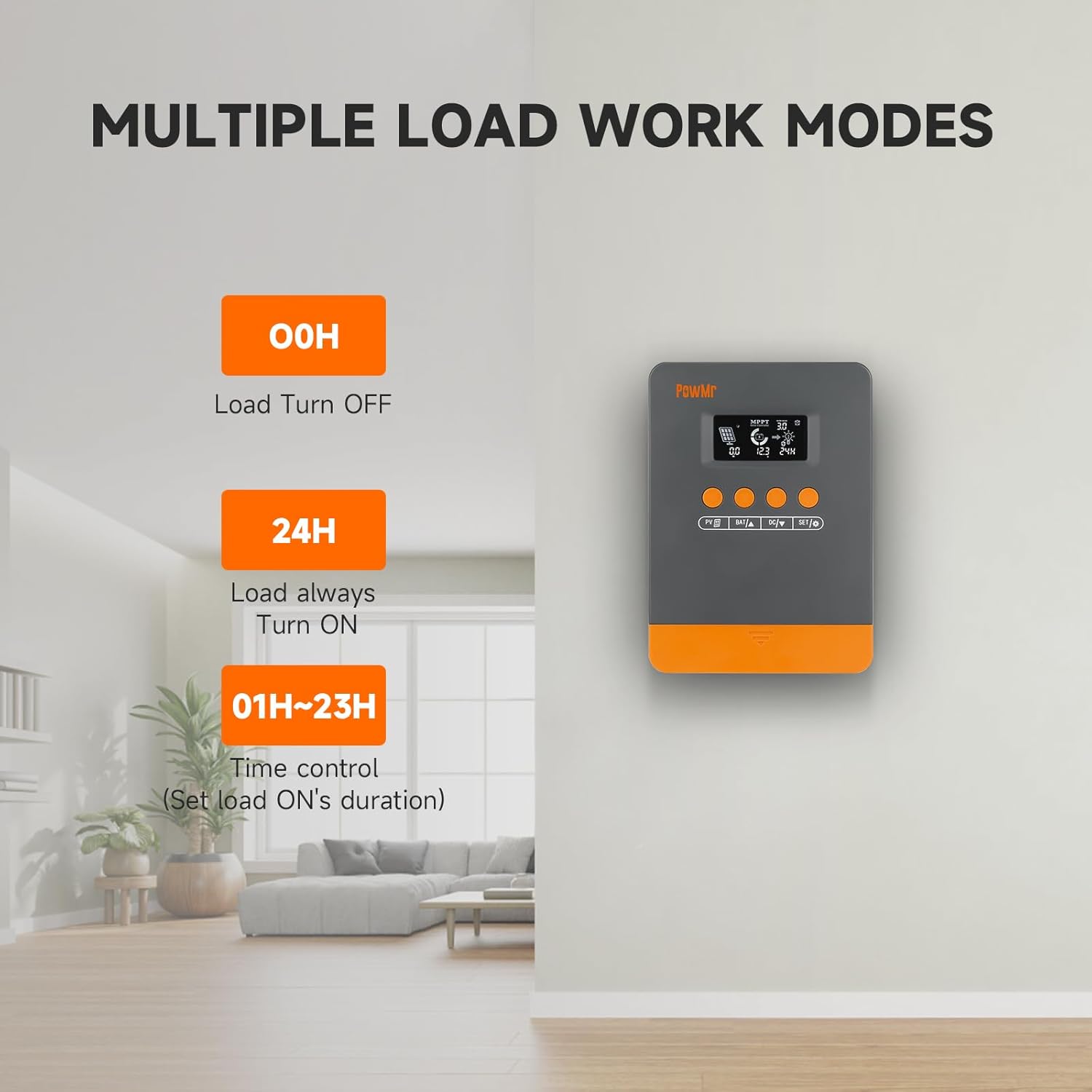
Figure 7: Load Work Modes. This image illustrates the different operational modes for the DC load output, including always off, always on, and time-controlled duration.
4.4. Calibrating Battery Voltage
که چیرې د بیټرۍ حجم ترمنځ توپیر شتون ولريtage monitored by the controller and a multimeter reading, you can calibrate the controller's voltage:
- اوږد فشار ورکړئ BAT/▲ key to enter the setting program.
- د کارولو BAT/▲ او DC/▼ د ارزښت د تنظیم کولو لپاره کیلي.
- فشار ورکړئ SET/⚙ د خوندي کولو او تاییدولو لپاره کیلي.

شکل 8: د بیټرۍ حجمtage Calibration. This image shows the controller's display during the battery voltage calibration process, allowing users to adjust the displayed voltage to match an external measurement.
5. ساتنه
منظم ساتنه ستاسو د لمریز چارج کنټرولر او سیسټم غوره فعالیت او اوږد عمر تضمینوي.
- اړیکې معاینه کړئ: Periodically check all wiring connections for tightness and corrosion. Loose connections can lead to power loss or damage.
- پاک کنټرولر: Keep the controller clean and free from dust and debris. Use a dry cloth for cleaning. Ensure ventilation openings are not obstructed.
- د بیټرۍ معاینه: Regularly inspect your batteries for signs of damage, leakage, or swelling. Ensure battery terminals are clean.
- د سولر پینل پاکول: Clean solar panels periodically to remove dirt, dust, or snow that may reduce efficiency.
- د څارنې فعالیت: Observe the controller's display for any unusual readings or error codes.
6. ستونزه حل کول
This section provides guidance for common issues and their solutions. Refer to the LCD screen for specific error codes.
6.1. Error Codes and Solutions
| د غلطۍ کوډ | لامل | د حل لاره |
|---|---|---|
| 18 | د فوتوولټیک حجم داخلولtage ډیر ټیټ | د لمریزو تختو شمیر زیات کړئ یا یې په لړۍ کې وصل کړئ ترڅو د فوتوولټیک ان پټ حجم لوړ کړئtage. |
| 60 | د ډیر تودوخې محافظت | وسایلو ته اجازه ورکړئ چې د بیا رغونې تودوخې څخه ښکته سړه شي ترڅو عادي چارج او خارج شي. |
| 63 | د بیټرۍ والtage ډیر لوړ | اندازه کول تایید کړئ که د بیټرۍ حجمtage د ټاکل شوي حجم څخه ډیرtage and disconnect photovoltaic array circuit breaker. |
| 65 | د بیټرۍ والtage ډیر ټیټ | بیټرۍ تر حجم پورې چارج کړئtage د زیرمې څخه ډیریږيtage recovery point. Refer to "3.7 Default/Parameters for Different Battery Types" for specific details. |
| 71 | د فوتوولټیک حجم داخلولtage ډیر لوړ | د فوتوولټیک ان پټ کمولو لپاره د کنټرولر سره وصل شوي فوتوولټیک صفونو شمیر کم کړئ، یا د حجم کمولو لپاره لړۍ او موازي اړیکې تنظیم کړئ.tage یا اوسني ارزښتونه. |
| 73 | د ډیر چارج کولو جریان | د محصول ټرمینل بار کم کړئ ترڅو ډاډ ترلاسه شي چې ټول بار د کنټرولر او بیټرۍ د ټاکل شوي حدودو دننه دی. |
| 72 | د زیات خارجیدونکي جریان | د محصول ټرمینل بار کم کړئ ترڅو ډاډ ترلاسه شي چې ټول بار د کنټرولر او بیټرۍ د ټاکل شوي حدودو دننه دی. |
۵.۴. د ستونزو د حل لپاره عمومي لارښوونې
- هیڅ ښودنه/بریښنا نشته: Check battery connections and ensure the battery has sufficient charge. Verify polarity.
- د بیټرۍ چارج نه کول:
- Ensure solar panels are connected correctly and receiving adequate sunlight.
- د سولر پینل حجم چیک کړئtage او اوسنی.
- Verify battery type settings on the controller.
- بار کار نه کوي:
- Check load connections and ensure the load is within the controller's rated capacity.
- Verify the load work mode setting (00H, 24H, or time control).
- ډاډ ترلاسه کړئ چې بیټرۍ کافي چارج لري.
- ناسم لوستل: Calibrate battery voltage لکه څنګه چې په 4.4 برخه کې تشریح شوي.
7. مشخصات
| فیچر | تفصیل |
|---|---|
| ماډل | M25A-12V/24V (POW-M25-PRO) |
| برانډ | پاو ښاغلی |
| د سیسټم Voltage | 12V / 24V اتومات |
| اعظمي. د PV ان پټ پاور (12V سیسټم) | 300W |
| اعظمي. د PV ان پټ پاور (24V سیسټم) | 600W |
| مکس PV Open-Circuit Voltage | <60V |
| د چارج اوسنۍ درجه | 25A |
| د تعقیب موثریت | تر 98٪ پورې |
| د تبادلې لوړ موثریت | تر 97٪ پورې |
| د ملاتړ شوي بیټرۍ ډولونه | Sealed, Gel, Flooded, Lithium (LFP), User-defined |
| د محصول ابعاد (L x W x H) | ۱.۳۵" x ۳.۷۱" x ۳.۷۱" (۳.۴۳ سانتي متره x ۹.۴۲ سانتي متره x ۹.۴۲ سانتي متره) |
| د توکي وزن | 1.1 پونډه (500 ګرامه) |
| نیټه لومړی شتون لري | د سپتمبر ۲۵، ۲۰۲۴ |

Figure 9: System Wiring and Model Specifications. This image provides a detailed schematic for connecting solar panels, battery, and load, alongside a table outlining specifications for various PowMr MPPT controller models, including the M25A-12V/24V.
8. تضمین او ملاتړ
For warranty information and technical support, please refer to the official PowMr webسایټ ته لاړ شئ یا مستقیم د دوی د پیرودونکو خدماتو سره اړیکه ونیسئ. د تضمین ادعاوو لپاره خپل د پیرود رسید وساتئ.


