پیژندنه
This manual provides detailed instructions for the Cillso H97 Wireless Earbuds. Please read this manual carefully before using the product to ensure proper operation and to maximize your user experience. Keep this manual for future reference.

Image: The Cillso H97 Wireless Earbuds in their charging case, displaying the digital battery indicator.
د بسته محتويات
- Cillso H97 Wireless Earbuds (Left and Right)
- د چارج کولو قضیه
- د USB-C چارج کیبل
- د کارن لارښود
چمتو کول
۴.۱. د غوږۍ او کیس چارج کول
Before first use, fully charge the earbuds and the charging case. Connect the provided USB-C cable to the charging port on the case and to a 5V/1A or 5V/2A power adapter. The digital display on the case will indicate the charging status.
- د چارج کولو وخت: د بشپړ چارج لپاره نږدې 1.5 ساعته.
- د بیټرۍ ژوند: په هر چارج کې تر ۶ ساعتونو پورې پلې بیک، او د چارج کولو کیس سره تر ۳۰ ساعتونو پورې ټولټال.
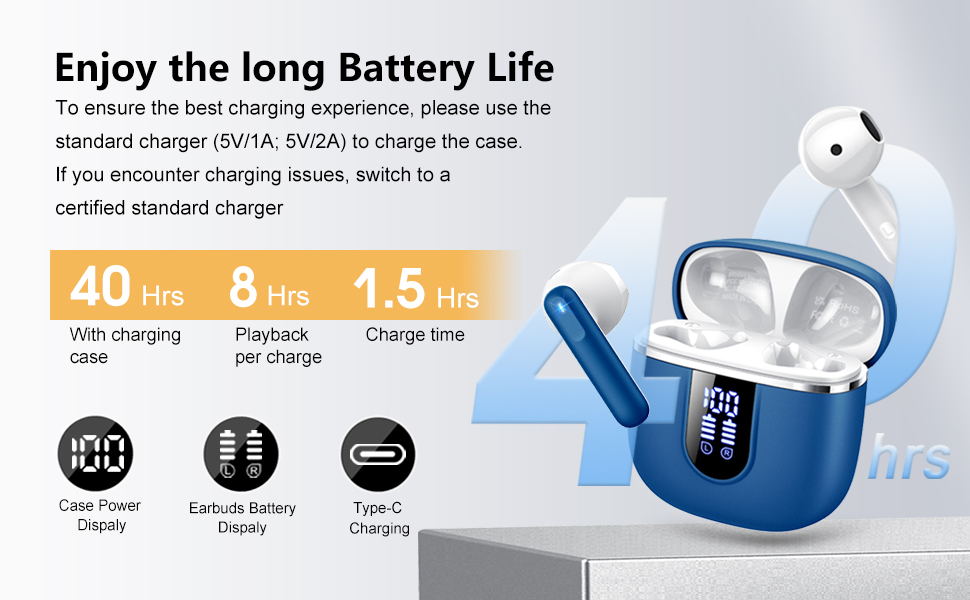
Image: Diagram illustrating the 40-hour total battery life, 8-hour single playback, and 1.5-hour charge time, along with the USB-C charging port and digital display.
The charging case is equipped with Over Current Protection (OCP) technology to prevent damage from prolonged high current. If the current exceeds the power limit, the power source will be cut off to protect the circuitry and device.

Image: Illustration explaining Over Current Protection (OCP) technology in the charging case.
2. د بلوتوت وسیلې سره جوړه کول
- د چارج کولو قضیه پرانیزئ. د غوږ بډونه به په اتوماتيک ډول د جوړې کولو حالت ته ننوځي.
- په خپل وسیله (سمارټ فون، ټابلیټ، لپ ټاپ) کې، بلوتوث فعال کړئ.
- لټون "H97" in the list of available Bluetooth devices and select it to connect.
- یوځل چې وصل شو، تاسو به د اوریدلو وړ تایید واورئ، او د غوږ بډونه به د کارولو لپاره چمتو وي.
The H97 earbuds feature Bluetooth 5.4 for a more stable connection, longer transmission range, lower power consumption, and reduced latency.

Image: Visual representation of Bluetooth 5.4 technology, highlighting benefits like stable connection, longer range, lower power consumption, and lower latency.
۳. د غوږونو اییربډونه اغوستل
Gently insert the earbuds into your ears, ensuring a comfortable and secure fit. The rounded tips are designed for in-ear comfort. Adjust them until the sound quality is optimal and they feel stable.

Image: Diagram showing the recommended angle for inserting the earbud into the ear for a secure fit.
عملیاتي لارښوونې
ټچ کنټرولونه
The H97 earbuds feature sensitive touch sensors for easy control of various functions:
| عمل | فعالیت |
|---|---|
| Double tap the left/right MFB button | میوزیک پلی کړئ / بند کړئ |
| One tap the left/right MFB button | ځواب / پای کال |
| Long press the right/left MFB button for 2s | راتلونکی/پخوانی لار |
| One tap the left/right MFB button (during call) | Volume Up/Down (specific mapping not detailed, typical for single tap) |
| Triple tap MFB button | Activate Voice Assistant (common function) |

Image: Visual guide to the smart touch controls on the earbuds for playback and call management.
د آډیو ځانګړتیاوې
The H97 earbuds deliver a high-quality audio experience:
- د لوړ فای سټیریو غږ: Featuring 13mm diameter speakers with crystal clear treble, vibrant mid-range, and powerful bass.
- 3D Bass Stereo: Enhanced bass for an immersive listening experience.
- روښانه زنګونه: Equipped with 4 ENC (Environmental Noise Cancelling) microphones to filter out background noise and suppress wind noise, ensuring clear communication.

Image: Diagram illustrating the 13mm speaker driver and triple-layer composite diaphragm for enhanced bass and sound quality.

Image: Illustration detailing the 4-microphone design for crystal-clear calls, including feedback and talk mics, and anti-wind noise features.
مطابقت
The Cillso H97 Wireless Earbuds are compatible with a wide range of Bluetooth-enabled devices, including:
- سمارټ فونونه (انډرایډ، iOS)
- ټابلیټونه
- لپټاپ
- Desktop Computers (with Bluetooth adapter)

Image: Icons representing compatibility with phones, tablets, laptops, and desktops, shown alongside the earbuds and a smartphone playing music.
ساتنه
پاکول او پاملرنه
The H97 earbuds are IP7 waterproof, offering protection against water, sweat, and rain. However, proper care is still recommended:
- Wipe the earbuds and charging case with a soft, dry cloth after each use, especially after workouts.
- د کثافاتو پاکونکو یا محلولونو کارولو څخه ډډه وکړئ.
- د چارج کولو کیبل سره وصل کولو دمخه ډاډ ترلاسه کړئ چې د چارج کولو پورټ وچ دی.
- اییربډونه د چارج کولو په قضیه کې ذخیره کړئ کله چې کارول نه وي ترڅو د دوی ساتنه وکړي او چارج یې وساتي.

Image: A person wearing the earbuds with water splashing, illustrating the IPX7 waterproof feature, along with icons for dust prevention, sweatproof, and nano material.
د چارج کولو غوره طریقې
- Always use the provided USB-C cable or a certified standard charger (5V/1A or 5V/2A) to charge the case.
- If you encounter charging issues, try switching to a different certified standard charger.
- Do not expose the charging case or earbuds to extreme temperatures.
د ستونزو حل کول
عام مسایل او حل لارې
| ستونزه | احتمالي حل |
|---|---|
| د غوږونو غوږونه نه جوړېږي یا نه نښلېږي |
|
| یوازې یو غوږ بډ کار کوي |
|
| ټیټ حجم یا د غږ خراب کیفیت |
|
| د چارج قضیه نه چارج کول |
|
مشخصات
| فیچر | تفصیل |
|---|---|
| د ماډل شمیره | H97 |
| برانډ | سیلسو |
| بلوتوث نسخه | 5.4 |
| آډیو ټیکنالوژي | 3D Bass Stereo, Hi-Fi Stereo Sound |
| د سپیکر اندازه | 13mm قطر |
| مایکروفون | 4 ENC Noise Cancelling Mics |
| د بیټرۍ ژوند (ایربډونه) | تر اتو ساعتونو پورې (یو ځل چارج) |
| د لوبې ټول وخت | تر 40 ساعتونو پورې (د چارج کولو قضیې سره) |
| د چارج کولو بندر | USB-C |
| د چارج کولو ان پټ | 5V/1A or 5V/2A recommended |
| د پنروک درجه | IP7 |
| مطابقت لرونکې وسیلې | Smartphones, Tablets, Laptops, Bluetooth Devices |
| د فریکونسی رینج | ۲۰ هرټز - ۲۰،۰۰۰ هرټز |
| د غوږ شکل | ګردي لارښوونې |
| د محصول ابعاد | 0.79 x 0.79 x 0.79 inches (earbud dimensions, case dimensions are 48.9mm x 53.4mm) |
| د توکي وزن | 0.352 اونس |

Image: Visual representation of the earbuds and charging case dimensions, emphasizing their lightweight and pocket-sized design.
تضمین او ملاتړ
د محصول تضمین او د پیرودونکو ملاتړ په اړه معلومات په چمتو شوي معلوماتو کې شتون نلري. مهرباني وکړئ د محصول بسته بندۍ یا د تولید کونکي چارواکي ته مراجعه وکړئ. webد تضمین پوښښ او د پیرودونکو ملاتړ سره د اړیکې نیولو څرنګوالي په اړه د جزیاتو لپاره سایټ.
د خوندیتوب معلومات
- د غوږ بډونه یا د چارج کولو قضیه مه جلا کوئ یا یې مه بدلوئ.
- محصول د سختې تودوخې، مستقیم لمر وړانګو او رطوبت څخه لرې وساتئ.
- د قوي اغیزو سره د محصول له مینځه وړلو یا تابع کولو څخه ډډه وکړئ.
- د ماشومانو او څارویو د لاسرسي څخه لرې وساتئ.
- د ځایی مقرراتو سره سم محصول په مسؤلیت سره تصفیه کړئ.


