1. پیژندنه
This manual provides essential instructions for setting up, operating, maintaining, and troubleshooting your Blackview BV4800 Rugged Phone. Please read this guide thoroughly to ensure proper use and to maximize the device's features and longevity. The Blackview BV4800 is designed for durability, featuring IP68/IP69K waterproof and MIL-STD-810H drop-proof certifications, a 6.56-inch HD+ display, a 5180mAh battery, and running on Android 13 with Doke OS 3.1.
2. د بسته محتويات
ډاډ ترلاسه کړئ چې ټول توکي ستاسو د محصول په کڅوړه کې شتون لري:
- تورview BV4800 رګډ تلیفون
- د USB ډول - سي کیبل
- د بریښنا اډاپټر
- د سیم Ejector وسیله
- د چټک پیل لارښود
- د تضمین کارت
3. وسیله ختمه شوهview
د خپل تور رنګ د فزیکي برخو سره ځان آشنا کړئview BV4800 phone.
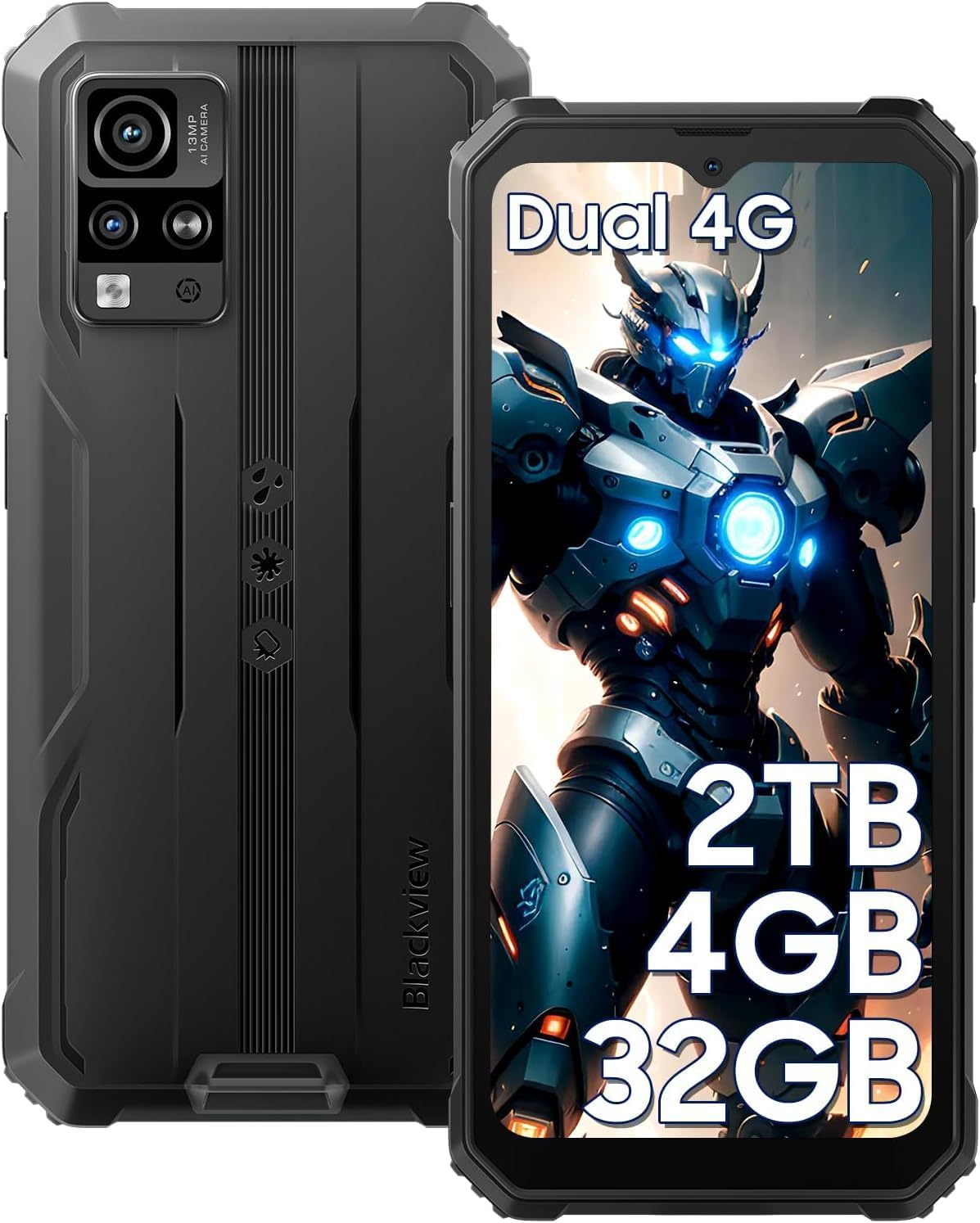
شکل 3.1: مخکی او شاته View د تور پوستوview BV4800. This image displays the phone's rugged exterior, including the rear camera module and the display.
- مخکینۍ کیمره: د نندارې په پورتنۍ مرکز کې موقعیت لري.
- ښکاره کول: ۵.۴۵ انچه HD+ ټچ سکرین.
- د حجم تڼۍ: په اړخ کې، د غږ کچې تنظیمولو لپاره.
- د بریښنا تڼۍ: On the side, for turning the device on/off and screen lock/unlock.
- د USB ډول-C پورټ: At the bottom, protected by a flap, for charging and data transfer.
- سپیکر: په ښکته برخه کې موقعیت لري.
- شاته کیمرې: Located on the back, including the 13MP main camera.
- رڼا: Adjacent to the rear cameras.
- د سیم/مایکرو ایس ډی کارت سلاټ: On the side, accessible with the SIM ejector tool.
4. ترتیب کول
۲. د سیم کارت او مایکرو ایس ډی کارت نصبول
تورview BV4800 supports two Nano SIM cards and one MicroSD/TF card simultaneously. Ensure the phone is powered off before installation.
- د سیم کارت ټری د تلیفون په اړخ کې ومومئ.
- د سیم ایجیکټر وسیله د ټرې تر څنګ په کوچني سوري کې دننه کړئ او په کلکه فشار ورکړئ تر هغه چې ټرې بهر راشي.
- Carefully place your Nano SIM cards and MicroSD card into the designated slots on the tray. Ensure they are correctly oriented as indicated on the tray.
- Gently push the tray back into the phone until it is flush with the device's side.
- After inserting a storage card, restart the cellphone for proper recognition.
۴. لومړنی بریښنا فعالول
د لومړي ځل لپاره خپل وسیله فعالولو لپاره:
- Press and hold the Power button located on the side of the phone until the Blackview لوګو په سکرین کې ښکاري.
- د لومړني تنظیم بشپړولو لپاره د سکرین پرامپټس تعقیب کړئ، پشمول د ژبې انتخاب، د وای فای اتصال، او د ګوګل حساب تنظیم کول.
4.3. د وسیلې چارج کول
د لومړي ځل کارولو دمخه، خپل تور په بشپړه توګه چارج کړئview بي وي ۵۲۰۰.

شکل 4.3.1: تور چارج کولview BV4800. The image shows the phone connected to a charger via its USB-C port, highlighting its 5180mAh battery capacity.
- Open the protective flap covering the USB Type-C port at the bottom of the phone.
- Connect the USB Type-C cable to the phone's port and the other end to the power adapter.
- د بریښنا اډاپټر په دیوال کې ولګوئ.
- The charging indicator will appear on the screen. A full charge may take several hours.
- In case of low battery, if the smartphone cannot power on, keep the charger connected for at least 30 minutes before attempting to power it on.
۳. ستاسو تور چلولview BV4800
5.1. بنسټیز نیویګیشن
The BV4800 uses a touchscreen interface. Common gestures include:
- ټایپ: یو توکي غوره کړئ یا یو اپلیکیشن خلاص کړئ.
- سوائپ: د سکرینونو یا لیستونو له لارې سکرول وکړئ.
- چنه په انځورونو کې زوم ان یا آوټ کړئ او web پاڼې
- اوږد پریس: د شرایطو مینو ته لاسرسی ومومئ یا عکسونه حرکت وکړئ.
5.2. Android 13 & Doke OS 3.1 Features
Your BV4800 runs on Android 13, enhanced with Blackview's Doke OS 3.1, offering improved privacy, personalization, and additional functionalities.

شکل 5.2.1: Android 13 and Doke OS 3.1 Interface. This image illustrates the user interface with features like notification permissions, privacy controls, and app customization.
- د محرمیت کنټرولونه: Manage app permissions, notification access, and clipboard history.
- شخصي کول: Customize themes, icons, and widgets to suit your preferences.
- Per-App Language: Set different languages for individual applications.
- د زنګ وهلو ثبتول: Utilize the built-in call recording feature (check local regulations).
- د تمرین شاخص تعقیب: Monitor your physical activity directly from the device.
5.3. ارتباط
The BV4800 supports 4G cellular networks and Wi-Fi connectivity.
- وای فای: ورتګ ترتیبات > شبکه او انټرنیټ > وای فای د شته وای فای شبکو سره وصل کیدو لپاره.
- د موبایل ډیټا (4G): ډاډ ترلاسه کړئ چې ستاسو سیم کارت فعال دی او د موبایل ډیټا فعاله ده ترتیبات> شبکه او انټرنیټ> ګرځنده شبکه.
- بلوتوث: Connect to wireless accessories via ترتیبات> وصل شوي وسایل> بلوتوث.
۲. د کیمرې ځانګړتیاوې
Capture moments with the 13MP rear camera and 5MP front camera, featuring various modes.

شکل 5.4.1: تورview BV4800 Camera Modes. This image displays the phone's camera capabilities, including Night Mode, Panorama Mode, Beauty Mode, and Underwater Mode.
- ۵۰ میګاپکسله اصلي کامره: د لوړ ریزولوشن عکسونو لپاره.
- ۲۰ میګاپکسله مخکینۍ کیمره: د سیلفي او ویډیو زنګونو لپاره.
- د اوبو لاندې حالت: Allows photography in aquatic environments.
- د شپې حالت: په ټیټ رڼا کې اخیستل شوي عکسونه ښه کوي.
- د پینوراما حالت: د پراخ زاویې منظره نیسي views.
- Improved HDR: Balances exposure in challenging lighting.
- 0.1s Ultra-fast PDAF: For quick and accurate focusing.
5.5. ځانګړي ځانګړتیاوې
- د دستکشې حالت: Enables sensitive screen operation even when wearing gloves. Activate this feature in ترتیبات > سمارټ مرسته > د دستکشې حالت.
- د مخ پېژندګلوي: Unlock your phone securely using facial recognition. Set up in ترتیبات > امنیت او محرمیت > د مخ خلاصول.
- د GPS نیویګیشن: Supports GPS, Beidou, GLONASS, and Galileo for accurate positioning and navigation.
- د OTG دنده: Use your BV4800 as a power bank to charge other devices or connect USB peripherals.
6. ساتنه
مناسب ساتنه ستاسو د تور رنګ اوږد عمر او غوره فعالیت تضمینويview بي وي ۵۲۰۰.
6.1. Durability Features and Guidelines

شکل 6.1.1: تورview BV4800 Durability. This image highlights the phone's IP68/IP69K waterproof and MIL-STD-810H drop-proof ratings, showing it resistant to dust, shocks, and water.
- IP68/IP69K Waterproof: The phone can withstand immersion in water up to 1.5 meters deep for 30 minutes. Ensure all port covers are securely closed before exposing the device to water.
- MIL-STD-810H د غورځیدو ضد: Certified to withstand drops from up to 1.5 meters. While rugged, avoid intentional drops or extreme impacts.
- دوړ ضد: وسیله د دوړو داخلیدو پروړاندې خوندي ده.
یادونه: While the phone is rugged, extreme conditions or improper handling can still cause damage. Always ensure port covers are sealed when in wet or dusty environments.
6.2. پاکول
د خپل تلیفون پاکولو لپاره، یو نرم، لینټ نه لرونکی ټوکر وکاروئ. د سختې خاورې لپاره، یو څه نرمampټوکر د اوبو سره ومینځئ. د سختو کیمیاوي موادو یا خړوبونکو موادو کارولو څخه ډډه وکړئ.
6.3. د سافټویر تازه معلومات
په منظم ډول د سافټویر تازه معلومات وګورئ او نصب کړئ ترڅو ډاډ ترلاسه کړئ چې ستاسو وسیله وروستي ځانګړتیاوې، امنیتي پیچونه، او د فعالیت ښه والی لري. لاړ شئ ترتیبات> سیسټم> د سیسټم تازه کول.
7. ستونزه حل کول
دا برخه هغه عامې ستونزې په ګوته کوي چې تاسو یې د خپل تور رنګ سره مخ کیدی شئview بي وي ۵۲۰۰.
| ستونزه | احتمالي حل |
|---|---|
| تلیفون نه چالانیږي. | Ensure the battery is charged. Connect to a charger for at least 30 minutes before attempting to power on. |
| Cannot detect SIM card. | Ensure the SIM card is correctly inserted and the tray is fully closed. Restart the phone. Verify SIM card is active with your carrier. |
| د شبکې ضعیف سیګنال. | Move to an area with better network coverage. Check if mobile data is enabled. Contact your carrier for network issues. |
| د ټچ سکرین بې ځوابه. | Restart the phone. If the issue persists, perform a factory reset (backup data first). |
| Apps freezing or crashing. | د اپلیکیشن کیچ پاک کړئ (ترتیبات > ایپس > [د اپلیکیشن نوم] > ذخیره او زیرمه > زیرمه پاکه کړئ). Update the app or the phone's software. |
| بیټرۍ په چټکۍ سره وچیږي. | Reduce screen brightness, close background apps, disable unnecessary features (GPS, Bluetooth, Wi-Fi when not in use). Check battery usage in settings. |
If you encounter issues not listed here or if the suggested solutions do not resolve the problem, please contact Blackview د پیرودونکي ملاتړ.
8. مشخصات
د تور رنګ لپاره مهم تخنیکي مشخصاتview BV4800 Rugged Phone:
| فیچر | تفصیل |
|---|---|
| ماډل | BV4800 |
| عملیاتي سیسټم | د ډوک OS 3.1 سره Android 13.0 |
| ښودل | 6.56-inch HD+ (720 x 1612 resolution) |
| RAM | ۲۴ جي بي (۸ جي بي فزیکي + ۱۶ جي بي مجازي) |
| داخلي ذخیره | 32GB |
| د پراخیدو وړ ذخیره | د مایکرو ایس ډی/TF کارت له لارې تر ۲TB پورې |
| شاته کیمره | 13MP |
| مخکینۍ کیمره | 5MP |
| د بیټرۍ ظرفیت | 5180mAh |
| ارتباط | 4G LTE, Wi-Fi, Bluetooth, GPS (GPS, Beidou, GLONASS, Galileo) |
| سیم سلاټونه | Dual Nano SIM + 1 MicroSD/TF card slot |
| پایښت | IP68/IP69K Waterproof & Dustproof, MIL-STD-810H Drop-proof |
| ابعاد | ۷.۱۳ x ۳.۷ x ۲.۰۵ انچه (پیکج) |
| د توکي وزن | ۲.۴۵ پونډه |
9. تضمین او ملاتړ
تورview offers a 2-year guarantee service for all Blackview phones. For any issues or inquiries regarding your BV4800, please contact Blackview د پیرودونکي ملاتړ.
- د تضمین موده: د پیرود نیټې څخه 2 کاله.
- د ملاتړ اړیکه: Refer to the contact information provided in your Quick Start Guide or on the official Blackview webسایټ
- آنلاین سرچینې: لیدنه وکړئ تورview په ایمیزون کې ذخیره کړئ د اضافي محصول معلوماتو او ملاتړ لپاره.
مهرباني وکړئ د تضمین ادعاګانو لپاره د پیرود ثبوت وساتئ.


