1. پیژندنه
Welcome to the Bigme HiBreak E-Ink Smartphone user manual. This document provides essential information for setting up, operating, maintaining, and troubleshooting your device. The Bigme HiBreak is designed to offer a unique, eye-friendly mobile experience with its E-Ink display, combining smartphone functionality with the comfort of an e-reader.
۲. په بکس کې څه دي؟
Please verify that all items are present in your Bigme HiBreak package:
- Bigme HiBreak Cell Phone
- USB Type-C Charging Cable (not explicitly listed but standard)
- SIM Ejector Tool (not explicitly listed but standard)
- Quick Start Guide (not explicitly listed but standard)
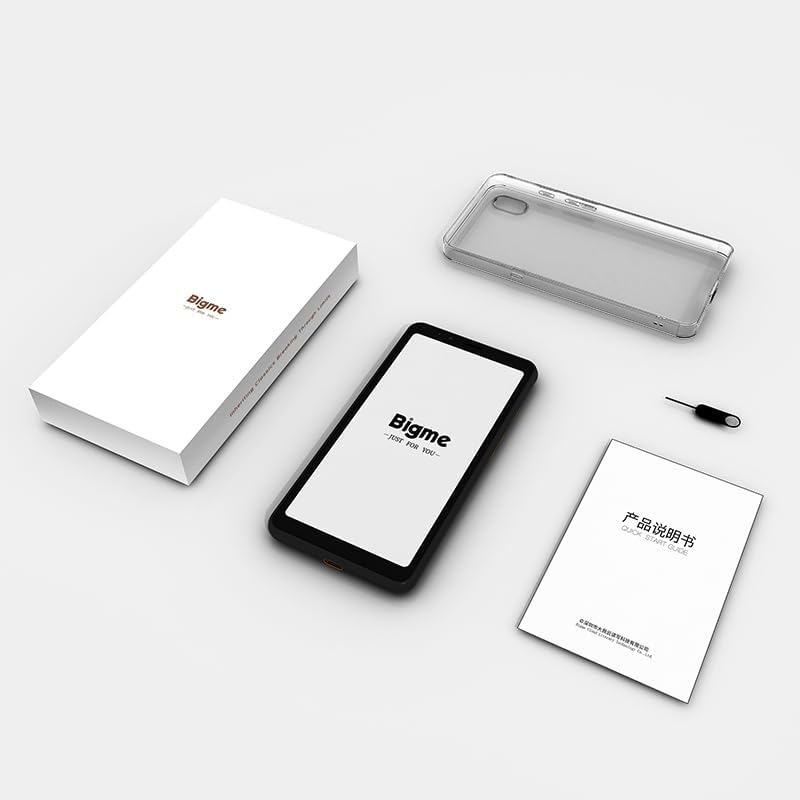
شکل 2.1: Contents of the Bigme HiBreak retail box. The image displays the Bigme HiBreak smartphone, a clear protective case, a small instruction manual, and a SIM ejector tool, all neatly arranged next to the product box.
3. محصول ختم شوview
The Bigme HiBreak features a minimalist design with a focus on its E-Ink display. Familiarize yourself with the device's physical components.

شکل 3.1: مخکی او شاته view of the Bigme HiBreak smartphone. The front shows the E-Ink display with a beach scene, while the back reveals the textured finish and single camera lens.

شکل 3.2: اوورview of Bigme HiBreak's core features. This image highlights the AI Assistant for intelligent Q&A and creative writing, the Android 11 operating system allowing third-party app installation, and the high-performance octa-core processor with 6GB RAM and 128GB ROM, expandable up to 1TB.
۲.۱ د وسیلې اجزا

شکل 3.3: Detailed diagram of the Bigme HiBreak components. This illustration points out the Front 5MP camera, Speaker, Customizable Function Button, microSD Card / SIM Card Slot, Paperlike E-Ink Screen, Volume / Page-Turn Buttons, Power Button, Rear 13MP camera, LED Flash, Microphone, and Type-C Port.
- E-Ink Screen: 5.84-inch HD E-Ink display (720x1440 pixels) for a paper-like viewتجربه
- مخکینۍ کیمره: 5MP camera, located at the top front.
- شاته کیمره: 13MP camera with LED flash, located on the back.
- د بریښنا تڼۍ: On the right side, used to power on/off and wake/sleep the device.
- Volume/Page-Turn Buttons: On the right side, controls volume and can be customized for page-turning in reading apps.
- د USB ډول-C پورټ: په ښکته برخه کې، د چارج کولو او معلوماتو لیږد لپاره.
- د سیم / مایکرو ایس ډی کارت سلاټ: On the left side, for inserting SIM cards and expandable storage.
- سپیکر او مایکروفون: د آډیو آوټ پټ او ان پټ لپاره.
4. ترتیب کول
۱.۲ د سیم او مایکرو ایس ډی کارتونو داخلول
- Locate the SIM/microSD card slot on the left side of the device.
- Insert the SIM ejector tool into the small hole next to the slot to open the tray.
- Place your Nano-SIM card(s) and/or microSD card (up to 1TB, if desired) into the tray, ensuring correct orientation.
- په نرمۍ سره ټری بیرته په سلاټ کې فشار ورکړئ تر هغه چې دا په خپل ځای کې کلیک وکړي.
4.2 ابتدايي پاور آن
- Press and hold the Power Button on the right side of the device until the Bigme logo appears on the screen.
- Follow the on-screen prompts to complete the initial Android 11 setup, including language selection, Wi-Fi connection, Google account login, and security settings.
5. عملیاتي لارښوونې
5.1 E-Ink Display Features
The E-Ink display is designed for comfortable viewing, especially for reading. It features a 36-level adjustable front light and Bigme Super Refresh technology.
- د تنظیم وړ مخکینۍ رڼا: Swipe down from the top of the screen to access the quick settings panel. Adjust the brightness slider to your preferred level for optimal viewد روښنايي په مختلفو شرایطو کې.
- Bigme Super Refresh: This technology minimizes ghosting (residual images) on the E-Ink screen, providing a smoother experience for dynamic content like web browsing or video playback. The device automatically manages refresh rates.

شکل 5.1: Bigme Super Refresh technology in action. The image shows the E-Ink screen displaying text with a clear indication of 'Auto ghosting elimination technology', demonstrating improved display performance.
5.2 Basic Navigation and App Management
The Bigme HiBreak runs on Android 11, offering a familiar smartphone interface.
- د لمس اشارې: Navigate the interface using standard Android touch gestures (tap, swipe, pinch-to-zoom).
- د اپلیکیشنونو نصب کول: Access the Google Play Store to download and install a wide variety of third-party applications.

شکل 5.2: User interacting with the Bigme HiBreak, showcasing various popular and educational apps on the E-Ink display, demonstrating the 'flowable interaction' and app compatibility.
5.3 Camera Usage and OCR
The HiBreak is equipped with 5MP front and 13MP rear HD cameras.
- عکسونه/ویډیوګانې اخیستل: Open the Camera app to capture images and record videos.
- Document Scanning (Offline OCR): Utilize the cameras for scanning documents. The built-in OCR (Optical Character Recognition) functionality supports formulas, graphics, and 54 languages, allowing for quick digitization and sharing of documents. The flash can improve clarity in low-light conditions.

شکل 5.3: Bigme HiBreak's camera capabilities. This image highlights the 5MP front and 13MP rear cameras, emphasizing their utility for document scanning with improved clarity in low-light conditions due to the built-in flash.
5.4 سمارټ ځانګړتیاوې
- Smart Voice-to-Text: Equipped with dual-microphone array technology for clear recordings and efficient transcription. Cloud synchronization to the Bigme cloud allows for easy multi-device access.
- د مصنوعي ذهانت مرستیال: The built-in AI Assistant can help generate speeches, articles, and creative content, boosting productivity.
- Office Assistant: Features full recording review and intelligent transcription for meetings, capturing crucial details.

شکل 5.4: Bigme HiBreak's versatile capabilities. This image illustrates the device's use as a smart office tool for meetings with recording and transcription, an AI Assistant for content generation, a tool for information retrieval (web browsing, news, apps), and a device for a paper-like reading experience with audiobooks.
۳.۲ د لوستلو تجربه
The E-Ink screen provides a comfortable, paper-like reading experience, reducing eye strain.

شکل 5.5: User enjoying a paper-like reading experience on the Bigme HiBreak. The image shows a person holding the smartphone, displaying an e-book with text-to-speech playback settings, emphasizing the customizable reading environment.
6. ارتباط
6.1 Mobile Network Bands
The Bigme HiBreak supports various mobile network bands. Please check compatibility with your local carrier.

شکل 6.1: Table detailing the mobile network bands supported by the Bigme HiBreak. The table lists various 3GPP bands (B1, B2, B3, B5, B7, B8, B20, B28, B34, B38, B39, B40, B41), their major operators, regions, and system types (UMTS, CDMA, GSM, FDD-LTE, TD-SCDMA).
6.2 وای فای او بلوتوث
The device supports standard Wi-Fi and Bluetooth connectivity for internet access and pairing with accessories.
- وای فای: د ترتیباتو > شبکې او انټرنیټ > وای فای له لارې د شته وای فای شبکو سره وصل شئ.
- بلوتوث: Pair with Bluetooth headphones, speakers, or other devices via Settings > Connected devices > Connection preferences > Bluetooth.
6.3 د GPS نیویګیشن
The Bigme HiBreak includes GPS for precise navigation, making it suitable for mapping and location-based services.
7. ساتنه او پاملرنه
7.1 د وسیلې پاکول
- د وسیلې سکرین او بدن پاکولو لپاره نرم ، لینټ پاک ټوکر وکاروئ.
- د سختو کیمیاوي موادو، خړوبونکو پاکوونکو، یا ایروسول سپرې کارولو څخه ډډه وکړئ.
- وسیله ډیر رطوبت ته مه ښکاره کوئ.
7.2 د بیټرۍ پاملرنه
- The device is equipped with a 3300mAh Lithium-Polymer battery.
- Charge the device using the provided USB Type-C cable and a compatible power adapter.
- د لوړې تودوخې څخه ډډه وکړئ، ځکه چې دوی کولی شي د بیټرۍ ژوند او فعالیت اغیزمن کړي.
- د بیټرۍ د غوره اوږد عمر لپاره، د بیټرۍ په مکرر ډول په بشپړه توګه چارج کولو څخه ډډه وکړئ.
7.3 محافظتي قضیه
The Bigme HiBreak comes with a high-quality TPU protective case, offering translucent softness and durability to protect your device from daily wear and tear.
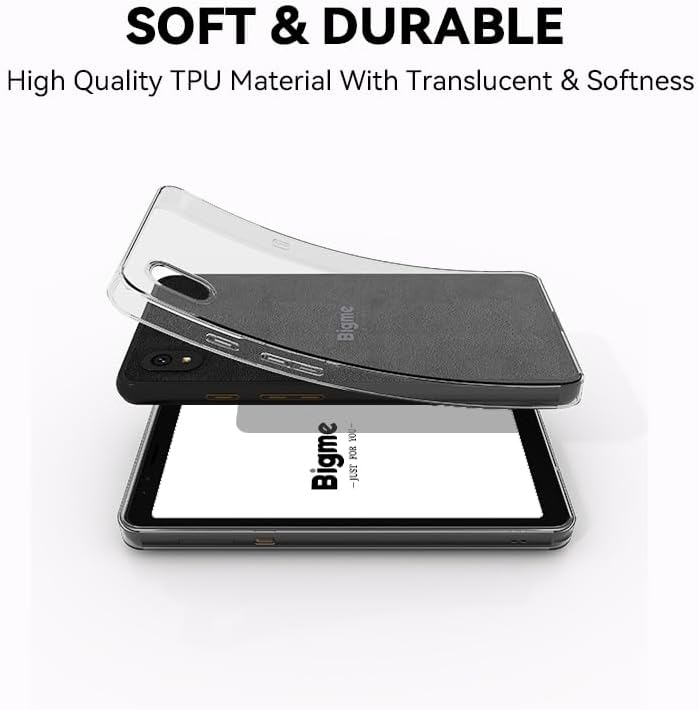
شکل 7.1: Bigme HiBreak with its included soft and durable TPU protective case. The image shows the clear, flexible case being placed over the smartphone, highlighting its translucent quality and protective design.
8. ستونزه حل کول
If you encounter issues with your Bigme HiBreak, refer to the following common solutions:
| مسله | احتمالي لامل / حل |
|---|---|
| وسیله فعاله نه ده | Ensure the battery is charged. Connect to a charger for at least 30 minutes. If still unresponsive, press and hold the power button for 10-15 seconds for a forced restart. |
| Poor call quality / Missing calls/texts | Check SIM card insertion. Verify mobile network signal strength. Ensure cellular bands are supported by your carrier (refer to Section 6.1). Disable advanced calling features in network settings if experiencing issues with specific carriers (e.g., T-Mobile). Restart the device. |
| Screen ghosting / artifacts | This is normal for E-Ink displays but should be minimal with Bigme Super Refresh. If persistent, try adjusting refresh settings in display options or restart the device. |
| Apps crashing / Device slow | Close background apps. Clear app cache (Settings > Apps > [App Name] > Storage & cache > Clear cache). Ensure sufficient storage space. Restart the device. |
| Wi-Fi / Bluetooth connectivity issues | Toggle Wi-Fi/Bluetooth off and on. Restart your router/paired device. Forget the network/device and reconnect. |
| Device unresponsive / Frozen | Press and hold the Power Button for 10-15 seconds to force a restart. |
8.1 د فابریکې ری سیٹ
که ستونزې دوام ومومي، د فابریکې بیا تنظیم کول ممکن اړین وي. خبرداری: دا به ستاسو په وسیله کې ټول معلومات له منځه یوسي. د پرمخ تللو دمخه مهم معلومات بیک اپ کړئ.
- ترتیبات> سیسټم> د بیا تنظیم کولو اختیارونو ته لاړ شئ.
- 'ټول معلومات پاک کړئ (د فابریکې بیا تنظیم)' غوره کړئ.
- خپله پریکړه تایید کړئ او په سکرین کې لارښوونې تعقیب کړئ.
9. مشخصات
Key technical specifications for the Bigme HiBreak E-Ink Smartphone:
| فیچر | مشخصات |
|---|---|
| ښودل | 5.84 Inches E-Ink, 720x1440 Pixels Resolution |
| مخکینۍ رڼا | ۳-سطحه د تنظیم وړ |
| عملیاتي سیسټم | Android 11 |
| پروسیسر | Octa-core (specific model not provided, but 2.3GHz mentioned in image) |
| RAM | 6 جي بي |
| داخلي ذخیره | 128 جي بي |
| د پراخیدو وړ ذخیره | مایکرو ایس ډي تر ۱ TB پورې |
| شاته کیمره | 13 MP |
| مخکینۍ کیمره | 5 MP |
| بیټرۍ | 3300mAh Lithium-Polymer (included) |
| ارتباط | ۴ جي ایل ټي ای، وای فای، بلوتوث، جي پي ایس |
| بندرونه | د USB ډول-C |
| د توکي وزن | 6 اونس |
| رنګ | تور |

شکل 9.1: Key specifications and features of the Bigme HiBreak. This infographic highlights the HD dual camera, Android 11 OS, Octa-core 2.3GHz CPU, 6GB RAM, 128GB ROM, 4G LTE SIM/microSD card slot, and the eye-friendly 5.84-inch ePaper display with Bigme super refresh auto ghosting elimination technology.
10. تضمین او ملاتړ
For warranty information and customer support, please refer to the documentation included with your purchase or visit the official Bigme website. If you require assistance with your Bigme HiBreak, please contact Bigme customer service directly.
11. مهم یادونه
Video Content: Please note that no official product videos with 'Seller' creator type were available in the provided data for embedding in this manual.


