1. پیژندنه
Thank you for choosing the XIAOMI Flexible Rechargeable Lampدا لارښود ستاسو د نوي L خوندي او مؤثره کارونې لپاره اړین معلومات چمتو کويampمهرباني وکړئ د کارونې دمخه یې په بشپړ ډول ولولئ او د راتلونکي حوالې لپاره یې وساتئ.

Figure 1: XIAOMI Flexible Rechargeable Lamp
2. د خوندیتوب معلومات
- د لرګیو جلا کول، ترمیم کول یا بدلول مه کوئamp خپل ځان.
- l وساتئamp away from water, moisture, and high temperatures.
- د چارج کولو لپاره یوازې چمتو شوی چارجینګ کیبل یا تصدیق شوی USB-C کیبل وکاروئ.
- Avoid direct eye exposure to the light source for extended periods.
- محصول او د هغې بیټرۍ د ځایی مقرراتو سره سم په مسؤلیت سره تصفیه کړئ.
3. د بسته محتويات
ډاډ ترلاسه کړئ چې ټول توکي په کڅوړه کې شتون لري:
- XIAOMI انعطاف منونکی چارج کیدونکی Lamp واحد
- Lamp بیس
- Clamp ضمیمه
- د USB-C چارج کیبل
- د کارونکي لارښود (دا لاسوند)
4. محصول ختم شوview
The XIAOMI Flexible Rechargeable Lamp is designed for versatile illumination, functioning as a desk lamp, clip-on lamp, or handheld light source. It features a magnetic attachment for easy angle adjustment and multiple lighting modes.

Figure 2: Versatile Usage Modes

Figure 3: Design Details (Charging Port, Button, Anti-slip Strip)
5. ترتیب کول
- لومړنی لګښت: د لومړي استعمال څخه دمخه، l په بشپړه توګه چارج کړئamp using the provided USB-C cable. Connect the cable to the lamp's Type-C port and a compatible USB power adapter (not included). The battery status indicator will show charging progress.
- Assembly (Desk Lamp): L ځای پر ځای کړئamp unit onto the circular lamp base. The magnetic connection will secure it.
- Assembly (Clip-on Lamp): cl ضمیمه کړئamp accessory to a suitable surface (e.g., desk edge, shelf). Then, magnetically attach the lamp unit to the designated area on the clamp.
6. عملیاتي لارښوونې
۶.۱ د بریښنا فعالول/بندول او د حالت انتخاب
- لنډ مطبوعات: Briefly press the power button to turn the lamp آن یا آف.
- اوږد پریس: Press and hold the power button to cycle through the four available lighting modes.

Figure 4: Four Lighting Modes
6.2 زاویه تعدیل
دamp head is attached magnetically, allowing for flexible positioning:
- عمودی گردش: l تنظیم کړئamp head up or down by up to 180 degrees.
- افقی گردش: l وګرځوئamp head horizontally by up to 360 degrees.
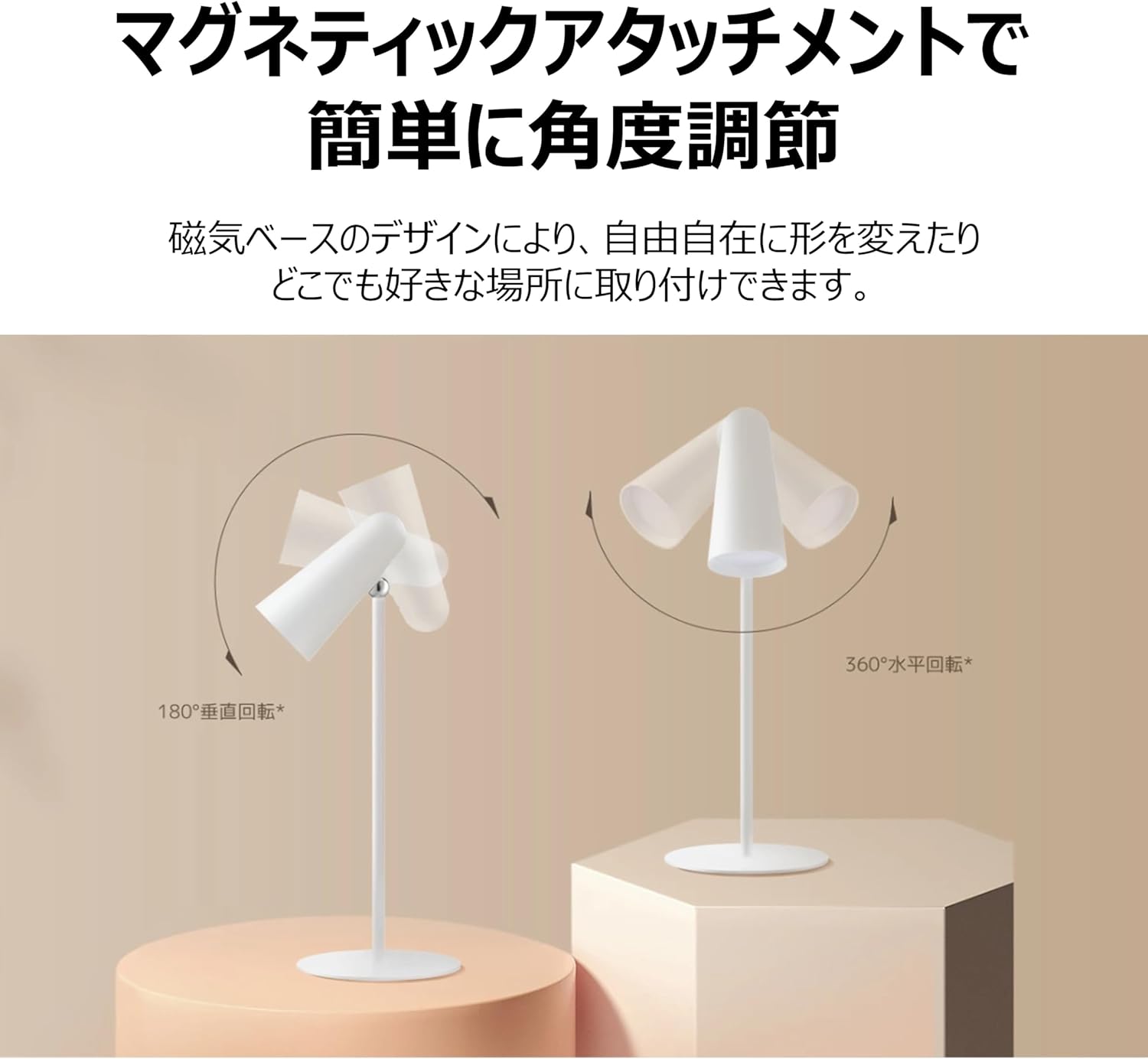
Figure 5: Magnetic Angle Adjustment
6.3 چارج کول
l سره وصل کړئamp to a power source using the USB-C cable. The lamp maintains consistent brightness even while charging. A full charge provides over 40 hours of illumination at the lowest brightness setting.

Figure 6: Charging the Lamp
7. ساتنه
- پاکول: l مسح کړئamp د نرم، وچ ټوکر سره. د کثافاتو پاکوونکي یا محلول مه کاروئ.
- ذخیره کول: l ذخیره کړئamp په یخ او وچ ځای کې کله چې د اوږدې مودې لپاره نه کارول کیږي.
- د بیټرۍ پاملرنه: د بیټرۍ د ژوند اوږدولو لپاره، د l په بشپړ ډول خارجولو څخه ډډه وکړئamp frequently. Charge it regularly, even if not in constant use.
8. ستونزه حل کول
| ستونزه | احتمالي لامل | د حل لاره |
|---|---|---|
| Lamp نه چلیږي | د بیټرۍ ټیټوالی؛ د بریښنا تڼۍ په سمه توګه نه ده فشار شوې | l چارج کړئamp; Ensure a firm short press on the power button. |
| Lamp چارج نه کول | Faulty cable or adapter; Loose connection | Check USB-C cable and adapter; Ensure connections are secure; Try a different cable/adapter. |
| رڼا تیاره ده یا ځلیږي | ټیټ بیټرۍ | l چارج کړئamp په بشپړه توګه |
| مقناطیسي ضمیمه خلاص احساس کوي | Lamp not properly seated on base/clamp | l بیا ځای پر ځای کړئamp unit firmly onto the magnetic base or clamp. |
9. مشخصات
| فیچر | مشخصات |
|---|---|
| د ماډل شمیره | BHR8959GL |
| ابعاد (D x W x H) | ۸۳.۸" x ۵۵.۷" x ۴۴.۱" |
| د توکي وزن | ۰.۹۸۶ اونس (۲۷.۹۴ ګرامه) |
| د بریښنا سرچینه | د بیټرۍ چلول (لیتیم ایون) |
| د بیټرۍ ژوند | Up to 40 Hours (lowest brightness) |
| د رڼا سرچینې ډول | LED |
| واټtage | 5 واټ |
| والیtage | 5 ولټه |
| مواد | Plastic (Acrylonitrile Butadiene Styrene base) |
| د کنټرول طریقه | Touch (Magnetic Switch) |
| د رنګ رینډینګ انډیکس (CRI) | را 90 |
| شاملې برخې | Stand, Clamp |
10. تضمین او ملاتړ
This XIAOMI product is covered by a limited warranty. For detailed warranty terms and conditions, please refer to the warranty card included with your purchase or visit the official XIAOMI webسایټ
For technical support, troubleshooting assistance, or service inquiries, please contact XIAOMI customer support through their official channels. Contact information can typically be found on the XIAOMI webسایټ یا ستاسو د پیرود اسناد.


