1. پیژندنه
The HYNOTONE ARES Distortion Preamp Pedal is designed to deliver aggressive, high-gain tones, mimicking the characteristics of a tube amplifier. Featuring a 5-stage JFET circuit, a versatile 3-band EQ, and specialized tone-shaping switches, this pedal is optimized for heavy music genres, extended-range guitars, and drop tunings. This manual provides detailed instructions for the proper setup, operation, and maintenance of your ARES pedal.
2. د خوندیتوب لارښوونې
- واحد د باران، رطوبت، یا ډیرې تودوخې سره مه مخ کوئ.
- Use only a regulated 9V DC power supply with a center-negative polarity. Incorrect power supplies can damage the unit and void the warranty.
- د تودوخې سرچینو ته نږدې یا مستقیم لمر وړانګو کې د واحد له ایښودلو څخه ډډه وکړئ.
- Do not attempt to open or service the unit yourself. Refer all servicing to qualified personnel.
- د ماشومانو د لاسرسي څخه لرې وساتئ.
3. د بسته محتويات
مهرباني وکړئ ډاډ ترلاسه کړئ چې ټول توکي په بسته کې شتون لري:
- HYNOTONE ARES Distortion Preamp پیډل
- د کارونکي لارښود (دا لاسوند)
- د تضمین کارت (که د تطبیق وړ وي)
4. محصول ختم شوview
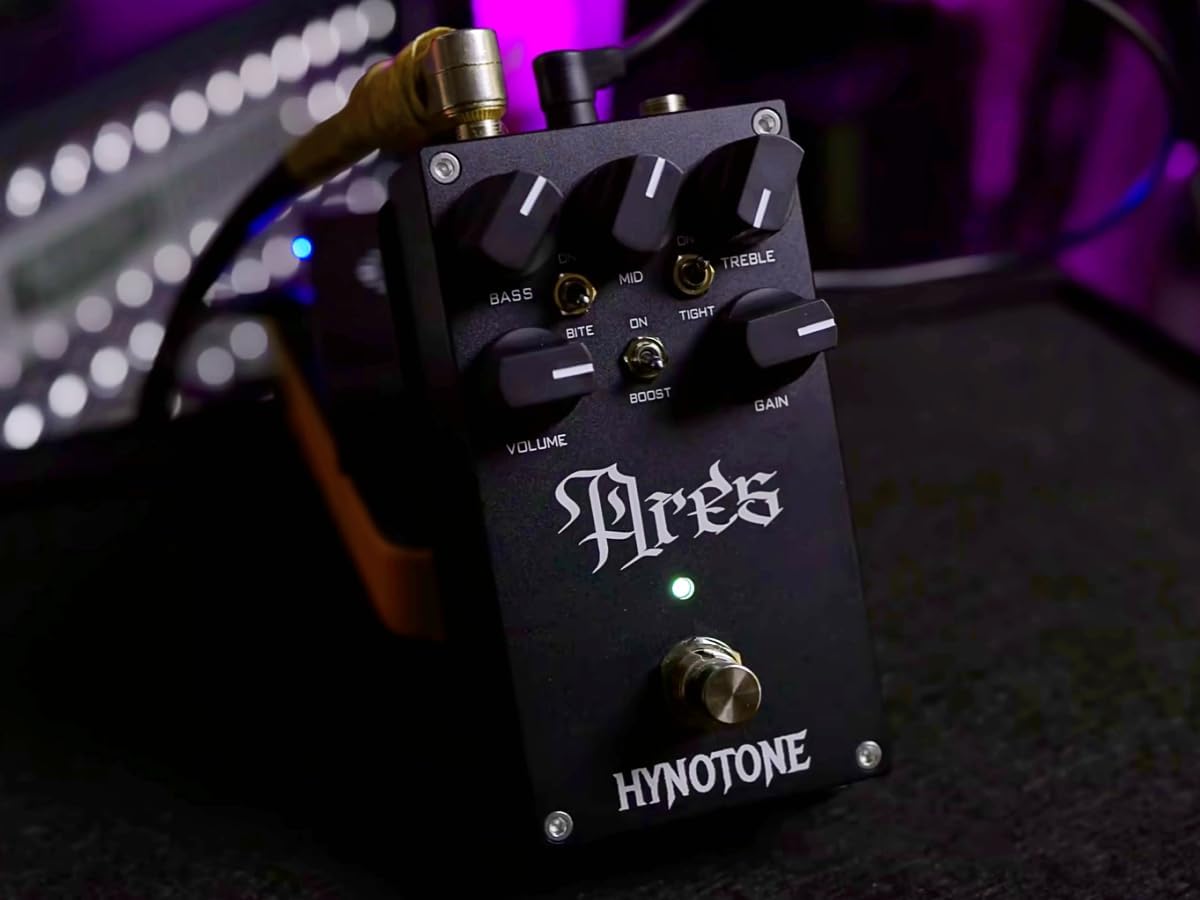
The HYNOTONE ARES pedal features a robust metal enclosure and intuitive controls for shaping your tone.

شکل 4.1: مخکی view of the HYNOTONE ARES pedal with all controls labeled, including Bass, Mid, Treble, Volume, Gain knobs, and Bite, Tight, Boost switches.
4.1. کنټرولونه او ځانګړتیاوې
- د باس غوټۍ: د ټیټ فریکونسۍ غبرګون تنظیموي.
- د منځنۍ غوټۍ: د منځنۍ فریکونسۍ غبرګون تنظیموي.
- ټربل نوب: د لوړې فریکونسۍ غبرګون تنظیموي.
- د حجم نوب: Controls the overall output level of the pedal.
- د ترلاسه کولو دستګاه: د تحریف اندازه تنظیموي.
- د BITE سویچ: Engages a mid-range grit, emphasizing a rawer, more aggressive distortion texture. When disengaged, the tone becomes smoother.
- TIGHT Switch: Refines the low-end for a punchy, focused sound, making the tone more aggressive. Recommended for use with 7-string guitars and drop tunings.
- د بوسټ سویچ: Tightens the low end and boosts mids, providing an aggressive and modern tone. Recommended for use with 7-string guitars and drop tunings.
- د پښو سویچ: اغېزمنتوب یا له پامه غورځوي.

شکل 4.2: یو داخلي view of the pedal's circuit board, highlighting the JFET components. The 5-stage JFET circuit is designed to emulate the sound and feel of a real tube preamp.
5. ترتیب کول
Follow these steps to connect your HYNOTONE ARES pedal:
- د بریښنا پیوستون: Connect a 9V DC center-negative power supply (not included) to the DC input jack on the pedal.
- د ننوتلو اړیکه: Connect your guitar or the output of another pedal to the INPUT jack on the ARES pedal using a standard 1/4-inch instrument cable.
- د محصول پیوستون: Connect the OUTPUT jack of the ARES pedal to your amplifier's input or the input of another pedal in your signal chain using a standard 1/4-inch instrument cable. For optimal results, especially when using the ARES as a preamp, connect it to your amplifier's effects return or a dedicated power amp.
شکل 5.1: The HYNOTONE ARES pedal connected in a typical setup, showing input and output cables, ready for use with an electric guitar.
6. عملیاتي لارښوونې
Once connected, you can begin shaping your tone using the pedal's controls.
6.1. بنسټیز عملیات
- Press the footswitch to engage (LED on) or bypass (LED off) the distortion effect.
- Start with all knobs at the 12 o'clock position for a neutral starting point.
- تنظیم کړئ GAIN knob to achieve your desired level of distortion. Higher settings will produce more aggressive tones.
- د کارولو حجم knob to match the output level of the pedal to your bypassed signal or to boost your signal for solos.
6.2. Tone Shaping with EQ and Switches
The 3-band EQ and specialized switches provide extensive control over your sound:

شکل 6.1: The HYNOTONE ARES pedal highlighting the Bass, Mid, and Treble EQ controls, which function similarly to a tube amplifier's tone stack.
- BASS, MID, TREBLE Knobs: Adjust these controls to sculpt your frequency response. These act like a traditional tube amp's tone stack, allowing for significant tonal variations.
- د BITE سویچ: Engage this switch for a pronounced mid-range character, adding a raw, gritty texture suitable for cutting through a mix. Disengage for a smoother, less aggressive mid-response.
- TIGHT Switch: Activate this switch to tighten the low-end frequencies, resulting in a more focused and articulate sound. This is particularly effective for palm-muted riffs and maintaining clarity in low tunings.
- د بوسټ سویچ: This switch simultaneously tightens the low end and boosts the mid-range, creating a modern, aggressive tone ideal for heavy riffs and solos, especially with extended-range guitars.

شکل 6.2: تړل view of the HYNOTONE ARES pedal, detailing the BITE, TIGHT, and BOOST switches and their functions for advanced tone shaping.
7. ساتنه
To ensure the longevity and optimal performance of your ARES pedal:
- پاکول: Use a soft, dry cloth to clean the pedal's exterior. Do not use abrasive cleaners or solvents.
- ذخیره کول: Store the pedal in a cool, dry place away from direct sunlight and extreme temperatures when not in use.
- اړیکې: Periodically check all cable connections for wear and tear. Replace damaged cables to prevent signal loss or noise.
8. ستونزه حل کول
If you encounter issues with your ARES pedal, refer to the following common problems and solutions:
| ستونزه | احتمالي لامل | د حل لاره |
|---|---|---|
| کله چې پیډل ولګول شي غږ نشته. | Incorrect power supply, faulty cables, pedal not connected correctly. | Verify power supply (9V DC, center-negative). Check all instrument cables. Ensure input/output connections are correct. |
| کمزوری یا تحریف شوی غږ (ناغوښتل شوی). | Low battery (if using battery power), incorrect gain/volume settings, faulty cables. | Ensure adequate power. Adjust GAIN and VOLUME knobs. Test with different cables. |
| ډېر شور یا غوغا. | Ground loop, interference from other electronics, faulty power supply. | Use a high-quality, isolated power supply. Move pedal away from other electronic devices. Check for proper grounding in your setup. |
| Footswitch not responding. | د برېښنا ستونزه، داخلي ستونزه. | Ensure pedal is powered on. If problem persists, contact customer support. |
که چیرې د دې حلونو له هڅه کولو وروسته هم ستونزه دوام ومومي، مهرباني وکړئ د نورو مرستو لپاره د پیرودونکو ملاتړ سره اړیکه ونیسئ.
9. مشخصات
Technical specifications for the HYNOTONE ARES Distortion Preamp پیډل:

شکل 9.1: A visual representation of the HYNOTONE ARES pedal's key technical specifications, including dimensions, weight, and electrical characteristics.
| مشخصات | ارزښت |
|---|---|
| د ماډل شمیره | ares01 |
| ابعاد (L x W x H) | 2.6 x 2.4 x 4.9 انچه (65 x 60 x 125 mm) |
| د توکي وزن | 11.2 اونس (315 ګرامه) |
| د ننوتلو خنډ | 1 MOhm |
| د محصول خنډ | 1 kOhm |
| د بریښنا انډول | Center-negative 9V nominal DC, 7-12V range |
| اوسنی رسم | 10mA typical, 100mA max |
| د نښلونکي ډول | 1/4 inch audio jack |
| هډوتري برسیر | 1/4 انچ آډیو |
| د سیګنال بڼه | انلاګ |
| د آډیو محصول اغیزې | Distortion, Preamp |
| د کنټرول ډول | Knob, Toggle Switches |
10. تضمین او ملاتړ
10.1. د تضمین معلومات
This product is covered by a limited warranty against defects in materials and workmanship. The duration and terms of the warranty may vary by region. Please refer to the warranty card included with your product or visit the official TOPPING webد تفصيلي تضمین معلوماتو لپاره سایټ.
10.2. د پیرودونکي ملاتړ
For technical assistance, troubleshooting, or service inquiries, please contact TOPPING customer support through their official website or the retailer from whom you purchased the product. Please have your model number (ares01) and purchase date available when contacting support.


