1. پیژندنه
د پیرودلو لپاره مننهasing the LONPOO Portable CD Player Boombox, model ZXG-608B. This device offers versatile audio playback options including CD, Bluetooth 5.3, FM radio, USB, and AUX input, along with a microphone port for added functionality. Its compact design and rechargeable battery make it suitable for various environments.
This manual provides essential information for safe operation, setup, and maintenance of your boombox. Please read it thoroughly before use and retain it for future reference.

Image 1.1: The LONPOO ZXG-608B Portable CD Boombox highlighting its multiple playback options: Bluetooth, CD, FM Radio, USB, MIC Port, and AUX-IN.
2. د خوندیتوب معلومات
- د بریښنا سرچینه: Use only the provided AC power cable or the internal rechargeable battery. Ensure the voltage د وسیلې اړتیاوې سره سمون لري.
- اوبه او رطوبت: Do not expose the device to rain, moisture, or immerse it in water. Avoid placing objects filled with liquids, such as vases, on the device.
- تودوخه: وسیله د تودوخې سرچینو لکه ریډیټرونو، د تودوخې راجسترونو، بخاریو، یا نورو تودوخې تولیدونکو وسایلو څخه لرې وساتئ.
- وینټیلیشن: د هوا مناسبه هوا ورکول ډاډمن کړئ. د هوا د بهېدو هیڅ لاره مه بندوئ.
- پاکول: Unplug the device from the power outlet before cleaning. Use a dry, soft cloth. Do not use liquid cleaners or aerosol cleaners.
- خدمت کول: د دې محصول پخپله خدمت کولو هڅه مه کوئ. ټول خدمتونه وړ خدماتي پرسونل ته راجع کړئ.
- CD Handling: Handle CDs by their edges. Avoid touching the data side. Keep CDs clean and free from scratches.
- د بیټرۍ خوندیتوب: Do not disassemble, crush, or expose the built-in battery to extreme temperatures. Dispose of batteries according to local regulations.
3. د بسته محتويات
ډاډ ترلاسه کړئ چې ټول توکي په کڅوړه کې شتون لري:
- 1x LONPOO Portable CD Player Boombox (Model ZXG-608B)
- 1x AC بریښنا کیبل
- ۱x ریموټ کنټرول (بیټرۍ شاملې ندي)
- ۱x د کارونکي لارښود (دا سند)

Image 3.1: Contents of the package, including the boombox, remote control, AC power cable, and user manual. The image also shows the product dimensions: 20 cm (7.8 inches) height, 23 cm (9 inches) width, and 15 cm (5.9 inches) depth, with a weight of 4.4 lbs.
4. محصول ختم شوview
Familiarize yourself with the main components and controls of your boombox.
4.1 د مخکني پینل کنټرولونه او ښودنه

انځور 4.1: مخکی view of the boombox and its remote control. The front panel features a large LCD display, STANDBY button, MODE button, previous/next track buttons, a large volume knob, EQ button, and USB port.
- د LCD نندارې: Shows track number, time, mode, and other status indicators.
- د سټنډرډ تڼۍ: واحد فعال یا بندوي.
- د موډ تڼۍ: Switches between CD, Bluetooth, FM Radio, USB, and AUX modes.
- Previous/Next Buttons (|<>|): Navigates tracks/stations.
- Play/Pause/Scan Button (▶/SCAN): Plays/pauses media or scans FM radio stations.
- STOP Button (■): د پلې بیک مخه نیسي.
- د حجم نوب: د آډیو تولید کچه تنظیموي.
- د EQ تtonۍ: Cycles through equalizer presets (Flat, Rock, Pop, Classic, Jazz).
- USB پورټ: د ډیجیټل آډیو غږولو لپاره fileد USB فلش ډرایو څخه.
- د سر غوږ جیک: د شخصي اوریدلو لپاره.
4.2 د شا پینل پیوستون
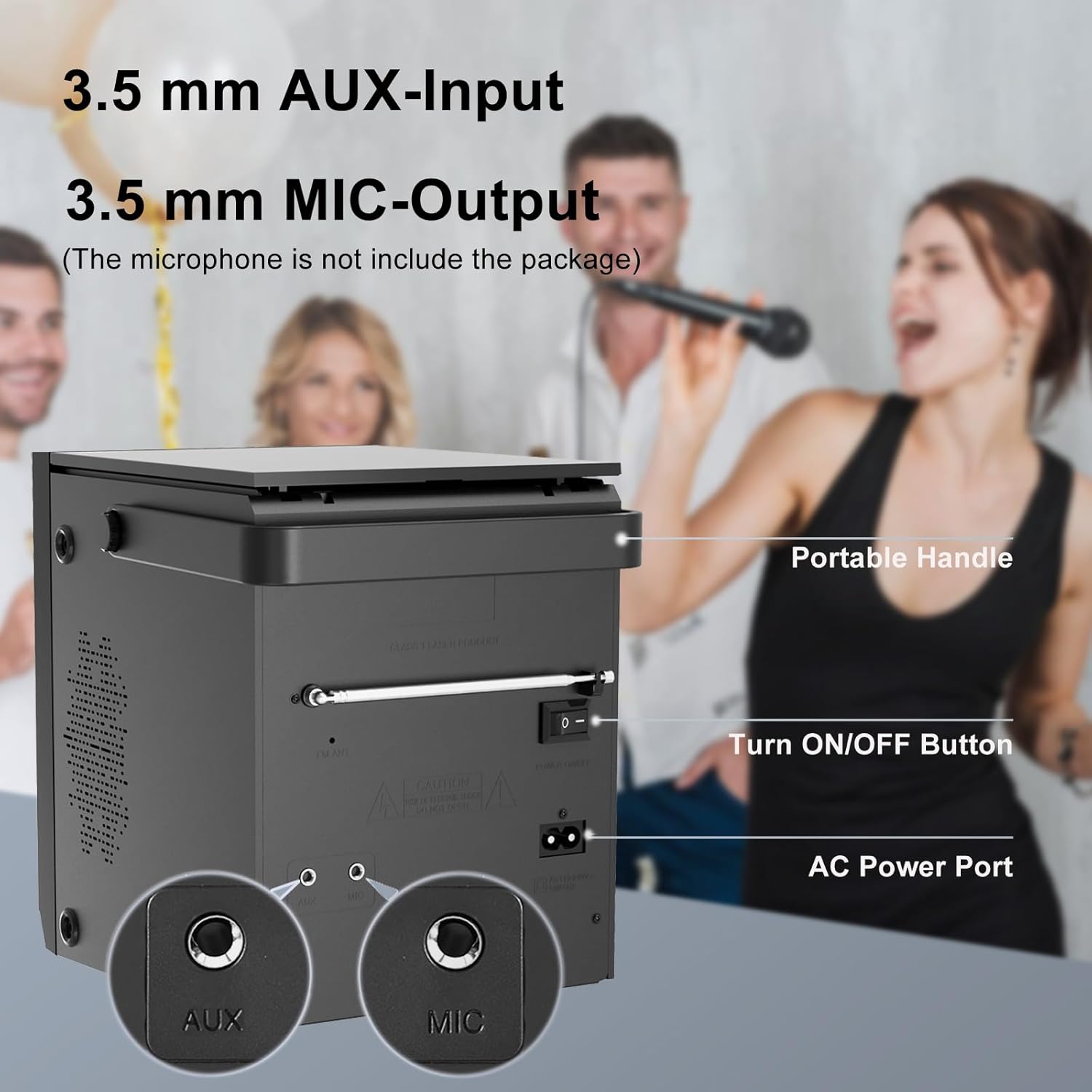
Image 4.2: Rear panel of the boombox, detailing the 3.5 mm AUX-Input, 3.5 mm MIC-Output, the main ON/OFF button, and the AC Power Port. A portable handle is also visible at the top.
- د AUX ان پټ (۳.۵ ملي متره): بهرني آډیو وسایل وصل کړئ.
- MIC Output (3.5mm): Connect a microphone for karaoke or voice input.
- د فعال / بند تڼۍ: د واحد لپاره د بریښنا اصلي سویچ.
- د AC بریښنا بندر: Connect the AC power cable for power and charging.
- FM انتن: Extend for better FM radio reception.
4.3 Top-Loading CD Compartment

Image 4.3: The top-loading CD compartment shown open with a CD inside. Icons illustrate playback options: Play in order, Single cycle, Repeat all, and Random play.
The CD compartment is located on the top of the unit. Gently lift the lid to access it.
4.4 ریموٹ کنټرول
The included remote control allows for convenient operation from a distance. (Batteries not included. Requires 2x AAA batteries, typically.)
5. ترتیب کول
5.1 د بریښنا نښلول
- د AC بریښنا: Connect the supplied AC power cable to the AC Power Port on the rear of the boombox and then to a standard wall outlet.
- د چارج وړ بیټرۍ: The boombox has a built-in 2000 mAh rechargeable battery, providing over 5 hours of continuous use at medium volume. The battery charges automatically when connected to AC power.

Image 5.1: The boombox powered by its internal rechargeable battery, capable of providing approximately 5 hours of playback.
5.2 ابتدايي پاور آن
- Ensure the main ON/OFF switch on the rear panel is in the "ON" position.
- فشار ورکړئ تيارسئ button on the front panel or the remote control to turn on the unit.
- The LCD display will illuminate.
6. عملیاتي لارښوونې
6.1 CD پلے بیک
- فشار ورکړئ موډ button until "CD" mode is selected on the display.
- د واحد په سر کې د سي ډي کمپارټمنټ پوښ خلاص کړئ.
- Place a CD with the label side facing up. Gently close the lid.
- The boombox will read the CD, and playback should start automatically. If not, press the ▶/SCAN تڼۍ
- د کارولو |<>| د ټریکونو پریښودو لپاره تڼۍ.
- فشار ورکړئ ▶/SCAN د پلې بیک د بندولو/بیا پیلولو لپاره تڼۍ.
- فشار ورکړئ ■ ودروئ د بيا غږولو د بندولو لپاره ت buttonۍ.
- فشار ورکړئ تکرار کړئ button on the remote control to cycle through repeat modes (Single, All, Random).
6.2 بلوتوث حالت
یادونه: This device supports Bluetooth connection for audio input from external devices but does not support Bluetooth earphones.
- فشار ورکړئ موډ button until "BT" or "Bluetooth" is displayed. The unit will enter pairing mode, indicated by a flashing Bluetooth icon or "PAIR".
- ستاسو په بلوتوث فعال شوي وسیله (د مثال په توګه، سمارټ فون، ټابلیټ) کې، بلوتوث فعال کړئ او د شته وسیلو لټون وکړئ.
- Select "LONPOO ZXG-608B" (or similar name) from the list.
- یوځل چې جوړه شي، بوم باکس به د تایید غږ خپور کړي، او د بلوتوټ شاخص به چمکۍ ودروي.
- تاسو اوس کولی شئ د خپل وصل شوي وسیلې څخه د بوم باکس له لارې آډیو غږ کړئ.

Image 6.1: Illustrates the process of pairing a smartphone with the boombox via Bluetooth for wireless audio streaming.
6.3 ایف ایم راډیو
- Extend the FM antenna on the rear panel for optimal reception.
- فشار ورکړئ موډ تڼۍ تر هغه وخته پورې چې "FM" حالت غوره شي.
- فشار ورکړئ او ونیسئ ▶/SCAN د شته ایف ایم سټیشنونو د اتوماتیک سکین کولو او خوندي کولو لپاره تڼۍ.
- د کارولو |<>| د خوندي شوي سټیشنونو ترمنځ د تګ راتګ لپاره تڼۍ.
۱۴ USB پلے بیک
- د مخکینۍ پینل په USB پورټ کې د USB فلش ډرایو دننه کړئ.
- فشار ورکړئ موډ button until "USB" mode is selected.
- دا واحد به په اتوماتيک ډول مطابقت لرونکی آډیو کشف او غږول پیل کړي files (د مثال په توګه، MP3).
- د کارولو |<>| د ټریکونو پریښودو لپاره تڼۍ.
- فشار ورکړئ ▶/SCAN د پلې بیک د بندولو/بیا پیلولو لپاره تڼۍ.
- فشار ورکړئ ■ ودروئ د بيا غږولو د بندولو لپاره ت buttonۍ.
6.5 AUX داخلول
- Connect an external audio device (e.g., MP3 player, smartphone) to the AUX Input port on the rear panel using a 3.5mm audio cable (not included).
- فشار ورکړئ موډ تڼۍ تر هغه وخته پورې چې "AUX" حالت غوره شي.
- د خپل وصل شوي بهرني وسیلې څخه پلے بیک او حجم کنټرول کړئ.

Image 6.2: Demonstrates connecting external devices like a smartphone via AUX input and using the USB port for playback.
6.6 د مایکروفون داخلول
- Connect a microphone (not included) to the MIC Output port on the rear panel.
- Adjust the volume using the main volume knob. The microphone input will mix with the currently playing audio source.

Image 6.3: Shows the boombox being used with a microphone, illustrating its karaoke function.
۵.۷ د برابرونکي (EQ) ترتیبات
فشار ورکړئ EQ button on the front panel or remote control to cycle through preset equalizer modes:
- فلیټ
- ډبره
- پاپ
- کلاسیک
- جاز

Image 6.4: Highlights the 20W stereo sound output and lists the available 3 repeat modes (Single, All, Random) and 5 EQ modes (Flat, Rock, Pop, Classic, Jazz).
7. ساتنه
- پاکول: د واحد بهرنۍ برخه د نرم او وچ ټوکر سره پاک کړئ. د کثافاتو پاکوونکي یا محلولونه مه کاروئ.
- د سي ډي لینز پاملرنه: که چیرې د سي ډي پلې بیک ستونزې رامنځته شي، نو په سوداګریزه توګه شتون لرونکي سي ډي لینز کلینر ډیسک وکاروئ.
- د بیټرۍ اوږدوالی: د بیټرۍ د ژوند اوږدولو لپاره، د بیټرۍ په مکرر ډول د بشپړ چارج کولو څخه ډډه وکړئ. یونټ په منظم ډول چارج کړئ، حتی که د اوږدې مودې لپاره نه کارول کیږي.
- ذخیره کول: When storing the unit for a long time, ensure it is powered off and disconnected from the AC supply. Store in a cool, dry place.
8. ستونزه حل کول
| ستونزه | احتمالي لامل | د حل لاره |
|---|---|---|
| هیڅ ځواک نشته | AC cable not connected; Main power switch off; Battery depleted. | Check AC connection; Ensure rear ON/OFF switch is ON; Charge the battery. |
| سي ډي نه غږېږي / "نه ډیسک" تېروتنه | CD inserted incorrectly; CD is dirty or scratched; CD lens is dirty; Incompatible CD format. | Reinsert CD label side up; Clean CD; Use a CD lens cleaner; Ensure CD is audio CD format. |
| بلوتوټ نه جوړیږي | Boombox not in BT mode; Device too far; Bluetooth already connected to another device. | Select BT mode; Move device closer; Disconnect from other devices and try again. |
| د ایف ایم راډیو ضعیف استقبال | انتن نه دی غځول شوی؛ کمزوری سیګنال. | د ایف ایم انتن په بشپړه توګه غځول؛ د ښه سیګنال لپاره واحد بدل کړئ. |
| د USB پلې بیک ستونزې | USB ډرایو په سمه توګه نه دی داخل شوی؛ نا مناسب file بڼه؛ USB ډرایو فاسد شوی دی. | د USB ډرایو بیا دننه کول؛ ډاډ ترلاسه کړئ files are MP3 or compatible; Try a different USB drive. |
| د AUX څخه هیڅ غږ نشته | AUX cable not connected; Incorrect mode selected; Volume too low on external device. | Check AUX cable connection; Select AUX mode; Increase volume on external device. |
9. مشخصات
- ماډل: ZXG-608B
- نښه: لونپو
- د محصول ابعاد (L x W x H): 4.72 x 7.09 x 5.91 انچه (12 x 18 x 15 سانتي متره)
- د توکي وزن: ۶ پونډه (۳ کیلو ګرامه)
- د سپیکر محصول: ۱۰ واټه RMS (۵ واټه x ۲)
- ارتباط: Bluetooth 5.3, USB, AUX Input (3.5mm), MIC Port (3.5mm)
- د بریښنا سرچینه: AC Power (Corded Electric) / Built-in Rechargeable Battery
- د بیټرۍ ظرفیت: 2000 mAh
- Playback Time (Battery): >5 hours (at medium volume)
- ملاتړ شوي رسنۍ: Audio CD, CD-R/RW, USB (MP3)
- د راډیو ټونر: FM
- د EQ طریقې: Flat, Rock, Pop, Classic, Jazz
- شامل لوازم: AC Power Cable, Remote Control, User Manual
10. تضمین او ملاتړ
LONPOO products are designed for reliability and performance. For warranty information, please refer to the warranty card included with your purchase or contact LONPOO customer support.
If you encounter any issues or have questions regarding your LONPOO Portable CD Player Boombox, please contact our customer support team for assistance. Contact details can typically be found on the official LONPOO webپه سایټ یا د محصول په بسته بندۍ کې.


