1. پیژندنه
The FINGERS ANC-Paradise TWS Earbuds are designed to provide an immersive audio experience with advanced Active Noise Cancellation (ANC) and Surround Noise Cancellation (SNC™) technologies. This manual provides essential information for setting up, operating, maintaining, and troubleshooting your earbuds to ensure optimal performance.

Image: FINGERS ANC-Paradise TWS Earbuds in their charging case.
۲. په بکس کې څه دي؟
مهرباني وکړئ د بسته بندۍ محتويات وګورئ ترڅو ډاډ ترلاسه کړئ چې ټول توکي شتون لري:
- 1 x FINGERS ANC-Paradise (Charging Case + TWS Pods)
- 1 x د USB چارج کیبل
- 2 x اضافي غوږ جیلونه
- 1 x د چټک پیل لارښود
- 1 x د برانډ یادښت
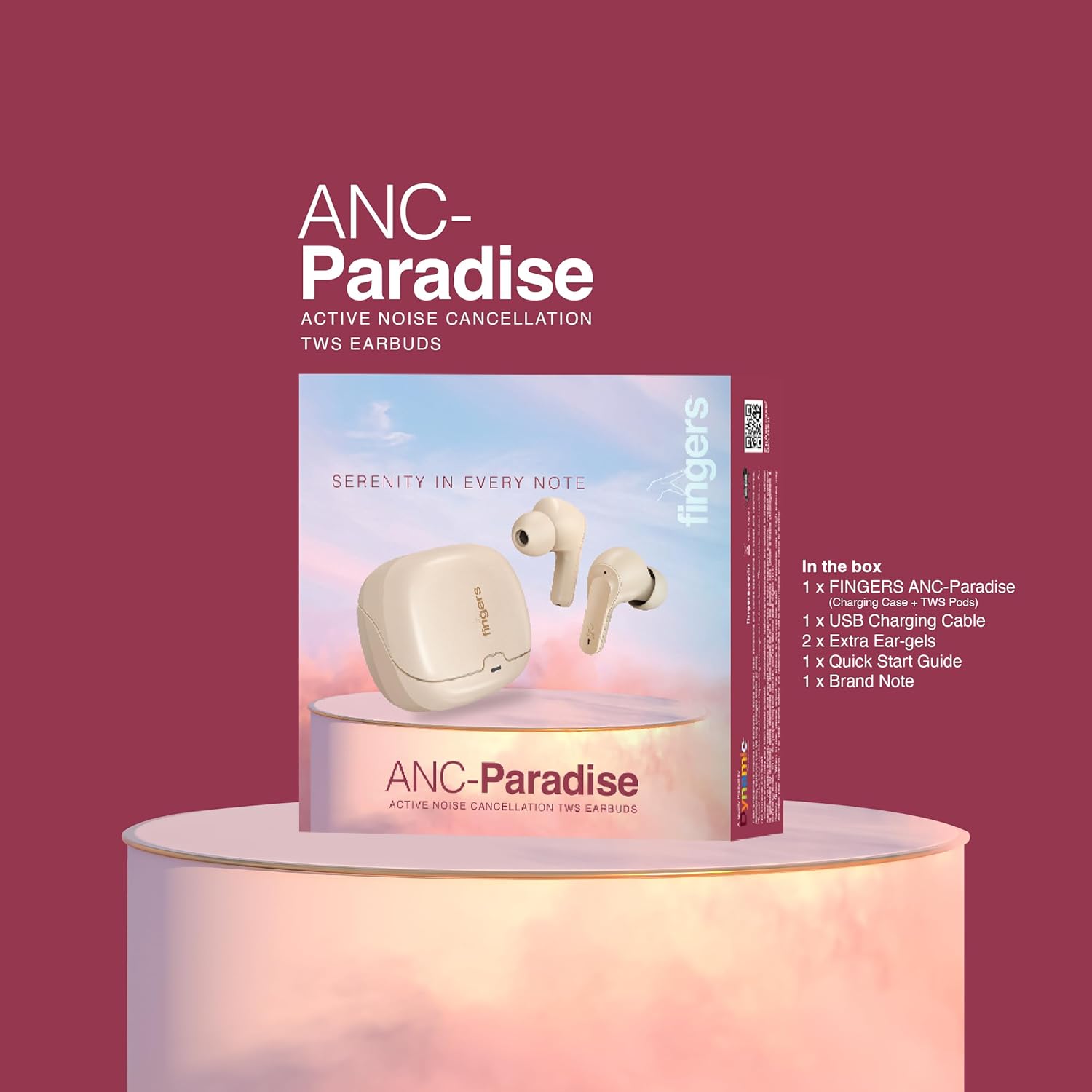
Image: All items included in the FINGERS ANC-Paradise TWS Earbuds package.
3. ترتیب کول
۴.۱. د غوږۍ او کیس چارج کول
Before first use, fully charge the earbuds and the charging case. Use the provided USB charging cable to connect the case to a power source.
- د چارج کولو قضیه: Connect the USB cable to the charging port on the case. The indicator light will show charging status.
- ایربودز: Place the earbuds into the charging case. Ensure they are properly seated; the indicator lights on the earbuds will confirm charging.
A full charge provides up to 32 hours of total playtime. The fast charging feature allows for 1.5 hours of playtime with just a 10-minute charge.

Image: Earbuds and case illustrating 32 hours of playtime and fast charging benefits.
3.2. د وسیلې سره جوړه کول
- ډاډ ترلاسه کړئ چې د غوږ بډونه چارج شوي دي.
- د چارج کولو قضیه پرانیزئ. د غوږ بډونه به په اتوماتيک ډول د جوړې کولو حالت ته ننوځي.
- په خپل وسیله (سمارټ فون، ټابلیټ، لپ ټاپ) کې، بلوتوث فعال کړئ.
- لټون available Bluetooth devices and select "FINGERS ANC-Paradise" from the list.
- یوځل چې وصل شو، تاسو به د تایید غږ واورئ، او د غوږ بډونه به د کارولو لپاره چمتو وي.
The earbuds offer a truly wireless experience and can be used as a single earbud or as a pair.
4. عملیاتي لارښوونې
۵.۴. د فعال شور لغوه کول (ANC)
Active Noise Cancellation (ANC) reduces ambient noise, allowing for a more focused listening experience. You can enable or disable ANC with a simple switch or touch control (refer to the Quick Start Guide for specific gestures).
4.2. Surround Noise Cancellation (SNC™)
SNC™ technology is designed for advanced voice clarity during calls. It intelligently filters out surrounding ambient noise, ensuring your voice is clear to the person on the other end.

Image: Earbuds illustrating the functions of Active Noise Cancellation and Surround Noise Cancellation.
۴.۱. د لمس حسي کنټرولونه
The earbuds feature intuitive touch controls for managing calls and music playback:
- پلی کول / ودرول: په دواړو غوږونو کې یو ځل کلیک وکړئ.
- بله لار: په ښي غوږۍ کې دوه ځله ټایپ کړئ.
- مخکینی لار په چپ غوږۍ کې دوه ځله ټایپ کړئ.
- ځواب / پای کال: په دواړو غوږونو کې یو ځل کلیک وکړئ.
- زنګ رد کړئ: هر یو ایربډ فشار ورکړئ او ونیسئ.
- د غږ همکار فعاله کړئ: Triple tap on either earbud (on default OS).

انځور: اوورview of control features including sweat resistance, voice assistant, and flexible usage modes.
۳. د غږ اغیزې
Customize your listening experience with three exceptional sound effects:
- Hi-Fi: For balanced and clear audio.
- باس: Enhances low frequencies for a deeper sound.
- ډبره: د راک موسیقۍ ژانرونو لپاره غوره شوی.
Refer to the Quick Start Guide for instructions on how to switch between these sound effects.

Image: Earbuds with visual representation of Hi-Fi, Bass, and Rock sound modes.
5. ساتنه او پالنه
- پاکول: د غوږ بډونه او د چارج کولو کیس په منظم ډول د نرم او وچ ټوکر سره پاک کړئ. د سختو کیمیاوي موادو یا خړوبونکي موادو کارولو څخه ډډه وکړئ.
- د اوبو مقاومت: The earbuds have an IPX4 rating, making them sweat resistant. This means they can withstand splashes of water and sweat, but they are not waterproof and should not be submerged in water.
- ذخیره کول: کله چې په کارولو کې نه وي، د غوږ بډونه د چارج کولو په قضیه کې وساتئ ترڅو دوی خوندي شي او چارج یې وساتي.
- دحرارت درجه: د غوږ بډونه د سختې تودوخې (ګرمې یا سړې) یا لوړې رطوبت سره مخ کیدو څخه ډډه وکړئ.
6. ستونزه حل کول
If you encounter issues with your FINGERS ANC-Paradise TWS Earbuds, please refer to the following common solutions:
- د غوږونو غوږونه نه جوړېږي یا نه نښلېږي:
- ډاډ ترلاسه کړئ چې دواړه غوږونه چارج شوي دي.
- په خپل وسیله کې بلوتوث بند کړئ، بیا یې بیرته فعال کړئ.
- وسیله د خپل بلوتوث ترتیباتو څخه هیر کړئ او بیا د جوړه کولو هڅه وکړئ.
- دواړه ایربډونه بیرته د چارج کولو کیس کې ځای په ځای کړئ، پوښ وتړئ، یو څو ثانیې انتظار وکړئ، بیا یې د بیا تنظیمولو لپاره بیا خلاص کړئ.
- یوازې یو ایربډ نښلوي:
- ډاډ ترلاسه کړئ چې دواړه غوږونه چارج شوي دي.
- دواړه ایربډونه بیرته د چارج کولو په قضیه کې کیږدئ، پوښ یې وتړئ، یو څو ثانیې انتظار وکړئ، بیا یې بیا خلاص کړئ. دا ډیری وختونه دوی بیا همغږي کوي.
- If the issue persists, try resetting the earbuds to factory settings (refer to the Quick Start Guide for specific instructions).
- غږ نشته:
- په خپل وسیله او ایربډ دواړو کې د غږ کچه وګورئ.
- ډاډ ترلاسه کړئ چې د غوږ بډونه ستاسو وسیله سره په سمه توګه وصل دي.
- د بل اپلیکیشن یا سرچینې څخه آډیو غږولو هڅه وکړئ.
- ANC په اغیزمنه توګه کار نه کوي:
- Ensure ANC is enabled.
- Adjust the fit of the ear-gels to ensure a proper seal in your ear canal.
7. مشخصات
| فیچر | تفصیل |
|---|---|
| د ماډل نوم | ANC-Paradise |
| د ارتباط ټیکنالوژي | بې سیم (بلوتوث) |
| د شور کنټرول | Active Noise Cancellation (ANC), Surround Noise Cancellation (SNC™) |
| د بیټرۍ ژوند | تر 32 ساعتونو پورې |
| چټک چارج کول | د ۵ دقیقو چارج سره د ۴ ساعتونو لوبې وخت |
| د اوبو د مقاومت کچه | IPX4 (د خولې په وړاندې مقاومت لرونکی) |
| ځانګړي ځانګړتیاوې | Built-In Voice Assistant, Fast Charging, Noise Cancellation, Surround Sound, Sweatproof, 3 Sound Effects |
| مطابقت لرونکې وسیلې | سمارټ فونونه، ټابلیټونه، لپټاپونه |
| د توکي وزن | 43 ګرامه |
| د آډیو ډرایور ډول | متحرک چلوونکی |
| خنډ | 32 اوم |
| د محصول ابعاد | 1.7 x 2.4 x 3.2 سانتي متره |
۷. د تضمین او ملاتړ معلومات
For warranty claims or technical support, please contact the manufacturer:
جوړونکی: Dynamic Conglomerate Pvt. Ltd.
پته: 329/330, GIDC Phase II, Near Sardar Chowk, Vapi, Valsad, Gujarat, 396195, India
Please retain your proof of purchase for warranty services. For further assistance, refer to the official FINGERS webسایټ یا د دوی پیرودونکي ملاتړ سره اړیکه ونیسئ.


