پیژندنه
Thank you for choosing the XGP X1 Motorcycle Helmet Speakers. This manual provides detailed instructions for the proper installation, operation, and maintenance of your new Bluetooth headset. Designed for motorcycle riders, the X1 offers high-quality audio, stable wireless connectivity, and essential features to enhance your riding experience. Please read this manual thoroughly before use to ensure optimal performance and safety.
په بکس کې څه دي
ډاډ ترلاسه کړئ چې ټولې برخې ستاسو په کڅوړه کې شتون لري:
- X1 Main Unit
- 40mm Hi-fi Speaker (2)
- بوم مایکروفون
- تڼۍ مایکروفون
- USB-C کیبل
- فلزي خط
- 3M Sticker Bracket
- د سپیکر پیډونه
- د کارن لارښود

Figure 1: XGP X1 Product Package Contents
محصول پای ته ورسیدview
The XGP X1 is a state-of-the-art motorcycle helmet communication system designed for clarity, durability, and ease of use. Key features include:
- پرمختللی بلوتوټ 5.3: Ensures faster data transmission, lower latency, and a broader transmission range for seamless connectivity.
- د بیټرۍ اوږد ژوند: An 800mAh battery provides up to 60 hours of music playback/phone calls and 360 hours of standby time on a 2-hour charge.
- IP67 پنروک درجه: Comprehensive sealing protects the unit from water ingress, allowing use in various weather conditions.
- د لوړ وفادار غږ: Equipped with 40mm Hi-fi speakers and professional tuning for clear, vibrant sound with deep bass and clear mids/highs.
- Dual Microphone Options: Includes both a boom microphone and a button microphone for compatibility with different helmet types.
- DSP/CVC Noise Cancellation: Effectively reduces environmental noise for clear voice communication.
- د غږ معاون ادغام: Double-click the power button to activate Siri or Google Assistant for navigation, music control, and calls.
- د دوه ګوني تلیفون اتصال: Supports simultaneous connection to two mobile phones without re-pairing, allowing convenient switching.
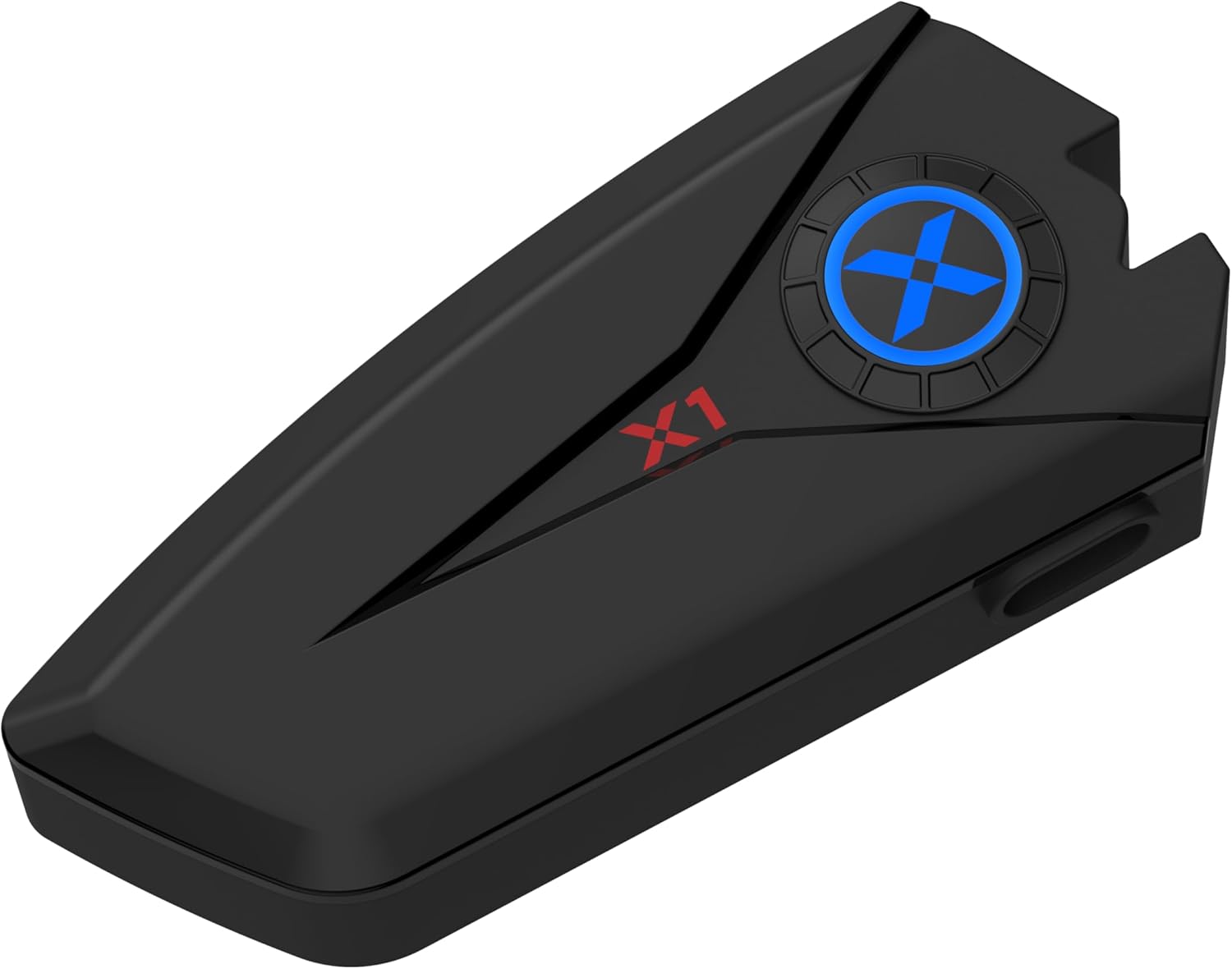
Figure 2: XGP X1 Main Unit

Figure 3: High-Capacity Bluetooth V5.3 Chip

Figure 4: 40mm Hi-Fi Stereo Sound Quality Components
تنظیم او نصب کول
The X1 is designed for broad helmet compatibility, offering two microphone types and two mounting bracket options to suit various helmet styles.
Choosing Your Microphone
- د بوم مایکروفون: Ideal for open-face, modular, or flip-up helmets where the microphone needs to extend closer to your mouth.
- تڼۍ مایکروفون: Suitable for full-face helmets where the microphone can be discreetly placed inside the chin bar.

Figure 5: Two Forms of Microphone
د اصلي واحد نصب کول
Choose between the metal bracket or the 3M sticker bracket based on your helmet type and preference.
- فلزي قوس: Provides a secure, clamp-on attachment to the helmet shell.
- 3M Sticker Bracket: Offers a strong adhesive attachment for helmets where clamping is not feasible or preferred. Ensure the surface is clean and dry before applying.
د سپیکر نصب کول
The 40mm Hi-fi speakers attach inside the helmet using velcro pads. Position them directly over your ears for optimal sound quality. Use the included speaker pads for comfort and proper fit.

Figure 6: Great Helmet Compatibility
عملیاتي لارښوونې
پاور آن/بند
- پاور آن: د بریښنا تڼۍ د نږدې 3 ثانیو لپاره فشار ورکړئ او ونیسئ تر هغه چې د شاخص رڼا روښانه شي.
- بندول: د بریښنا تڼۍ د شاوخوا 5 ثانیو لپاره فشار ورکړئ او ونیسئ تر هغه چې د شاخص څراغ بند نشي.
د بلوتوث جوړې کول
- Ensure the X1 is powered off.
- د بریښنا تڼۍ د شاوخوا 5-7 ثانیو لپاره فشار ورکړئ او ونیسئ تر هغه چې د شاخص څراغ په بدیل سره سور او نیلي روښانه شي، چې د جوړه کولو حالت په ګوته کوي.
- په خپل ګرځنده تلیفون کې، بلوتوث فعال کړئ او د شته وسایلو لټون وکړئ.
- Select "XGP X1" from the list of devices.
- یوځل چې وصل شي، د شاخص څراغ به په جامد نیلي بدل شي.
د دوو ګرځنده تلیفونونو نښلول
The X1 supports simultaneous connection to two mobile phones without the need for re-pairing. This is convenient for users with separate personal and work phones.
- Pair the first phone following the Bluetooth Pairing steps above.
- کله چې لومړی تلیفون وصل شي، په لومړي تلیفون کې بلوتوث په موقت ډول غیر فعال کړئ.
- Put the X1 back into pairing mode (red and blue flashing).
- Pair the second phone.
- Re-enable Bluetooth on the first phone. Both phones should now be connected to the X1.

Figure 7: Two Mobile Phones Connection
د اړیکې مدیریت
- زنګ ووهئ: د بریښنا تڼۍ لنډ فشار ورکړئ.
- ټلیفون پای: د زنګ وهلو پر مهال د بریښنا تڼۍ لنډ فشار ورکړئ.
- زنګ رد کړئ: د 2 ثانیو لپاره د بریښنا تڼۍ فشار او ونیسئ.
- Auto-Answer: The X1 can be set to auto-answer incoming calls after 6 seconds. Refer to the user manual for specific settings if this feature is not enabled by default.

Figure 8: Auto-Answer Incoming Phone Call
د غږ غږ
- پلی کول / ودرول: د بریښنا تڼۍ لنډ فشار ورکړئ.
- بله لار: د حجم پورته کولو تڼۍ لنډ فشار ورکړئ.
- مخکینی لار د حجم کمولو تڼۍ لنډ فشار ورکړئ.
- د حجم کنټرول: Long press Volume Up or Volume Down buttons.
د غږ معاون
Activate your phone's voice assistant (Siri, Google Assistant) directly from the X1.
- د غږ همکار فعاله کړئ: Double-click the Power button. You can then issue commands for GPS navigation, music playback, making calls, and more.

شکل ۸: د غږ معاون فعالیت
چارج کول او د بیټرۍ ژوند
The X1 is equipped with an 800mAh battery, providing extensive usage time.
- د چارج کولو وخت: Approximately 2 hours for a full charge using the provided USB-C cable.
- Music Playback/Phone Call Time: تر 60 ساعتونو پورې.
- ولاړ وخت: تر 360 ساعتونو پورې.
Connect the USB-C cable to the charging port on the X1 unit and a suitable USB power source (e.g., computer USB port, wall adapter). The indicator light will show charging status (refer to the full user manual for specific light indications).

شکل ۶: د بیټرۍ ژوند او چارج کول
د اوبو ضد کول (IP67)
The XGP X1 features an IP67 waterproof rating, meaning it is protected from dust and can withstand immersion in water up to 1 meter for 30 minutes. This design ensures reliable performance even in rainy conditions.
- Each component is carefully sealed to prevent water ingress.
- Allows you to focus on riding without concern for light rain or splashes.
While the device is waterproof, avoid prolonged submersion or exposure to high-pressure water jets to maintain its integrity.

شکل ۱۳: د IP67 د اوبو ضد ځانګړتیا
ساتنه
To ensure the longevity and optimal performance of your XGP X1 headset, follow these maintenance guidelines:
- پاکول: اصلي واحد او سپیکرې د نرم، d سره پاک کړئamp ټوکر د سختو کیمیاوي موادو یا خړوبولو پاکونکو څخه کار مه اخلئ.
- ذخیره کول: کله چې د اوږدې مودې لپاره نه کارول کیږي، وسیله په یخ او وچ ځای کې د مستقیم لمر وړانګو او سختې تودوخې څخه لرې وساتئ.
- چارج کول: Charge the battery regularly, even if not in frequent use, to maintain battery health. Avoid fully discharging the battery for prolonged periods.
- د بندر ساتنه: Ensure the USB-C charging port cover is securely closed when not charging to maintain waterproofing.
- د مایکروفون پاملرنه: Keep the microphone foam cover clean and free from debris to ensure clear voice pickup.
د ستونزو حل کول
If you encounter issues with your XGP X1, please refer to the following common solutions:
| ستونزه | احتمالي لامل | د حل لاره |
|---|---|---|
| وسیله به نه چالانېږي | د بیټرۍ کچه ټیټه ده؛ د بریښنا تڼۍ د اوږدې مودې لپاره نه ده فشار شوې | Charge the device fully; Press and hold the Power button for 3 seconds. |
| د تلیفون سره جوړه نشي کیدی | وسیله د جوړې کولو په حالت کې نه ده؛ په تلیفون کې بلوتوټ بند دی؛ ډیرې جوړې شوې وسیلې دي | Ensure device is flashing red/blue; Enable phone Bluetooth; Delete old Bluetooth connections on phone. |
| د سپیکرو څخه هیڅ غږ نشته | Volume too low; Speakers not connected properly; Phone volume low | Increase X1 volume; Check speaker connections; Increase phone volume. |
| Poor call quality/noise | Microphone position; Excessive wind noise; DSP/CVC not active | Adjust microphone closer to mouth; Ensure microphone foam is intact; DSP/CVC is automatic, but check for obstructions. |
| د بیټرۍ لنډ ژوند | Battery not fully charged; Old battery | Ensure full 2-hour charge; Contact support if battery life significantly degrades over time. |
If the problem persists after trying these solutions, please contact XGP customer support for further assistance.
مشخصات
| فیچر | تفصیل |
|---|---|
| د ماډل نوم | XGP X1 |
| د ارتباط ټیکنالوژي | بلوتوث 5.3 |
| هیډفون جیک | ډول C |
| د بیټرۍ ژوند | 60 Hours (Music/Talk), 360 Hours (Standby) |
| د چارج کولو وخت | 2 ساعته |
| د اوبو د مقاومت کچه | IP67 پنروک |
| د آډیو ډرایور ډول | Dynamic Driver (40mm Hi-fi Speaker) |
| د شور کنټرول | Active Noise Cancellation (DSP/CVC) |
| د کنټرول طریقه | غږ، تڼۍ |
| مطابقت لرونکې وسیلې | ګرځنده تلیفونونه |
| د توکي وزن | 6.7 اونس |
| جوړونکی | XGP |
| نیټه لومړی شتون لري | د اکتوبر ۲۹، ۲۰۲۳ |
تضمین او ملاتړ
XGP products are manufactured to high-quality standards. For information regarding warranty coverage, please refer to the warranty card included in your product packaging or visit the official XGP website. If you require technical assistance, troubleshooting beyond this manual, or have questions about your XGP X1, please contact XGP customer support through the contact information provided on our webسایټ یا ستاسو د پیرود پلیټ فارم.
آنلاین ملاتړ: Visit the XGP official website for FAQs, updated manuals, and contact forms.
د بریښنالیک ملاتړ: Refer to your product packaging or the XGP webد پیرودونکو خدماتو بریښنالیک پتې لپاره سایټ.


