1. پیژندنه
The CATLINK Baymax-Lite is an automatic self-cleaning cat litter box designed to provide a clean and hygienic environment for your cat while simplifying litter maintenance. It features smart controls, health monitoring capabilities, and multiple cleaning modes.
This manual provides essential information for the safe and efficient use of your CATLINK Baymax-Lite litter box. Please read it thoroughly before installation and operation.
2. د خوندیتوب معلومات
- د عمر او وزن محدودیتونه: This device is not recommended for cats under 6 months of age or weighing less than 1.5 kg (3.3 lbs).
- د کثافاتو ډول: For optimal cleaning performance, use clumping litter, preferably bentonite-based. Do not exceed the MAX fill line when adding litter.
- ځای په ځای کول: Place the litter box on a flat, stable surface. Keep it away from water sources and direct sunlight.
- د بریښنا رسول: Use only the provided power adapter. Ensure the power cord is not damaged or pinched.
- پاکول: Disconnect power before cleaning. Do not immerse the main unit in water.
- ماشومان او څاروي: Keep children and other pets away from the device during operation.
- د پنچ ضد محافظت: The litter box is equipped with multiple sensors (infrared, weight, anti-pinch rotation) to detect your cat and stop operation immediately if a cat enters during a cleaning cycle.
3. د بسته محتويات
ډاډ ترلاسه کړئ چې ټولې برخې په بسته کې شتون لري:
- CATLINK Baymax-Lite Self-Cleaning Cat Litter Box Main Unit
- د بریښنا اډاپټر
- Waste Bags (Roll)
- Odor Eliminator Gel/Cartridge
- د کارونکي لارښود (دا لاسوند)
- Optional: Litter Mat, Step (if included in your specific package)
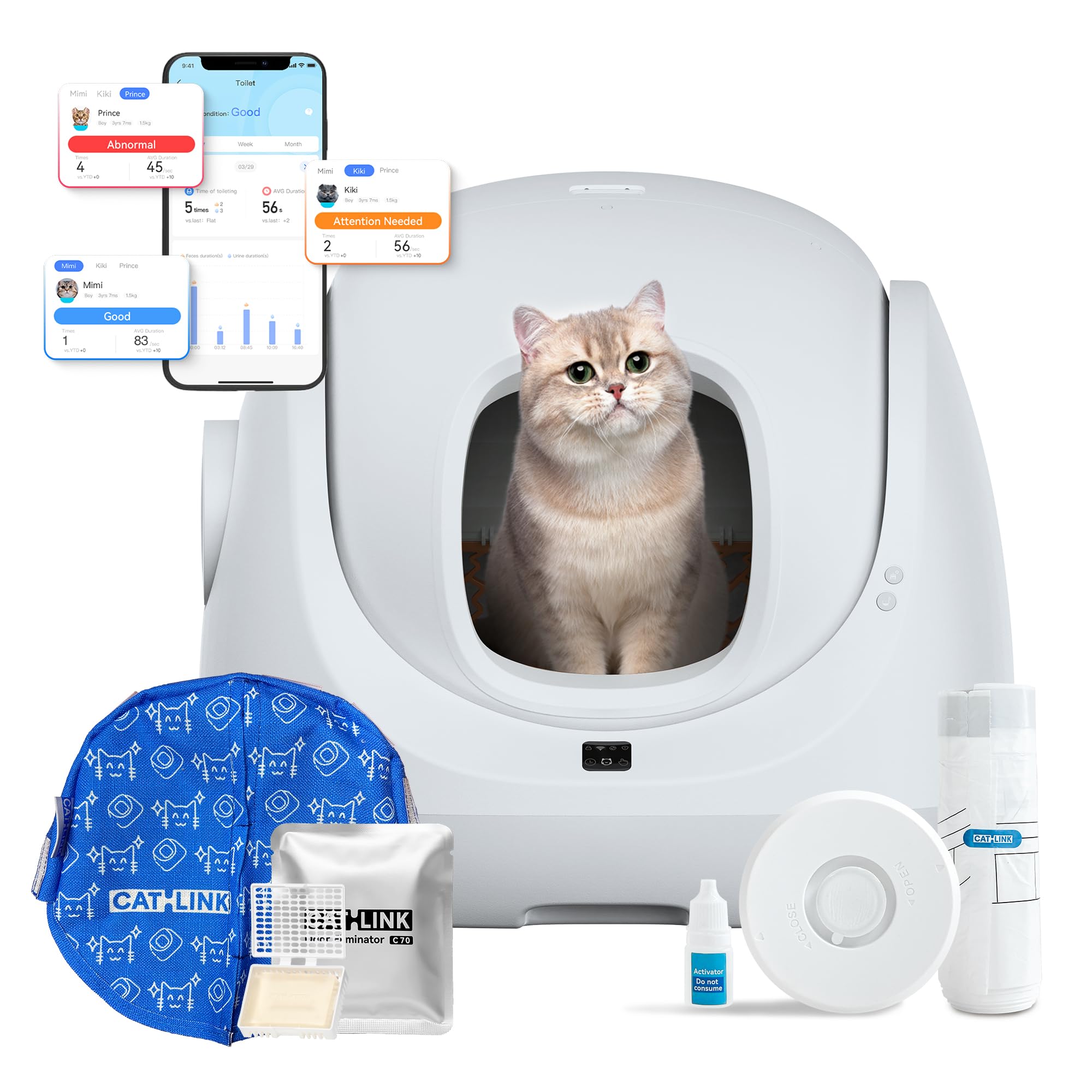
Image: CATLINK Baymax-Lite main unit with various accessories, including waste bags and odor eliminator.
4. د تنظیم کولو لارښود
4.1 پاکول او ځای پرځای کول
- په احتیاط سره د بسته بندۍ څخه ټولې برخې لرې کړئ.
- Place the CATLINK Baymax-Lite on a firm, level surface. Ensure there is enough space around the unit for proper operation and maintenance.
- Ensure the unit is not placed near heat sources, direct sunlight, or in areas with high humidity.

Image: Illustration showing the compact dimensions of the CATLINK Baymax-Lite (Width 465mm, Height 500mm, Depth 500mm) and its suitability for various spaces.
۳.۲ د کثافاتو اضافه کول
- Open the top cover of the litter box.
- Pour clumping cat litter into the sphere. Ensure the litter level does not exceed the "MAX" line indicated inside the sphere.
- پورتنۍ پوښ په خوندي ډول وتړئ.

Image: Steps for adding cat litter to the Baymax-Lite, showing the top opening and the litter being poured in.

Image: Illustration demonstrating compatibility with various clumping litter types, including tofu litter and mixed cat litter, and the MAX fill line.
4.3 د بریښنا نښلول
Connect the power adapter to the litter box and then plug it into a wall outlet. The device will power on automatically.
4.4 App Connection (Wi-Fi)
- Download the CATLINK app from your smartphone's app store.
- Create an account and follow the in-app instructions to connect your Baymax-Lite to your home's 2.4 GHz Wi-Fi network. Ensure both Bluetooth and Wi-Fi are enabled on your phone during the pairing process.
- Once connected, you can create a personal profile for your cat(s) within the app.
4.5 Cat Adaptation
Allow your cat time to adjust to the new litter box. You may place some of their old litter in the Baymax-Lite initially to encourage use. Do not force your cat into the unit.

Image: Illustration showing cats of different weights (1.5kg, 5kg, 10kg) using the Baymax-Lite, highlighting its accessibility for kittens and senior cats with a 20cm entry height.
5. عملیاتي لارښوونې
The CATLINK Baymax-Lite offers various cleaning modes and smart features controllable via the CATLINK app.
5.1 د پاکولو طریقې
- اتوماتیک حالت: The device automatically detects when your cat has used the litter box and initiates a cleaning cycle after a set delay (configurable in the app).
- مهال ویش: Schedule specific cleaning times through the app.
- لاسي حالت: Initiate a cleaning cycle manually via the app or by pressing the button on the device.
- خالي حالت: This mode completely empties all litter from the sphere into the waste bin, useful for full litter changes or deep cleaning. Activate via the app.
5.2 د اپلیکیشن ځانګړتیاوې
- روغتیا څارنه: The app records your cat's weight, usage time, and frequency, providing insights into their health. Alerts can be set for unusual patterns.
- ریموټ کنټرول: Clean the litter box from anywhere using the app.
- د څو پیشوګانو پیژندنه: (Optional, may require activation via app for a fee) Allows the device to distinguish between multiple cats and track their individual usage.
- Consumable Alerts: Receive notifications when litter, waste bags, or odor eliminator levels are low.

Image: Screenshot of the CATLINK app showing real-time monitoring of litter, waste bags, and odor eliminator, along with cat usage data.

Image: The CATLINK app interface demonstrating the "Empty All" function for quick and complete litter removal.
6. ساتنه
6.1 د کثافاتو کڅوړه خالي کول
The waste bin has a capacity of 7 liters, allowing for up to 7 days of use for a single cat. When the app indicates the bin is full or you notice odors, it's time to empty it.
- Ensure the device is in a standby state or powered off.
- Pull out the waste drawer from the bottom front of the unit.
- Remove the full waste bag, seal it, and dispose of it.
- Insert a new waste bag into the drawer and push the drawer back into the unit until it clicks into place.

Image: Illustration showing the process of replacing the waste bag in the Baymax-Lite, designed for easy, stand-up maintenance.
6.2 Cleaning the Sphere
The inner sphere is removable and washable for thorough cleaning.
- بریښنا بنده کړئ او وسیله یې خلاص کړئ.
- Remove the inner sphere.
- The sphere features a drain plug; remove it to drain any liquids.
- Rinse the sphere with water and mild detergent. Ensure it is completely dry before reassembling.
- Reinstall the sphere and secure it properly.

Image: Visual guide on how to remove and wash the inner sphere of the Baymax-Lite, highlighting its drainable design.
۵.۳ د بوی کنټرول
The Baymax-Lite employs a triple odor control system:
- Sealed Waste Bin: Prevents odors from escaping.
- Odor Absorbing Gel: Replace regularly as indicated by the app or when effectiveness diminishes.
- Antibacterial Barrier Curtain: Helps contain odors within the unit.

Image: Diagram illustrating the three components of the Baymax-Lite's odor control system: sealed waste bin, odor absorbing gel, and antibacterial barrier curtain.
7. ستونزه حل کول
If you encounter issues with your CATLINK Baymax-Lite, refer to the following common problems and solutions. For more detailed diagnostics, consult the CATLINK app or contact customer support.
| ستونزه | احتمالي لامل | د حل لاره |
|---|---|---|
| وسیله فعاله نه ده | د بریښنا اډاپټر وصل نه دی؛ د بریښنا د رسولو ستونزه. | Ensure power adapter is securely connected to both the device and a working power outlet. |
| Cleaning cycle not starting automatically | Automatic mode not enabled; cat weight not detected; sensors obstructed. | Check app settings for automatic mode. Ensure the cat meets the minimum weight requirement (1.5 kg). Clean sensors for any obstructions. |
| Litter not cleaning effectively | Incorrect litter type; litter level too high/low; clumping issues. | Use recommended clumping litter. Adjust litter level to below the MAX line. Ensure litter is fresh and clumps well. |
| د اپلیکیشن ارتباط مسلې | د وای فای غلط پټنوم؛ د ۵GHz وای فای شبکه؛ کمزوری سیګنال. | Ensure you are connecting to a 2.4 GHz Wi-Fi network. Re-enter Wi-Fi password. Move the device closer to the router or check Wi-Fi signal strength. Restart the device and router. |
| Error messages or unexpected stops | Obstruction detected; sensor malfunction; internal error. | Check for any obstructions inside the sphere or near sensors. Power cycle the device. If the issue persists, contact customer support. |
| بوی دوام لري | Waste bin full; odor eliminator needs replacement; poor ventilation. | Empty the waste bin. Replace the odor eliminator. Ensure the room has adequate ventilation. |
8. مشخصات
| فیچر | تفصیل |
|---|---|
| د ماډل شمیره | Baymax lite |
| ابعاد (L x W x H) | 53.28 x 54.5 x 59.9 سانتي متره (20.98 x 21.46 x 23.58 انچه) |
| د محصول وزن | 11 کیلوګرامه (24.25 پونډه) |
| Inner Sphere Capacity | ۳۳۰ لیتره (تقریبا) |
| د کثافاتو بن ظرفیت | 7 Liters (up to 7 days for one cat) |
| مواد | اکریلونایتریل بوټاډین سټیرین (ABS) |
| ځانګړي ځانګړتیاوې | Self-cleaning, Wi-Fi control, Health monitoring, Multiple cleaning modes, Anti-pinch safety sensors |
| ارتباط | 2.4 GHz وائی فای |
| د پیشو وړاندیز شوی وزن | 1.5 kg - 10 kg (3.3 lbs - 22 lbs) |
9. تضمین او ملاتړ
9.1 د تضمین معلومات
This product comes with a standard manufacturer's warranty. Please refer to the warranty card included in your package or contact CATLINK customer service for specific details regarding warranty duration and coverage.
You are eligible for free returns within 30 days of purchase. Please retain your proof of purchase for warranty claims.
9.2 د پیرودونکي ملاتړ
For technical assistance, troubleshooting, or any questions regarding your CATLINK Baymax-Lite, please contact our customer support team:
- د تلیفون ملاتړ: +49 (0)7251 5098806 (Monday - Friday, 9:00-17:00 CET)
- د بریښنالیک ملاتړ: support@catlinkeu.com (په ۲۴/۷ کې شتون لري)

Image: Contact details for CATLINK European customer service, including phone number and email address.


