محصول پای ته ورسیدview
The SCULPFUN S9 Pro is a high-precision 10W laser engraver and cutter machine designed for versatile applications. It offers powerful engraving and cutting capabilities on a wide range of materials, including wood, leather, plastic, acrylic, and metal. With its advanced features, the S9 Pro ensures detailed and efficient results for various crafting and prototyping projects.

Figure 1: SCULPFUN S9 Pro 10W Laser Engraver, showcasing its robust frame and laser module.
کلیدي ځانګړتیاوې
- Powerful 10W Laser Module: Enables precise engraving and cutting on various materials. Capable of cutting up to 20mm wood and 15mm acrylic.
- لویه کاري ساحه: A generous 400mm x 410mm (15.75" x 16.14") area for diverse project sizes.
- لوړ دقت: Features a 0.06mm ultra-fine laser focus and 0.01mm precision for detailed work.
- پراخه مطابقت: Compatible with popular engraving software like LaserGRBL and LightBurn, supporting Windows and MAC systems. Supports various file formats including JPG, PNG, DXF, SVG, AI, G-code, NC, and BMP.
- ښه خوندیتوب: Equipped with a laser filter cover that blocks 98% of ultraviolet light, double safety power switch, and pre-drilled holes for secure wiring. Includes a steel pad to protect surfaces and mitigate fire hazards.
د تنظیم کولو لارښود
The SCULPFUN S9 Pro is designed for straightforward assembly. Follow these steps for initial setup:
- بسته بندي کول: په احتیاط سره د بسته بندۍ څخه ټولې برخې لرې کړئ. ډاډ ترلاسه کړئ چې د بسته بندۍ په لیست کې لیست شوي ټولې برخې شتون لري.
- چوکاټ مجلس: Assemble the main frame of the engraver. The parts are typically labeled for easy identification. Refer to the included quick-start guide for visual instructions.
- د لیزر ماډل نصب کول: Securely attach the laser module to the gantry. Ensure it is firmly in place.
- تارونه: Connect all necessary cables, including power and data cables, according to the provided diagrams. Ensure connections are secure.
- د سافټویر نصب کول: Install the recommended engraving software (e.g., LaserGRBL or LightBurn) on your computer. Drivers may be required for proper communication.
- ابتدايي اندازه کول: Perform initial calibration steps as outlined in the software or quick-start guide to ensure proper laser alignment and focus.
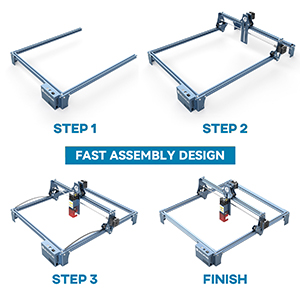
Figure 2: Visual representation of the fast assembly process for the SCULPFUN S9 Pro.

Figure 3: Diagram illustrating the 400x410mm large carving area of the engraver.
عملیاتي لارښوونې
Operating the SCULPFUN S9 Pro involves preparing your design, setting up the material, and initiating the engraving or cutting process through the software.
Software Compatibility and Usage
The S9 Pro is compatible with a variety of mature engraving software, ensuring flexibility for users:
- ملاتړ شوی سافټویر: لیزر جی آر بي ایل، لایټ برن، بین باکس، ګربل کنټرولر، لایټ فایر.
- عملیاتي سیسټمونه: Supports Windows (XP, 7, 8, 10) and MAC systems (with LightBurn).
- File بڼې: Compatible with JPG, PNG, DXF, SVG, AI, G-code, NC, BMP, and more.

Figure 4: Illustration of the broad software compatibility, including LaserGRBL and LightBurn.
Material Preparation and Laser Focus
Proper material placement and laser focusing are crucial for optimal results.
- د موادو ځای په ځای کول: Place your material flat on the working area. Use the included steel pad to protect your work surface from laser damage and fire hazards.
- Laser Focusing: The S9 Pro features a 0.06mm ultra-fine laser focus. Adjust the laser module height to achieve the sharpest possible focus on your material. This ensures precise engraving and cutting.
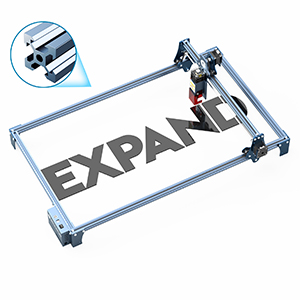
Figure 5: Demonstrating the adjustment of the laser module for optimal focus on the material.

Figure 6: Illustration of the high-density and sharp laser beam, highlighting its effective cutting range and ultra-fine focus.
Engraving and Cutting Materials
The S9 Pro is capable of processing a wide array of materials:
| د موادو ډول | وړتیاوې | یادښتونه |
|---|---|---|
| لرګي | Engraving & Cutting (up to 20mm) | Plywood, light wood, walnut, teak. Adjust settings for different wood densities. |
| اکریلیک | Engraving & Cutting (up to 15mm) | Clear and colored acrylic. |
| چرم | نقاشي او پرې کول | Ideal for personalized leather goods. |
| فلزي | نقاشي | Requires specific settings for different metal types. |
| پلاستیک | نقاشي او پرې کول | Test on a small area first to avoid melting or fumes. |
| Fabric/Cloth | نقاشي | Suitable for denim and other textiles. |

شکل 7: مثالamples of cutting depth on various materials like plywood, MDF, light wood, acrylic, walnut, and teak.

شکل ۷: بصري سابقهamples of wood carving, leather carving, acrylic carving, steel carving, wood cutting, leather cutting, acrylic cutting, and cloth carving.
ساتنه
Regular maintenance ensures the longevity and optimal performance of your SCULPFUN S9 Pro.
- پاکول: Regularly clean the laser lens and the working area to remove dust, debris, and residue from engraving/cutting. Use a soft, lint-free cloth and appropriate cleaning solutions if necessary.
- د هوايي مرستې سیسټم: If using an air assist system, ensure the nozzle is clear and free from blockages to maintain efficient airflow.
- یخ کول: To prevent overheating and prolong laser module life, allow the laser to cool for approximately 15 minutes after every 4 hours of continuous operation.
- Laser Module Lifespan: The laser module has a finite lifespan, typically around one year with regular use. Performance may decline over time, particularly for cutting thicker materials. Replacement modules can be sourced from the manufacturer or authorized dealers.
- غوړول: Periodically check and lubricate the moving parts, such as the guide rails and lead screws, to ensure smooth operation.
د ستونزو حل کول
This section addresses common issues you might encounter with your SCULPFUN S9 Pro.
| ستونزه | احتمالي لامل | د حل لاره |
|---|---|---|
| لیزر نه چلېږي یا کمزوری محصول | Loose connection, laser module issue, incorrect software settings, dirty lens. | Check all cable connections. Verify laser power settings in software. Clean the laser lens. If issues persist, the laser module may need replacement. |
| Poor engraving/cutting quality (e.g., blurry, incomplete cuts) | Incorrect focus, wrong speed/power settings, material issues, dirty lens. | Re-focus the laser. Adjust speed and power settings based on material type and thickness. Ensure material is flat and clean. Clean the laser lens. |
| Software not connecting to engraver | Incorrect COM port, driver issues, software version incompatibility. | Verify the correct COM port is selected in the software. Reinstall drivers. Ensure software is up-to-date or compatible with your firmware. Restart both computer and engraver. |
| Machine not moving or erratic movement | Loose belts, motor issues, power supply problem, software command error. | Check and tighten timing belts. Ensure power supply is stable. Restart software and machine. Consult manufacturer support if motors are unresponsive. |
For more detailed troubleshooting, refer to the official SCULPFUN support resources or online communities for LaserGRBL and LightBurn.
مشخصات
- ماډل: S9 Pro
- د لیزر تولید ځواک: ۱۰۰۰۰ میګاواټه (۱۰ واټه)
- د لیزر ټولګي: 4
- Engraving Precision: 0.01mm
- لیزر تمرکز: 0.06mm ultra-fine
- کاري ساحه: ۸۸ ملي متره x ۹۸ ملي متره (۳.۸ انچه x ۳.۴ انچه)
- د محصول ابعاد: 22.4 x 20.4 x 3 انچه
- د توکي وزن: ۲.۴۵ پونډه
- جوړونکی: SCULPFUN
- د اصلي هیواد: چین
تضمین او ملاتړ
For detailed warranty information, product support, or to purchase replacement parts (such as laser modules), please refer to the official SCULPFUN webسایټ ته مراجعه وکړئ یا مستقیم د دوی د پیرودونکو خدماتو سره اړیکه ونیسئ. د هر ډول تضمین ادعا لپاره د پیرود ثبوت په توګه د پیرود رسید وساتئ.
SCULPFUN Official Store: Visit SCULPFUN Store on Amazon


