1. پیژندنه
The Daakro ZK-502MT Bluetooth Amplifier Board is a versatile 2.0 channel audio amplifier designed for DIY home audio projects. It features dual HiFi amplifier chips, providing clear and high-fidelity sound. With support for both Bluetooth 5.0 and AUX inputs, it offers flexible connectivity options for various audio sources. This manual provides detailed instructions for setup, operation, and maintenance of your ZK-502MT ampلایف بورډ
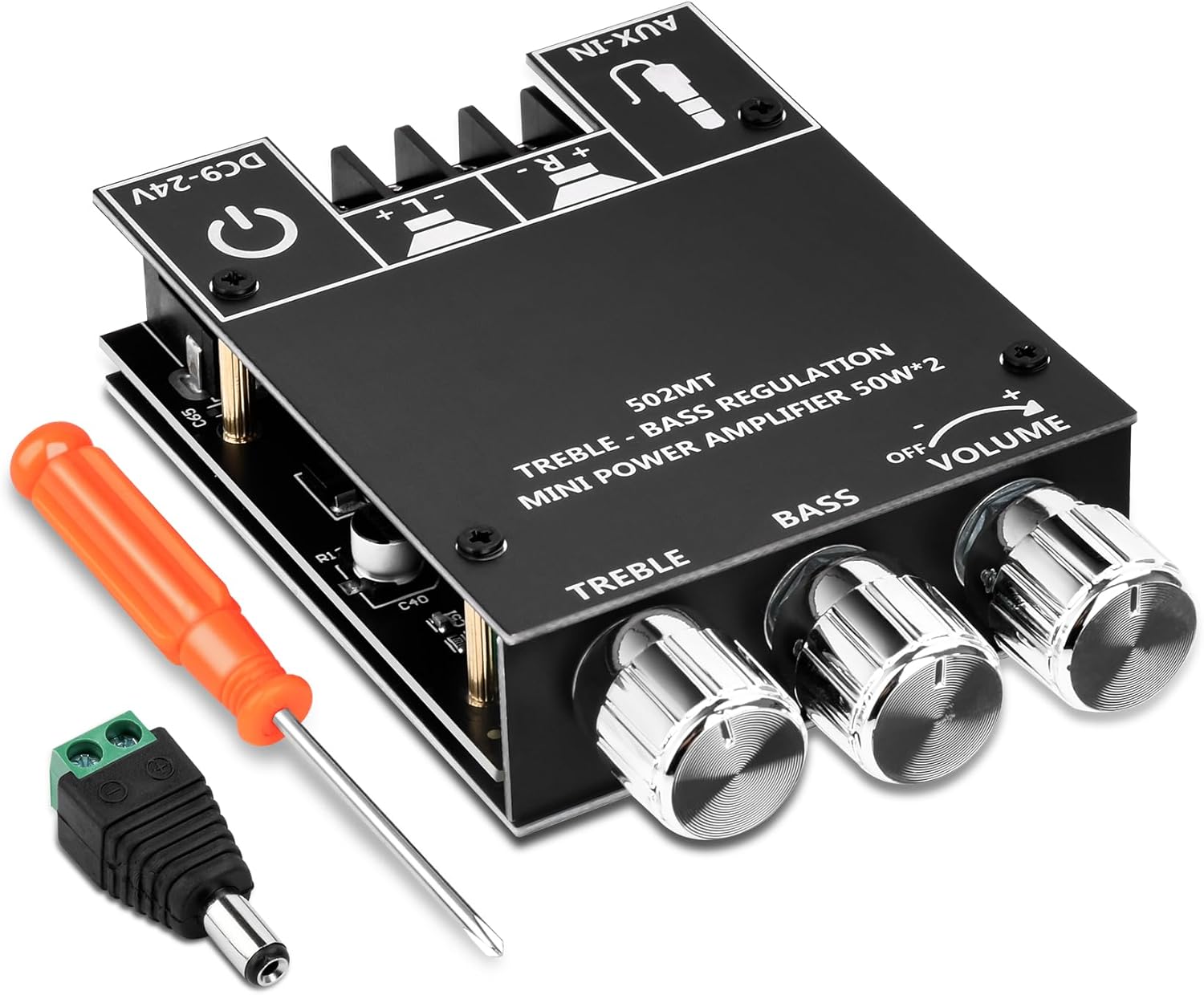
Image 1.1: The ZK-502MT Bluetooth Amplifier Board, including a screwdriver and a DC power adapter.
2. کلیدي ځانګړتیاوې
- Dual HiFi Ampلایفیر چپ: Utilizes two HiFi amplifier chips with PurePath technology for ultra-high resolution, low distortion, and high-fidelity sound.
- 2.0 د چینل ترتیب: Supports left and right channel output, each providing 50W output power for an immersive sound experience.
- Dual Audio Input Modes: Seamlessly switch between Bluetooth 5.0 for wireless connectivity and traditional AUX input for wired audio sources.
- پراخه غوښتنلیک: Compatible with a wide input voltage range from 9V to 24V DC and suitable for 20-200W, 4-8Ω speakers.
- هر اړخیزه ساتنه: Built-in protection mechanisms include over-voltage ، تر وال لاندېtage, over-temperature, short-circuit, and reverse connection protection.
- Treble and Bass Control: Independent knobs for adjusting treble and bass to customize your audio output.
۲. په بکس کې څه دي؟
د بسته بندۍ پرانستلو سره، مهرباني وکړئ تصدیق کړئ چې لاندې ټولې برخې پکې شاملې دي:
- ZK-502MT Bluetooth Ampلوړ بورډ
- Top Plate with Control Labels
- لاندې پلیټ
- سکرو ډرایور
- د ډي سي پاور اډاپټر نښلونکی
- د تودوخې سنک
- Mounting Hardware (Screws, Standoffs)
- Control Knobs (Volume, Treble, Bass)

Image 3.1: All components included in the ZK-502MT package.
4. د تنظیم کولو لارښود
Follow these steps to properly set up your ZK-502MT Bluetooth Ampد ژوند کولو بورډ.
۴.۲ د اجزاو مجلس
- Attach Heat Sink: Secure the provided heat sink to the main amplifier chip on the board. Ensure good contact for optimal heat dissipation.
- Assemble Casing: Use the provided standoffs and screws to attach the top and bottom plates to the amplifier board. The top plate has labels for controls and ports.
- Install Knobs: Place the three control knobs onto their respective shafts for Volume, Bass, and Treble.


Image 4.1: Proper installation of the heat sink and control knobs.
د سپیکر اتصال
خپل سپیکرې د دې سره وصل کړئ amplifier board using the screw terminals. The board supports 2.0 channel output (Left and Right). Ensure correct polarity (+ and -) for each speaker.
- Connect the positive (+) terminal of your left speaker to the 'L+' terminal on the board.
- Connect the negative (-) terminal of your left speaker to the 'L-' terminal on the board.
- Connect the positive (+) terminal of your right speaker to the 'R+' terminal on the board.
- Connect the negative (-) terminal of your right speaker to the 'R-' terminal on the board.
د amplifier board is suitable for 20-200W, 4-8Ω speakers.

Image 4.2: Connection points for speakers, power, and AUX input.
4.3 د بریښنا نښلول
Connect a DC power supply (9V-24V) to the power input terminal. The board includes a DC power adapter connector for convenience.
- ډاډ ترلاسه کړئ چې ستاسو د بریښنا رسولو حجمtage is within the 9V to 24V DC range.
- Connect the power supply to the DC-IN port on the ampلایف بورډ
- The board has built-in reverse connection protection, but always double-check polarity before powering on.

Image 4.3: Detail of the power input and speaker terminals.
5. عملیاتي لارښوونې
This section details how to operate your ZK-502MT ampلایف بورډ
۸ پاور آن/بند
- To power on, ensure all connections are secure, then connect the power supply to a power outlet. The power indicator LED will illuminate.
- To power off, disconnect the power supply from the outlet.
5.2 Volume, Treble, and Bass Control
د amplifier board features three rotary knobs for audio adjustment:
- حجم: Rotate the "VOLUME" knob clockwise to increase volume and counter-clockwise to decrease.
- باس: Rotate the "BASS" knob clockwise to increase bass frequencies and counter-clockwise to decrease.
- تگول: Rotate the "TREBLE" knob clockwise to increase treble frequencies and counter-clockwise to decrease.
۶.۱ د آډیو ان پټ حالتونه
The ZK-502MT supports two audio input modes: Bluetooth and AUX.

انځور ۵.۱: د amplifier board supports both Bluetooth and AUX input modes.
5.3.1 بلوتوث حالت
- ډاډ ترلاسه کړئ amplifier board is powered on.
- The board will automatically enter Bluetooth pairing mode. A voice prompt or indicator light may confirm this.
- On your audio source device (e.g., smartphone, tablet, computer), enable Bluetooth and search for available devices.
- Select "ZK-502MT" from the list of devices to pair. No password is required.
- Once paired, a confirmation sound will be heard, and you can begin playing audio wirelessly.

Image 5.2: Bluetooth connectivity range of the ZK-502MT.
۶.۳ د AUX ان پټ حالت
- Connect a 3.5mm audio cable from your audio source device (e.g., MP3 player, TV, laptop) to the "AUX-IN" port on the ampلایف بورډ
- د amplifier board will automatically switch to AUX input mode when a cable is detected.
- Begin playing audio from your source device.
6. تخنیکي مشخصات
| فیچر | مشخصات |
|---|---|
| د ماډل شمیره | ZK-502MT |
| برانډ | داکرو |
| د چینلونو شمیر | 2.0 (سټریو) |
| د تولید بریښنا | ۴۵ واټه + ۲۰ واټه (ټول ۶۵ واټه) |
| ننوتۍ جلدtage حد | ډي سي ۱۲ ولټه - ۲۴ ولټه |
| د سپیکر مخنیوی | 4-8Ω |
| Speaker Power Compatibility | ۱۷۶۰ واټه - ۱۷۸۰ واټه |
| بلوتوث نسخه | 5.0 |
| د آډیو معلومات | Bluetooth, AUX (3.5mm) |
| ابعاد (L x W x H) | 3.54 x 2.36 x 0.83 انچه (9 x 6 x 2.1 سانتي متره) |
| د توکي وزن | 4.2 اونس (119 ګرامه) |

Image 6.1: Physical dimensions of the ZK-502MT ampلایف بورډ

Image 6.2: Power Output Comparison Table for different input voltages and speaker impedances.
7. ستونزه حل کول
| ستونزه | احتمالي لامل | د حل لاره |
|---|---|---|
| د غږ تولید نشته |
|
|
| بلوتوث نه نښلي |
|
|
| د غږ تحریف یا خراب کیفیت |
|
|
| Amplifier board gets hot |
|
|
8. ساتنه
To ensure the longevity and optimal performance of your ZK-502MT amplifier board, follow these simple maintenance guidelines:
- پاکول: Gently wipe the surface of the board with a soft, dry cloth. Do not use liquid cleaners or solvents, as they may damage the electronic components.
- د دوړو لرې کول: Periodically use compressed air to remove dust from the heat sink and other components to maintain proper cooling.
- ذخیره کول: که ذخیره کول amplifier board for an extended period, disconnect it from power and store it in a cool, dry place away from direct sunlight and excessive humidity.
- سمبالول: Always handle the board by its edges to avoid touching sensitive components or causing static discharge.
9. تضمین او ملاتړ
Daakro is committed to providing high-quality products and excellent customer service.
- تضمین: دا محصول د الف سره راځي د 36 میاشتو تضمین د پیرود نیټې څخه، د تولید نیمګړتیاوې پوښي. مهرباني وکړئ د تضمین ادعاوو لپاره د پیرود ثبوت وساتئ.
- د پیرودونکو خدمت: For any questions, technical assistance, or warranty inquiries, please contact Daakro customer support.
- آنلاین ملاتړ: Visit the official Daakro Store on Amazon for more information and support resources: Daakro Amazon Store.

Image 9.1: Daakro After-Sales Support information.


