پیژندنه
Thank you for choosing the Casio G-Shock GA-110 watch. This manual provides essential information regarding the setup, operation, and maintenance of your new timepiece. Designed for durability and precision, the GA-110 offers a range of features including world time, stopwatch, countdown timer, and multiple alarms, all housed in a robust, water-resistant casing.
Please read this manual carefully to ensure proper use and to maximize the lifespan of your watch. Keep this manual for future reference.
څارنهview

Figure 1: The Casio G-Shock GA-110 watch worn on a wrist. This image provides a real-world perspective of the watch's size and appearance, featuring its black resin construction and white dial.
The Casio G-Shock GA-110 features a combination analog and digital display. It is equipped with four buttons for various operations:
- تعدیل (پورته کیڼ اړخ ته): د تنظیم کولو حالتونو ته د ننوتلو او وتلو لپاره، او د ترتیباتو تایید لپاره کارول کیږي.
- حالت (لاندې کیڼ اړخ ته): Cycles through different modes (Timekeeping, World Time, Stopwatch, Countdown Timer, Alarm).
- REVERSE (Top Right): Used to scroll backward through settings or increase values.
- FORWARD (Bottom Right): Used to scroll forward through settings or decrease values.

شکل ۳.۴: تفصیلي مخکینۍ برخه view of the Casio G-Shock GA-110 watch. This image displays the watch's overall design, highlighting the black resin band and case, and the distinctive white analog-digital dial with multiple sub-dials and digital displays.

شکل 3: اړخ view of the Casio G-Shock GA-110 watch. This image illustrates the robust casing and the placement of the ADJUST and MODE buttons on the left side of the watch.
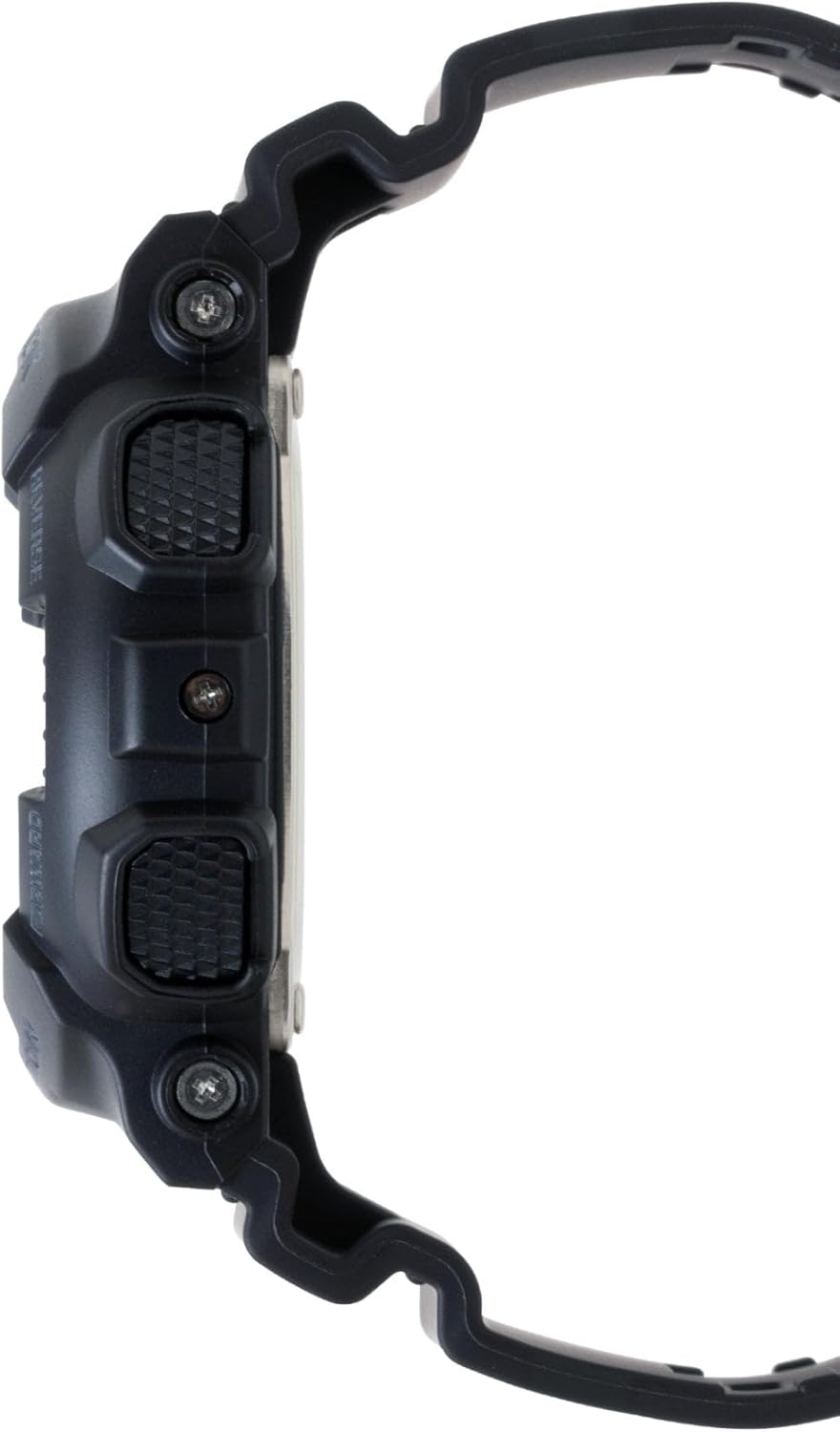
شکل ۲: مخالف اړخ view of the Casio G-Shock GA-110 watch. This image shows the placement of the REVERSE and FORWARD buttons on the right side of the watch, along with the textured grip.
چمتو کول
۳. د لومړني وخت تنظیم
- د وخت ساتلو حالت کې، لاندې ونیسئ سمون تڼۍ تر هغه وخته پورې چې د ښار کوډ فلش پیل شي. دا د ترتیب حالت په ګوته کوي.
- د کارولو REVERSE او فارورډ د خپل مطلوب کور ښار کوډ غوره کولو لپاره تڼۍ.
- فشار ورکړئ موډ button to cycle through the settings: City Code → DST (Daylight Saving Time) → 12/24-hour format → Seconds → Hour → Minute → Year → Month → Day → Illumination Duration.
- د کارولو REVERSE او فارورډ د چمکۍ ارزښت بدلولو لپاره تڼۍ.
- د ټولو ارزښتونو له ټاکلو وروسته، فشار ورکړئ سمون د تنظیم کولو حالت څخه وتلو لپاره تڼۍ.
2. Analog Hand Adjustment
If the analog hands do not match the digital time, you may need to adjust them manually.
- د وخت ساتلو حالت کې، لاندې ونیسئ سمون button until the city code flashes.
- فشار ورکړئ موډ button repeatedly until "H.SET" appears on the digital display.
- د کارولو REVERSE او فارورډ buttons to move the analog hands to the 12 o'clock position.
- فشار ورکړئ سمون button to confirm and exit. The hands will automatically move to match the digital time.
3. د بیټرۍ معلومات
The watch is powered by one LR44 battery, which is included and pre-installed. The battery life varies depending on usage of features like the backlight and alarms. When the display becomes dim or functions become erratic, it may be time for a battery replacement. Refer to the Maintenance section for more details.
د څار عملیات
۴.۱. د نیویګیشن حالت
فشار ورکړئ موډ button to cycle through the different modes in the following order:
Timekeeping Mode → World Time Mode → Stopwatch Mode → Countdown Timer Mode → Alarm Mode
۱. د وخت ساتلو حالت
This is the default mode, displaying the current time and date. You can switch between 12-hour and 24-hour formats by pressing the فارورډ button in Timekeeping Mode (when not in setting mode).
۶. د نړۍ د وخت حالت
په نړیوال وخت حالت کې، وکاروئ REVERSE او فارورډ تonsیو ته view the current time in 48 cities (29 time zones) around the world. Press the سمون button to toggle Daylight Saving Time (DST) on or off for the currently displayed city.
4. د سټاپ واچ حالت
The stopwatch measures elapsed time, split times, and two finishes. The measuring capacity is 1/1000 second for the first hour, then 1/10 second for up to 100 hours.
- مطبوعاتي فارورډ د سټاپ واچ پیل/بندولو لپاره.
- مطبوعاتي REVERSE د بندیدو په وخت کې د سټاپ واچ صفر ته بیا تنظیمولو لپاره.
- During measurement, press REVERSE to record a split time. Press REVERSE again to release the split and continue measurement.
۴. د شمېرنې ټایمر حالت
The countdown timer can be set from 1 minute to 24 hours. An alarm sounds when the countdown reaches zero.
- د شمېرنې ټایمر حالت کې، لاندې ونیسئ سمون تڼۍ تر هغه وخته پورې چې د اوسني شمېرنې پیل وخت روښانه شي.
- د کارولو موډ د ساعتونو او دقیقو ترمنځ د چمکۍ حرکت کولو لپاره تڼۍ.
- د کارولو REVERSE او فارورډ د چمکۍ ارزښت بدلولو لپاره تڼۍ.
- مطبوعاتي سمون د تنظیم کولو حالت څخه وتلو لپاره.
- مطبوعاتي فارورډ د شمېرنې پیل یا بندولو لپاره.
- مطبوعاتي REVERSE to reset the countdown to its start time while it is stopped.
6. د الارم حالت
The watch has 5 daily alarms (AL1 to AL4, and SNZ for snooze alarm) and an hourlد وخت سیګنال (SIG).
- په الارم حالت کې، وکاروئ REVERSE او فارورډ buttons to scroll through the alarms (AL1, AL2, AL3, AL4, SNZ, SIG).
- د الارم تنظیمولو لپاره، لاندې ونیسئ سمون button when the desired alarm (e.g., AL1) is displayed. The hour setting will flash.
- د کارولو موډ د ساعتونو او دقیقو ترمنځ د چمکۍ حرکت کولو لپاره تڼۍ.
- د کارولو REVERSE او فارورډ د چمکۍ ارزښت بدلولو لپاره تڼۍ.
- مطبوعاتي سمون د تنظیم کولو حالت څخه وتلو لپاره.
- مطبوعاتي فارورډ to toggle the alarm (and SIG) on or off. An indicator will appear on the display when an alarm or the hourly time signal is active.
7. Illumination (LED Light)
فشار ورکړئ REVERSE button in any mode (except when setting) to illuminate the display. The illumination duration can be set in Timekeeping Mode settings (refer to Initial Time Setting, step 3).
ساتنه
۱. د ساعت پاکول
- ساعت په منظم ډول د نرم، وچ ټوکر سره پاک کړئ ترڅو خاورې او رطوبت لرې کړئ.
- For resin bands and cases, a mild soap solution and a soft brush can be used, followed by rinsing with clean water and thorough drying.
- د سختو کیمیاوي موادو، محلولونو، یا د کثافاتو پاکوونکو کارولو څخه ډډه وکړئ، ځکه چې دا کولی شي د ساعت موادو ته زیان ورسوي.
۳. د اوبو مقاومت
The GA-110 is water-resistant to 200 meters (20 BAR). This means it is suitable for showering, swimming, and diving. However, please observe the following precautions:
- کله چې ساعت لوند یا ډوب وي، تڼۍ مه چلوئ.
- Avoid exposing the watch to hot water or steam (e.g., hot showers, saunas), as this can compromise the water resistance seals.
- If the watch is exposed to saltwater, rinse it thoroughly with fresh water and dry it completely.
- Have the water resistance seals checked periodically (e.g., every 2-3 years) by an authorized service center, especially after battery replacement.
3. د بیټرۍ بدلول
The watch uses one LR44 battery. When the battery runs low, the display may dim or functions may become unreliable. Battery replacement should ideally be performed by an authorized Casio service center or a qualified watch technician to ensure proper sealing and maintain water resistance. Attempting to replace the battery yourself may void the warranty and compromise the watch's water resistance.
د ستونزو حل کول
| ستونزه | احتمالي لامل | د حل لاره |
|---|---|---|
| انلاګ لاسونه د ډیجیټل وخت سره سمون نه خوري. | Hands are misaligned. | Perform analog hand adjustment (refer to Setup section). |
| ډیجیټل ښودنه تیاره یا خالي ده. | ټیټ بیټرۍ. | بیټرۍ بدله کړئ (د ساتنې برخې ته مراجعه وکړئ). |
| تڼۍ ځواب نه ورکوي. | Watch may be in a frozen state or battery is very low. | Try pressing all four buttons simultaneously for a few seconds to reset. If unresponsive, replace battery. |
| وخت غلط دی. | Incorrect city code, DST setting, or manual adjustment error. | Re-set the Home City, DST, and time settings (refer to Setup section). |
| Water inside the watch or fogging. | Compromised water resistance due to impact, aging seals, or button operation underwater. | Immediately take the watch to an authorized Casio service center for inspection and repair. Do not attempt to dry it yourself. |
مشخصات
- د ماډل شمیره: GA-110
- Case/Band Material: رال
- کرسټال: د معدني شیشې
- ښکاره کول: انژیک - ډیجیټل
- حرکت: کوارټز
- د اوبو مقاومت: ۱۰۰ متره (۱۰ بار)
- بیټرۍ: ۱ x LR۴۴ (شامل دی)
- د بیټرۍ ژوند: Approximately 2 years (varies with usage of power-intensive functions)
- دقت: ±15 seconds per month (without time signal calibration)
- Watch Dimensions (H×W×D): نږدې 55 × 51.2 × 16.9 ملي متره
- وزن وګورئ: تقریبا 72 ګرامه
- دندې: World Time (48 cities + UTC), 1/1000-second Stopwatch, Countdown Timer, 5 Daily Alarms (1 Snooze Alarm), Hourly Time Signal, Full Auto-calendar, 12/24-hour format, LED light with Afterglow.
Note: Product package dimensions and weight (e.g., 5 x 4.5 x 3.25 inches; 5.6 ounces) refer to the shipping package, not the watch itself.
د تضمین معلومات
Your Casio G-Shock GA-110 watch comes with a محدود تضمین. The terms and duration of the warranty may vary by region and retailer. Please refer to the warranty card included with your purchase or visit the official Casio webد تضمین پوښښ، شرایطو او شرایطو په اړه د مفصلو معلوماتو لپاره سایټ.
د پیرود ثبوت (رسید) وساتئ ځکه چې دا به د هر ډول تضمین ادعا لپاره اړین وي.
د پیرودونکي ملاتړ
For further assistance, technical support, or service inquiries, please contact Casio customer support through their official website or the contact information provided in your warranty documentation. You can typically find support resources, FAQs, and service center locations on the official Casio webسایټ:


