1. محصول ختم شوview
The MOBAPAD N1 HD is a versatile wireless controller designed for an enhanced gaming experience across multiple platforms. It features advanced technologies such as Hall Effect Joysticks for precise control, ALPS Dual-Axis Motors for immersive HD vibration, and six-axis motion control. This controller is compatible with Nintendo Switch, PC, iOS, and Android devices, offering seamless connectivity and responsive performance.

انځور: مخکینۍ برخه view of the MOBAPAD N1 HD Wireless Controller, showcasinد دې ارګونومیک ډیزاین او د تڼۍ ترتیب.
2. کلیدي ځانګړتیاوې
- د څو پلیټ فارم مطابقت: Fully compatible with Nintendo Switch, PC, iOS, and Android devices, ensuring broad usability.
- د هال اغیزې جوی سټیکونه: Provides smooth, precise, and durable control with minimal wear, ideal for accurate gaming.
- ALPS Dual-Axis Motors with HD Vibration: Delivers realistic and immersive haptic feedback for enhanced gameplay.
- د شپږ محور حرکت کنټرول: Built-in gyroscope enables enhanced motion control for compatible games.
- NFC for Amiibo Scanning: Supports NFC technology for scanning Amiibo figures on Nintendo Switch.

Image: The controller illustrating its immersive motion control capabilities with swirling lines around it.

Image: The controller positioned in front of a collection of Amiibo figures, highlighting its NFC scanning function.

Image: The controller shown alongside icons for Switch, Android/iOS, and PC, demonstrating its multi-device compatibility.
3. تنظیم او پیوستون
Follow these steps to connect your MOBAPAD N1 HD controller to your desired device.
۳.۳. د نینټینډو سویچ سره نښلول
- د کور مینو څخه ، غوره کړئ کنټرولونکي، بیا گرفت / نظم بدل کړئ.
- While the screen is displaying "Press L + R on the controller", press and hold the د کور تڼۍ on the MOBAPAD N1 HD controller for 3-5 seconds until the player LEDs begin to flash.
- Once connected, the player LED(s) corresponding to the controller number will remain lit.
۲. د کمپیوټر سره نښلول (وینډوز)
- Connect the controller to your PC using a USB-C cable. The controller will be recognized as a wired controller.
- For wireless connection, ensure your PC has Bluetooth enabled. Go to Bluetooth & other devices settings.
- "بلوتوث یا بل وسیله اضافه کړئ" غوره کړئ او "بلوتوث" غوره کړئ.
- فشار ورکړئ او ونیسئ د کور تڼۍ on the controller until the LEDs flash rapidly, indicating pairing mode.
- Select "MOBAPAD N1 HD" from the list of available devices.
3.3. Connecting to iOS/Android Devices
- په خپل iOS یا Android وسیله کې بلوتوټ فعال کړئ.
- Go to Bluetooth settings and search for new devices.
- فشار ورکړئ او ونیسئ د کور تڼۍ on the controller until the LEDs flash rapidly.
- Select "MOBAPAD N1 HD" from the list of available devices to pair.
۳. د کنټرولر چلول
Familiarize yourself with the controller's layout and functions for optimal gameplay.
۲.۱. د تڼۍ ترتیب
- کیڼ انالوګ سټیک: For movement and camera control. Features Hall Effect technology.
- ښي انلاګ سټیک: For camera control and aiming. Features Hall Effect technology.
- D-pad: Directional input for menu navigation and specific game actions.
- د A/B/X/Y تڼۍ: د معیاري عمل تڼۍ.
- د L/R تڼۍ: د اوږو تڼۍ.
- د ZL/ZR تڼۍ: د محرک تڼۍ.
- منفي (-) تڼۍ: Typically for opening in-game menus or specific functions.
- جمع (+) تڼۍ: Typically for opening in-game menus or specific functions.
- د کور تڼۍ: Returns to the system's home screen. Also used for pairing and NFC scanning.
- د نيولو تڼۍ: Takes screenshots or video clips (Nintendo Switch).
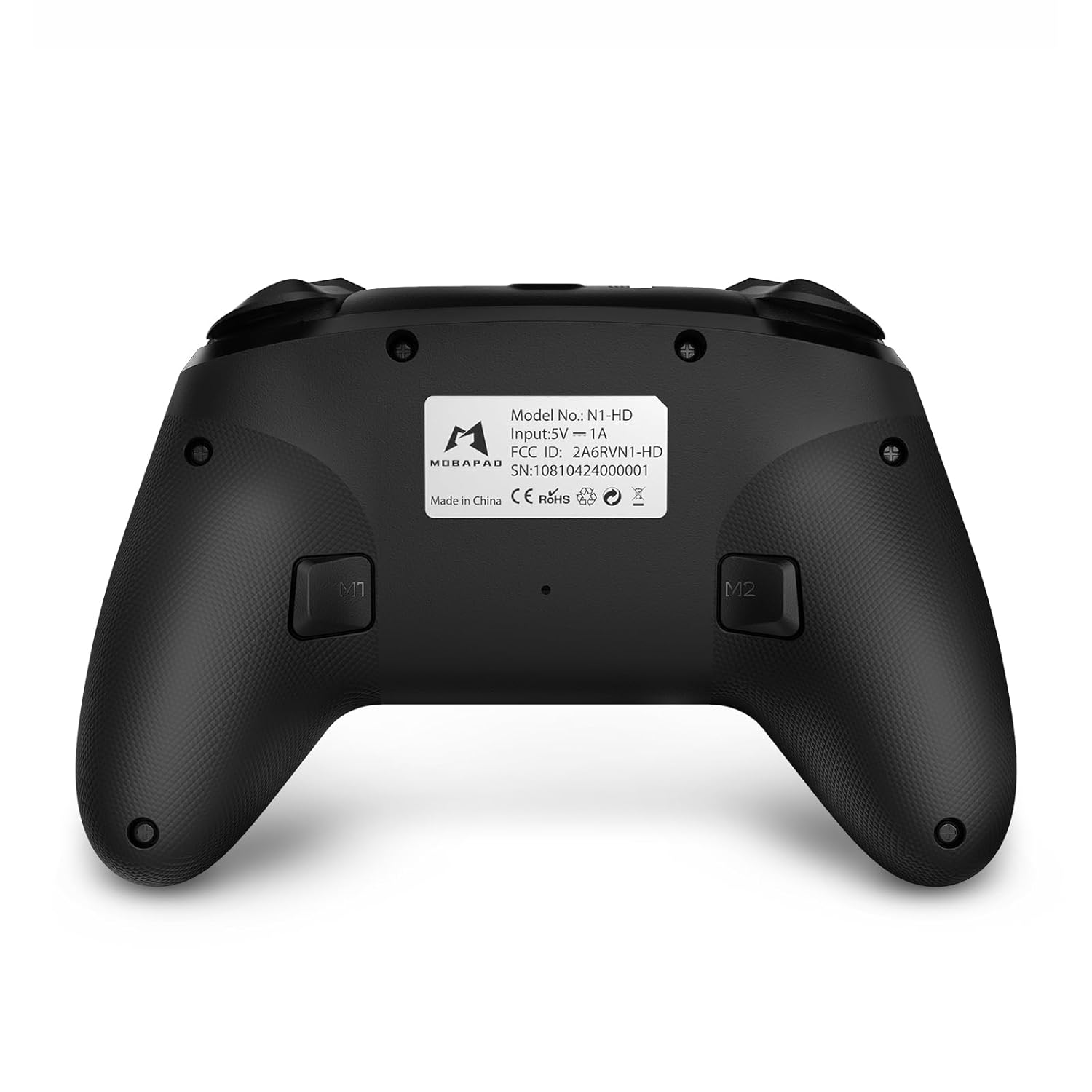
- M1/M2 تڼۍ: Programmable back buttons for custom macros or remapping.
انځور: تفصیلي مخ view of the MOBAPAD N1 HD controller, showing all buttons and joysticks.

انځور: شاته view of the MOBAPAD N1 HD controller, highlighting the M1 and M2 programmable buttons and product label.
4.2. NFC Functionality (Amiibo Scanning)
To use the NFC function for Amiibo scanning on Nintendo Switch:
- Ensure your controller is connected to the Nintendo Switch.
- In a compatible game, when prompted to scan an Amiibo, place the Amiibo figure directly over the د کور تڼۍ area on the controller.
- Hold the Amiibo in place until the game registers the scan.
5. ساتنه او پالنه
مناسب ساتنه ستاسو د کنټرولر اوږد عمر او غوره فعالیت تضمینوي.
- پاکول: د کنټرولر د پاکولو لپاره نرم، وچ ټوکر وکاروئ. د سختې خاورې لپاره، لږ څهampټوکر د اوبو سره. د سختو کیمیاوي موادو یا خړوبونکو موادو څخه ډډه وکړئ.
- ذخیره کول: کنټرولر په یخ او وچ ځای کې د مستقیم لمر وړانګو او سختې تودوخې څخه لرې وساتئ.
- د بیټرۍ پاملرنه: The controller contains a Lithium Ion battery. Avoid fully discharging the battery frequently. If storing for extended periods, charge the battery to about 50% to prolong its lifespan. Do not expose the battery to fire or extreme heat.
- سمبالول: د کنټرولر له غورځولو یا د قوي ټکانونو سره د مخ کیدو څخه ډډه وکړئ، ځکه چې دا کولی شي داخلي برخو ته زیان ورسوي.
6. ستونزه حل کول
If you encounter issues with your MOBAPAD N1 HD controller, refer to the following common solutions.
| ستونزه | احتمالي لامل | د حل لاره |
|---|---|---|
| کنټرولر نه نښلوي. | Low battery, out of range, incorrect pairing mode, interference. | Charge the controller fully. Ensure it is within range of the device. Re-enter pairing mode (hold Home button). Move closer to the device or away from other wireless devices. |
| تڼۍ یا جوی سټیکونه غیر ځواب ویونکي دي. | د سافټویر خرابوالی، فزیکي خنډ، زیان. | Restart the controller and the connected device. Check for any debris around the buttons/joysticks. If issues persist, contact customer support. |
| Vibration is weak or absent. | Vibration setting off, game does not support vibration, motor issue. | Check in-game settings and system settings to ensure vibration is enabled. Verify if the game supports vibration feedback. |
| NFC scanning fails. | Incorrect placement, game not prompting scan, controller not connected. | Ensure the Amiibo is placed directly over the Home button area. Confirm the game is prompting for an Amiibo scan. Verify controller is properly connected to the Switch. |
7. مشخصات
| فیچر | تفصیل |
|---|---|
| د ماډل شمیره | Mobapad N1 HD Black |
| ابعاد (L x W x H) | 5.91 x 2.36 x 3.94 انچه |
| وزن | 7.05 اونس |
| د بیټرۍ ډول | 1 لیتیم آئن بیټرۍ (شامل ده) |
| ارتباط | Wireless (Bluetooth), USB-C (wired) |
| مطابقت | Nintendo Switch, PC, iOS, Android |
| ځانګړي ځانګړتیاوې | Hall Effect Joysticks, ALPS Dual-Axis Motors, HD Vibration, Six-Axis Gyroscope, NFC |
8. تضمین او ملاتړ
For warranty information or technical support, please contact MOBAPAD customer service. Refer to the official MOBAPAD webد ځانګړو تضمین شرایطو او د اړیکو توضیحاتو لپاره سایټ یا ستاسو د پیرود اسناد.
You can visit the official MOBAPAD store on Amazon for more information: MOBAPAD Store


