پیژندنه
The Neoteck ZT-FS1 Anemometer Wind Meter is a multifunctional digital instrument designed for measuring wind speed, air volume, temperature, and humidity. It is suitable for various applications including HVAC system testing, outdoor activities, and environmental monitoring. This manual provides detailed instructions for the proper use and maintenance of your device.
په بکس کې څه دي
- 1 x Neoteck ZT-FS1 Wind Speed Gauge
- 2 x AAA بیټرۍ
- 1 x د کارونکي لارښود
- 1 x سکرو ډرایور
محصول پای ته ورسیدview
Familiarize yourself with the components and controls of your Neoteck ZT-FS1 Anemometer.

شکل ۱: مخ او شا View of the Neoteck ZT-FS1 Anemometer with labeled components.
- د فین بلیډونه: Rotates to measure wind speed and airflow.
- د تودوخې او رطوبت سینسر: Detects ambient temperature and relative humidity.
- د پرچی ضد ډیزاین: یو خوندي گرفت چمتو کوي.
- LCD سکرین: د اندازه کولو لوستل او د واحد شاخصونه ښیې.
- Power Button (U): وسیله آن یا بندوي.
- Backlight Button (BL): د LCD بیک لایټ فعال یا غیر فعالوي.
- د واحد تڼۍ: د اندازه کولو د مختلفو واحدونو له لارې تیریږي.
- HOLD MAX/MIN Button: Toggles between data hold, maximum value, and minimum value display.
- VEL FLOW/AREA Button: Switches between wind speed (VEL) and air volume (FLOW/AREA) measurement modes.
- د بیټرۍ پوښ: د بیټرۍ کڅوړه ساتي.
چمتو کول
د بیټرۍ نصب کول
- د وسیلې په شا کې د بیټرۍ پوښ ومومئ.
- د بیټرۍ پوښ خلاصولو لپاره چمتو شوي سکریو ډرایور وکاروئ.
- دوه AAA بیټرۍ دننه کړئ، د سم قطبیت ډاډ ترلاسه کړئ (+/-).
- د بیټرۍ پوښ بدل کړئ او د سکرو سره یې خوندي کړئ.
عملیاتي لارښوونې
بریښنا فعاله/بنده او شاته رڼا
- فشار ورکړئ د بریښنا تڼۍ (U) د وسیله چالانولو لپاره.
- فشار ورکړئ او ونیسئ د بریښنا تڼۍ (U) د وسیله بندولو لپاره.
- فشار ورکړئ Backlight Button (BL) to activate the LCD backlight for low-light conditions. Press again to turn it off.

Figure 2: The backlit LCD screen provides clear readings in various lighting conditions.
د باد سرعت اندازه کول
د باد سرعت اندازه کولو لپاره:
- ډاډ ترلاسه کړئ چې وسیله فعاله ده.
- فشار ورکړئ VEL FLOW/AREA button until 'VEL' is displayed on the screen, indicating wind speed mode.
- Point the fan blades directly into the wind. The display will show the current wind speed.
- فشار ورکړئ UNIT button to cycle through the available wind speed units: Knots, km/h, mph, m/s, ft/s, ft/min.
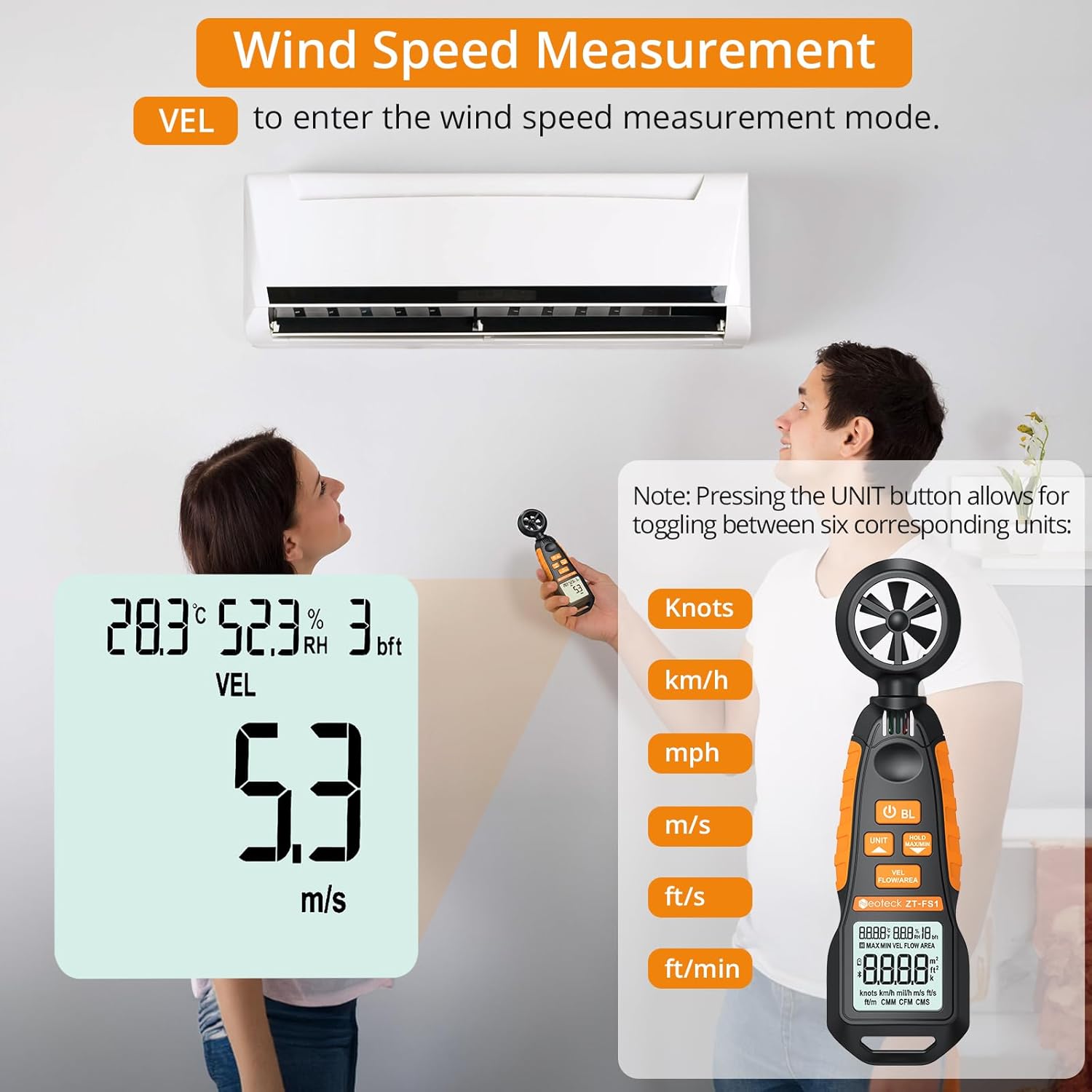
Figure 3: Measuring wind speed with the anemometer. The display shows current speed and unit options.
Air Volume Measurement (CFM/CMM/CMS)
To measure air volume:
- ډاډ ترلاسه کړئ چې وسیله فعاله ده.
- فشار ورکړئ VEL FLOW/AREA button until 'FLOW' is displayed on the screen, indicating air volume mode.
- Before measurement, you must input the cross-sectional area of the duct or vent. Refer to the full manual for detailed instructions on entering area values.
- Align the fan of the instrument vertically with the air outlet. The display will show the air volume.
- فشار ورکړئ UNIT button to cycle through the available air volume units: CMM (Cubic meter/minute), CFM (Cubic inch/minute), CMS (Cubic meter per second).
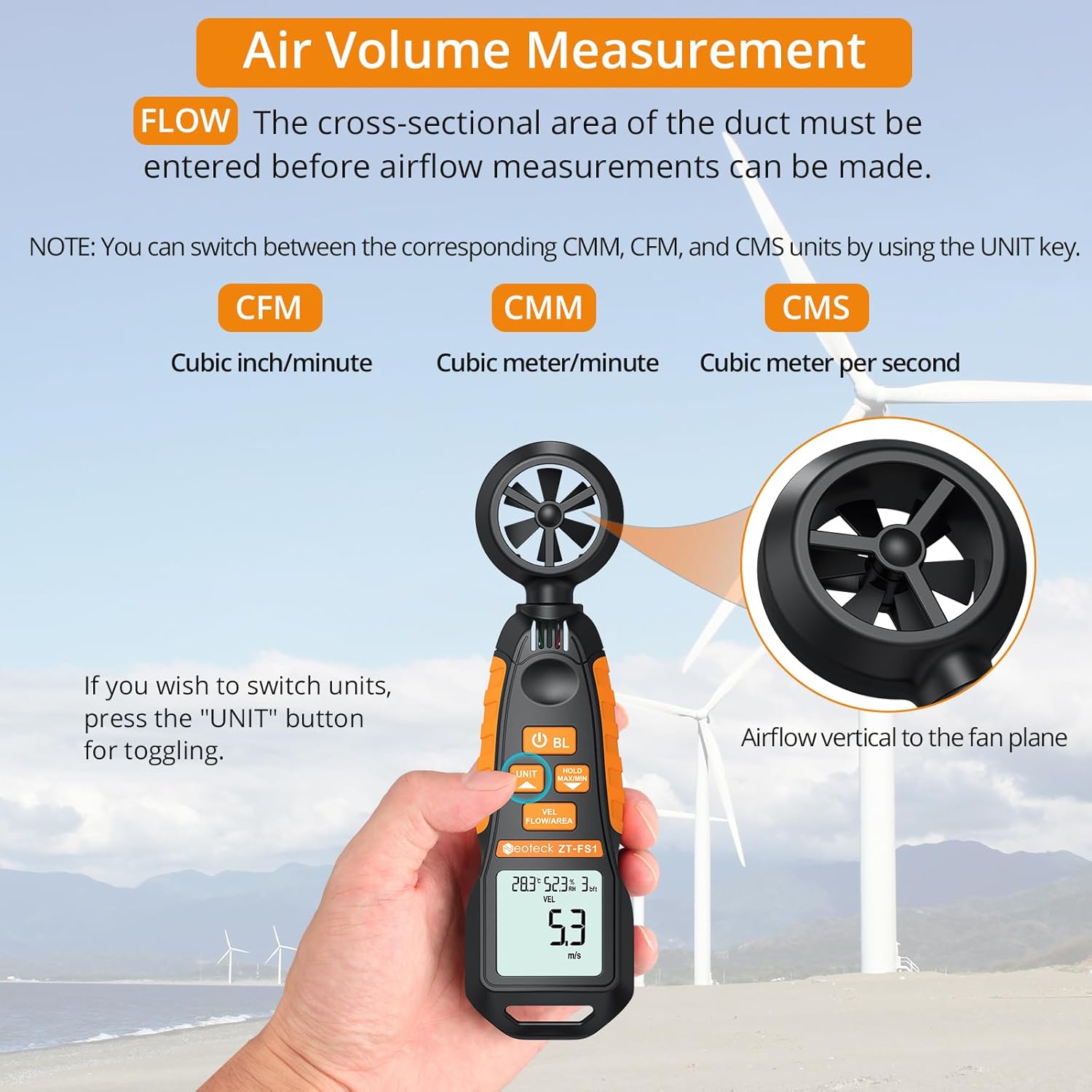
Figure 4: Measuring air volume from a duct. Ensure the cross-sectional area is correctly entered.
د تودوخې او رطوبت اندازه کول
The device continuously measures ambient temperature and relative humidity. These readings are displayed on the upper part of the LCD screen. Note that the temperature and humidity sensor may require at least 30 minutes to adapt to a new environment for accurate readings.
Data Hold and Max/Min Functions
- فشار ورکړئ MAX / دقیقه ونیسئ button once to activate the Data Hold function. The current reading will be frozen on the display. Press again to exit.
- فشار ورکړئ او ونیسئ MAX / دقیقه ونیسئ button for more than 2 seconds to enter the Maximum/Minimum measurement mode. The display will cycle between the maximum (MAX) and minimum (MIN) values recorded since entering this mode. Press and hold again to exit.
Auto-Shutdown Function
The device features an auto-shutdown function to conserve battery power. If no button is pressed for a certain period (typically 15 minutes), the device will automatically turn off.
- To disable auto-shutdown: While the device is off, hold the MAX / دقیقه ونیسئ تڼۍ او بیا فشار ورکړئ د بریښنا تڼۍ (U) for 2 or more seconds. Five beeps will confirm that auto-shutdown is disabled.
د رسنیو سرچینې
د محصول رسمي ویډیو
Video 1: An official product video demonstrating the Neoteck Anemometer's functions for testing wind speed and airflow.
مشخصات
| فیچر | تفصیل |
|---|---|
| برانډ | نوټیک |
| د ماډل شمیره | NTK259 |
| مواد | شیشه، فلز، پلاستیک |
| ابعاد (L x W x H) | 6.97 x 1.97 x 1.18 انچه |
| د توکي وزن | 85 ګرامه (3 اونس) |
| د باد سرعت حد | 0.4-30 m/s (0.895-67.11 mph) |
| د باد سرعت دقت | ± 2٪ |
| د باد سرعت حل | 0.1 m/s |
| د حرارت درجه | -20.0 ℃ تر 60.0 ℃ |
| د تودوخې دقت | ± 2℃ |
| د رطوبت اندازه | د 0.0٪ څخه تر 99.9٪ RH |
| د رطوبت دقت | ± 2 R RH |
| Sampد نرخ کچه | په هر 5 ثانیو کې |
| د بریښنا سرچینه | 2 x AAA بیټرۍ (شامل دي) |
| ښودل | د بیک لائټ سره LCD |
| اتومات بندول | هو (مفعول کیدی شي) |
ساتنه
- وسیله پاکه او وچه وساتئ. یو نرم استعمال کړئ، دamp د پاکولو لپاره ټوکر. د کثافاتو پاکوونکي یا محلول مه کاروئ.
- د اوږدې مودې لپاره د وسیلې د سختې تودوخې، رطوبت یا مستقیم لمر وړانګو سره د مخ کیدو څخه ډډه وکړئ.
- که چیرې وسیله د اوږدې مودې لپاره ونه کارول شي، نو د لیکیدو مخنیوي لپاره بیټرۍ لرې کړئ.
- Handle the fan blades carefully to prevent damage, as this can affect measurement accuracy.
د ستونزو حل کول
- وسیله نه فعالیږي: وګورئ چې بیټرۍ په سمه توګه نصب شوي او کافي چارج لري. که اړتیا وي نو بیټرۍ بدل کړئ.
- ناسم لوستل: Ensure the fan blades are clean and unobstructed. Allow the temperature/humidity sensor sufficient time (approx. 30 minutes) to adapt to the environment.
- ښودنه تیاره یا روښانه ده: بیټرۍ بدل کړئ.
- Auto-shutdown occurs too quickly: Verify if the auto-shutdown feature is enabled or disabled as desired (refer to Auto-Shutdown Function section).
تضمین او ملاتړ
For warranty information, technical support, or service inquiries, please refer to the product packaging or contact Neoteck customer service directly. Contact details can typically be found on the manufacturer's official webسایټ


