1. پیژندنه
The Fenton Pulse65 is a versatile portable party speaker designed for various events and environments. It delivers powerful sound, offers wireless connectivity, and features dynamic lighting. This manual provides essential information for the safe and optimal use of your Pulse65 speaker.
کلیدي ځانګړتیاوې:
- 60W RMS (140W max) output for clear, powerful sound with deep bass.
- Bluetooth 5.3 for wireless streaming and stereo pairing (TWS).
- Dynamic multicolour light show synchronized with music.
- IPX4 splashproof design for outdoor use.
- Integrated 12-hour rechargeable battery.
- Includes a wireless UHF microphone and remote control.
- USB playback and FM radio functionality.
2. د خوندیتوب معلومات
مهرباني وکړئ د دې محصول کارولو دمخه د خوندیتوب ټولې لارښوونې ولولئ او پوه شئ. دا لارښود د راتلونکي حوالې لپاره وساتئ.
- د اوبو مقاومت: The Pulse65 is IPX4 splashproof. Do not immerse the speaker in water or expose it to heavy rain. Ensure all port covers are securely closed when used near water.
- د بریښنا سرچینه: Use only the specified charging cable and power adapter. Do not attempt to open or modify the battery compartment.
- وینټیلیشن: Do not block any ventilation openings. Ensure adequate airflow around the speaker.
- پاکول: د پاکولو دمخه بریښنا قطع کړئ. نرم او وچ ټوکر وکاروئ. مایع پاکوونکي یا ایروسول مه کاروئ.
- دحرارت درجه: Avoid extreme temperatures. Do not expose to direct sunlight for extended periods or place near heat sources.
- ماشومان: د ماشومانو له لاسرسي لرې وساتئ. دا محصول د لوبو ندی.
3. د بسته محتويات
ډاډ ترلاسه کړئ چې ټول توکي په کڅوړه کې شتون لري:
- Fenton Pulse65 Portable Party Speaker
- بې سیم UHF مایکروفون
- ریموټ کنټرول
- د USB چارج کیبل
- د کارن لارښود
4. ترتیب کول
۱. ابتدايي چارج کول
Before first use, fully charge the speaker. Connect the provided USB charging cable to the speaker's charging port and a suitable USB power adapter (not included). The charging indicator will show the charging status. A full charge provides approximately 12 hours of playback, depending on usage volume and light effects.
4.2. بریښنا کول/بندول
فشار ورکړئ او ونیسئ ځواک د کنټرول پینل کې تڼۍ د سپیکر د فعالولو یا بندولو لپاره.
۴. د بېسیم مایکروفون تنظیم کول
The included wireless UHF microphone is pre-paired with the speaker. Ensure the microphone has fresh batteries (not included) and is powered on. The microphone's display will indicate its status.

Image: The Fenton Pulse65 speaker shown with its wireless microphone and remote control, illustrating the complete package.
5. عملیاتي لارښوونې
5.1. د کنټرول پینلview
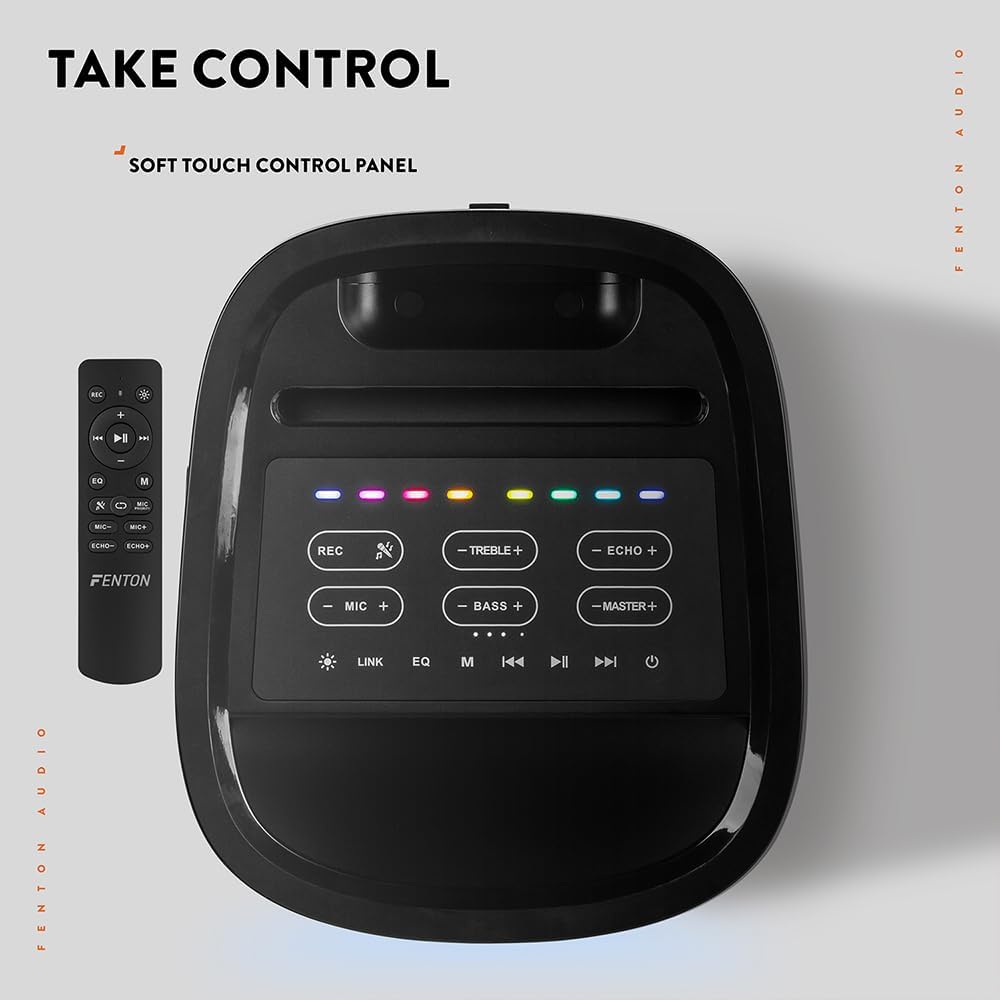
انځور: له پورته څخه ښکته view of the Fenton Pulse65 speaker's soft-touch control panel, alongside the remote control, highlighting various buttons for audio and light adjustments.
The top panel features soft-touch controls for various functions:
- REC: غږ ثبت کړئ.
- ستونزه +/-: Adjust treble levels.
- ECHO +/-: Adjust microphone echo effect.
- MIC +/-: د مایکروفون حجم تنظیم کړئ.
- BASS +/-: Adjust bass levels.
- MASTER +/-: Adjust overall master volume.
- لینک: Activate TWS (True Wireless Stereo) pairing.
- EQ: Cycle through equalizer presets.
- م (موډ): Switch between input modes (Bluetooth, USB, FM Radio, AUX).
- پلی کول / ودرول: د آډیو غږول پلی کړئ یا یې ودروئ.
- مخکینی/راتلونکی: Skip tracks or tune FM radio stations.
- ځواک: سپیکر آن/بند کړئ.
5.2. د بلوتوث پیوستون
- Turn on the Pulse65 speaker.
- فشار ورکړئ م (موډ) button until the Bluetooth indicator lights up or you hear a Bluetooth pairing prompt.
- په خپل ګرځنده وسیله کې، بلوتوټ فعال کړئ او د شته وسایلو لټون وکړئ.
- Select "Fenton Pulse65" from the list.
- Once connected, the speaker will confirm with an audible prompt.

Image: The Fenton Pulse65 speaker with a smartphone placed in its integrated dock, illustrating the Bluetooth streaming and charging capabilities.
5.3. ریښتیني بې سیم سټیریو (TWS) جوړه کول
To link two Pulse65 speakers for stereo sound:
- Ensure both Pulse65 speakers are powered on and in Bluetooth mode, but not connected to any device.
- په یوه سپیکر کې (دا به لومړنی سپیکر وي)، فشار ورکړئ LINK button. It will search for another Pulse65.
- The primary speaker will automatically connect to the secondary speaker. Once connected, you will hear a confirmation tone.
- Now, connect your mobile device to the primary Pulse65 speaker via Bluetooth as described in section 5.2.
- آډیو به اوس په دواړو سپیکرونو کې په سټیریو کې غږیږي.
5.4. USB پلی بیک
یو USB فلش ډرایو دننه کړئ چې MP3 آډیو لري files into the USB port on the back of the speaker. The speaker will automatically switch to USB mode and begin playback. Use the Play/Pause and Previous/Next buttons to control playback.
5.5. ایف ایم راډیو
- فشار ورکړئ م (موډ) د FM راډیو حالت ته د بدلولو لپاره تڼۍ.
- فشار ورکړئ او ونیسئ پلی/ودرول د شته ایف ایم سټیشنونو د اتوماتیک سکین کولو او خوندي کولو لپاره تڼۍ.
- د کارولو مخکینی/راتلونکی د خوندي شوي سټیشنونو له لارې د تګ راتګ لپاره تڼۍ.
۳.۳. مایکروفون او ګیتار ان پټونه
The speaker features dedicated inputs for a wired microphone and a guitar on the rear panel. Connect your devices to these ports. Use the MIC +/- او ECHO +/- controls on the top panel to adjust the microphone's volume and echo effect.

Image: A composite image showing the rear panel of the Fenton Pulse65 speaker with its various input ports, and a front view of the speaker with a microphone, illustrating connectivity options.
5.7. د رڼا طریقې
The multicolour LED lights on the speaker can be controlled via the remote control or specific buttons on the control panel (if available, refer to the remote for full control). Cycle through different light patterns or turn them off as desired.

انځور: نږدې انځور view of the Fenton Pulse65 speaker, highlighting its multicolour LED light ring on the front grille, indicating its splashproof design.
6. ساتنه
6.1. پاکول
Wipe the speaker's exterior with a soft, dry, or slightly damp cloth. Do not use abrasive cleaners, waxes, or solvents. Ensure all port covers are closed before cleaning if using a damp ټوکر
6.2. ذخیره کول
سپیکر په یخ او وچ ځای کې د مستقیم لمر وړانګو او سختو تودوخې څخه لرې وساتئ. که چیرې د اوږدې مودې لپاره ذخیره کوئ، نو د بیټرۍ روغتیا ساتلو لپاره په هرو څو میاشتو کې بیټرۍ نږدې 50٪ ته چارج کړئ.
6.3. د بیټرۍ پاملرنه
To prolong battery life, avoid fully discharging the battery frequently. Recharge the speaker when the low battery indicator appears. Do not expose the battery to excessive heat.
7. ستونزه حل کول
If you encounter issues with your Fenton Pulse65, refer to the following common problems and solutions:
| ستونزه | احتمالي لامل | د حل لاره |
|---|---|---|
| سپیکر نه چالانېږي. | د بیټرۍ ټیټه کچه؛ د بریښنا تڼۍ په سمه توګه نه ده فشار شوې. | سپیکر په بشپړه توګه چارج کړئ. د څو ثانیو لپاره د بریښنا تڼۍ فشار ورکړئ او ونیسئ. |
| له سپیکر څخه غږ نه راځي. | حجم ډېر ټیټ دی؛ د ننوتلو ناسم حالت؛ وسیله وصل نه ده. | Increase master volume. Press 'M' to select correct input mode. Ensure Bluetooth device is connected or USB is inserted correctly. |
| د بلوتوث جوړه جوړه ناکامه کیږي. | سپیکر د جوړې کولو په حالت کې نه دی؛ وسیله ډیره لرې ده؛ مداخله. | Ensure speaker is in Bluetooth mode and not connected to another device. Move device closer to speaker. Turn off other Bluetooth devices. |
| مایکروفون کار نه کوي. | Microphone off; Low battery in mic; Mic volume too low. | Ensure wireless mic is powered on. Replace mic batteries. Increase MIC volume on speaker. |
| د TWS جوړه ناکامه شوه. | سپیکرونه لا دمخه له یوې وسیلې سره وصل دي؛ سپیکرونه ډیر لرې دي. | Disconnect both speakers from any Bluetooth devices. Ensure both are in Bluetooth mode. Place speakers close together during pairing. |
8. مشخصات
- نښه: فینټون
- ماډل: نبض ۴
- د سپیکر اعظمي تولید ځواک: 140 واټ (چټک)
- د تعدد ځواب: 12000 Hz
- د ارتباط ټیکنالوژي: بلوتوث 5.3
- د آډیو محصول حالت: سټیریو
- د نصب کولو ډول: ټابلیټ
- د سپیکر ډول: بهر
- د محصول ابعاد: 49 x 34.5 x 39.5 سانتي متره
- وزن: 7.6 کیلو ګرامه
- بیټرۍ: 1 Nonstandard Battery (included), 12-hour playback
- د IP درجه بندي: IPX4 (سپلاش پروف)
- جوړونکی: Tronios BV
- د اصلي هیواد: چین

Image: The Fenton Pulse65 speaker displayed with its approximate dimensions (40cm height, 32cm width, 27cm depth) and an icon indicating 12 hours of battery life.
9. تضمین او ملاتړ
For warranty information and customer support, please refer to the documentation provided with your purchase or visit the official Fenton brand store. You can find more information and contact details at the Fenton Brand Store.


