پیژندنه
This manual provides essential information for the safe and efficient use of your Itel A50 Dual SIM smartphone. Please read this manual carefully before using the device to ensure optimal performance and to prevent damage.

Figure 1: Itel A50 Dual SIM Smartphone (Cyan Blue)
The image displays the Itel A50 smartphone in cyan blue, showcasing both its front screen and the textured back panel with the triple camera module and flash. The phone has a sleek design with rounded corners.
چمتو کول
۲. د سیم کارتونو او میموري کارتونو داخلول
The Itel A50 supports dual SIM cards and an external memory card (up to 2TB). Ensure the device is powered off before inserting or removing cards.
- د وسیلې په اړخ کې د سیم کارت ټری ومومئ.
- د ټرې د خلاصولو لپاره د چمتو شوي سیم ایجکټور وسیلې څخه کار واخلئ.
- Carefully place your Nano-SIM cards and microSD card into the designated slots on the tray. Ensure the gold contacts face downwards.
- په نرمۍ سره ټری بیرته وسیلې ته فشار ورکړئ تر هغه چې دا ځای ته کلیک وکړي.
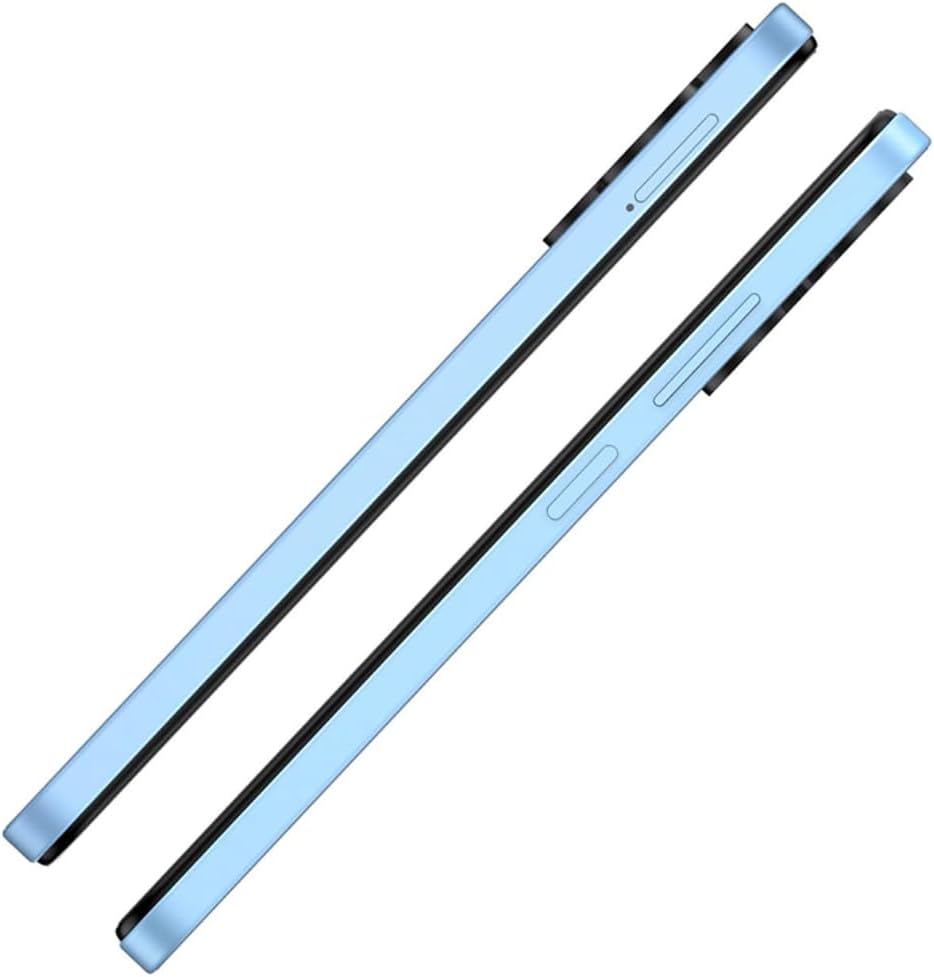
شکل 2: اړخ View with SIM Tray
This image shows the right side of the Itel A50 smartphone, highlighting the elongated volume rocker and the power button below it. The SIM card tray slot is visible above the volume buttons.
2. د بیټرۍ چارج کول
Before first use, fully charge the device battery. The Itel A50 comes with a 5000mAh battery.
- د USB ډول-سي کیبل د تلیفون په ښکته کې د چارج کولو پورټ سره وصل کړئ.
- د کیبل بله پای د بریښنا اډاپټر سره وصل کړئ او د دیوال آوټ لیټ سره یې ولګوئ.
- د چارج کولو شاخص به په سکرین کې څرګند شي.

شکل ۳.۱: د چارج کولو بندر
The image shows the bottom edge of the Itel A50 smartphone with a white USB-C charging cable plugged into the central port. To the left of the charging port, a 3.5mm headphone jack is visible, and to the right, a speaker grille.
عملیاتي لارښوونې
1. بریښنا فعال/بند
- د فعالولو لپاره: Press and hold the Power button (located on the right side) until the Itel logo appears.
- د بریښنا بندولو لپاره: د پاور تڼۍ فشار ورکړئ او ونیسئ تر هغه چې د پاور اختیارونو مینو څرګند شي، بیا "پاور بند" غوره کړئ.
- د بیا پیلولو لپاره: د پاور تڼۍ فشار ورکړئ او ونیسئ تر هغه چې د پاور اختیارونو مینو څرګند شي، بیا "بیا پیل کړئ" غوره کړئ.

Figure 4: Front Display
This image displays the front of the Itel A50 smartphone, showing its large screen with a waterdrop notch at the top for the front camera. The display shows a vibrant, abstract wallpaper.
2. بنسټیز نیویګیشن
- ټچ سکرین: Tap, swipe, pinch-to-zoom to interact with the interface.
- کور سکرین: اصلي سکرین چیرې چې تاسو ایپسونو او ویجټونو ته لاسرسی کولی شئ.
- خبرتیاوې: د سکرین له پورتنۍ برخې څخه ښکته ته سوائپ کړئ view notifications and quick settings. The integrated Dynamic Bar provides essential notifications more seamlessly.
3. د کیمرې کارول
The Itel A50 features a rear camera system for capturing photos and videos.
- د خپل کور سکرین یا د اپلیکیشن دراز څخه د کیمرې ایپ خلاص کړئ.
- خپل مطلوب حالت غوره کړئ (عکس، ویډیو، پورټریټ، او نور).
- د عکس اخیستلو یا د ویډیو ثبتولو پیل/بندولو لپاره د شټر تڼۍ کلیک وکړئ.

شکل ۴.۱: د شا کیمرې ماډل
This image shows the back of the Itel A50 smartphone, highlighting the prominent camera island in the upper left corner. The island contains three circular lenses and a flash, with "AI CAMERA" text visible. The back panel has a subtle textured pattern.
ساتنه او پالنه
- پاکول: د سکرین او بدن پاکولو لپاره له نرم، لینټ څخه پاک ټوکر څخه کار واخلئ. د کثافاتو پاکونکو یا محلولونو څخه ډډه وکړئ.
- دحرارت درجه: وسیله د سختې تودوخې (ګرمې یا سړې) سره مه مخ کوئ.
- د اوبو مقاومت: The Itel A50 is not water-resistant. Avoid contact with liquids.
- د بیټرۍ ژوند: To prolong battery life, avoid fully discharging the battery frequently. Optimize power consumption using the built-in power-saving solutions.
- د سافټویر تازه معلومات: د غوره فعالیت او امنیت ډاډمن کولو لپاره د خپل وسیله سافټویر تازه وساتئ.
د ستونزو حل کول
| ستونزه | احتمالي حل |
|---|---|
| وسیله فعاله نه ده. | ډاډ ترلاسه کړئ چې بیټرۍ چارج شوې ده. چارجر سره وصل شئ او د بیا چالانولو هڅه کولو دمخه څو دقیقې انتظار وکړئ. |
| سکرین غیر ځواب ورکوونکی دی. | د پاور تڼۍ د شاوخوا ۱۰-۱۵ ثانیو لپاره په فشارولو او نیولو سره جبري بیا پیل وکړئ. |
| د شبکې ضعیف سیګنال. | د سیم کارت داخلول وګورئ. هغه سیمې ته لاړ شئ چې ښه شبکه پوښښ ولري. وسیله بیا پیل کړئ. |
| اپلیکیشنونه ورو یا خرابېږي. | Close background apps. Clear app cache. Ensure sufficient storage space. Restart the device. The device is designed for smooth and efficient operations, optimizing performance for specific scenarios. |
| بیټرۍ په چټکۍ سره وچیږي. | Reduce screen brightness. Disable unnecessary features (Wi-Fi, Bluetooth, GPS) when not in use. Use power-saving modes. |
مشخصات
| فیچر | تفصیل |
|---|---|
| د ماډل نوم | T603 (Item model number: A667LP) |
| برانډ | ایټل |
| عملیاتي سیسټم | OS 14 |
| د نصب شوي RAM حافظې اندازه | 8 GB (3+5GB RAM) |
| د حافظې د ذخیره کولو ظرفیت | 128 GB (Supports up to 2TB external memory) |
| د CPU ماډل | ۱.۲ ګیګاهرتز کورټیکس اې۸ پروسسر |
| د CPU سرعت | 2 GHz |
| د سکرین اندازه | ۳۱.۵ انچه (د لید وړ سکرین قطر: ۳۲ انچه / ۸۱ سانتي متره) |
| بې سیم کیریر | خلاص شوی |
| سیلولر ټیکنالوژي | 4G |
| بیټرۍ | ۱ لیتیم آیون بیټرۍ ته اړتیا ده (شامله ده)، ۹۶۰۰mAh |
| د کڅوړې ابعاد | 18 x 9 x 4.5 سانتي متره؛ 187 جی |
| نیټه لومړی شتون لري | ۱۲ سپتمبر ۲۰۱۳ |
| جوړونکی | itel |
تضمین او ملاتړ
For warranty information and technical support, please refer to the warranty card included in your product packaging or visit the official Itel webسایټ. د تضمین ادعاوو لپاره د پیرود ثبوت وساتئ.
For further assistance, you may contact Itel customer service through their official channels.


