پیژندنه
This manual provides detailed instructions for the safe and effective use of your Ourlife 5K30FPS WiFi Action Camera. Please read this manual thoroughly before operating the device to ensure optimal performance and longevity.
د اوurlife M40TR is a versatile action camera designed to capture high-quality video and photos in various environments, including underwater, thanks to its robust waterproof casing. It features 5K 30fps video recording, a dual-screen display, a 170-degree wide-angle lens, and Wi-Fi connectivity.
په بکس کې څه دي
د بکس خلاصولو پر مهال، مهرباني وکړئ تصدیق کړئ چې ټولې برخې شتون لري:
- Ourlife M40TR Action Camera
- د پنروک قضیه
- د لوازمو نصب کول
- د USB چارج کیبل
- د کارونکي لارښود (دا لاسوند)
- Remote Control (if included with specific package)

Image: The Ourlife M40TR Action Camera shown with its waterproof housing and a small remote control. This image illustrates the primary components included with the camera.
محصول پای ته ورسیدview
Familiarize yourself with the camera's main components and interfaces.
- مخکینۍ پرده: 1.3-inch display for quick status checks.
- Rear Screen: 2.0-inch IPS touch screen for menu navigation and playback.
- لینز: 170-degree wide-angle lens.
- د بریښنا / حالت تtonۍ: د بریښنا د فعالولو/بندولو او د حالتونو ترمنځ د بدلولو لپاره کارول کیږي.
- د شټر/ښه تڼۍ: Used to start/stop recording or take photos, and confirm selections.
- د مایکروفون پورټ: د بهرني مایکروفون سره نښلولو لپاره.
- USB پورټ: د چارج کولو او ډیټا لیږد لپاره.
- د مایکرو ایس ډی کارت سلاټ: د حافظې کارت داخلولو لپاره.
- د بیټرۍ کڅوړه: For battery insertion.

انځور: نږدې انځور view of the Ourlife Action Camera highlighting its 2-inch responsive touch screen. This screen is used for controlling camera functions and reviewپه فوtage.
چمتو کول
1. د بیټرۍ چارج کول
Before first use, fully charge the camera battery. Connect the camera to a USB power source (e.g., computer, wall adapter) using the provided USB cable. The charging indicator light will illuminate during charging and turn off when complete.
۳. د مایکرو ایس ډی کارت داخلول
A MicroSD card (not included) is required for recording. Use a Class 10 or higher MicroSD card, up to 128GB. Insert the card into the MicroSD card slot with the contacts facing the correct direction until it clicks into place.
یادونه: For optimal performance, format the MicroSD card within the camera before first use and periodically thereafter.
۴.۳. د اوبو ضد کیس نښلول
The camera comes with a waterproof case for underwater use and protection against impacts. Ensure the camera is securely placed inside the case and the latch is firmly closed before submerging or exposing to harsh conditions.
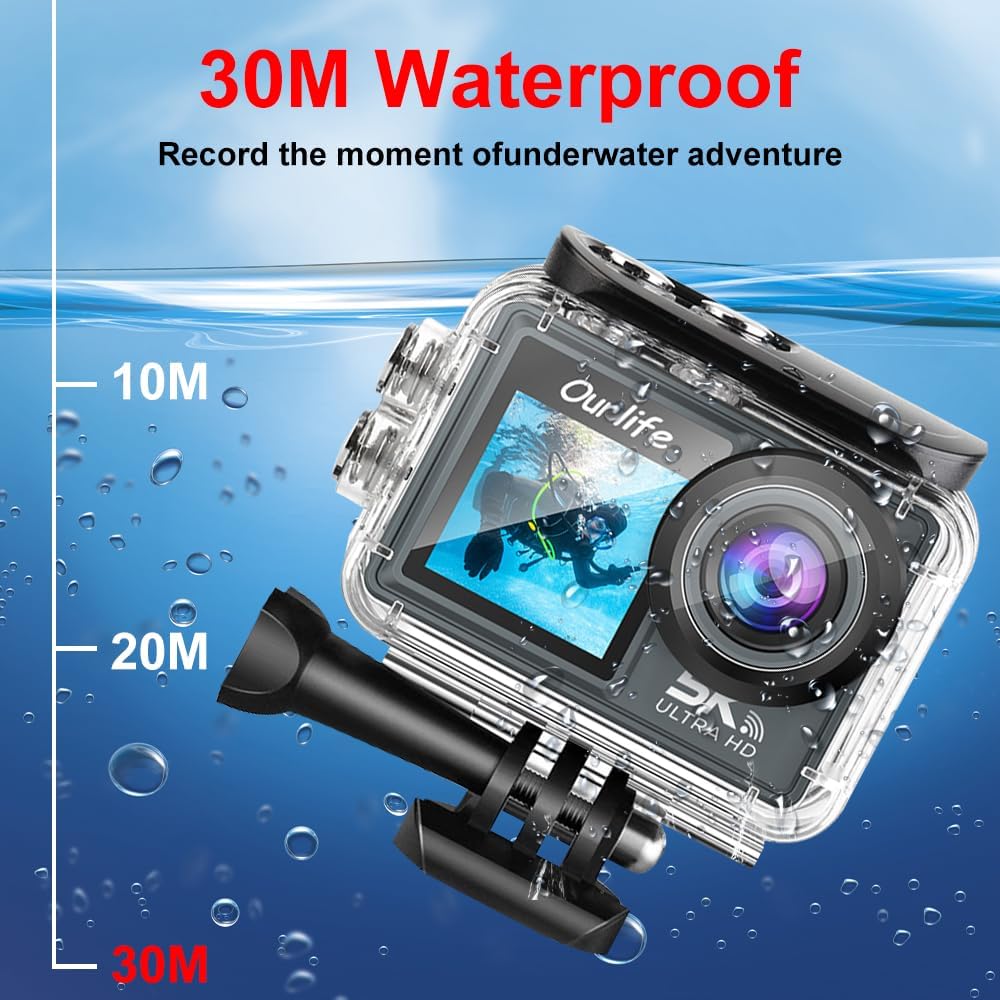
Image: The Ourlife Action Camera enclosed in its waterproof case, depicted underwater with depth markers indicating its 30-meter waterproof capability. This highlights the camera's suitability for aquatic activities.
4. بریښنا کول/بندول
To power on, press and hold the Power/Mode button for a few seconds. To power off, press and hold the Power/Mode button again until the screen turns off.
د کیمرې چلول
۱. اساسي کنټرولونه او نیویګیشن
Use the Power/Mode button to cycle through different shooting modes (Video, Photo, Playback, Settings). Use the touch screen for menu navigation and selecting options. The Shutter/OK button initiates recording or takes a photo in the respective modes.
2. د ویډیو ثبت کول
In Video mode, press the Shutter/OK button to start recording. Press it again to stop. The camera supports resolutions up to 5K at 30 frames per second (fps), as well as 4K, 2.7K, 1080P, and 720P options. Adjust resolution in the settings menu.
۴. د عکس اخیستل
In Photo mode, press the Shutter/OK button to take a single photo. The camera offers various photo modes including single shot, automatic shooting, burst mode, and timed photography.
4. Wi-Fi and App Connectivity
Enable Wi-Fi in the camera's settings. Download the official Ourlife app on your smartphone or tablet. Connect your device to the camera's Wi-Fi network. The app allows for remote control, live preview, playback, and sharing of your footage.
5. External Microphone Support
For enhanced audio quality, connect a compatible external microphone to the camera's microphone port. Ensure the microphone is securely connected before recording.
6. Enhanced Image Stabilization (EIS)
The camera features Electronic Image Stabilization (EIS) to reduce blur and shake in your videos, especially during action-packed activities. This feature can be toggled On or Off in the camera settings.

Image: A side-by-side comparison demonstrating the effect of Enhanced Image Stabilization (EIS). The left image shows a clear, stable shot with EIS enabled, while the right image shows a blurred shot with EIS disabled, illustrating the benefit of the feature.
7. Wide-Angle Lens
The 170-degree wide-angle lens captures a broad field of view, ideal for landscapes, group shots, and immersive action footage. Be aware that wide-angle lenses may exhibit some distortion at the edges of the frame.

انځور: د انځور ښودنهasing the 170-degree ultra wide-angle capability of the Ourlife Action Camera, demonstrating how it captures a significantly broader scene compared to narrower angles, ideal for expansive views.
ساتنه
- پاکول: Use a soft, lint-free cloth to clean the camera lens and screens. For the waterproof case, rinse with fresh water after saltwater use and allow to air dry.
- ذخیره کول: کیمره په یو سړه او وچ ځای کې وساتئ چې د مستقیم لمر وړانګو او سختو تودوخې څخه لرې وي. که تاسو د اوږدې مودې لپاره بیټرۍ ذخیره کوئ نو بیټرۍ لرې کړئ.
- د بیټرۍ پاملرنه: Avoid fully discharging the battery frequently. Charge the battery regularly, even if not in use, to maintain its lifespan.
د ستونزو حل کول
| ستونزه | احتمالي حل |
|---|---|
| کیمره نه چالانیږي. | Ensure the battery is charged. Reinsert the battery. |
| ویډیو نشي ثبتولی / عکسونه اخیستلی نشي. | Check if a MicroSD card is inserted and formatted. Ensure sufficient storage space. |
| د ویډیو/عکس خراب کیفیت. | Clean the lens. Check resolution settings. Ensure adequate lighting. |
| د وای فای اتصال ستونزې. | Ensure Wi-Fi is enabled on the camera and your device. Restart both devices. Check app permissions. |
| کیمره کنګل کیږي یا بې ځوابه کیږي. | د هارډ ری سیٹ ترسره کولو لپاره بیټرۍ لرې کړئ او بیا یې دننه کړئ. |
مشخصات
| فیچر | تفصیل |
|---|---|
| د ماډل شمیره | M40TR |
| د ویډیو حل | Up to 5K 30fps (also 4K, 2.7K, 1080P, 720P) |
| د پنروک ژوروالی | Up to 30 meters (with waterproof case) |
| د اصلي سکرین اندازه | 2.0 انچ IPS |
| Secondary Screen Size | 1.3 انچه |
| د لینس زاویه | 170-degree Wide-Angle |
| ارتباط | وای فای، USB |
| ذخیره کول | MicroSD Card (Class 10 or higher, up to 128GB) |
| د بهرني مایکروفون ملاتړ | هو |
| د انځور ثبات | د بریښنایی عکس العمل ثبات (EIS) |
| رنګ | تور |
تضمین او ملاتړ
For warranty information and technical support, please refer to the official Ourlife webسایټ ته مراجعه وکړئ یا مستقیم د دوی د پیرودونکو خدماتو سره اړیکه ونیسئ. د تضمین ادعاوو لپاره د پیرود ثبوت په توګه د پیرود رسید وساتئ.
Official Ourlife Store: Visit the Ourlife Store on Amazon


