پیژندنه
The MiBOXER PW5 5-in-1 LED Controller is designed for precise and convenient management of various LED lighting systems. It supports multiple LED types and offers dual wireless connectivity for seamless integration and control.
This manual provides essential information for the safe and efficient installation, operation, and maintenance of your PW5 LED Controller.
کلیدي ځانګړتیاوې
- 5-in-1 Compatibility: Supports Single Color, Dual White (CCT), RGB, RGBW, and RGB+CCT LED setups.
- Dual Wireless Connectivity: Features WiFi and 2.4GHz technology for stable operation and smart app integration.
- High Output Capacity: Handles up to 20A output, suitable for high-power LED installations.
- سمارټ کنټرول: Compatible with "Tuya Smart" app and third-party voice control systems like Alexa and Google Assistant.
- Color and Dimming Control: Offers 16 million colors, adjustable color temperature, brightness, and saturation.
- د فشار کمولو ملاتړ: Allows for flexible dimming control.
- د حافظې دنده: Retains the last-used settings.
- پراخه ټوکtagد لړيو: Operates on DC12-24V.
د بسته محتويات
- MiBOXER PW5 5-in-1 LED Controller
- د کارن لارښود

Image: The MiBOXER PW5 LED Controller shown alongside its retail packaging and a small instruction manual.
تنظیم او نصب کول
د خوندیتوب احتیاطونه
- ډاډ ترلاسه کړئ چې بریښنا د نصب کولو دمخه منحل شوې.
- Install in a dry environment, away from moisture and extreme temperatures.
- صحیح والیت تایید کړئtage (DC12-24V) and current ratings for your LED strips and power supply.
- د 20A د اعظمي تولید جریان څخه ډیر مه کوئ.
د تارونو ډیاګرام
Connect your LED strips and power supply to the controller as shown in the diagram below. Ensure correct polarity for all connections.

Image: Detailed wiring diagram of the MiBOXER PW5 controller. It shows the V+ and V- input terminals, GND and PUSH dimming terminals, and output terminals labeled V+, W, WW, CW, R, G, B for various LED strip types. An indicator output mode table is also visible, showing White for Single Color, Yellow for Dual White, Red for RGB, Green for RGBW, and Blue for RGB+CCT.
- Connect the DC12-24V power supply to the INPUT V+ او V- ترمینلونه
- Connect your LED strip(s) to the corresponding OUTPUT terminals based on your LED type:
- واحد رنګ: Connect to V+ and W (White)
- دوه ګونی سپین (CCT): Connect to V+, WW (Warm White), and CW (Cool White)
- RGB: Connect to V+, R (Red), G (Green), and B (Blue)
- RGBW: Connect to V+, R, G, B, and W (White)
- آر جي بي + سي سي ټي: Connect to V+, R, G, B, WW, and CW
- For PUSH dimming functionality, connect a compatible PUSH switch to the GND او زور ترمینلونه
پورته کول
The controller is designed for tabletop mounting. Ensure it is placed on a stable, flat surface with adequate ventilation.

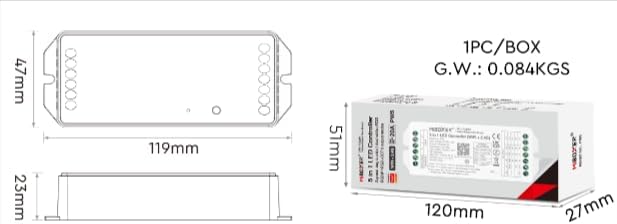
Image: Two diagrams illustrating the physical dimensions of the MiBOXER PW5 controller. The first shows a top-down view with a length of 119mm and width of 47mm. The second shows a side view with a height of 23mm, and also includes package dimensions of 120mm x 51mm x 27mm.
عملیات
Switching Output Modes
The PW5 controller supports 5 different output modes. To switch between these modes:
- فشار ورکړئ "سیټ" button once to cycle through the output modes.
- The indicator light on the controller will change color to reflect the current mode:
- White: Single Color
- Yellow: Dual White
- Red: RGB
- Green: RGBW
- Blue: RGB+CCT
2.4G RF ریموټ کنټرول
The controller can be linked to a compatible 2.4G RF remote control (sold separately).
- To link: Power on the controller. Within 3 seconds, press the "ON" button on the remote control 3 times. The LED strip will flash to confirm successful linking.
- To unlink: Power on the controller. Within 3 seconds, press the "ON" button on the remote control 5 times. The LED strip will flash to confirm unlinking.
WiFi and App Control (Tuya Smart)
The PW5 controller integrates with the "Tuya Smart" app for advanced control via WiFi.
- د خپل وسیلې د ایپ پلورنځي څخه "تویا سمارټ" ایپ ډاونلوډ کړئ.
- خپل تویا سمارټ حساب ته راجستر یا ننوتل.
- To activate WiFi pairing mode: Long press the "سیټ" button for 3 seconds until the indicator flashes quickly.
- In the Tuya Smart app, follow the instructions to add a new device. Select the appropriate lighting device type.
- Once connected, you can control brightness, color, color temperature, saturation, and set up group/multi-zone control.
- The app also supports music rhythm functions.
Voice Control (Alexa, Google Assistant)
After successful integration with the Tuya Smart app, you can link your account to voice assistants like Amazon Alexa or Google Assistant for hands-free control.
- د الیکسا یا ګوګل کور ایپ خلاص کړئ.
- د "مهارتونو" یا "د ګوګل سره کار کوي" برخې ته لاړ شئ.
- لټون او د "تویا سمارټ" مهارت/خدمت فعال کړئ.
- کله چې غوښتنه وشي نو خپل د تویا سمارټ حساب سره لینک کړئ.
- Discover devices. Your MiBOXER PW5 controller should appear.
- تاسو اوس کولی شئ د غږ امرونه وکاروئ لکه:
- "الیکسا، د خونې څراغونه روښانه کړه."
- "سلام ګوګل، د پخلنځي څراغونه نیلي رنګ ته واړوه."
- "الیکسا، د خوب خونې څراغونه ۵۰٪ ته کم کړه."
ساتنه
- کنټرولر پاک او له دوړو څخه پاک وساتئ. د پاکولو لپاره نرم، وچ ټوکر وکاروئ.
- سخت کیمیاوي توکي او کثافات پاکونکي مه کاروئ.
- د ډیر تودوخې مخنیوي لپاره د وسیلې شاوخوا مناسب هوا ورکول ډاډمن کړئ.
- Regularly check wiring connections for security and integrity.
د ستونزو حل کول
| ستونزه | احتمالي لامل | د حل لاره |
|---|---|---|
| LEDs نه روښانه کېږي | کنټرولر ته بریښنا نشته؛ غلط تارونه؛ غلط LED پټه. | Check power supply connection; verify input/output wiring polarity; test LED strip with another power source. |
| ریموټ کنټرول کار نه کوي | Remote not linked; remote battery low; interference. | Re-link the remote control; replace remote battery; reduce interference sources. |
| د اپلیکیشن کنټرول کار نه کوي | Controller not connected to WiFi; incorrect app settings; WiFi signal weak. | Ensure controller is in WiFi pairing mode and connected to your network; check app settings; move controller closer to WiFi router. |
| Incorrect colors or dimming | Wrong output mode selected; incorrect wiring for LED type. | Press "SET" button to cycle to the correct output mode; verify LED strip wiring matches the selected mode. |
مشخصات
| د ماډل شمیره | PW5 |
| ننوتۍ جلدtage | DC12-24V |
| د محصول اوسنی | Max 20A |
| د چینلونو شمیر | 5 |
| ارتباط | WiFi, 2.4GHz RF |
| Control Distance (2.4G) | 30m |
| د عملیاتي حرارت درجه | له 10 درجو څخه تر 40 درجو پورې |
| ابعاد | ۱۵۰ ملي متره x ۱۸ ملي متره x ۲۴ ملي متره (تقریبا ۵.۹ x ۰.۷ x ۰.۹ انچه) |
| د توکي وزن | ۷.۳۷ اونس (تقریبا ۲۰۹ ګرامه) |
| جوړونکی | Miboxer |
تضمین او ملاتړ
د تضمین معلوماتو او تخنیکي ملاتړ لپاره، مهرباني وکړئ رسمي MiBOXER ته مراجعه وکړئ. webسایټ ته مراجعه وکړئ یا خپل پرچون پلورونکي سره اړیکه ونیسئ. د تضمین ادعاوو لپاره د پیرود رسید وساتئ.
د نورو مرستو لپاره، تاسو کولی شئ لیدنه وکړئ په ایمیزون کې د MiBOXER پلورنځی.


