1. پیژندنه
The MiBOXER HZ5 5-in-1 LED Controller is a versatile device designed for managing various LED lighting systems. It supports both Zigbee 3.0 and 2.4G wireless communication, offering flexible control for single color, dual white (CCT), RGB, RGBW, and RGB+CCT LED lights. This controller integrates seamlessly with compatible smart home systems and offers precise control over brightness, color, and color temperature.
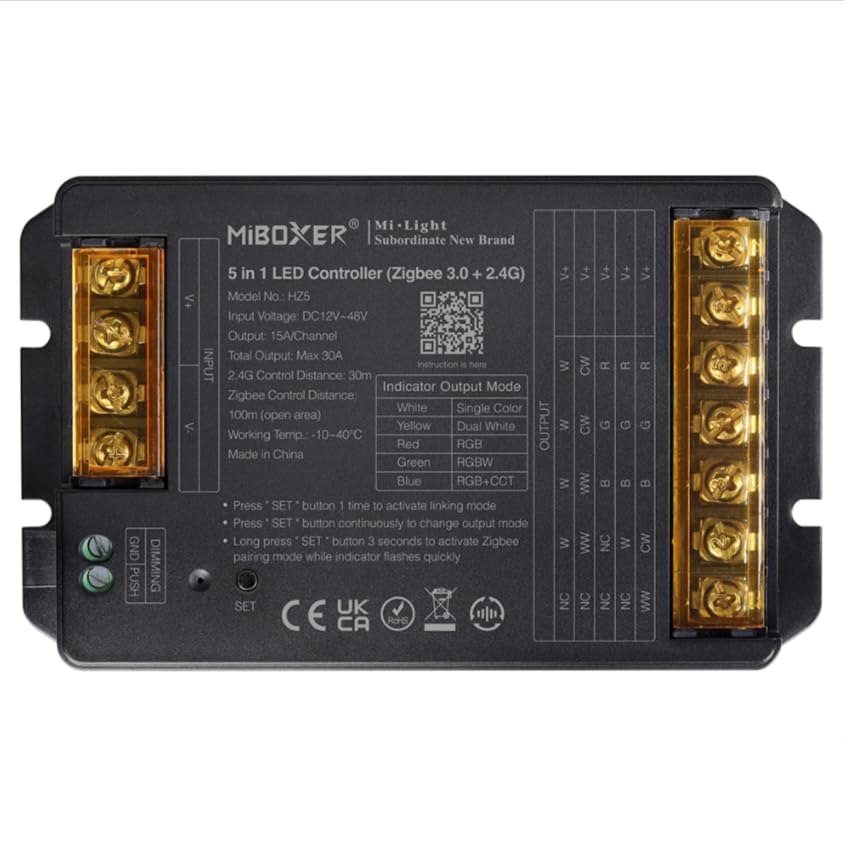
Image 1: MiBOXER HZ5 5-in-1 LED Controller device.
2. د خوندیتوب معلومات
- Always disconnect power before installing or performing maintenance on the controller or connected LED strips.
- د ننوتلو حجم ډاډمن کړئtage (DC12-24V) and output current (Max 6A/Channel, Total Max 12A) ratings are strictly observed to prevent damage to the device or LED strips.
- Do not expose the controller to moisture, water, or extreme temperatures (-10~40°C).
- دا وسیله یوازې د داخلي کارونې لپاره ده.
- که تاسو د نصبولو د کومو ګامونو په اړه ډاډه نه یاست، نو د وړ بریښنایی متخصص سره مشوره وکړئ.
3. د محصول ب Featuresې
- د زیګبي ۳.۰ معیاري پروتوکول: Ensures broad compatibility with Zigbee-enabled smart home hubs.
- د 5-in-1 مطابقت: Supports single color, dual white (CCT), RGB, RGBW, and RGB+CCT LED lights.
- Extensive Color Control: Offers 16 million colors adjustable, saturation adjustable, and color temperature adjustable.
- د فشار کمولو ملاتړ: Allows for simple brightness adjustment using a push switch.
- متحرک حالتونه: Built-in 18 dynamic modes with jumping and gradually changing effects (for 2.4G remote control).
- ۲.۴ جي بېسیم ټیکنالوژي: Provides stable control with a range of up to 30 meters.
- د اپلیکیشن او غږ کنټرول: Compatible with smart apps and voice assistants like Alexa and Google Assistant.
4. ترتیب او نصب کول
4.1 د تار لګولو لارښوونې
Proper wiring is crucial for the correct operation of the LED controller. Refer to the diagrams below for different LED strip configurations. Always ensure power is disconnected before making any connections.
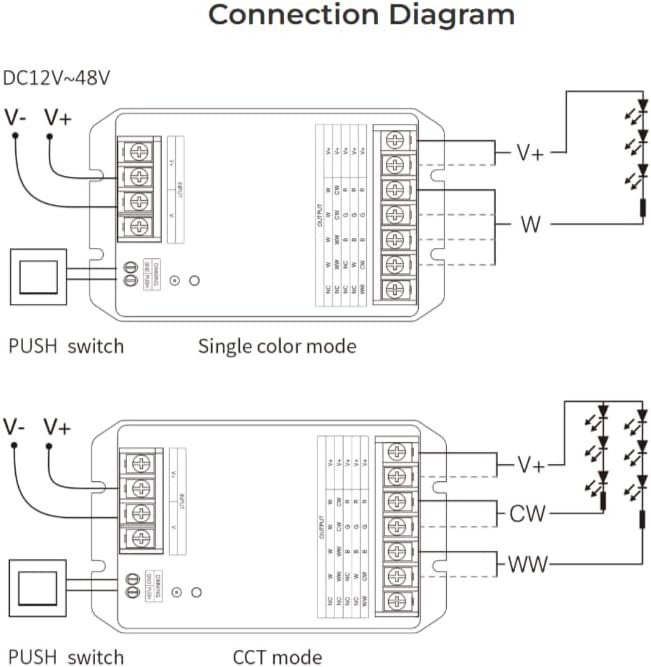
Image 2: Wiring diagrams for Single Color and CCT (Dual White) LED strips. Connect the V+ and V- terminals for power input. For Single Color, connect the LED strip's positive to V+ and negative to W. For CCT, connect the LED strip's positive to V+, warm white to WW, and cool white to CW.

Image 3: Wiring diagrams for RGB, RGBW, and RGB+CCT LED strips. Connect the V+ and V- terminals for power input. For RGB, connect the LED strip's positive to V+, Red to R, Green to G, and Blue to B. For RGBW, add the White channel to W. For RGB+CCT, add Warm White to WW and Cool White to CW.
4.2 Pairing and App Integration
The HZ5 controller supports both 2.4G remote control and smart app integration via Zigbee 3.0. To pair the device with a remote or app, follow these steps:
- په وسیله کې بریښنا.
- Activate Linking Mode: Press the 'SET' button on the controller once to activate linking mode. The indicator light will flash.
- Activate WiFi Pairing Mode: For app control, long press the 'SET' button for 3 seconds. The indicator light will flash quickly, indicating it's ready for WiFi pairing.
- د اپلیکیشن ترتیب: Open your compatible smart home app (e.g., MiBoxer Smart app), select 'Add Device', and follow the on-screen instructions to discover and add the controller. Ensure Bluetooth is enabled on your phone for easier device discovery.
Video 1: This video demonstrates the wiring instructions for a MiBOXER controller, which is applicable to the HZ5 model for proper connection of LED strips.

انځور ۶: پخوانیample of the mobile application interface for controlling LED lighting, showing color selection and brightness adjustment.

Image 5: The MiBOXER HZ5 controller is compatible with popular voice assistants such as Amazon Alexa and Google Assistant for convenient hands-free operation.
5. عملیاتي لارښوونې
5.1 Switching Output Modes
The HZ5 controller can operate in different output modes depending on the connected LED strip type. The indicator light on the controller changes color to show the current output mode:
- سور: RGB حالت
- شین: RGBW حالت
- آبي: RGB+CCT mode
- ژیړ: Single Color mode
- سیان: Dual White (CCT) mode
To change the output mode, press the 'SET' button continuously until the desired indicator color is displayed.
5.2 د اپلیکیشن له لارې کنټرول
Once paired with the smart app, you can control your LED lighting with various functions:
- د رنګ انتخاب: د ۱۶ ملیون رنګونو څخه د غوره کولو لپاره د رنګ څرخ وکاروئ.
- د روښانتیا سمون: د روښانتیا کچه له ۱٪ څخه تر ۱۰۰٪ پورې تنظیم کړئ.
- د رنګ حرارت: For CCT and RGB+CCT strips, adjust the color temperature from warm white to cool white.
- Dynamic Scenes: Select from pre-programmed dynamic modes or create custom scenes.
- د موسیقۍ ترکیب: Some apps may offer music synchronization features.
- مهالویش: Set timers and schedules for automatic on/off or scene changes.
Video 2: This video demonstrates app control for a similar 5-in-1 LED strip controller (WL5), showcasing color, brightness, and scene adjustments. The functionality is comparable to the HZ5 model.
Video 3: Another demonstration of app control for a MiBOXER 5-in-1 LED strip controller (WL5), highlighting various color and mode selections. This provides a visual guide to the HZ5's app capabilities.
6. ساتنه
- پاکول: د کنټرولر پاکولو لپاره نرم، وچ ټوکر وکاروئ. سخت کیمیاوي مواد یا د کثافاتو پاکوونکي مه کاروئ.
- ذخیره کول: Store the controller in a cool, dry place away from direct sunlight and extreme temperatures when not in use for extended periods.
- د فرم ویئر تازه معلومات: Periodically check the MiBOXER app for any available firmware updates to ensure optimal performance and access to new features.
7. ستونزه حل کول
- ځواک نشته: Ensure the power adapter is correctly connected and providing the specified DC12-24V. Check all wiring connections.
- LEDs ځواب نه ورکوي: Verify that the LED strip is correctly wired to the controller according to the specific mode (Single Color, CCT, RGB, RGBW, RGB+CCT). Check if the correct output mode is selected on the controller.
- د جوړه کولو مسلې: If the controller fails to pair with the app or remote, ensure the device is in the correct pairing mode (single press for linking, long press for WiFi pairing). Try resetting the controller by disconnecting and reconnecting power, then re-attempt pairing.
- وقفه ای کنټرول: Check for potential interference from other 2.4G devices. Ensure the controller is within the 30-meter control distance from the remote or WiFi router.
- ناسم رنګونه: If RGB/RGBW/RGB+CCT colors are incorrect, double-check the wiring of the R, G, B, W, CW, WW channels to ensure they match the LED strip's configuration.
8. مشخصات
| فیچر | تفصیل |
|---|---|
| د ماډل شمیره | HZ5 |
| ننوتۍ جلدtage | DC12-24V |
| د محصول اوسنی | 6A/چینل |
| ټول محصول | Max 12A |
| د کنټرول واټن (2.4G) | 30m |
| د کار د حرارت درجه | -10~40°C |
| ابعاد (L x W x H) | 134mm x 81mm x 24mm (نږدې) |
| د توکي وزن | 6.2 اونس |

Image 6: Technical drawing showing the dimensions of the MiBOXER HZ5 controller.
9. تضمین او ملاتړ
This product is typically covered by a standard manufacturer's warranty against defects in materials and workmanship. Please refer to your purchase documentation or contact the retailer for specific warranty terms and duration.
For technical support, troubleshooting assistance, or further inquiries, please contact MiBOXER customer service or visit their official webسایټ. د تضمین ادعاوو لپاره د پیرود ثبوت په توګه د پیرود رسید وساتئ.


