1. پیژندنه
This manual provides detailed instructions for the setup, operation, and maintenance of your JoFomp 17.3" Large Digital Wall Clock. Please read this manual thoroughly before use to ensure proper functionality and longevity of the product.
2. د خوندیتوب معلومات
- Ensure the clock is connected to a stable power source (5V/2A adapter included).
- وسیله د سختې تودوخې، مستقیم لمر وړانګو، یا لوړې رطوبت سره مه مخ کوئ.
- د ماشومانو د لاسرسي څخه لرې وساتئ.
- هڅه مه کوئ چې وسیله پخپله جلا کړئ یا ترمیم کړئ. د مرستې لپاره د پیرودونکي ملاتړ سره اړیکه ونیسئ.
- ریموټ کنټرول 2 AAA بیټرۍ ته اړتیا لري (شامل ندي).
- A 1 AAA battery (not included) is required for the memory function to retain settings during power outages.
3. د بسته محتويات
ډاډ ترلاسه کړئ چې ټول توکي په کڅوړه کې شتون لري:
- JoFomp 17.3" Digital Wall Clock
- ریموټ کنټرول
- 5V/1A DC بریښنا اډاپټر
- د بریښنا تار
- Mounting Hooks (2)
- Mounting Template Ruler
- د کارونکي لارښود (دا لاسوند)

شکل ۳.۱: شامل شوي لوازمات او اصلي واحد.
4. محصول ختم شوview
The JoFomp 17.3" Large Digital Wall Clock features a clear LED display and multiple functions for convenience.

Figure 4.1: Front display of the digital wall clock.
4.1 ځانګړتیاوې ښکاره کول
- د وخت ښودنه: Large 17.3" LED digits.
- د نیټې ښودل: میاشت او ورځ.
- د اونۍ ورځ: Indicated by illuminated text (Mon-Sun).
- دحرارت درجه: Displays in Celsius or Fahrenheit.
- رطوبت: Displays relative humidity percentage.
- دوه ګونی الارمونه: Two independent alarm settings.
- د DST شاخص: Daylight Saving Time status.

Figure 4.2: Labeled display functions.
4.2 Back Panel and Buttons
The back of the clock houses control buttons and connection ports.

Figure 4.3: Back panel with labeled components.
- د تنظیم کولو بټن: Five buttons for manual adjustments (Light, SET, +, -, Alarm).
- Memory Battery Compartment: For 1 AAA battery (not included) to retain settings.
- د بریښنا بندر: د بریښنا اډاپټر د نښلولو لپاره.
- د پورته کولو سوراخ: For wall installation.
5. ترتیب کول
5.1 د بریښنا نښلول
- Connect the power cord to the clock's power port.
- Plug the 5V/2A power adapter into a standard electrical outlet. The clock will power on and display.
یادونه: The clock requires continuous power to operate. It is not battery-powered for primary display.
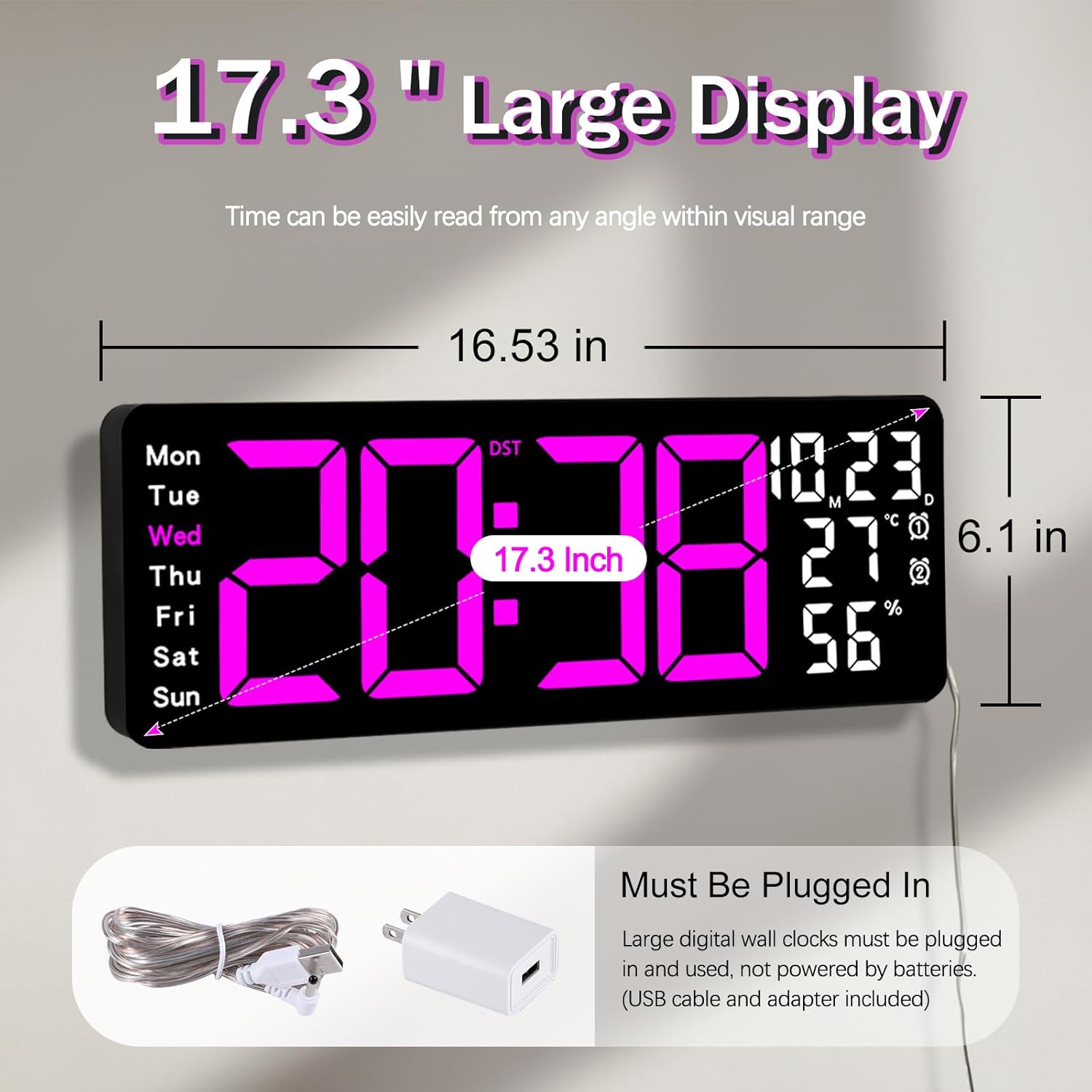
Figure 5.1: Power connection and dimensions.
5.2 Memory Battery Installation (Optional)
To retain time and settings during a power outage, install a 1 AAA battery (not included) into the memory battery compartment on the back of the clock.
- Locate the memory battery compartment on the back of the clock.
- د کڅوړې پوښ خلاص کړئ.
- Insert one 1.5V AAA battery, ensuring correct polarity (+/-).
- د کمپارټ پوښ په خوندي توګه وتړئ.
5.3 دیوال نصبول
Use the included mounting template ruler and hooks for easy wall installation.
- Determine the desired location for your clock.
- Place the mounting template ruler on the wall at the desired height.
- Mark the positions for the mounting hooks according to the ruler's indications.
- Install the mounting hooks into the wall at the marked positions.
- Carefully hang the clock onto the installed hooks, ensuring it is level and secure.
6. عملیاتي لارښوونې
The clock can be operated using either the remote control or the buttons on the back.
6.1 د وخت او نیټې ترتیب
Use the remote control or the "SET" button on the back of the clock.
- فشار ورکړئ SET button (on remote or back of clock) to enter setting mode.
- د کارولو + او - د چمکۍ ارزښت تنظیمولو لپاره تڼۍ (د مثال په توګه، ساعت، دقیقه، کال، میاشت، ورځ).
- مطبوعاتي SET بیا د اوسني ترتیب تاییدولو لپاره او بل پیرامیټر ته لاړ شئ.
- تکرار کړئ تر هغه چې ټول تنظیمات تنظیم شوي نه وي.
6.2 12/24 Hour Format Conversion
د ۱۲ ساعتونو او ۲۴ ساعتونو وخت بڼو ترمنځ د بدلولو لپاره:
- وقف شوی فشار ورکړئ 12/24H د ریموټ کنټرول تڼۍ.
- Alternatively, during time setting, the format option will appear.

Figure 6.1: 12/24H format conversion.
۴.۲ د تودوخې واحد بدلون (°C/°F)
د سیلسیس او فارنهایټ د تودوخې واحدونو ترمنځ د بدلولو لپاره:
- فشار ورکړئ ° سي / ° ف د ریموټ کنټرول تڼۍ.
6.4 Alarm Setting (Dual Alarms)
ساعت دوه خپلواک الارمونه ملاتړ کوي.
- فشار ورکړئ الارم button on the remote control or the back of the clock.
- کارول + او - د مطلوب الارم وخت ټاکلو لپاره.
- مطبوعاتي الارم again to confirm and move to the next alarm or exit.
- To activate/deactivate an alarm, press the corresponding alarm button (e.g., AL1 or AL2) په ریموټ کې.
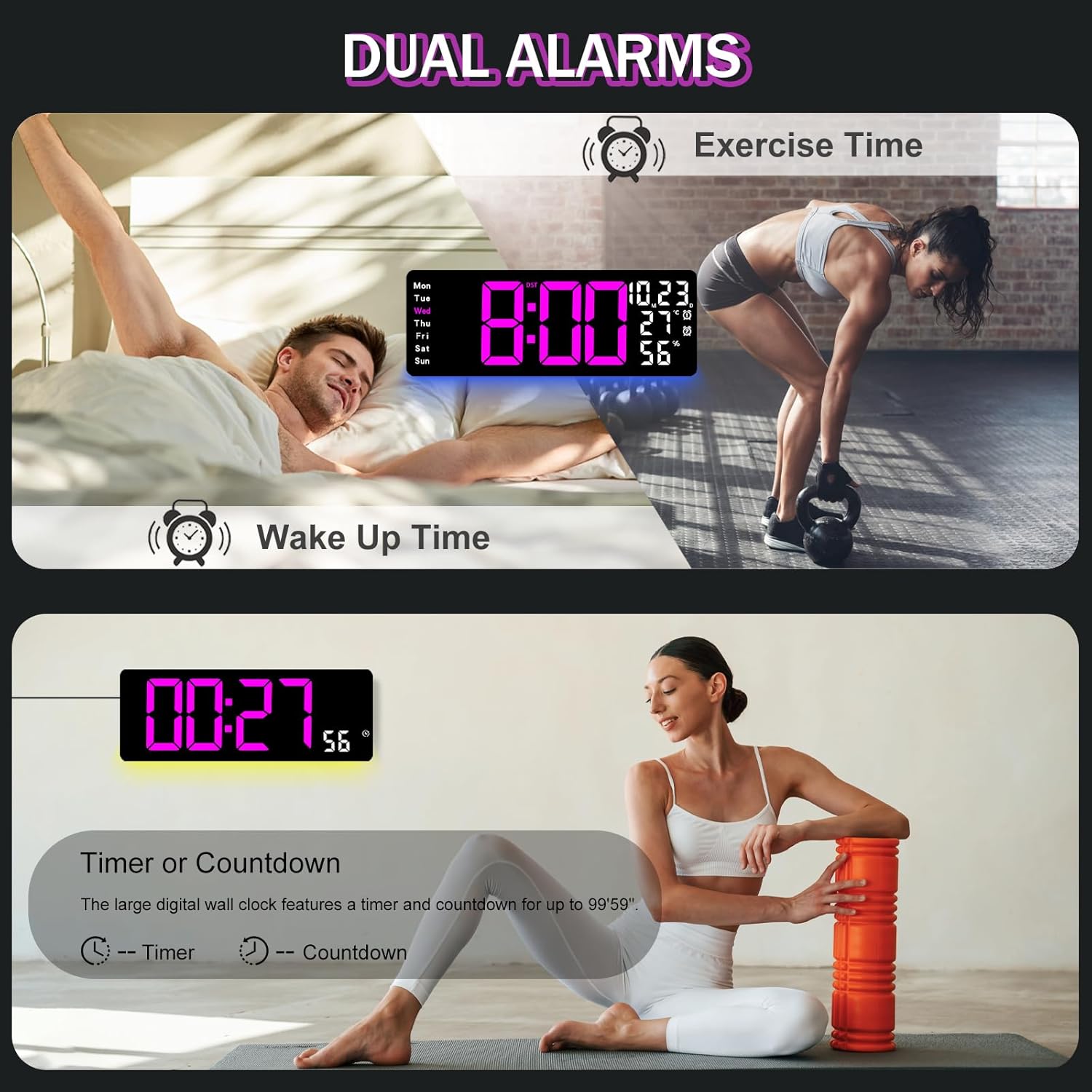
Figure 6.2: Dual alarm and timer functions.
6.5 د روښانتیا تنظیم کول
The clock offers 10 levels of brightness, adjustable manually or automatically.
- اتوماتیک روښانتیا: The built-in light sensor adjusts brightness based on ambient light. Activate this mode by pressing the آټو په ریموټ کې تڼۍ.
- لاسي روښانتیا: فشار ورکړئ روښانتیا button on the remote, then use + او - to select one of the 10 levels.

Figure 6.3: Custom and auto-brightness settings.

Figure 6.4: Brightness regulator illustration.
6.6 Ambient Light Features
The clock includes a night light feature at the bottom with multiple color options.
- فشار ورکړئ رڼا button on the remote control or the back of the clock to cycle through 8 fixed colors and 1 multi-color mode.
- In multi-color mode, the colors automatically convert. Press OK to fix a favorite color.
- Adjust the brightness of the ambient light using the + او - buttons when the ambient light is active.

Figure 6.5: Multiple ambient night light options.

Figure 6.6: 9 color ambient light options.
6.7 Timer and Countdown Function
The clock features a timer (count-up) and countdown function up to 99 minutes and 59 seconds.
- فشار ورکړئ ټیمر د ریموټ کنټرول تڼۍ.
- کارول + او - to set the desired time for countdown.
- مطبوعاتي پیل / ودرول to begin or pause the timer/countdown.
- مطبوعاتي RESET د ټایمر پاکولو لپاره.

Figure 6.7: Timing function (count-up/countdown).
Video 6.1: Demonstration of multi-functional features including night light change, brightness control, count-up, and countdown. This video also shows the time, date, day, alarm clock, temperature, and humidity displayed on the same screen, along with 12/24 hour conversion, Celsius/Fahrenheit conversion, and DST enablement. The back design and buttons are also briefly shown.
۵.۳ د ورځې د رڼا د سپما وخت (DST)
If DST is observed in your region, you can enable or disable it.
- اوږد فشار ورکړئ - button on the remote control to enable or disable DST. The DST indicator will appear/disappear on the display.

Figure 6.8: Enabling and disabling Daylight Saving Time.

Figure 6.9: Daylight Saving Time (DST) functionality.
6.9 د ریموټ کنټرول کارول
The remote control provides convenient access to all clock functions without needing to reach the clock directly.

Figure 6.10: Remote control and its functions.

Figure 6.11: Remote control in use.
- Ensure the remote control has 2 AAA batteries installed (not included).
- Point the remote control directly at the clock for optimal response.
- Each button on the remote corresponds to a specific function as described in this manual.
7. ساتنه
- Clean the clock's display and body with a soft, dry cloth. Avoid abrasive cleaners or solvents.
- Ensure the power adapter and cord are free from damage.
- Replace the memory battery annually to ensure settings are retained during power interruptions.
8. ستونزه حل کول
| ستونزه | احتمالي لامل | د حل لاره |
|---|---|---|
| د ساعت ښودنه بنده ده. | بریښنا نشته. | Check if the power adapter is securely plugged into the clock and the outlet. Ensure the outlet is functional. |
| ریموټ کنټرول کار نه کوي. | Low or dead batteries in remote; obstruction; remote out of range. | Replace remote batteries (2 AAA). Ensure no obstructions between remote and clock. Point directly at the clock within effective range. |
| د بریښنا بندیدو وروسته ترتیبات ورک شولtage. | No memory battery or dead memory battery. | Install a fresh 1.5V AAA battery in the memory compartment. |
| Incorrect temperature/humidity reading. | Sensor interference or placement. | Ensure the clock is not placed near heat sources, direct sunlight, or in areas with extreme drafts. Allow time for the sensor to stabilize. |
| Ambient light not changing colors. | Stuck in fixed color mode. | Press the LIGHT button on the remote to cycle through modes. If stuck on a fixed color, press the OK button to release it from fixed mode. |
9. مشخصات
| فیچر | تفصیل |
|---|---|
| برانډ | JoFomp |
| د ماډل شمیره | 6669 |
| د ښودلو ډول | ډیجیټل LED |
| د ښودلو اندازه | 17.3 انچه |
| د محصول ابعاد | ۱۷" څراغ x ۱۷" ح |
| د بریښنا سرچینه | Corded Electric (5V/2A adapter included) |
| د حافظې بیټرۍ | 1 x AAA (شامل نه دی) |
| د روښانتیا کچه | 10 (Auto/Manual) |
| Ambient Light Colors | 8 Fixed + 1 Multi-color |
| ځانګړي ځانګړتیاوې | Large Display, Adjustable Brightness, Temperature Display, Humidity Display, Dual Alarms, Timer, Countdown, DST, Remote Control |
| د نصب کولو ډول | دیوال غر |
| د توکي وزن | ۲.۴۵ پونډه |
10. تضمین او ملاتړ
JoFomp products are designed for reliability and performance. For warranty information or technical support, please refer to the contact details provided with your purchase or visit the official JoFomp webسایټ. د پیرود ثبوت په توګه د پیرود رسید وساتئ.


