پیژندنه
Thank you for choosing the Porodo Lifestyle 4K Digital Camera. This camera is designed to capture your world in stunning detail, offering 4K video recording and high-resolution 50MP images. With features like 16x digital zoom, a flip flash, and a 180° rotating screen, it is ideal for vlogging, photography, and various content creation needs. This manual provides essential information on setting up, operating, and maintaining your camera to ensure optimal performance and longevity.
د خوندیتوب معلومات
- Do not expose the camera to extreme temperatures, direct sunlight, or high humidity.
- د کیمرې د غورځولو یا قوي تاثیراتو سره مخ کیدو څخه ډډه وکړئ.
- Keep the camera away from water and liquids unless specifically designed for underwater use (this model is not).
- د کیمرې د جلا کولو یا بدلولو هڅه مه کوئ. دا به تضمین باطل کړي.
- یوازې د بیټرۍ ټاکل شوی ډول او د چارج کولو طریقه وکاروئ.
- د ماشومانو د لاسرسي څخه لرې وساتئ.
د بسته محتويات
مهرباني وکړئ د لاندې توکو لپاره بکس وګورئ:
- Porodo Lifestyle 4K Digital Camera
- د چارج وړ بیټرۍ (650mAh)
- د ډول - سي چارج کیبل
- د کارونکي لارښود (دا لاسوند)
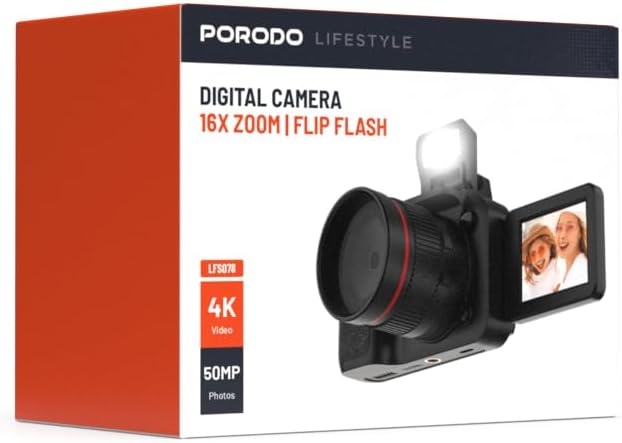
انځور: مخکینۍ برخه view of the Porodo Lifestyle 4K Digital Camera retail box, showing the camera and key features.

انځور: شاته view of the Porodo Lifestyle 4K Digital Camera retail box, displaying product specifications and features.
محصول پای ته ورسیدview
Familiarize yourself with the various parts of your Porodo Lifestyle 4K Digital Camera.

Image: The Porodo Lifestyle 4K Digital Camera shown with its 180° rotating screen flipped open and the integrated flash extended upwards.
- لینز: Main optical component for capturing images and videos.
- Flip Flash: په ټیټ رڼا شرایطو کې اضافي رڼا چمتو کوي.
- 180° Rotating Screen (2.2'' Display): د انعطاف وړ اجازه ورکوي viewing angles, ideal for vlogging and selfies.
- د بریښنا تڼۍ: کیمره چالان/بندوي.
- د شټر تڼۍ: عکسونه اخلي یا د ویډیو ثبت پیل/بندوي.
- د زوم کنټرولونه: د ۱۶x ډیجیټل زوم تنظیموي.
- د نیویګیشن تڼۍ: د مینو نیویګیشن او ترتیباتو تنظیم کولو لپاره.
- د ډول - سي پورټ: د چارج کولو او ډیټا لیږد لپاره.
- د میموري کارت سلاټ: For inserting an SD card (not included).
چمتو کول
۱. د بیټرۍ نصب او چارج کول
- د کیمرې په ښکته برخه کې د بیټرۍ د برخې پوښ ومومئ.
- د پوښ د خلاصولو لپاره لیچ سلائډ کړئ.
- Insert the provided 650mAh battery, ensuring the contacts align correctly.
- د بیټرۍ د برخې پوښ تر هغه پورې وتړئ تر څو چې په خوندي ډول کلیک ونه کړي.
- Connect the camera to a power source using the Type-C charging cable. The charging indicator will illuminate.
- A full charge takes approximately 2.5 hours. The indicator will change or turn off when charging is complete.
۴.۴. د میموري کارت نصبول
A memory card (SD card, not included) is required to store photos and videos.
- Locate the memory card slot, usually on the side or bottom of the camera.
- Insert the SD card with the metal contacts facing the correct direction (refer to the diagram near the slot if available) until it clicks into place.
- د لرې کولو لپاره، کارت په نرمۍ سره دننه کړئ تر هغه چې راووځي.
۴. لومړنی بریښنا فعالول
- د څو ثانیو لپاره د بریښنا تڼۍ فشار ورکړئ او ونیسئ تر هغه چې سکرین روښانه شي.
- Upon first use, you may be prompted to set the date and time. Use the navigation buttons to adjust and confirm.
عملیاتي لارښوونې
Basic Photo Mode (50MP)
- کیمره چالان کړئ. دا به معمولا د عکس حالت ته ډیفالټ وي.
- Frame your shot using the 2.2'' display.
- Press the Shutter button halfway down to focus (if applicable).
- Press the Shutter button fully to capture a 50MP image.

Image: A person holding the Porodo Lifestyle 4K Digital Camera, demonstrating a typical usage scenario for capturing photos.

انځور: بل view of a person holding the Porodo Lifestyle 4K Digital Camera, illustrating the camera's ergonomic design during use.
Basic Video Mode (4K)
- Switch the camera to video mode (usually via a dedicated button or menu option).
- Press the Shutter button once to start 4K video recording. A recording indicator (e.g., red dot, timer) will appear on the screen.
- د شټر ت buttonۍ فشار ورکړئ ترڅو ثبت ثبت کړئ.

Image: The Porodo Lifestyle 4K Digital Camera highlighting its 4K video resolution capability.
Using the 16X Digital Zoom
- While in photo or video mode, use the zoom controls (often marked with 'W' for Wide and 'T' for Telephoto) to adjust the 16x digital zoom.
- Press 'T' to zoom in and 'W' to zoom out.
Using the Flip Flash
- To activate the flash, manually flip it up from its resting position.
- The camera will automatically use the flash when needed in low-light conditions, depending on your flash settings (e.g., Auto, Fill-in, Red-eye reduction).
- To turn off the flash, gently push it back down until it locks into place.
Using the 180° Rotating Screen
- The 2.2'' display can be rotated 180 degrees.
- Flip the screen out from the side of the camera and rotate it to face forward for selfies or vlogging, or to various angles for creative shots.
- Ensure the screen is securely positioned before shooting.

Image: The Porodo Lifestyle 4K Digital Camera illustrating its 2.2-inch display and 180-degree flip screen functionality.
Playback and Deleting Files
- Enter Playback mode (usually via a dedicated button or menu option).
- Use the navigation buttons to scroll through your photos and videos.
- د حذف کولو لپاره a file, select it and press the Delete button (often marked with a trash can icon). Confirm deletion when prompted.
د کمپیوټر سره نښلول
- کیمره بنده کړه.
- Connect the camera to your computer using the provided Type-C cable.
- Turn on the camera. It should appear as a removable disk drive on your computer.
- You can now transfer photos and videos to your computer.
ساتنه
د کیمرې پاکول
- د کیمرې د بدن پاکولو لپاره نرم، لینټ نه پاک ټوکر وکاروئ.
- For the lens and screen, use a specialized lens cleaning cloth and solution. Do not use abrasive materials.
- Avoid spraying cleaning solutions directly onto the camera. Apply to the cloth first.
د بیټرۍ پاملرنه
- Recharge the battery fully before first use.
- د بیټرۍ د عمر د اوږدولو لپاره د هغې د بار بار بشپړ وچولو څخه ډډه وکړئ.
- If storing the camera for an extended period, charge the battery to about 50% and remove it from the camera.
ذخیره کول
- کیمره په یخ او وچ ځای کې وساتئ، د مستقیم لمر وړانګو او سختې تودوخې څخه لرې.
- Use a camera bag or case to protect it from dust and scratches.
د ستونزو حل کول
| ستونزه | احتمالي لامل | د حل لاره |
|---|---|---|
| کیمره نه چالانیږي. | بیټرۍ مړه شوې یا په سمه توګه نه ده نصب شوې. | بیټرۍ چارج کړئ. ډاډ ترلاسه کړئ چې بیټرۍ په سمه قطبي حالت کې داخل شوې ده. |
| عکسونه/ویډیوګانې نشي اخیستل کېدای. | د حافظې کارت ډک دی، داخل شوی نه دی، یا فاسد دی. | د حافظې کارت دننه کړئ. غیر ضروري حذف کړئ files. کارت فارمیټ کړئ (دا به ټول معلومات له منځه یوسي). |
| Images/Videos are blurry. | لینز چټل دی. کافي رڼا نشته. د کیمرې ټکان. | Clean the lens. Use the flash or shoot in brighter conditions. Hold the camera steady. |
| فلش کار نه کوي. | Flash is not flipped up. Flash setting is off. | Ensure the flash is manually flipped up. Check flash settings in the menu. |
| کیمره کنګل کیږي. | د سافټویر خرابوالی. | د کیمرې د بیا تنظیمولو لپاره بیټرۍ لرې کړئ او بیا یې دننه کړئ. |
مشخصات
Detailed technical specifications for the Porodo Lifestyle 4K Digital Camera:

Image: Visual representation of the camera's core capabilities: 4K video, 50MP photos, and 16x digital zoom.

Image: A detailed table outlining the technical specifications of the Porodo Lifestyle 4K Digital Camera.
- د موډل نوم: Porodo Lifestyle 4K Digital Camera – 50MP, 16x Zoom, Flip Flash, 180° Rotating Screen
- د توکي ماډل شمېره: 6849108448116
- نښه: پوردو
- اعظمي Webد کیم عکس حل: 50 MP
- د ویډیو حل: دوه زره (۲۳۰۴x۱۲۹۶)
- ډیجیټل زوم: 16X
- نظری زوم: 1.0
- ښکاره کول: 2.2'' (180° Rotating Screen)
- د بیټرۍ ظرفیت: 650mAh (1 P76 battery included)
- کاري وخت: تر 3 ساعتونو پورې
- د چارج وخت: تقریبا 2.5 ساعته
- د چارج کولو بندر: ټایپ-سي
- د عکس سینسر ټیکنالوژي: CMOS
- ملاتړ شوی File بڼې: JPG (images), AVI (videos)
- د انځور ثبات: ډیجیټل
- د اړخ نسبت: ۴:۳، ۱۶:۹
- د اندازه کولو تفصیل: ځای
- د محصول ابعاد: 6 x 13 x 9 سانتي متره؛ 310 جی
- د اصلي هیواد: چین
تضمین او ملاتړ
Porodo products are designed with quality and reliability in mind. For warranty information and technical support, please refer to the official Porodo webسایټ ته مراجعه وکړئ یا خپل سیمه ایز توزیع کونکي سره اړیکه ونیسئ.
آنلاین ملاتړ: لیدنه وکړئ Porodo Store on Amazon د محصول معلوماتو او تازه معلوماتو لپاره.
د تمدید شوي تضمین اختیارونه: Additional warranty plans may be available through authorized retailers. Please check with your point of purchase for details.


