پیژندنه
د پیرودلو لپاره مننهasing the RUIZU 64GB USB MP3 Player. This compact and versatile device is designed to provide a high-quality audio experience with features such as Bluetooth 5.3 connectivity, FM radio, voice recording, and line-in functionality. Its clip-on design makes it ideal for active lifestyles. Please read this manual carefully to ensure proper use and optimal performance.
د بسته محتويات
ډاډ ترلاسه کړئ چې ټول توکي ستاسو په کڅوړه کې شتون لري:
- RUIZU 64GB USB MP3 Player
- واير شوي ايرفونونه
- د USB چارج کیبل
- د کارن لارښود

Image: Contents of the RUIZU MP3 Player retail package.
محصول پای ته ورسیدview
The RUIZU MP3 Player features a compact design with a built-in clip for easy attachment to clothing or bags. It includes a small display for navigation and control buttons for various functions.
فزیکي ځانګړتیاوې
- د ښودلو سکرین: Shows menu, track information, and settings.
- د کنټرول تڼۍ: Play/Pause, Next/Previous Track, Volume Up/Down, Menu, Back.
- د USB-A نښلونکی: Integrated for direct connection to computers or chargers.
- 3.5mm آډیو جیک: For wired earphones or AUX connection.
- کلیپ: For secure attachment.
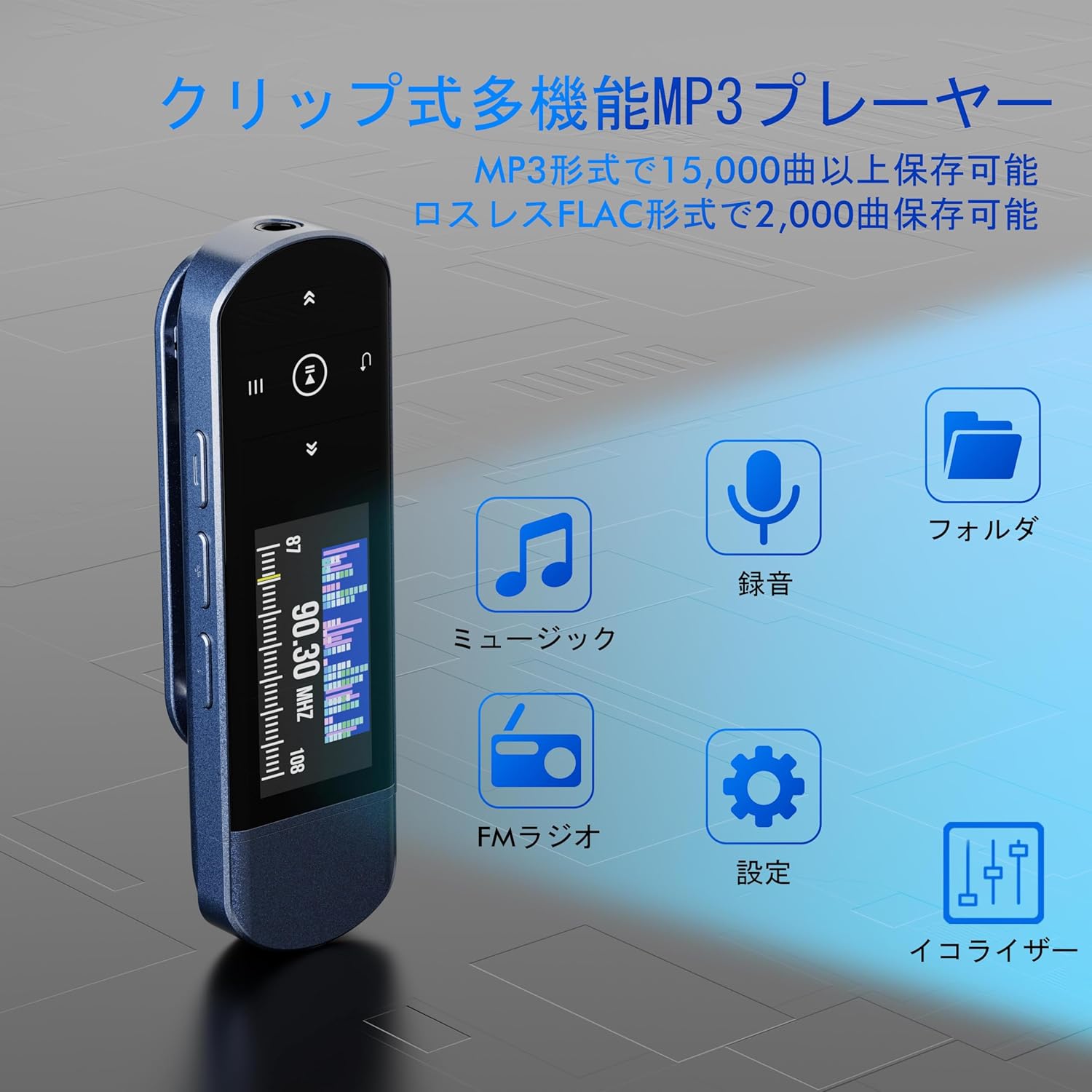
انځور: مخکینۍ برخه view of the RUIZU MP3 Player highlighting its clip and main functions.

Image: Dimensions of the RUIZU MP3 Player.
چمتو کول
1. د وسیلې چارج کول
Before first use, fully charge the MP3 player. Connect the integrated USB-A connector directly to a computer's USB port or a USB wall adapter (not included). A full charge typically takes approximately 2 hours and provides up to 20 hours of playback.
۵.۳. د موسیقۍ لیږدول Files
The RUIZU MP3 Player has 64GB of internal storage for your music. You can transfer files using two methods:
- کمپیوټر له لارې: Plug the MP3 player's USB-A connector directly into your computer's USB port. The device will appear as a removable disk. Drag and drop your music files (MP3, APE, FLAC, WMA, M4A, WAV, AAC) into the player's storage.
- Via Smartphone (OTG): Connect the MP3 player to your smartphone using an OTG cable/adapter (not included). Your smartphone must support OTG functionality. Once connected, you can transfer music files from your phone to the player. For optimal performance, transfer files in batches under 1GB.
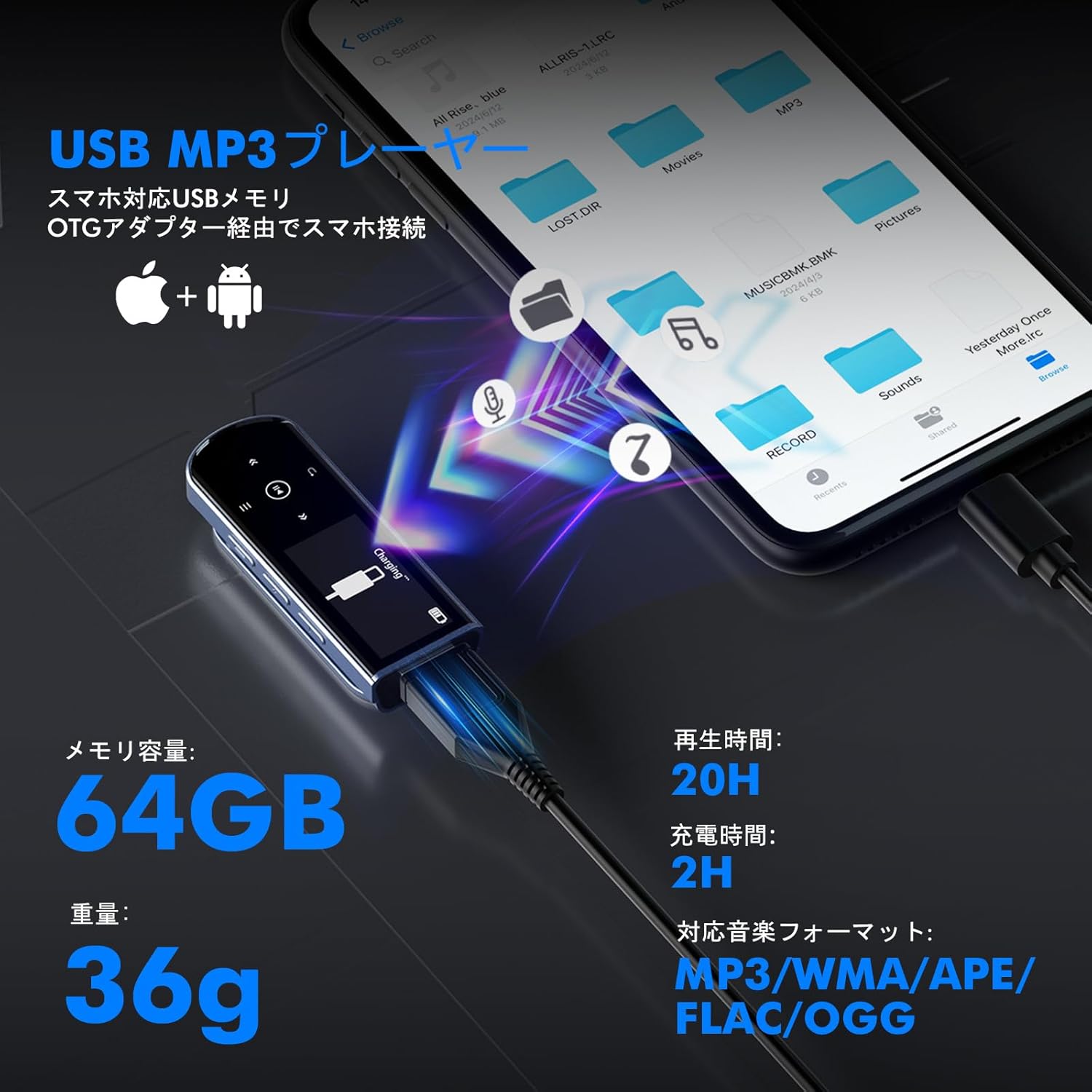
Image: Demonstrating music file transfer from a smartphone or PC to the MP3 player.
عملیاتي لارښوونې
1. بنسټیز نیویګیشن
Use the control buttons to navigate through menus and control playback:
- پاور آن/بند: د بریښنا تڼۍ فشار کړئ او ونیسئ.
- مینو/ شاته: Use the Menu button to access the main menu or go back to the previous screen.
- نیویگیشن: Use the directional buttons (Up/Down/Left/Right) to select options.
- تایید کړه: Press the Play/Pause button to confirm a selection.
2. د میوزیک غږول
From the main menu, select 'Music' to browse and play your audio files. The player supports various playback modes:
- شفل: ټریکونه په ناڅاپي ترتیب سره غږوي.
- Playlist Loop: Repeats the current playlist.
- پرله پسې غږول: Plays tracks in order.
- د فولډر تکرار: Repeats all tracks within the current folder.
- Single Folder Repeat: Repeats a single track within the current folder.
Supported audio formats include MP3, APE, FLAC, WMA, M4A, WAV, and AAC.

انځور: اوورview of playback modes and supported audio formats.
3. د بلوتوث پیوستون
The player features Bluetooth 5.3 for stable wireless audio. To connect to Bluetooth headphones or speakers:
- ډاډ ترلاسه کړئ چې ستاسو د بلوتوث هیډفونونه/سپیکر د جوړه کولو حالت کې دي.
- On the MP3 player, navigate to the Bluetooth menu.
- Select 'Search Device' to find available Bluetooth devices.
- د جوړې کولو لپاره له لیست څخه خپل وسیله غوره کړئ.
Note: The MP3 player's Bluetooth function is for connecting to audio output devices (headphones, speakers) only. It cannot connect to computers, cars, or smartphones via Bluetooth.

Image: Bluetooth 5.3 connectivity with headphones and speakers.
4. ایف ایم راډیو
د FM راډیو فعالیت کارولو لپاره:
- Plug in wired earphones; they act as the antenna.
- د اصلي مینو څخه، 'ایف ایم راډیو' غوره کړئ.
- Use the navigation buttons to scan for stations or manually tune to a frequency (76.0-90.0 MHz).

Image: Using the FM radio function during outdoor activities.
5. د غږ ثبتونکی
The MP3 player includes a built-in voice recorder:
- د اصلي مینو څخه، 'ریکارډ' غوره کړئ.
- Press the Play/Pause button to start recording.
- Press Play/Pause again to pause/resume, and the Menu button to stop and save.
6. Line-in Recording
Record audio directly from an external source (e.g., another phone, CD player) using the line-in function:
- Connect the audio output of the external device to the MP3 player's 3.5mm audio jack using an AUX cable (not included).
- Navigate to the 'Line-in Record' option in the menu.
- Start playback on the external device and initiate recording on the MP3 player.
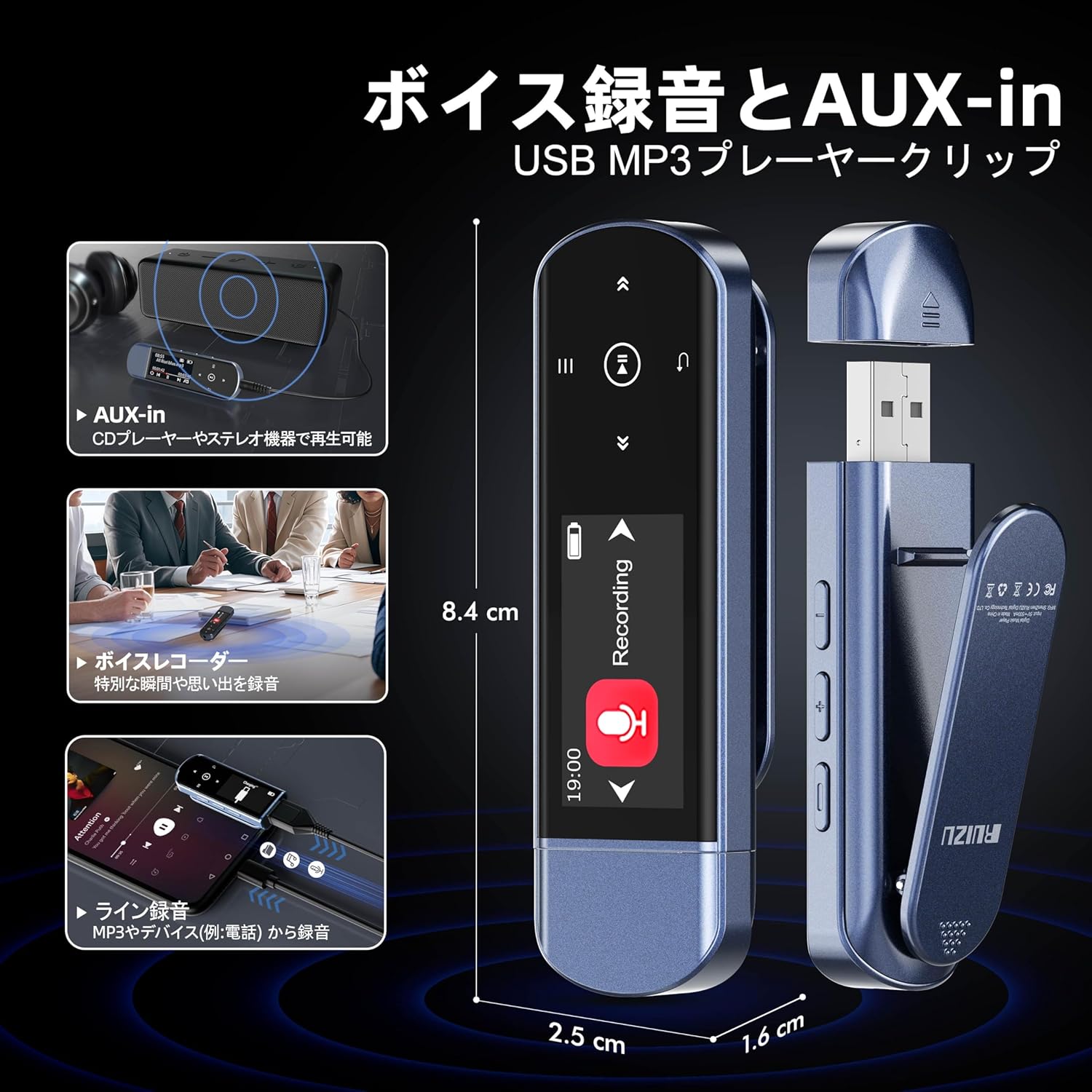
Image: Voice recorder and line-in recording functionality.
7. Car Audio Connection
Connect your MP3 player to your car's audio system:
- Via AUX: Use a 3.5mm AUX cable (not included) to connect the player's audio jack to your car's AUX input for clear wired sound.
- د USB له لارې: Plug the MP3 player's USB-A connector directly into your car's USB port for direct streaming. Ensure your car's system supports USB audio playback.
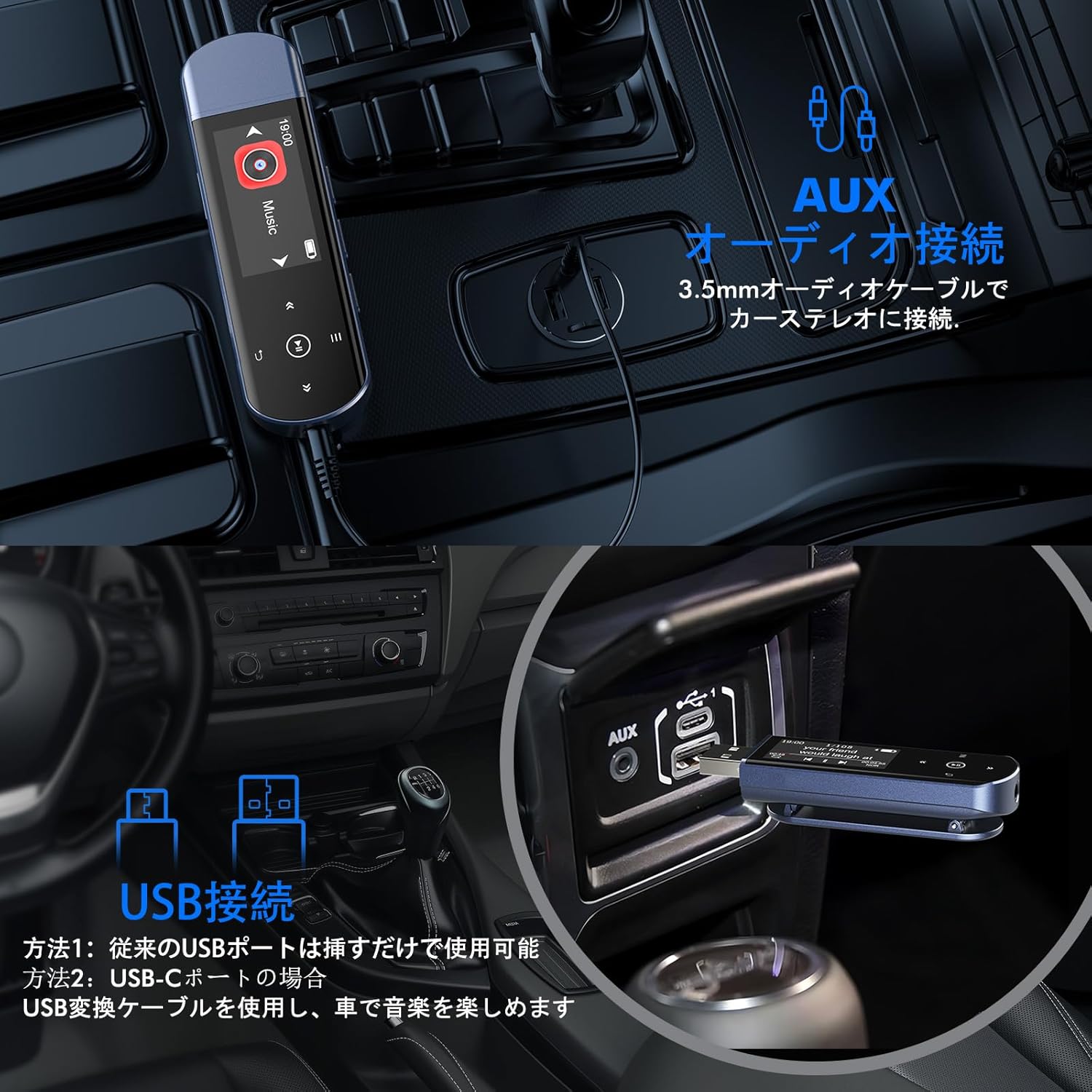
Image: Connecting the MP3 player to a car's audio system.
ساتنه
- پاکول: Use a soft, dry cloth to clean the device. Avoid liquid cleaners.
- ذخیره کول: لوبغاړی په یخ او وچ ځای کې د مستقیم لمر وړانګو او سختې تودوخې څخه لرې وساتئ.
- د بیټرۍ پاملرنه: د بیټرۍ د ژوند اوږدولو لپاره، د وسیلې په مکرر ډول په بشپړ ډول چارج کولو څخه ډډه وکړئ. په منظم ډول یې چارج کړئ، حتی که د اوږدې مودې لپاره نه کارول کیږي.
- د اغیزو څخه ډډه وکړئ: وسیله د څاڅکو او اغیزو څخه خوندي کړئ.
د ستونزو حل کول
| ستونزه | احتمالي لامل / حل |
|---|---|
| وسیله فعاله نه ده. | Battery may be depleted. Charge the device for at least 30 minutes. If the issue persists, try a different USB port or charging cable. |
| انتقال نشي کولی files وسیله ته. | Ensure the device is properly connected to the computer/smartphone. Try a different USB port or cable. For OTG transfer, ensure your smartphone supports OTG and use an appropriate adapter. Transfer files in smaller batches (under 1GB) for better stability. |
| د بلوتوث اتصال ستونزې. | Ensure the MP3 player and the target Bluetooth device are in pairing mode and within range. Forget previous pairings on both devices and try pairing again. Remember, the player only connects to audio output devices. |
| Music playback skips or stops. | چیک کړئ که آډیو file is corrupted. Ensure the battery is sufficiently charged. Avoid strong electromagnetic interference. |
| بیټرۍ په چټکۍ سره وچیږي. | Ensure the device is powered off completely when not in use. Background processes or high volume can consume more power. A factory reset might resolve software-related battery drain issues. |
| Display text is too small. | This is a design characteristic of the compact display. There is no setting to enlarge the font size. |
| تڼۍ غیر ځواب ویونکي دي یا فشارول یې ستونزمن دي. | Ensure you are pressing the buttons firmly and accurately. Clean any debris around the buttons. |
مشخصات
| فیچر | تفصیل |
|---|---|
| برانډ | RUIZU |
| د ماډل شمیره | THX62 |
| د ذخیره کولو ظرفیت | 64GB |
| بلوتوث نسخه | 5.3 |
| د بیټرۍ ژوند (پلے بیک) | تر 20 ساعتونو پورې |
| د چارج کولو وخت | نږدې 2 ساعته |
| ملاتړ شوي آډیو فارمیټونه | MP3, APE, FLAC, WMA, M4A, WAV, AAC |
| د ایف ایم راډیو فریکوینسي | 76.0-90.0 MHz (Japanese standard) |
| ابعاد | 8.4 x 2.5 x 1.6 سانتي متره |
| وزن | نږدې 36 ګرامه |
| رنګ | آبي |
تضمین او ملاتړ
Your RUIZU MP3 Player is covered by a standard manufacturer's warranty. Please refer to the warranty card included in your package for specific terms and conditions. For technical support, troubleshooting assistance, or warranty claims, please contact the retailer or RUIZU customer service through the contact information provided with your purchase.


